Auth & Permissions
Implementation status (shipped): Local auth (JWT + rotating refresh token), TOTP MFA, API tokens with scopes, five external identity provider types configured at runtime from the admin UI (LDAP, OIDC, SAML, RADIUS, TACACS+), failover to backup servers on LDAP / RADIUS / TACACS+, group-based RBAC enforced on every API router, and a set of builtin roles seeded at startup (see
PERMISSIONS.md). Deferred: SCIM provisioning.
Overview
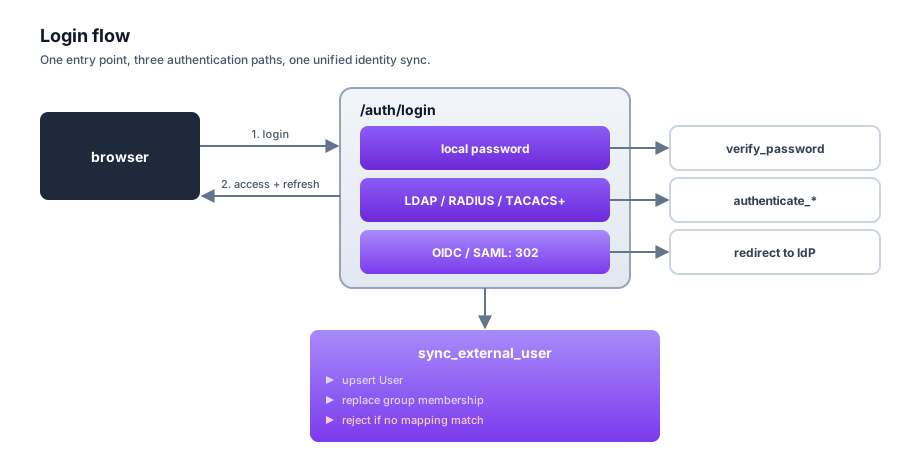
SpatiumDDI’s auth stack has three layers:
- Authentication — verifying who you are. Local password login, plus
any mix of enabled external providers. All external providers funnel
through a unified
sync_external_user()that creates / updates the localUserand replaces their group membership from the provider’s group mappings. A login with no group mapping match is rejected. - Session — the login handler issues a short-lived JWT access token
(15 min default) and a longer-lived rotating refresh token stored as a
hashed row in
user_session. - Authorization — every API router uses a permission helper
(
require_permission/require_resource_permission/require_any_permission) to check that the caller’s groups carry a role with a matching permission entry. See PERMISSIONS.md for the grammar.
Local auth
POST /auth/loginaccepts JSON{username, password}. Returns{access_token, token_type, force_password_change}; the refresh token is set only as the HttpOnlyspatium_refreshcookie and is never in the body.- Passwords are
bcrypthashed. New users defaultforce_password_change=Trueso the UI redirects them to/change-passwordbefore they can do anything else. - Access token expires in 15 min. Refresh token expires in 7 days
(
refresh_token_expire_daysdefault) and rotates on every use. - Rotation grace window (#2941). The tabs of one browser share the
refresh cookie, so two tabs can refresh at the same moment with the same
cookie. For 10 seconds after a rotation (
ROTATION_GRACEinbackend/app/core/session_rotation.py) the rotated-away session stands for its successor: a refresh presenting the rotated cookie gets a new access token for the SAME successor session (no third session and no new cookie, since the browser already holds the successor’s), and an access token minted for the rotated session is still accepted. Concurrent refreshes serialize on a row lock, so they land on one successor. After the window a rotated cookie is a401and its access tokens are refused. The grace applies only to a revocation by rotation, recorded inuser_session.rotated_at+rotated_to_id; a logout, a force-logout from the session viewer, a password change or disabling the account revokes the live session, which ends the old cookie and the old access token at once, with no grace. The API docs’ spec route (GET /api/v1/auth/openapi.json, #2935), which reads the refresh cookie without rotating it, applies the same rule: a docs tab holding a cookie another tab rotated within the window still loads the schema, and one revoked any other way does not.- The window is anchored to the rotation. A refresh inside the window
does not rotate again, so it never moves
rotated_at; replaying the old cookie over and over cannot stretch the 10 seconds. The successor’s own absolute expiry and idle timeout are checked on every grace answer, and a grace refresh does not count as activity. - What a captured cookie is worth. A refresh cookie captured from a rotated session and replayed inside those 10 seconds is answered like the browser it came from: with an ordinary 15-minute access token for the successor session. That is the trade the window makes, and why it is 10 seconds rather than the minute some identity providers allow: long enough for a concurrent refresh, and requests already in flight with the old access token, to land; short enough that a cookie copied out of a rotated session is useless almost at once. Revoking the successor (logout, force-logout, a password change) ends that access token too, since it names the successor.
- Revocation cannot be raced by a rotation. The bulk revocations lock the account’s live sessions before revoking them, so a refresh rotating one at the same moment either finishes first (and its successor is revoked with the rest) or waits and is refused. A force-logout from the session viewer follows a row that was rotated after the list was fetched to its live successor, and revokes that.
- The window is anchored to the rotation. A refresh inside the window
does not rotate again, so it never moves
admin/adminis seeded on first start withforce_password_change=True. Reset the password from the CLI with the one-liner in the README.
Sign-in throttles
POST /auth/login checks three budgets, all kept in Redis, before it looks
at the password. Each refusal is a 429 with the same message, so a refusal
says nothing about whether the account exists.
| Budget | Limit | Keyed by |
|---|---|---|
| Per source | 30 attempts / 60 s (_LOGIN_RL_MAX in app/core/auth_throttle.py). Shared with /auth/login/mfa and the approvals break-glass |
The client address: an IPv4 address as itself, an IPv4-mapped IPv6 address (::ffff:a.b.c.d) as its IPv4 address, any other IPv6 address as its /64. A single host is routinely handed a whole /64, so counting each /128 separately gave it a fresh budget per address |
| Per username | 20 failed passwords / 15 min (LOGIN_FAIL_MAX_PER_USERNAME) |
The submitted name, lower-cased, whether or not an account has it |
| Install-wide | 500 failed passwords / 15 min (LOGIN_FAIL_MAX_GLOBAL) |
Nothing: one counter for the install |
The per-username and install-wide budgets count failures only. The attempt
is spent before the password is checked, so concurrent guesses cannot all
read an under-budget count, and a right password gives it back. A name
already over its own budget is not charged to the install-wide one, so
hammering a single name cannot spend everyone’s budget on its own. A
refusal answers Retry-After with the seconds left in the window that
refused it, and writes a login / failure audit row with reason
login_throttled and no user_id. Set either variable to 0 to turn
that budget off.
These budgets fail open: with Redis unreachable every attempt is
allowed, and account lockout plus the second factor are the bounds that
remain. Account lockout (lockout_threshold, Settings → Account Lockout) is a
separate, per-account setting kept on the user row, and is off by default.
The trade-off: these ceilings are a bounded denial of service. Anyone who can reach the sign-in page can spend them on purpose.
- Twenty wrong passwords for a name refuse that name’s sign-ins, the right password included, for up to 15 minutes. Nothing else is affected.
- Spreading 500 wrong passwords over enough names and addresses refuses every password sign-in on the install for up to 15 minutes, a superadmin’s included.
What it buys is a bound on password guessing that no number of source
addresses or invented names escapes. Without it, guessing spread across
many /64s and many names was limited only by how many addresses the
guesser held. The denial is bounded: it ends when the window does, it
does not touch existing sessions, API tokens, or OIDC / SAML sign-in, and
it locks no account. An install that would rather not carry it raises
LOGIN_FAIL_MAX_GLOBAL or sets it to 0. To end a refusal early, delete
the counter in Redis: login_fail:global, or login_fail:user: followed
by the first 32 hex characters of the SHA-256 of the lower-cased name.
The source address is the one TrustedProxyMiddleware resolves (#1221):
X-Real-IP when the TCP peer is in TRUSTED_PROXY_CIDRS, otherwise the
peer itself. Behind your own reverse proxy, set
FRONTEND_TRUSTED_PROXY_CIDRS (REVERSE_PROXY.md),
or every client is counted as the proxy and shares one per-source budget.
TOTP MFA (issue #69)
Local-user 2FA stacks on top of the password flow. As of #408, TOTP enrolment is also open to external-identity users (LDAP / OIDC / SAML / RADIUS / TACACS+) — not for login (they still authenticate at their provider), but so an SSO superadmin can re-confirm sensitive reveals (appliance kubeconfig, pairing codes, agent bootstrap keys, SNMP community) with a TOTP code, since those reveals demand a credential the session alone doesn’t prove and an SSO account has no local password.
-
Enrolment: Settings → Security → “Enable MFA” generates a fresh TOTP secret stored Fernet-encrypted in the
User.totp_secret_encryptedcolumn (recovery codes inrecovery_codes_encrypted,totp_enabledflag flips true only after the first valid code). The backend emits theotpauth://provisioning URI viapyotp.TOTP(secret).provisioning_uri(...); the frontend renders the QR code client-side from that URI. The operator scans with Authenticator / Authy / 1Password / Bitwarden, enters a 6-digit code to confirm enrolment, and the next page shows 10 single-use backup codes (persisted hashed). Backup codes are only shown once. Starting an enrolment needs a step-up (#1241, #1354), because it decides whose authenticator the account trusts from then on. What it asks for depends on where the account’s password lives:Account Step-up Local The local password LDAP / RADIUS / TACACS+ The password, re-verified against that account’s own provider ( user.auth_provider_id). The provider’s own authenticate function runs, so its backup servers and fail-over apply; the answer must resolve to the same external id the account is linked on, so the same password for a different directory account proves nothing. A wrong password spends the step-up budget below. A directory that does not answer is503and spends nothingOIDC / SAML A forced re-authentication at its own IdP: POST /auth/mfa/enroll/reauthreturns the IdP URL (prompt=login+max_age=0for OIDC,ForceAuthn="true"for SAML) and the Account page navigates there. The callback is the provider’s ordinary callback URL, so nothing changes at the IdP, and tells itself apart by apurposein the signed flow token. The OIDC ID token must carry anauth_timeno earlier than the flow’s start (30 s of skew allowed) and not in the future, and a token with noauth_timeis refused; the SAML Assertion’sAuthnInstantgets the same test and is spent once like a login’s. The IdP’s subject must be the account’s own. The result is a single-use proof in Redis (5 minutes,GETDEL) bound to the user and the sign-in, andenroll/begintakes it. A callback signs nobody inAn external account whose provider is deleted, disabled, or of a type that can do neither A sign-in within the last 10 minutes ( MFA_ENROL_SIGN_IN_WINDOW): the session’screated_at, which a token refresh carries forward rather than restamps, so a stolen session cannot refresh its way into looking recent; a request with no session (an API token) fails closed. This is the only place the window survives, because such an account cannot sign in again eitherThe proof is bound to the sign-in (its
created_at), not to theUserSessionrow, because the return trip reloads the SPA and its refresh rotates the row. Another sign-in of the same user cannot take it, and a replayed callback (the samestate+ code, or the same Response) leaves no second one. A hijacker who shares the victim’s refresh cookie shares the sign-in, so the proof’s protection is the IdP login itself: they cannot produce it, only race the user to a proof the user just made. Redis down is503(the step-up fails closed), and a re-authentication that does not complete auditsmfa.enrol_reauth/deniedwith the reason.GET /auth/mfa/statusreports which step-up applies (enrol_requires:password,provider_password,provider_reauthorrecent_sign_in), the provider’s name (enrol_provider_name), and for the window fallback whether the current sign-in is still recent (enrol_sign_in_recent,enrol_sign_in_window_minutes). A refused attempt answers403and is audited asmfa.enrol_begin/denied. Wrong answers to any MFA step-up (begin, the first code at verify, disable, regenerate recovery codes) count toward a per-account budget of 5 per 15 minutes, after which the step-up answers429without checking the credential: these run for a caller who already holds a session, so unthrottled each would be a password (or TOTP) oracle. A wrong answer at verify, disable or regenerate answers403, never401(the console reads a401as an expired session and resubmits, which spent two attempts on one typo, #1371), and verify claims its attempt atomically before checking the code (refunding it on a right one), so concurrent guesses cannot all slip under the budget. The budget lives in Redis and, unlike the login throttle, fails closed: while Redis is unreachable these step-ups answer503withRetry-After: 60. A started enrolment lasts 15 minutes (#1354). Verify refuses an older one (400) and discards it; sign-out, a password change and an admin password reset discard one too, andGET /auth/mfa/statusreportsenrolment_pendingonly while it is still valid. Its start time is the candidate secret’s own Fernet timestamp, since begin encrypts a fresh secret every time it runs. An abandoned enrolment used to stay open indefinitely to code guesses from any of the user’s sessions, and a hit turned MFA on with a secret the user never saw. The account lockout counts wrong sign-in answers, not step-up answers, so nothing else would bound the guessing; an outage pauses MFA changes and leaves sign-in alone. - Login flow: when MFA is enabled, the
POST /auth/loginresponse carries a short-lived pre-token instead of the full access token. The UI prompts for either a 6-digit TOTP code or a backup code and exchanges the pre-token viaPOST /auth/login/mfafor the real{access_token, ...}body, with the refresh token set as thespatium_refreshcookie. Backup codes are invalidated on use. - MFA attempt limits:
POST /auth/login/mfachecks three bounds before it looks at the code, and a TOTP code and a backup code are treated the same by all three.- Account lockout (#71). A locked account gets the same 403 as at
/auth/login, so a correct code cannot finish the sign-in or clear the lock. Wrong codes count towards the lockout counter like wrong passwords. - Per-account MFA budget, on whether or not lockout is enabled:
5 wrong codes within 15 minutes (
MFA_FAIL_MAX/MFA_FAIL_WINDOW_MINUTESinapp/services/account_lockout.py) and the MFA step answers 429 withRetry-Afteruntil 15 minutes after the last counted failure. Refused attempts are not counted, so waiting is enough. It is stored on the user row (mfa_failed_count,mfa_last_failed_at), read under a row lock, and so holds when Redis is unavailable. A successful sign-in or an admin unlock (POST /users/{id}/unlock) resets it. - Per-challenge budget. One pre-token accepts at most 3 wrong
codes (
MFA_CHALLENGE_FAIL_MAXinapp/core/auth_throttle.py) and is single-use on success; after either, sign-in starts again at the password. This one is kept in Redis and is skipped when Redis is down; the per-account budget is the bound that still applies.
Refusals are audited as
login/failurerows with reasonaccount_locked,mfa_attempts_exhaustedormfa_challenge_spent, and the wrong code that uses up the per-account budget also writes anaccount.mfa_attempts_exhaustedrow. No code, recovery code or pre-token is ever written to the audit log or the logs. - Account lockout (#71). A locked account gets the same 403 as at
- Disable: a user clears their own MFA via
POST /auth/mfa/disable(local users supply their password AND a current TOTP code; password-less external-auth users supply just the current TOTP code). The action lands in the audit log (action="mfa.disabled") and the user can re-enrol from scratch. - Re-confirming sensitive reveals (#408): the secret-reveal
endpoints (agent keys / SNMP community / appliance kubeconfig / pairing
codes / block-sync and firewall-feed secrets) re-verify the operator right
before handing back the cleartext, through the shared operator step-up
(
app.api.stepup.require_operator_stepup, #1413), so a wrong answer spends the same per-account budget as every other step-up and each refusal is audited under the endpoint’s own*_reveal_deniedaction. The approvals break-glass keeps its own audit row and account-lockout count but passes the same budget gate. A local user proves their password; a password-less external-auth user proves a current TOTP code (so they must enrol MFA first, hence the open enrolment above). TOTP is deliberately not accepted in lieu of a local user’s password — that would make the reveal step-up only as strong as the enrolment gate, rather than the password it exists to demand. Disable / regenerate-recovery-codes follow the same shape (password for local, TOTP-only for SSO). - Actions that mint a credential need the same step-up (#1355): reading
an auth provider’s secrets (
POST /auth-providers/{id}/secrets, which was a GET with no step-up), creating a superadmin or promoting an account to one, resetting a superadmin’s password, and minting an API token. Each hands out something that outlives the session or passes every later step-up, so without it the reveal step-up protected nothing from a stolen session: it could mint itself a credential and reveal anything. The body carriesstepup_password/stepup_totp_code(password/totp_codeon the secrets reveal). Wrong answers spend the per-account step-up budget (fails closed; an omitted answer is refused without spending it), a refusal is403, and every attempt is audited with the method used (stepup_method). Once the budget is spent the step-up answers429withRetry-Afterset to the time left on the block, and that refusal is audited too (error_detail: stepup_blocked, #1413). An SSO account must enrol TOTP before it can mint an API token. - So does granting superadmin through a group (#1412). A user is also
a superadmin when one of their groups holds a role carrying
*/*, or a live*/*time-bound grant. So the step-up is required by any group create / edit, role edit or time-bound grant that would make someone a superadmin who is not one: adding a member to such a group, giving such a role to a group with members, adding*/*to a role groups already hold, or a*/*grant. The check is on the effect, computed before anything is written (app.services.superadmin_grant), so an edit that touches only existing superadmins needs none, and one that reaches fifty users needs one. Superadmin status here ignoresis_active: judged the active-only way, a stolen session could disable a role-only superadmin, reset its password with no step-up, and re-enable it. The dialogs learn that a step-up is needed from the server — a403carryingX-Stepup-Required: true— then ask for it and resubmit. The Copilot’s temporary-access proposal refuses such a grant, since a chat Apply cannot ask for a password. An auth-provider group mapping that targets a superadmin group needs it too (#1476): it grants nothing at once, but the next sign-in from any account in the external group becomes a superadmin, and who that is cannot be known when the mapping is saved. So the check there is on the target group: creating such a mapping, re-pointing one at such a group, or renaming the external group of one that targets it. A priority change needs none, since every matching mapping applies.
External identity providers
All providers are configured at runtime from /admin/auth-providers. The
AuthProvider row carries:
| Column | Type | Notes |
|---|---|---|
id |
UUID | |
name |
str | Display name shown on the login page. |
type |
str | "ldap", "oidc", "saml", "radius", or "tacacs". |
is_enabled |
bool | Disabled providers are skipped at login. |
priority |
int | Lower = tried first (password-flow fallthrough). |
auto_create_users |
bool | Create missing users at first login. |
auto_update_users |
bool | Update email / display name on every login. |
config |
jsonb | Public config (see per-provider fields below). |
secrets_encrypted |
bytes | Fernet-encrypted secrets dict. |
Secrets at rest. Everything in secrets_encrypted is wrapped with
Fernet. The encryption key is derived from settings.credential_encryption_key
(explicit) or SHA-256(secret_key) (fallback), so a fresh deploy that only
sets SECRET_KEY still works. See backend/app/core/crypto.py.
Group mappings. Each provider owns a list of AuthGroupMapping rows
(external_group → internal_group_id). The unified sync in
backend/app/core/auth/user_sync.py resolves the user’s provider-reported
groups case-insensitively and rejects the login if no mapping matches.
An external account belongs to one provider (#1235).
user.auth_provider_id records it, and a login matches on
(auth_provider_id, external_id): the LDAP DN, OIDC sub, SAML NameID,
or <provider id>:<username> for RADIUS / TACACS+. It used to match on
(auth_source, external_id), and auth_source is the provider’s type,
so with two LDAP domains or two OIDC IdPs configured a subject from the
second signed in as the first one’s user of the same name, superadmin flag
included. Two providers of one type are two authorities; an identifier from
one says nothing about the other.
In order, a login through provider P as subject S with username U:
- signs in as the account linked to P with external id S;
- else claims the account an administrator linked to P
(
POST /users/{id}/link-provider), or created for P (POST /userswithauth_provider_id, #1291), whose username is U and which has not signed in since; - else, for an account from before
auth_provider_idexisted (NULL, same type, external id S), refuses withaccount_link_requireduntil an administrator links it. The login never links such an account itself: one provider of the type existing now does not show that only one ever did, and a deleted provider’s accounts kept their identifiers in released builds; - else refuses with
username_collisionif any other account holds U; - else provisions a new account under P (if
auto_create_users).
On the password grant (LDAP / RADIUS / TACACS+), a refusal at step 3 or 4 does not end the login: the next provider by priority still gets its turn, so an account owned by a lower-priority provider is not locked out by a higher-priority one that also accepts the same username and password.
An account is never adopted by username alone, whatever its source. So
a user whose identifier at the provider changed — an LDAP DN after an OU
move — is refused until an administrator links the account again from
Users → Edit → Sign-in provider. Linking clears the stored identifier,
and the next sign-in through that provider as the account’s username claims
it; the link also revokes every session the account holds. Deleting a
provider clears its accounts’ identifiers as well as their provider, so a
new provider of the same type issuing the same sub / DN never adopts one
— they wait for an administrator’s link. Deleting a provider also revokes
those accounts’ sessions, and is refused (409) for the administrator whose
own account signs in through it. A local account cannot be linked: it has a password, and linking it
would hand it to whoever holds the same username at the provider. The
upgrade attributes existing accounts where it can prove the provider (a
RADIUS / TACACS+ external id names it; an LDAP / OIDC / SAML account is
attributed when its type has exactly one provider, the account was created
after that provider, and no other provider that may have been of its type
was deleted after the account was created, read from the audit_log
create / delete rows; an audit log missing the survivor’s own create
row, as after a restore without it, attributes nothing), and leaves the rest
for an administrator. A
disabled provider still counts as a provider of its type: with one
enabled and one disabled LDAP provider, the upgrade links no LDAP account. They show an unlinked chip on the Users page, and
list_users reports their auth_provider as null.
LDAP
Driver: backend/app/core/auth/ldap.py (ldap3).
Flow per login:
- Bind as the service account (
config.bind_dn+secrets.bind_password). - Search under
config.user_base_dnusingconfig.user_filter(must contain the{username}placeholder). - Bind as the returned DN + the user’s password to verify credentials.
- Extract groups from the
memberOfattribute (orconfig.attr_member_of).
Key config fields:
| Field | Default | Notes |
|---|---|---|
host |
— | FQDN or IP of the primary directory. |
port |
636 (SSL) / 389 | |
backup_hosts |
[] |
List of "host" or "host:port" entries. Bracketed IPv6 ([::1]:389) allowed. |
use_ssl |
true |
ldaps:// on port 636. |
start_tls |
false |
Upgrade a plain connection after bind. |
bind_dn |
— | Service account DN. |
user_base_dn |
— | Search base for user lookups. |
user_filter |
(&(objectClass=user)(sAMAccountName={username})) |
Must contain {username}. |
attr_username / attr_email / attr_display_name |
sAMAccountName / mail / displayName |
|
attr_member_of |
memberOf |
|
tls_ca_cert_file |
— | Container path to a custom CA. |
OIDC
Driver: backend/app/core/auth/oidc.py (authlib).
Flow:
- Login page calls
GET /auth/{provider_id}/authorize— 302 redirects to the IdP’s authorization endpoint with a signed-JWT state+nonce cookie (oidc_flow). - IdP redirects back to
/auth/{provider_id}/callbackwith an authorization code. - Backend validates the state+nonce cookie, exchanges the code, validates
the ID token via
authlib.jose(discovery + JWKS cached), and redirects to/auth/callback#token=…&refresh=…on the frontend. - Frontend’s
LoginCallbackPageconsumes tokens from the URL hash and routes into the app.
Key config fields:
| Field | Notes |
|---|---|
discovery_url |
e.g. https://accounts.google.com/.well-known/openid-configuration |
client_id |
From the IdP. |
scopes |
Array. Defaults to ["openid", "profile", "email"]. |
claim_username / claim_email / claim_display_name / claim_groups |
Claim names to pull from the ID token. |
Secrets: client_secret.
SAML
Driver: backend/app/core/auth/saml.py (python3-saml).
Flow:
- Login page calls
GET /auth/{provider_id}/authorize— builds an HTTP-RedirectAuthnRequestand 302s to the IdP’s SSO URL. - IdP POSTs the
SAMLResponseback to/auth/{provider_id}/callback(ACS endpoint). - Backend consumes the assertion and redirects to
/auth/callback#token=…. GET /auth/{provider_id}/metadatareturns SP metadata XML so admins can register SpatiumDDI at the IdP. It advertises one endpoint, the ACS above (HTTP-POST).
No single logout. SpatiumDDI does not take part in SAML single logout
(SLO): its metadata advertises no SingleLogoutService, it sends no
LogoutRequest, and signing out of SpatiumDDI ends only its own session. A
logout at the IdP does not end a SpatiumDDI session, which lasts until it
expires or the user signs out (#1420: the metadata used to advertise an
/auth/{provider_id}/slo endpoint that no route served).
Key config fields:
| Field | Notes |
|---|---|
idp_metadata_url |
Optional — backend can pull IdP details automatically. |
idp_entity_id / idp_sso_url / idp_slo_url |
Set these when you don’t provide a metadata URL. idp_slo_url is stored but not used: see “No single logout” above. |
idp_x509_cert |
Base64 or PEM — used to verify the assertion. |
sp_entity_id |
Defaults to the app URL. |
attr_username / attr_email / attr_display_name / attr_groups |
SAML attribute names. |
Secrets: sp_private_key (PEM, optional — only needed for signed requests).
The IdP must release a stable NameID. The NameID is the account’s key at
its provider (external_id), so it must name the same user on every
sign-in: persistent or emailAddress (SpatiumDDI requests the latter). A
transient NameID is new each time and is refused at the ACS with a
message saying so; without that refusal the first sign-in would create an
account that every later one is refused, since its username is then taken
and an account is never adopted by username.
SAML needs HTTPS with any hosted IdP. Step 2 above is a cross-site
POST: the browser is on the IdP’s origin and submits the assertion to
SpatiumDDI. The short-lived saml_flow cookie set in step 1 — which
binds the assertion to the browser that started the flow — only rides
that POST when it is marked SameSite=None, and browsers honour
SameSite=None only when the cookie is also Secure. A Lax cookie is
withheld from every cross-site POST, which is what made all logins
against a hosted IdP fail with error=saml_state_missing
(#873). Note the
contrast with OIDC, whose flow cookie is legitimately SameSite=Lax:
the OIDC provider returns the browser with a cross-site GET
redirect, which Lax permits.
The cookie policy is therefore picked per deployment, from the external URL’s scheme:
| External URL | Flow cookie | Works with |
|---|---|---|
https://… |
SameSite=None; Secure |
any IdP |
http://… |
SameSite=Lax |
only an IdP sharing SpatiumDDI’s registrable domain (its POST is same-site) |
SameSite=None cannot be used over plain HTTP at all — the browser
drops such a cookie at set time — so HTTP keeps Lax rather than
losing the same-site case too. When that Lax cookie does not come back,
the ACS reports /login?error=saml_requires_https instead of
saml_state_missing, because on an HTTP deployment a missing cookie is
the signature of a cross-site IdP and the fix is TLS, not a retry.
The URL whose scheme decides all this is the admin-set External URL
(Settings → General, platform_settings.app_base_url) when configured,
otherwise the incoming request URL — the same value the SP metadata
advertises as the ACS, i.e. the origin the IdP actually posts to.
Behind a TLS-terminating proxy, set the External URL to the public
https:// address. Relying on X-Forwarded-Proto alone is not enough:
the frontend container’s nginx only keeps the https an outer terminator
sent when that terminator is listed in FRONTEND_TRUSTED_PROXY_CIDRS (unset, it
trusts no proxy and writes its own scheme, so the request looks like plain
HTTP to the API and the SP metadata would advertise an http:// ACS URL).
The api logs sso_external_url_not_set whenever it falls back. See
REVERSE_PROXY.md. The forwarded header does carry the real scheme where
nginx itself terminates TLS: DOCKER.md Option C, and the Helm chart’s
TLS-enabled frontend.
RADIUS
Driver: backend/app/core/auth/radius.py (pyrad).
Flow: one UDP round-trip per login. The driver sends Access-Request with
User-Name + User-Password (pyrad encrypts). Access-Accept with group
info lifted from the reply attribute (Filter-Id by default) is a success;
Access-Reject is bad credentials; timeout / MAC mismatch raises
RADIUSServiceError so the caller can fall through to the next provider.
Key config fields:
| Field | Default | Notes |
|---|---|---|
server |
— | Primary RADIUS host. |
port |
1812 |
Auth port. |
backup_servers |
[] |
List of "host" or "host:port" entries. |
timeout |
5 |
Seconds per attempt. |
retries |
3 |
Per server, before failing over. |
nas_identifier |
"spatiumddi" |
Stamped into every Access-Request. |
attr_groups |
"Filter-Id" |
Attribute that carries group info. |
dictionary_path |
— | Optional extra RADIUS dictionary file path. |
Secrets: secret (shared secret — bytes).
TACACS+
Driver: backend/app/core/auth/tacacs.py (tacacs_plus).
Flow:
client.authenticate(username, password)over TCP;valid=Trueis a success.client.authorize(username)round-trip pulls AV pairs.priv-lvlnumeric values are surfaced aspriv-lvl:Nso admins can map e.g.priv-lvl:15→Adminsin the group-mapping UI.
Key config fields:
| Field | Default | Notes |
|---|---|---|
server |
— | Primary TACACS+ host. |
port |
49 |
|
backup_servers |
[] |
List of "host" or "host:port" entries. |
timeout |
5 |
Seconds. |
attr_groups |
"priv-lvl" |
AV pair used for group mapping. |
Secrets: secret.
Backup server failover (LDAP / RADIUS / TACACS+)
Each password provider accepts an optional list of backup hosts via
config.backup_hosts (LDAP) or config.backup_servers (RADIUS / TACACS+).
Entries are strings of the form "host" or "host:port"; bracketed IPv6
literals ([::1]:389) are supported. The admin UI exposes a “Backup hosts /
servers” textarea (one entry per line).
LDAP failover uses ldap3.ServerPool(pool_strategy=FIRST, active=True,
exhaust=True):
active=True— the pool checks reachability before issuing operations.exhaust=True— once a host fails it is removed for the lifetime of the pool, so subsequent binds in the same Connection don’t keep retrying a dead host.
RADIUS + TACACS+ failover iterates primary → backups manually:
- A definitive auth answer (Access-Accept / Access-Reject,
valid=True/valid=False) stops iteration. The first server that gives you an answer wins — failing over on a rejection is wrong. - Network / timeout / protocol errors (pyrad’s
MAC mismatchon a bad shared secret,socket.timeout,ConnectionError, etc.) fail over to the next target. - All backups share the primary’s shared secret,
nas_identifier,timeout, and dictionary.
Test-connection probe
Every provider type exposes a probe under backend/app/core/auth/ that
returns {ok, message, details} without raising — test_connection for
LDAP / RADIUS / TACACS+, probe_discovery for OIDC, and probe_metadata
for SAML. The admin UI’s “Test” button hits
POST /api/v1/auth-providers/{id}/test to run the
probe. For LDAP + OIDC + SAML the probe does a real service bind /
discovery fetch / metadata fetch; for RADIUS + TACACS+ it sends a stub
Access-Request — a Reject for the bogus credentials still proves the
server is reachable and the shared secret is correct (the MAC would not
validate otherwise).
Provider priority
When a password-grant login arrives at /auth/login:
- Local credentials are tried first. If the
Userexists and has a hashed password, that wins (or loses) on its own. - Otherwise the handler iterates every enabled provider whose type is in
PASSWORD_PROVIDER_TYPES = ("ldap", "radius", "tacacs")in(priority, name)order. Eachauthenticate_*()call runs in a worker thread (asyncio.to_thread) with a 20 s timeout. - The first definitive answer wins. Service errors (unreachable / misconfigured) are logged and fall through to the next provider.
- If nothing accepted, a single
401+ aloginaudit row are emitted.
OIDC and SAML are redirect flows — they are never tried at /auth/login.
The login page lists every enabled OIDC/SAML provider as a “Sign in with
…” button that kicks off the redirect flow directly.
Permission enforcement
See PERMISSIONS.md for the full grammar + built-in roles. In short:
- Every router has a
Depends(require_resource_permission(<type>))dependency that maps HTTP method → action (GET=read,POST/PUT/PATCH=write,DELETE=delete). - Handlers doing resource-scoped checks also call
user_has_permission(user, action, resource_type, resource_id)before mutating. Superadminshort-circuits every check without writing a denial audit row.Inactiveusers are refused regardless of permissions.
Audit
Every login attempt — success, failure, LDAP service error — writes an
AuditLog row with action="login", result="success"|"failure", the
auth source (local, ldap, oidc, saml, radius, tacacs), source
IP, user agent, and for failures a new_value.reason string. Failed
logins for unknown usernames still get a row (user_id=NULL,
user_display_name=<attempted name>) so brute-force attempts are visible
in the audit viewer.
API tokens
Long-lived bearer credentials for scripts, CI pipelines, and
automation. As of issue #74, tokens carry an explicit scopes set
that narrows the owning user’s permissions — a token can do at
most what its scope set allows AND what the owning user has
permission for. Tokens are indistinguishable from JWTs on the wire
(both use Authorization: Bearer …); the auth middleware peeks at
the prefix to pick the validation path.
Scopes (issue #74). APIToken.scopes is a JSONB list drawn from
a closed coarse-grained vocabulary (backend/app/services/api_token_scopes.py),
checked against TOKEN_SCOPE_VOCABULARY at create time so a typo is
rejected with 422 rather than silently locking the operator out:
read— restricts the token to safe-method requests (GET/HEAD/OPTIONS); any mutation401s.ipam:write— allows mutations under/api/v1/ipam/*,/vlans/*,/vrfs/*,/network-devices/*.dns:write— allows mutations under/api/v1/dns/*(zones, records, groups, views, RPZ blocklists, pools). It does not cover/api/v1/dnsbl/*(IP reputation lists) or/api/v1/dns-threat/*(threat analytics); a token that writes there needs an empty scope set, with RBAC as the gate.dhcp:write— allows mutations under/api/v1/dhcp/*.agent— allows only the agent push surface (/api/v1/dns/agents/*,/api/v1/dhcp/agents/*).
Prefixes match on a whole path segment, so /api/v1/dns covers
/api/v1/dns/... and never /api/v1/dnsbl/....
Multiple scopes compose by union (any single match passes). An empty scope set means no scope restriction at all (the token still inherits the owning user’s RBAC, which is the only gate) — equivalent to the pre-#74 behaviour. New tokens pick scopes by ticking checkboxes in the create dialog.
Scope enforcement runs before RBAC: a non-empty scope set narrows the
token, and the owning user’s RBAC still applies on top, so a read-scoped
token owned by an IPAM Editor can list subnets but cannot create one. A
per-token resource-instance binding (resource_grants, #374) can narrow
further to specific {action, resource_type, resource_id} grants, validated
at create time to be a subset of what the issuing user holds.
The IPAM router and the DNS zone and pool routers also check the ids a
request names before any handler runs: subnet_id, address_id and zone_id must be within the
token’s grants, whether they appear in the path or the query string, and a
block_id / space_id must name a block or space that contains one of the
token’s subnets. Routes keyed on a block or space that answer about several
subnets (DNS-sync previews, aggregation suggestions) and the IPAM reports
(stale IPs, hygiene, vendors) narrow their rows to the token’s subnets.
Free-space queries over a block or space are refused to a token bound to
subnets, since free space is a fact about every subnet in the container.
backend/tests/test_token_path_scope_sweep.py walks the route table for
each of these rules, so a route added later is covered without an edit.
Outside those routers a resource-scoped token is refused with 403.
A report, dashboard or metrics series mounted elsewhere answers about
every subnet, zone or server it aggregates over, and its permission gate
sees only the resource type, so it cannot serve a token bound to one
instance. The only exceptions are routes that narrow their own answer to
the token’s grants or return nothing about the estate: GET /auth/me,
GET /auth/me/permissions, global search (GET /search,
GET /search/types), the MCP endpoint (/ai/mcp, which applies the
per-tool rule below), and the DNS tools that query public resolvers
(/dns/tools/*). A route joins that list by being mounted with
include_token_scoped (app/api/token_path_scope.py) or by declaring
@honours_token_binding (app/api/token_binding.py); a route added
anywhere else refuses such a token until it does. The same rule covers
/metrics when it is read with an API token. Sessions and tokens without
resource_grants are not affected.
A resource-scoped token is held to its grants beyond the URL path too. An
IPAM write that names a DNS zone in its body (dns_zone_id,
extra_zone_ids, the zone bindings of a subnet, block or space) may name
only one of the subnet’s own effective zones, the row’s current zone, or a
zone the token
holds a dns_zone grant on (GHSA-875w). Reads that belong to no grantable
resource at all, such as a DNS server’s recent events and rndc status,
are refused to a resource-scoped token (GHSA-c4v7).
The same holds over the Operator Copilot and the MCP endpoint
(POST /api/v1/ai/mcp). A tool’s permission check sees only the
resource type, so the tool registry additionally refuses a
resource-scoped token every tool that does not declare
honours_token_binding — a tool that filters its answer to the bound
zones / subnets, or gates a by-id read on them. Undeclared tools are
left out of tools/list and refused at dispatch, for in-app chat as well
as MCP. backend/tests/test_copilot_tool_token_binding.py pins the
declared set and checks each tool against a zone and subnet the token is
not bound to.
Wire format. Raw tokens start with sddi_ followed by 40 bytes of
url-safe base64 entropy (secrets.token_urlsafe(40)). Operators typically see only the first
10 characters (sddi_AbCdE) in the UI as an identifier — this is
the APIToken.prefix column, sufficient to pick a token out of a
list without leaking entropy to an observer.
At rest. Only the SHA-256 hash is stored (APIToken.token_hash).
The raw value is returned exactly once from POST /api/v1/api-tokens
and never again — losing it means creating a new token.
Device enrolment QR code (issue #906)
The only way to get a token onto a phone used to be typing or pasting it between devices. That is the worst step in the mobile sign-in flow, and worse than merely annoying: an operator who cannot paste cleanly emails the token to themselves or reads it aloud, and the credential ends up somewhere it should never have been.
The reveal-token modal therefore offers a QR code in two shapes:
| Shape | Payload |
|---|---|
| Token only | the bare token string — no format needed |
| Server + token | spatiumddi://enrol?host=…&port=…&scheme=…&token=…&fingerprint=… |
The enrolment URI is a contract with the mobile client
(spatiumddi-mobile),
which already parses both shapes. port is omitted when it is the
scheme default, and scheme only appears when it is http — being
explicit about the insecure case is the right way round, since a code
that silently downgrades is the failure worth preventing. IPv6 hosts
are bracketed so the client cannot reparse them as host:port. The
builder lives in frontend/src/lib/enrolment.ts.
The connection comes from the browser, not the server. Behind a
reverse proxy, split DNS or NAT the control plane does not know its own
externally-reachable address, and would guess wrong on exactly the
deployments this is most useful for. The UI starts from
window.location and lets the operator correct it — a laptop on a VPN
and a handset on wifi routinely disagree about how to reach one server.
Why the fingerprint is the interesting part. A self-hosted control plane usually presents a certificate from a private CA or the appliance’s own root, so the client has to ask the operator to confirm it rather than blanket-trusting an unknown certificate. Comparing 64 hex characters by eye on a phone is precisely the check people skim. Putting the fingerprint in a code the operator scans from inside an authenticated session makes that comparison machine-checked — the weakest step in the trust flow becomes the strongest, for one query parameter.
GET /api/v1/api-tokens/enrolment-context supplies it, gated on
authentication only (matching token creation — a TLS fingerprint is not
a secret; it is what the server hands every client that connects).
It answers only when SpatiumDDI actually owns the TLS termination,
i.e. there is an active ApplianceCertificate — the row deployed to
the TLS secret the frontend serves. On a Compose or plain-Kubernetes
install an external proxy terminates TLS with a certificate this
process has never seen, and the honest answer is null with a reason,
not a guess: a fingerprint that disagrees with the wire would make the
client report a mismatch on a correct setup, training operators to
click through the one warning this exists to make meaningful. The UI
also lets the operator untick certificate pinning for the case where
something in front of SpatiumDDI re-terminates TLS.
Exposure. The QR is hidden behind an explicit reveal, like the token text beside it, and is not rendered into the DOM until then. That is not decoration: a QR makes the credential camera-readable, so it is strictly easier to capture over a shoulder — or from a screen-share — than the masked string. The code carries no exposure the displayed token does not, but it is easier to capture at a distance.
Short-lived enrolment codes would be better still: if minting ever moves to a device-token grant, the QR could carry a single-use code and the token would never leave the server. The URI format above does not preclude that.
Validation path. app/api/deps.py:get_current_user checks for the
sddi_ prefix first; if present it hashes the bearer, looks the row
up by hash, enforces is_active and expires_at, then loads the
owning user and records the use in last_used_at. The write is at most
once a minute per token and commits on its own, so a token used only for
reads shows its use too (#1158). JWTs take the original path. A
missing / wrong / revoked token returns 401 (Invalid or revoked API token; an expired one, API token has expired), a different detail from an invalid JWT.
Lifecycle.
- Create via the Admin → API Tokens UI or
POST /api/v1/api-tokens(JSON:{name, description?, expires_at?, expires_in_days?, scopes?, resource_grants?, stepup_password?, stepup_totp_code?}— the owner’s step-up is required, #1355). The create response contains the rawtokenfield once — the UI forces a “copy now” dialog before it disappears. - List via
GET /api/v1/api-tokens(your tokens only; superadmins see everyone’s). - Revoke softly via
PATCH /api/v1/api-tokens/{id}with{is_active: false}— the row stays solast_used_atis still visible for incident forensics. - Re-enable an inactive token with
{is_active: true}: superadmin only, with the operator step-up (stepup_password/stepup_totp_code). An owner who needs access back creates a new token. A non-superadmin gets403and the refusal is audited (reenable_requires_superadmin). - Change
scopeswith the samePATCH. Narrowing (dropping a scope, or restricting an unrestricted token) needs nothing more; widening (adding a scope, or sending[]so the token is unrestricted) needs the step-up. Renaming and revoking need neither. - Delete hard via
DELETE /api/v1/api-tokens/{id}— same outward behaviour (401 on next use), audit row written on both paths.
TTL. The UI defaults to 90 days and flags “Never” in amber so
operators have to opt into long-lived bearers. The backend accepts
both expires_in_days (UX-friendly) and expires_at (ISO timestamp,
for automation). Expired tokens 401 with a distinct detail message
so clients can detect “refresh me” vs “reconfigure me”.
Open items
- SCIM provisioning — not planned for Phase 1.
- Per-provider signing key rotation — manual today; automate in a later wave.
- Global-scope / service-account tokens — the
APIToken.scopecolumn supportsglobal, but validation rejects them today pending a proper service-account user model. Token-onlyallowed_pathsand per-token permission overrides exist on the model but aren’t exposed on create yet.
Rules & constraints
Server-side validations that reject requests with a human-readable
error. Clients should surface the response detail to the operator
rather than swallowing the failure. Permission-related rejections
(403 forbidden) are covered separately in docs/PERMISSIONS.md.
Login & session
- Invalid credentials. Local password verification failure returns
401. Enforced atbackend/app/api/v1/auth/router.py. - Account disabled. Login is refused with
403whenuser.is_activeis false — regardless of auth source. For an external account the check is insync_external_user, before any session, token or profile update, and the attempt is audited asdeniedwith reasonaccount_disabled(#1242); the OIDC / SAML redirect flows land on the login page with?error=account_disabled.backend/app/api/v1/auth/router.py,backend/app/core/auth/user_sync.py. - Must change password applies to local accounts only (#1242). An
external account has no password here to change, so an admin cannot set
force_password_changeon one (400), nor reset its password (400— reset it in the identity provider). A row that already carries the flag is not held to it: enforcement readsUser.password_change_required. - Empty external ID from IdP. External login (LDAP / OIDC / SAML /
RADIUS / TACACS+) with no stable external identifier in the IdP
response is rejected — we won’t create a
Userrow we can’t correlate later.backend/app/core/auth/user_sync.py. - No group-mapping match. An external user whose IdP group claim
doesn’t match any
AuthGroupMappingrow for that provider is rejected with401, even if the IdP authenticated them. This is deliberately strict — there is no implicit “default group” fallback.backend/app/core/auth/user_sync.py. - Auto-create disabled. First external login for a new subject is
refused with
401ifprovider.auto_create_users=False: the provider then signs in only accounts already linked to it.backend/app/core/auth/user_sync.py. To admit a new user, pre-create the account (#1291): Users → New User → Signs in through the provider, orPOST /userswithauth_provider_idand no password. That makes an account bound to the provider with no password and no external id yet; the user’s first sign-in through that provider as that username claims it, exactly as after alink-provider. A sign-in with the same username through any other provider is still refused as a collision, and creating such an account as a superadmin needs the operator step-up. - Username collision. An external subject not linked to an account,
whose username already belongs to any account — local, or linked to
another provider — is rejected (
username_collision) rather than adopting it (#1235).backend/app/core/auth/user_sync.py. - Account not linked. An account from before provider linking that
the upgrade could not attribute is rejected (
account_link_required) until an administrator links it; the denied audit row names the account.backend/app/core/auth/user_sync.py. - Refresh token invalid or expired. Refresh is rejected with
401when the token is not in the sessions table, has been revoked (other than by a rotation inside the grace window above), or has passedexpires_at.backend/app/api/v1/auth/router.py. - Disabling an account ends its sessions (#1383).
PUT
/api/v1/users/{id}
that changesis_activerevokes every session the account holds, as an admin password reset does, and its audit row records how many (sessions_revoked). Re-enabling revokes any that are left, so a re-enabled account starts with no sessions, even one disabled before this change. While an account is disabled, a request on one of its sessions is refused with403and is not recorded as activity (last_seen_atstays), and a refresh returns401.backend/app/api/v1/users/router.py,backend/app/api/deps.py. - Open streams re-check their caller. A streaming response (cluster
health, pod logs, nmap progress, AI chat) re-runs the same session,
account, API-token and permission checks every 15 seconds while it is
open, and ends once any of them fails, or once the access token it was
opened with expires. The UI reconnects with its current token.
backend/app/api/stream_auth.py.
Password management
-
One length authority, and it is the configured policy. The Pydantic-validator baseline rejects only an empty password (
422), so a legacy client still fails before reaching the handler; every length verdict comes from the configurable policy (length / character classes / history / age, issue #70), which runs server-side againstPlatformSettingsand returns400with a per-rule error list.backend/app/api/v1/auth/router.py,backend/app/services/password_policy.py.That baseline used to be 8 characters (#1004) — a second minimum, unconfigurable, contradicting the default policy’s 12 and making a relaxed 6-character policy unreachable through the API while the UI offered it. It also fired as a Pydantic
422, whosedetailis an error array rather than the{reason, errors}object the policy path returns, and the change-password screen parsed neither shape: a 7-character password was reported to the operator as “check your current password”. Any newfield_validatoron these request models emits that same array shape, so the frontend parses it (frontend/src/lib/password-policy.ts). - The browser evaluates the policy too, and gates on what it
evaluated.
GET /auth/password-policyis unauthenticated so the login and change-password forms can render the rule list before a token exists; the Change Password screen disables submit while any evaluated rule fails, sparing a round trip whose outcome it can already predict. The server stays authoritative — this never permits anything. Password history is excluded from the gate and rendered as a note, because the browser cannot check it; giving it the same green tick as the checkable rules made a failing password read as nearly complete.frontend/src/lib/password-policy.ts. - Current password required. Change-password endpoints verify
current_passwordbefore accepting the new value; a mismatch returns400rather than silently succeeding.backend/app/api/v1/auth/router.py.
Auth providers
- Duplicate provider name. Two
AuthProviderrows with the samenameare rejected with409, regardless of type.backend/app/api/v1/auth_providers/router.py. - Invalid provider type.
typemust be one of the values inPROVIDER_TYPES(ldap,oidc,saml,radius,tacacs).backend/app/api/v1/auth_providers/router.py. - Group mapping target must exist.
AuthGroupMappingrows rejectinternal_group_idvalues that don’t resolve to an existingGroup.backend/app/api/v1/auth_providers/router.py.