Production Deployment Topologies
SpatiumDDI is designed to scale from a single homelab VM all the way to a distributed multi-region deployment with the control plane in the cloud and DNS/DHCP agents running on-prem. This guide walks through seven reference topologies and shows which knobs each one flexes — including the self-contained multi-node appliance HA path (Topology 7), where you promote OS appliances into a 3/5/7-node control-plane cluster from the web UI with no Patroni / Helm / kubectl to operate.
For the per-platform install steps, see:
DOCKER.md— Docker Compose deployment recipes../../k8s/README.md— Kubernetes manifests + Helm chartDNS_AGENT.md— DNS-agent protocol detailsAPPLIANCE.md— OS appliance imageWINDOWS.md— Windows Server-side checklist (WinRM / DnsAdmins / DHCP Users)
What needs to scale, and how
| Concern | Where it lives | How it scales |
|---|---|---|
Control plane API (api) |
FastAPI process | Stateless — run N copies behind a load balancer |
Async work (worker) |
Celery worker process | N copies, sharded by queue (ipam, dns, dhcp, default) |
Scheduler (beat) |
Celery beat | Exactly one instance — not horizontally scalable. Run two with leader-election (celery-beat-leader) only if you need HA |
Frontend (frontend) |
nginx + static Vite build | Stateless — horizontally scalable, often co-located with the API behind the same LB |
| PostgreSQL | Stateful, primary write source | Patroni (bare-metal/VM), CloudNativePG (K8s + the OS appliance) for HA. On the appliance, CNPG instances scale automatically with the promoted control-plane member count (#272). Read replicas optional — SpatiumDDI doesn’t currently route reads to replicas |
| Redis | Cache + Celery broker + factory-reset lock | Sentinel for HA; single-node fine until you need >1 worker host. On the appliance, Sentinel replicas scale with the member count |
| Appliance control plane (k3s) | Single-binary k3s on each OS-appliance node | Promote Appliances in the Fleet UI → embedded-etcd quorum (3/5/7) + a MetalLB control-plane VIP. Self-contained — no external DCS / load balancer to run (Topology 7) |
| DNS agents (BIND9 + sidecar) | Per DNS server | One agent per DNS server. 2-node HA via primary/secondary or split-horizon view |
| DHCP agents (Kea + sidecar) | Per DHCP server | One agent per DHCP server. Group-centric Kea HA across 2+ peers |
| Backup destinations | External (S3/SCP/Azure/SMB/FTP/GCS/WebDAV) | Out-of-band — operator’s responsibility. SpatiumDDI just writes archives there |
DNS serving pod memory. Each DNS server’s container (agent and daemon
under one limit, 2Gi by default) grows with the records its group holds:
measured at 20,000 zones and 1,000,000 records, named held 868 MB and the
agent peaked at 480 MB while taking a bundle, so a group that size fits
the default only while its resolver cache stays small, and wants 3Gi if it
also recurses for clients. A cold start at that size spends tens of minutes
checking zones before named listens, which the containers’ 60-minute
startup probe allows for. See
DNS.md §8.0
for the measurements and where to raise each limit.
The control plane’s blast radius is roughly the API container’s writable
layer (which is empty when scheduled targets push to a remote
destination). The agents survive control-plane outages because they
long-poll the /config endpoint with an ETag and cache the last-known-good
config locally — non-negotiable #5 in CLAUDE.md.
Topology 1 — Single VM (dev / homelab)
Everything in one Docker Compose stack. This is the default
make up target and what most homelab installs run.
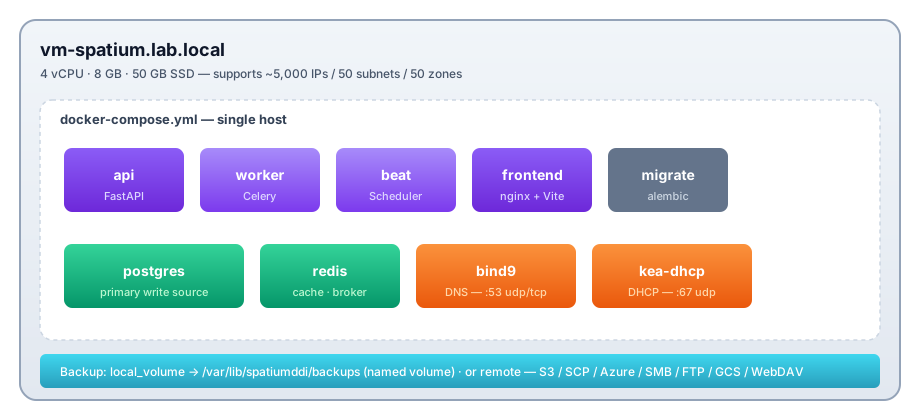
Pros: simplest to run, fastest to bring up, single backup unit. Cons: every service shares one host. A noisy neighbor (e.g. a DHCP storm filling Kea’s lease store) can degrade the API. No HA.
Sizing: 4 vCPU / 8 GB / 50 GB SSD comfortably handles up to ~5,000 IP addresses across ~50 subnets, ~50 DNS zones, and a modest DHCP scope set. Past that, split off the agents (Topology 2).
Topology 2 — Control plane + separate DNS/DHCP appliances
The shape most production deployments reach for first. Control plane on its own VM; DNS and DHCP agents on dedicated, network-edge machines. Agents long-poll the control plane’s API.
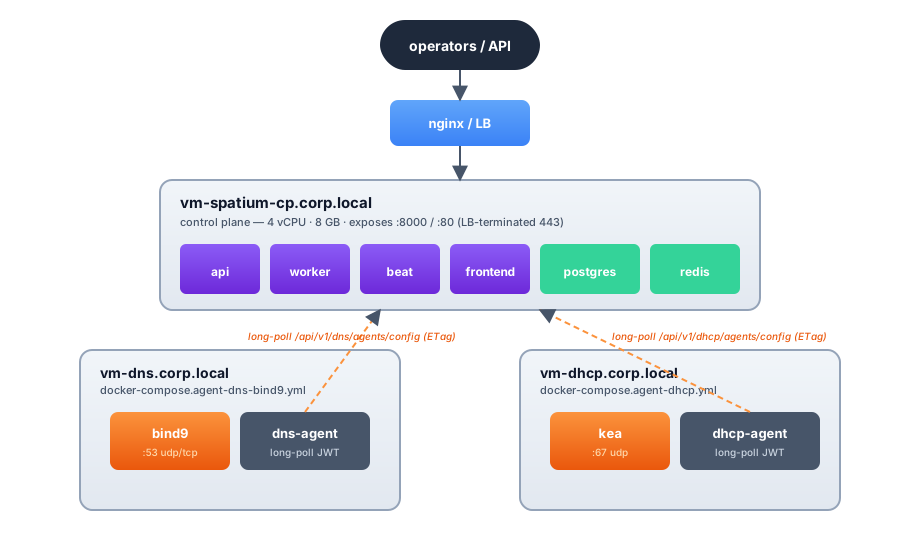
What this gets you:
- Control plane outages don’t take DNS/DHCP down. The agents serve zones / leases from the local cache until the API is reachable again.
- DNS and DHCP can sit at the network edge with their own firewall rules, while the API can be inside a corp network behind LDAP / OIDC.
- Each appliance can be sized for its workload — DNS query volume vs DHCP lease churn typically don’t peak at the same time of day.
The two compose files:
# On vm-dns (BIND9 — swap in `agent-dns-powerdns.yml` or
# `agent-dns-technitium.yml` for those drivers):
export CONTROL_PLANE_URL=https://spatium-cp.corp.local
export DNS_AGENT_KEY=<paste-from-Settings→Security→Agent bootstrap keys>
export DNS_HOSTNAME=vm-dns.corp.local
docker compose -f docker-compose.agent-dns-bind9.yml up -d

# On vm-dhcp:
export SPATIUM_API_URL=https://spatium-cp.corp.local
export SPATIUM_AGENT_KEY=<paste-from-Settings→Security→Agent bootstrap keys>
export DHCP_HOSTNAME=vm-dhcp.corp.local
docker compose -f docker-compose.agent-dhcp.yml up -d
The agent registers with the control plane on first boot, exchanges
its PSK for a rotating JWT, then long-polls forever. See
DNS_AGENT.md for the protocol.
OS-appliance agents take a different path. The compose +
SPATIUM_AGENT_KEYrecipe above is the raw-Docker route. If your agents are SpatiumDDI OS appliances, install the Appliance role and onboard them with an 8-digit pairing code from/appliance → Pairing— no hex key to copy. The agent’s supervisor registers, the operator approves it on/appliance → Fleet, and roles are assigned from the UI. See the README’s “Joining DNS / DHCP agents” section +APPLIANCE.md.
Topology 3 — DNS + DHCP HA pairs
Production-grade availability. Multiple DNS servers in a server group (primary + secondary, or split-horizon views), Kea DHCP HA across two peers. Each DNS or DHCP host is its own VM.
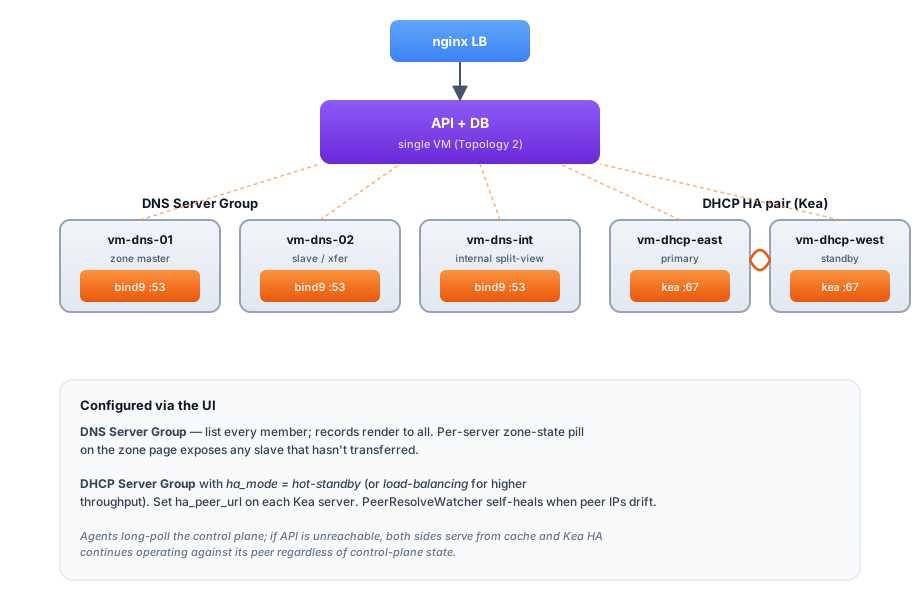
Configured via the UI:
- DNS Server Group — list
vm-dns-01andvm-dns-02as members of one group. Records render to both. SpatiumDDI watches per-server zone serials so you can spot a slave that hasn’t transferred (zone-state pill on the zone page). - DHCP Server Group with HA mode =
hot-standby(orload-balancingfor higher throughput). Setha_peer_urlon each Kea server to its own HA listener URL,http://<that server's address>:8000/; each server’s URL is rendered into every peer’speerslist, which is how the partner finds it. On appliances the firewall then opens that port to the other members only (#1167). The2026.04.21-2release shipped the three-wave HA story including peer-IP self-healing — DNS changes that rename a peer no longer break the HA pair.
The DNS and DHCP agents continue to long-poll the control plane; if the API is unreachable, both sides serve from cache and Kea HA continues operating against its peer regardless of control-plane state.
Topology 4 — HA control plane (Patroni + Redis Sentinel)
Removes the control plane as a single point of failure. Two or more API hosts behind a load balancer; PostgreSQL via Patroni (3 nodes is the standard quorum); Redis via Sentinel. Beat stays single-instance (see the table at the top — it’s not horizontally scalable without leader-election).
Running the OS appliance? See Topology 7 instead — it gives you this same HA shape self-contained (bundled CNPG + Redis Sentinel + embedded etcd + a MetalLB VIP), scaled by promoting appliances in the Fleet UI with no Patroni / LB / kubectl to run. Topology 4 is for hand-rolled bare-metal / Docker control planes.
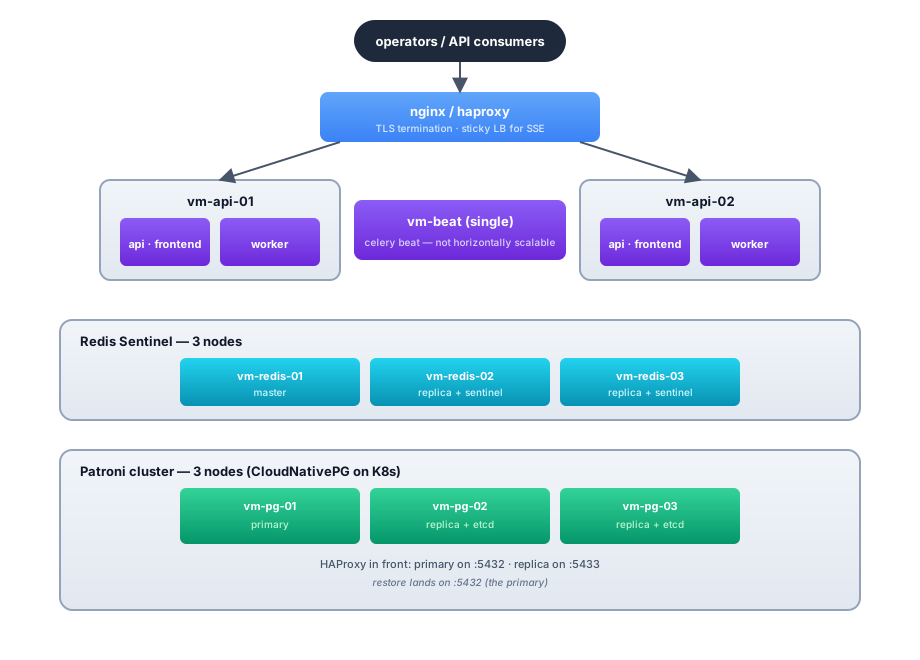
DNS / DHCP agents per Topology 2 / 3 above, pointing at the LB URL.
What’s in the repo for this:
k8s/ha/postgres-cluster.yaml— CloudNativePG manifest (K8s analogue of Patroni). Three-node primary + 2 replicas with auto-failover.k8s/ha/redis-sentinel.yaml— Redis Sentinel manifest.k8s/ha/postgres-docker-compose.yaml— a Patroni overlay for Docker Compose that does not work and is unsupported in 1.0: Patroni never starts, and on an existing install it comes up on empty volumes (see its header, and #137 for making Compose HA real). For a real HA database off Kubernetes, use the appliance (Topology 7).charts/spatiumddi— umbrella Helm chart that selects the HA shapes viapostgresql.kind=cnpg/redis.kind=sentinel.
The API is stateless — no in-memory session state — so a request hitting either api host gets the same answer. Sticky LB only matters for the SSE streams (chat orchestrator, scheduled-target-archives list); the LB just needs to keep the connection on the same backend once it’s open.
Beat HA caveat. Celery beat is intentionally single-instance.
Running two beats without leader-election double-fires every
scheduled task. If you need beat HA, use celery-beat-leader (Redis-
based leader election) and configure each beat instance with the
same lock key. We don’t ship that today — for most installs the
“recreate beat from a healthy backup” recovery path is fine.
Topology 5 — Hybrid cloud: control plane in cloud, agents on-prem
Control plane runs in your cloud account (AWS / Azure / GCP / Hetzner / DigitalOcean / Vultr — any provider). DNS and DHCP agents stay on-prem because they’re network-path dependencies — DNS recursion has to terminate close to the queriers, DHCP has to be on the same broadcast domain as its clients.
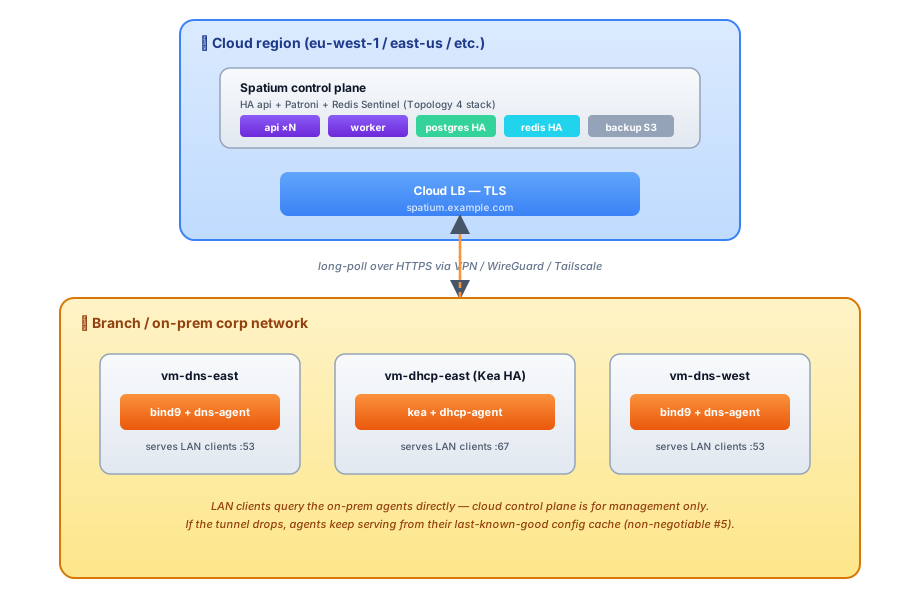
Why this works:
- The control plane’s only outbound dependency is the database. Cloud provides better postgres HA than most on-prem racks.
- The agents don’t need a persistent control-plane connection. They long-poll over HTTPS; the connection can drop for hours and they keep serving from cache.
- Backup destinations don’t have to be in the same region. A cloud
control plane can write nightly archives to an on-prem SCP target
(or vice versa). See the SCP / S3 / Azure / SMB / FTP / GCS / WebDAV
driver matrix in
docs/features/SYSTEM_ADMIN.md§2.9.
Caveats:
- Latency. The web UI and
/api/v1/*round-trips go cloud-to-corp. For a US team operating an EU control plane that’s 80–150 ms per request — workable but noticeably slower than local. Pick a region near your operators. - TLS certificate management for
spatium.example.combelongs to the cloud-side LB. Use ACME (the embedded ACME / Let’s Encrypt client shipped in #438) or bring-your-own. - Audit-forward / SMTP / webhook events fire from the cloud-side control plane. Make sure your network policy lets them out — most setups don’t have to think about this.
Cloud variants of each component:
| Component | AWS | Azure | GCP | Comment |
|---|---|---|---|---|
| API + worker + beat | EC2 + ALB / ECS Fargate / EKS | VM Scale Set + App Gateway / AKS | GCE + L7 LB / GKE | Stateless; treat as cattle |
| Postgres | RDS (Multi-AZ) | Azure Database for PostgreSQL | Cloud SQL | All three honor postgresql+asyncpg:// URLs |
| Redis | ElastiCache (cluster mode) | Azure Cache for Redis | Memorystore | Sentinel not required when the managed service does failover |
| Backup destination | S3 native | Azure Blob native | GCS native | All three driver kinds ship in the registry |
| Frontend (static) | CloudFront + S3 | Azure CDN + Blob | Cloud CDN + GCS | Or just serve from the same LB |
Topology 6 — Kubernetes (single chart, multi-node)
The Kubernetes flavour of Topology 4. The umbrella Helm chart
(charts/spatiumddi) ships every component — api / worker / beat /
frontend / migrate / Postgres + Redis subcharts (or external
endpoints) / optional DNS+DHCP agent StatefulSets.
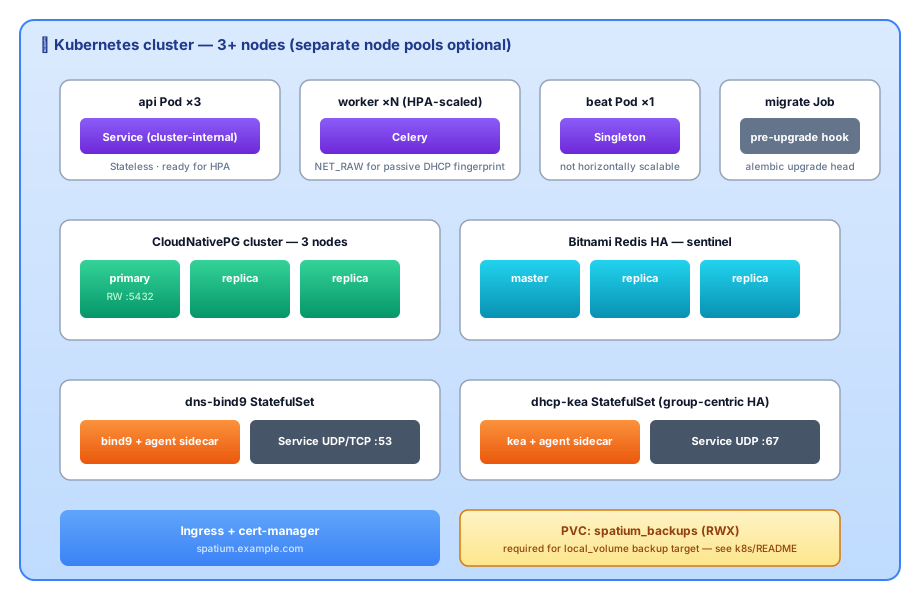
The chart’s relevant values:
postgresql.kind: cnpg           # HA Postgres via the CloudNativePG operator
redis.kind: sentinel            # HA Redis via the in-chart sentinel shape
api.replicas: 3
worker.replicas: 4
worker.netRawCapability: true   # for passive DHCP fingerprinting
dnsAgents.enabled: true         # spawns the bind9 StatefulSet
dhcpAgents.enabled: true        # spawns the kea StatefulSet (group-centric HA)
Beat is always a single-replica singleton — there’s no toggle for it.
See ../../k8s/README.md for the Helm-vs-raw-manifest
walkthrough, the RWX PVC overlay needed for local_volume backup
targets, and the upgrade-flow recipe.
Topology 7 — Appliance multi-node control-plane HA (#272)
The self-contained version of Topology 4, built without touching
Patroni, Helm values, or kubectl. Every SpatiumDDI OS appliance is a
single-node k3s cluster; you scale the control plane
to 3 / 5 / 7 nodes by promoting appliances from the web UI
(/appliance → Fleet → Manage control plane cluster…). This is the
recommended HA path for operators who installed from the ISO.
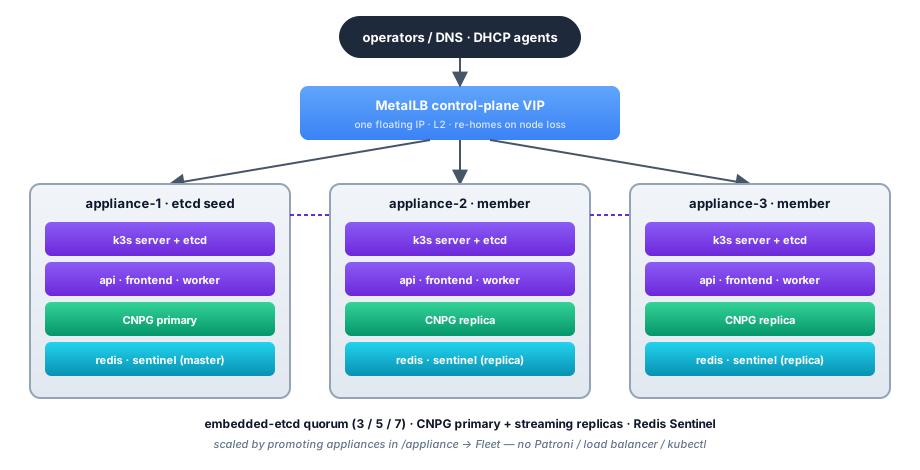
How it differs from Topology 4 / 6:
- No external Patroni / CloudNativePG to operate. The appliance
bundles the CNPG operator; promoting a node scales the
ClusterCR’s instance count automatically (primary + streaming replicas + failover). - Embedded etcd, not an external DCS. k3s runs etcd in-process on
each server node. Odd member counts only (1 → 3 → 5 → 7); the API
refuses a batch that would land on an even total. Promotion does a full
k3s cluster-identity reset + rejoin of the seed’s etcd (handled by the
supervisor’s host-side
spatium-cluster-joinrunner — backed up + guardrailed). - One floating VIP, set in the UI. A bundled MetalLB (L2) hands the
frontend Service a control-plane VIP you pick in
Appliance → Network &
Host
. Point DNS/DHCP agents + operator browsers at the VIP, not a single node IP — an agent pinned to one node’s address loses its control plane whenever that node is down. (Control-plane cluster members need no such care: their supervisor heartbeats the in-cluster API Service automatically.) The self-signed Web UI cert auto-grows its SANs to cover every member + the VIP (an uploaded cert is never touched). - Singletons handled by the chart — 1-replica
Recreatebeat with fast reschedule tolerations + a migrate Job gating app pods on the alembic head. Nocelery-beat-leaderto run. - Control-plane workloads stay on control-plane nodes via a per-role node label, so promoting a DNS-only appliance never schedules Postgres onto it.
Bring-up:
- Install the first appliance (ISO, Control plane role) — that’s the etcd seed + a working one-node control plane.
- Install two more appliances and pair them (Appliance role, or a second/third Control-plane install).
/appliance → Fleet → Manage control plane cluster…→ select the two → promote. Within ~60 s: etcd quorum across 3, CNPG at 3 instances, Redis Sentinel 3-node, api/worker/frontend at 3 replicas.Appliance → Network & Host→ set a MetalLB pool + a control-plane VIP. The frontend moves onto the VIP; the cert auto-covers it. Point every off-cluster DNS/DHCP agent’s control-plane URL at this VIP.
Failure behaviour: lose one of three nodes → etcd keeps quorum (2/3), CNPG fails over to a replica, the MetalLB VIP re-homes to a surviving node, the UI stays up on the same address. CNPG replicates asynchronously, so a failover can lose the last few commits (RPO > 0). Bring the node back, or replace it — operator-driven dead-node replacement is the Phase 9 follow-up tracked on #272.
Demote / teardown: demoting members in the Fleet UI reverses the scale (the etcd seed can’t be demoted; demoting to an even count is refused). A control-plane node can’t be revoked while it’s a live cluster member — demote it first.
When to use Topology 4 / 6 instead: you already run a managed Postgres
(RDS / Cloud SQL) or an existing Kubernetes platform, or you want
read-scale / cross-region shapes the appliance doesn’t bundle. Topology 7
is the “I want HA without becoming a Postgres + Kubernetes operator”
answer. Full design + the live shake-out log live in
issue #272;
the appliance internals are in APPLIANCE.md.
PowerDNS-primary + BIND-secondary hybrid (driver crossover)
SpatiumDDI ships three agent-managed authoritative DNS drivers: BIND9 (default), PowerDNS and Technitium. Each DNSServerGroup is single-driver — but multiple groups, each on a different driver, can serve overlapping namespaces via plain AXFR or RFC 9432 catalog zones. The two shapes below use PowerDNS + BIND9 as the worked example; a Technitium group substitutes for either side over plain AXFR, which it transfers over TSIG the same way. It does not do catalog zones: both roles are broken and refused until #1766 (#1782), so a catalog-zone shape needs BIND9 (or PowerDNS as producer) on both sides.
Shape A — PowerDNS-primary + BIND-secondary on the same zones. PowerDNS handles writes (online DNSSEC signing, ALIAS records, LUA records); BIND fans the zones out to a battle-tested edge. Catalog-zone-driven AXFR keeps both drivers in sync because the producer-side catalog renderer emits identical wire bytes from either driver (issue #127 Phase 3d).
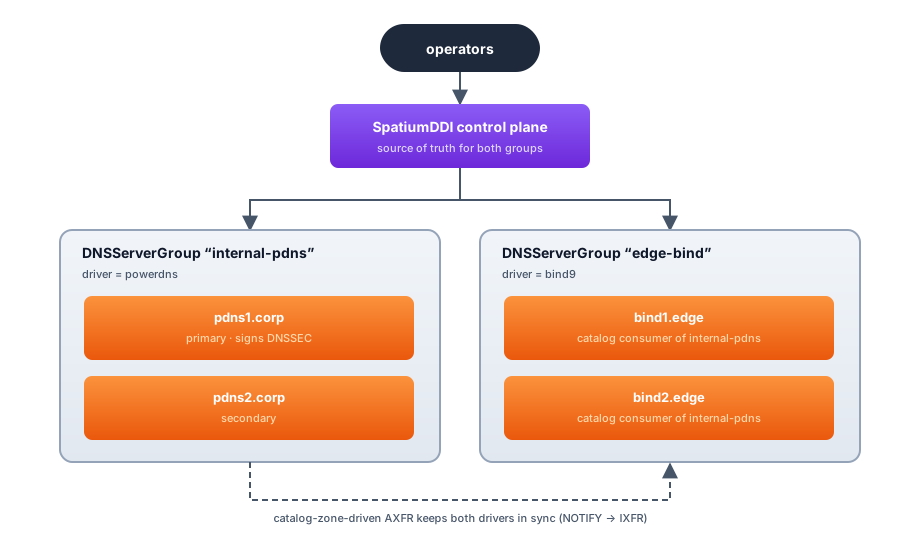
Wire it up:
- In
internal-pdnssetcatalog_zones_enabled=true+catalog_zone_name=catalog.example.com.. The PowerDNS primary publishes the catalog zone alongside member zones via the agent’s REST patch path. - In
edge-bind, create each fanned-out zone aszone_type=secondary(orstub) with its per-zonemasterslist pointing at the PowerDNS primary (aniporip@portstring, issue #336). BIND loads each astype slave;and AXFRs from the master; acatalog_zones_enabled=true+catalog_zone_name=catalog.example.com.setting on theedge-bindgroup additionally distributes the member list across every BIND member of the group via one RFC 9432 catalog (BIND 9.18+). - Operator changes land via the SpatiumDDI UI → write-through to PowerDNS REST → PowerDNS bumps zone serial → BIND notices via NOTIFY-then-IXFR.
Shape B — Per-zone driver placement (not crossover). Some zones live on PowerDNS (those needing ALIAS / LUA), some on BIND9 (those needing first-class views or RPZ blocklists), some on Technitium (those serving or forwarding encrypted DNS, especially DoQ or DoH-upstream, which neither of the others can do). Each zone is owned by exactly one group; the operator picks the right group at zone-create time. The Operator Copilot’s propose_create_dns_zone tool accepts a driver_hint arg that picks a matching group automatically.
The driver-feature gate (server-side, _DRIVER_GATED_RECORD_TYPES + _DRIVER_GATED_OPERATIONS) means a driver-specific feature called against a group on the wrong driver returns 422 with a remediation message (“move the zone to a PowerDNS-only group”). Mixed-driver groups are also rejected — an “internal-pdns” group cannot have one PowerDNS plus one BIND9 server, by design. The full gate table is in docs/features/DNS.md §0.
Migrating a BIND9 group to PowerDNS without DNS downtime
Replacing a BIND9 group with a PowerDNS group on the same zones is a four-step recipe. The IPAM ↔ DNS sync, RBAC, and DDNS pipeline don’t change — only the driver underneath the zones.
The same four steps migrate to a Technitium group, with two differences: substitute
--profile dns-technitium/dnsAgents.servers[].flavor: technitium/docker-compose.agent-dns-technitium.ymlin step 1, and note that Technitium resolves SOA against the configured primaries when it creates a secondary — an unreachable primary fails the create outright rather than retrying, so bring the source group up first. Signing in step 4 works the same way (Technitium does online sign / unsign), but manual key rollover stays BIND9-only: Technitium rolls on its ownrolloverDaysschedule.
Pre-flight check. Inventory zones with PowerDNS-incompatible features: classic views (PowerDNS does views via tags — no auto-translation today), RPZ blocklists (recursor-only, not authoritative). If any zone in the group uses these, leave that zone on BIND9 and only migrate the others. The control plane allows mixed installs precisely so you can split the unmigratable zones off into a separate group.
1. Stand up the PowerDNS group alongside BIND9. Deploy a PowerDNS agent (Compose --profile dns-powerdns, Helm dnsAgents.servers[].flavor: powerdns, or a standalone-VM docker-compose.agent-dns-powerdns.yml) and let it auto-register. In the SpatiumDDI UI, create a new DNSServerGroup with driver=powerdns and the registered server as its primary. Both groups are now live; the BIND group still serves all zones.
2. Secondary-zone copy via AXFR. For each zone you’re migrating, create a matching zone_type=secondary zone in the PowerDNS group with its per-zone masters list pointing at the BIND primary (an ip or ip@port string, issue #336). PowerDNS loads each as a slave and AXFRs the current contents from BIND. Wait one sync cycle (~60 s), then verify dig +short SOA <zone> @<powerdns-pod> matches the BIND primary’s serial. No record edits should land during this window — schedule the migration for a low-write period.
3. Promote PowerDNS to primary. In the UI, edit each zone and switch its group_id to the PowerDNS group, then flip its zone_type from secondary back to primary (which clears the masters pointer). The control plane: (a) write-through-PATCHes the zone to PowerDNS as primary, (b) creates the primary entry, (c) rebuilds the SOA. BIND can stay on the zone as a plain secondary (read-only, with its masters now pointing at PowerDNS) for a soft cutover, or be removed entirely. DDNS / IPAM auto-sync continue uninterrupted because they target the zone by ID, not by driver.
4. Sign zones (optional). With the zones now on PowerDNS, signed zones are a single click — open the zone-edit modal, hit Sign zone in the DNSSEC card. PowerDNS generates KSK + ZSK (online signing), rectifies the zone, and the agent reports DS records back to the control plane. Re-publish DS records to your registrar — that’s the only out-of-band step. The DNSSEC card has a per-DS copy-to-clipboard button. See issue #127 Phase 3c for the full flow.
Rollback recipe. If something goes wrong between step 2 and step 3, the BIND group is still authoritative — flip the zones back via the UI. If something goes wrong after step 3, the secondary on BIND is still serving the last-known-good zone state; promote it back to primary by switching the zone’s group back to BIND and setting its zone_type to primary. The IPAM ↔ DNS reconciler will pick up any record drift on the next 60-s sync cycle and re-stamp the zone.
Post-restore caveat for DNSSEC zones. PowerDNS DNSSEC keys live on the agent’s LMDB volume, not in the control-plane backup. A factory-reset + restore-from-backup that wipes the agent’s volume regenerates keys and produces NEW DS records — which means a new round-trip to the registrar. The restore endpoint surfaces this as a RestoreOutcomeResponse.warnings[] advisory listing every signed zone; the BackupPage UI renders it as an amber callout. See issue #127 Phase 4d.
Picking a topology
| You have… | Start with |
|---|---|
| A single homelab box, 3 people max using it | Topology 1 |
| One DC, network-edge appliances expected | Topology 2 |
| One DC, downtime-sensitive DNS or DHCP | Topology 3 |
| Hand-rolled bare-metal / Docker HA control plane | Topology 4 |
| Branch offices feeding back to a HQ control plane | Topology 5 |
| Anything K8s-native | Topology 6 |
| HA control plane from the OS appliance, no Patroni/kubectl | Topology 7 |
| Need ALIAS / LUA records | Add a PowerDNS group to any of the above |
| Need DNS-over-QUIC, or encrypted upstream forwarding over DoH / DoQ | Add a Technitium group to any of the above |
You can move between topologies without re-installing. Going from Topology 1 → 2 → 3 → 4 is purely additive: new VMs join the existing control plane via the agent-key bootstrap. The database doesn’t move; you just point more agents at the same API URL with the bootstrap key from Settings → Security → Agent bootstrap keys, and each agent registers itself on first boot. On the OS appliance, the 1 → 3 → 5 control-plane scale (Topology 7) is likewise additive — you promote more appliances from the Fleet UI, no reinstall and no database move.
Backup + factory-reset across topologies
Backup and factory-reset (issues #117 + #116) work the same regardless of topology — they hit the API endpoints, which are stateless. A few shape notes:
local_volumebackup target in Topology 1 is fine on the single host. In Topology 2+, it lives on the control-plane VM and isn’t shared with anything; switch to S3 / SCP / Azure / GCS / SMB / FTP / WebDAV for distributed installs.- Restore runs via
pg_restoreagainst the live Postgres. In Topology 4+ point this at the primary (for a hand-rolled Patroni cluster behind HAProxy, the read/write port, not the read-only one). The api containers’ SQLAlchemy pool gets disposed during restore, so transient 503s during the restore window are expected — see thepool_pre_ping=True+ transient-DB handler inapp/db.py. - Cross-install rewrap on restore (issue #117 Phase 2) means
cross-topology restores don’t need the recovered
SECRET_KEYcopied to the destination’s env. Restore “just works” between Topology 1 ↔ 4 even if theirSECRET_KEYenv vars differ. - Factory reset (issue #116) is global per-install; it doesn’t touch agents. Each agent re-bootstraps from its PSK after a reset that wiped the agent-key rows.
Fleet firewall posture across topologies (#285)
The declarative fleet firewall (full operator story in the “Fleet firewall”
section of APPLIANCE.md) applies to the appliance
topologies (1, 2, 3, 7) — Docker-Compose / generic
K8s control planes (4, 5, 6) manage host firewalling with their own tooling.
It’s dark by default (the appliance.firewall module + the firewall_enabled
master switch); when enabled, each node’s drop-in is compiled server-side from
the fleet → role → appliance policy layers:
- Single VM (1) — one node carries every role; the merge opens 53 (DNS), 67/68 + 547 (DHCP, v4 + v6), the control-plane ports peer-scoped (here: just itself), and the mgmt floor. The all-CP-hardened enforcement gate trivially passes (one hardened node).
- Control plane + separate DNS/DHCP appliances (2, 3) — the DNS-only and DHCP-only worker appliances open only their role ports + the floor; etcd (2379/2380) + kubelet (10250) never open on a non-CP worker. The control node(s) open the control-plane ports scoped to the cluster-peer CIDR set.
- Appliance multi-node CP HA (7) — every CP member opens etcd/kubelet + MetalLB memberlist (7946) + frr-k8s’s webhook (19443, #1827) scoped to the peer CIDRs (never LAN-wide; the #285 fix), and 6443 to peers ∪ pod ∪ service ∪ kubeapi-expose. The peer-drift cross-check (warn-only) flags a member whose peer entry hasn’t propagated, or a left member’s stale /32.
Air-gapped / manual join under enforcement
A joining k3s node must reach the seed’s apiserver on 6443 before the
supervisor can render its own peer-scoped drop-in (a bootstrap chicken-and-egg).
The appliance keeps 6443 LAN-reachable via a baked sentinel drop-in
(/etc/nftables.d/00-spatium-k3s-bootstrap.nft) for exactly this window — etcd
- kubelet are not LAN-reachable, so the exposure is limited to the token+mTLS-guarded apiserver. The sentinel is retired (multi-node, no join window) on a later cut; until then it stays baked. So in an air-gapped LAN with enforcement on, a new node joins normally — no firewall step is needed on the joiner, and the control plane’s peer set grows to include it on the next heartbeat. Do not enable enforcement on a fresh cluster until every CP member reports hardened (the enforcement gate blocks this by default; override only if you understand a still-LAN-wide node won’t actually apply the policy).
What’s NOT supported (yet)
- Active-active control plane across regions. The schema isn’t partitioned for it. One Patroni / CNPG / appliance-etcd cluster per install today.
- Operator-driven dead-node replacement on the appliance. Promote / demote ship today (Topology 7); evicting a permanently-dead etcd member and minting a pairing code for its replacement is the Phase 9 follow-up on #272.
- Multi-tenant control plane. Coming as Phase 5 per the CLAUDE.md roadmap. Today, “tenants” = separate installs.
- Read replicas as query routes. All reads currently go to the primary. The Patroni cluster’s replicas exist for failover, not read scaling.
- PostgreSQL on AWS Aurora-Postgres compatibility. Should work
in theory (Aurora speaks the same wire protocol) but isn’t on
the supported matrix. The
pool_pre_pingsemantics interact poorly with Aurora’s 30s connection-recycle. File an issue if you’ve validated it.