OS Appliance Deployment Specification
Overview
SpatiumDDI can be shipped as a self-contained OS appliance image — a bootable image where the OS, all services, and the SpatiumDDI application are pre-installed and pre-configured. This allows deployment without any prior OS or container runtime setup: download, boot, configure via web UI, done.
The appliance is Debian 13 + embedded k3s (a single-binary Kubernetes distribution). SpatiumDDI’s container set deploys as k3s HelmChart custom resources — the same umbrella + appliance Helm charts that ship for standalone Kubernetes installs. Operators get a real Kubernetes node without having to install or manage one; release upgrades reconcile through helm-controller, role swaps are single kubectl label node calls, and atomic A/B slot upgrades carry both OS and container versions in one unit so they can’t drift.
Current architecture (post-#183, 2026-05-17)
The appliance runs k3s as its container orchestrator. Pre-#183 it ran docker-compose driven from spatiumddi-firstboot; that path is gone in every shipped artifact. The historical post-#170 architecture section below documents the docker-compose era for context — it’s preserved because most field installs predate #183. For new installs and the current release, start here.
One-paragraph summary
spatiumddi-firstboot writes a HelmChart CR into k3s’s auto-deploy directory (/var/lib/rancher/k3s/server/manifests/). The k3s-bundled helm-controller picks it up + runs helm install from a chart tarball baked into the appliance rootfs (/usr/lib/spatiumddi/charts/).
#272 — two install roles (the installer wizard collapsed from the earlier three; the old full-stack / frontend-core distinction is now a runtime DNS/DHCP role toggle, not an install choice — and legacy variant strings are still accepted from a not-yet-reinstalled box):
- Control plane (the default; the required FIRST install) — control plane (api / frontend / worker / beat / migrate / Postgres / Redis) + the supervisor, all on a single-node k3s that is also the etcd seed. DNS + DHCP are OFF at install — the operator enables them per node from the
/appliance → Fleetrole toggle (so the data plane is always a deliberate fleet decision). The umbrella chart deploys the control plane; the supervisor owns the per-role node labels. More control-plane nodes are made by promoting Appliances in the Fleet UI (#272 Phase 7), not installed as this role. - Appliance — supervisor + agent-landing nginx. Pairs against a remote control plane via 8-digit pairing code; roles (
dns-bind9/dns-powerdns/dns-technitium/dhcp) are assigned post-approval from the control plane’s/appliance → Fleettab. Can later be promoted to join the control-plane cluster.
The historical AIO / Core-only / Application narrative below documents the pre-#272 three-role world; the firstboot dispatch still handles those strings as aliases.
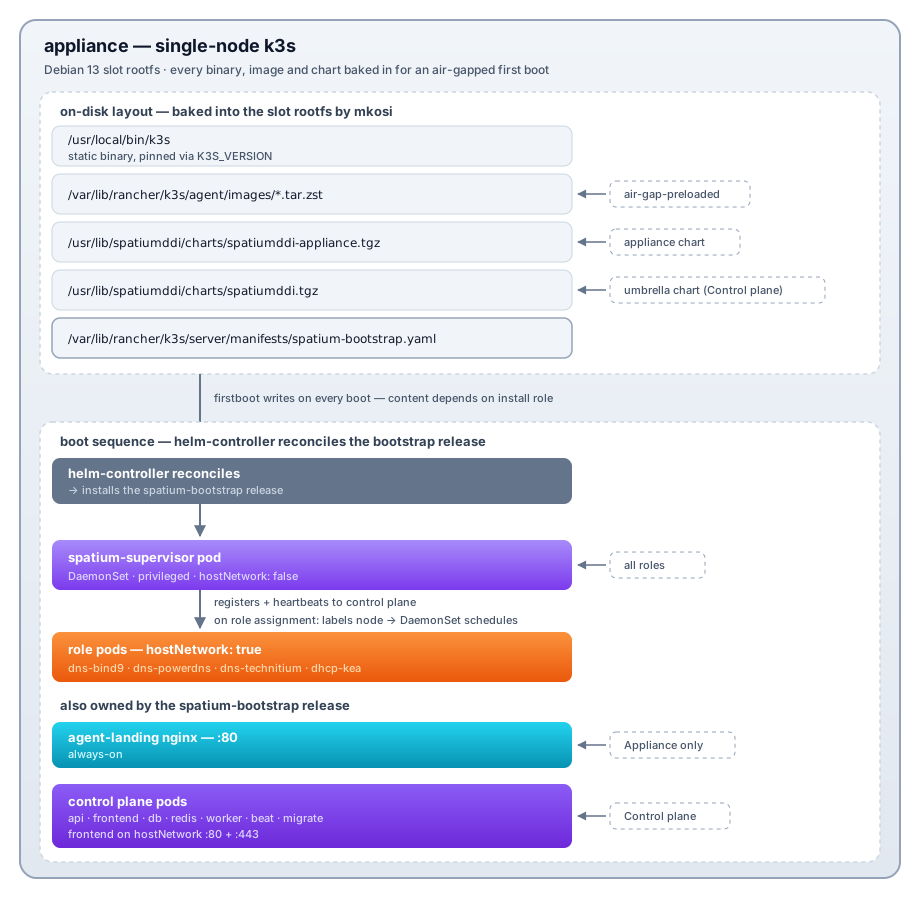
What’s bundled in the slot rootfs
mkosi bakes everything the appliance needs to come up fully air-gapped:
- k3s static binary (~70 MB) at
/usr/local/bin/k3s;kubectl/crictl/ctrsymlink to it. - k3s airgap images (CoreDNS / local-path / pause / metrics-server) as zst-compressed tarballs at
/var/lib/rancher/k3s/agent/images/*.tar.zst. k3s auto-imports them into containerd at boot. - SpatiumDDI container images as zst tarballs at
/usr/lib/spatiumddi/images/. firstboot imports them into k3s containerd viactr -n k8s.io images import. Includes api / frontend / worker / beat / migrate / dns-bind9 / dns-powerdns / dns-technitium / dhcp-kea / supervisor / nginx + postgres:16-alpine + redis:8.10.2-alpine for the Control plane role. - Control-plane environment is written once, under the chart’s
sharedEnvvalue, which the umbrella chart appends to the api, worker AND beat containers (#1826). That is whereAPPLIANCE_MODE,APPLIANCE_HOSTNAME,APPLIANCE_HOST_IPSandINITIAL_NTP_SERVERSlive.APPLIANCE_VERSIONjoins them from a value of its own,applianceVersion: it is re-read from the booted slot’s/etc/spatiumddi/appliance-releaseon every boot, so it follows an upgrade or rollback, and on a multi-node cluster it is the seed’s, since only the seed renders this manifest. It is not asharedEnventry because a cluster Rolling Upgrade holds it withimage.taguntil every node runs the target (#2176): a HelmChartConfig can pin a single value but replaces a list whole, so as an entry the seed’s boot onto its new slot rolled the api, worker and beat mid-run. When the slot-image mirror is on, its URL and secret go to the api and the worker (the worker’s upgrade preflight checks the mirror’s free space), not to beat. The worker runs alert evaluation (node_pressure,cluster_dns_degraded) and the rolling-upgrade orchestrator, so a variable only the api carries makes everyappliance_modegate read as off there. Agent pre-shared keys stay underapi.env: only the api reads them.charts-render-check.shfails a render where api, worker and beat disagree on the shared set, or where beat carries the mirror secret. - Helm chart tarballs at
/usr/lib/spatiumddi/charts/. The appliance chart drives Appliance installs (and the supervisor on the Control plane); the umbrella chart drives the Control plane. Built at release time + signed. - bash-completion +
kalias for kubectl — operator SSHing in for triage drops straight into a usable shell.
A fresh appliance boot never reaches out to ghcr.io or any external registry. The first time it does is when an operator explicitly applies a new release through /appliance → OS Versions or /appliance → Releases.
Two HelmChart CRs
spatium-bootstrap— written byspatiumddi-firstbootinto k3s’s auto-deploy directory on every boot. Content depends on install role (Control plane / Appliance). Owns the always-on resources (supervisor on every role; agent-landing on Appliance; control plane pods on Control plane).spatiumddi-appliance— written by the supervisor on its first successful heartbeat (every role runs a supervisor). Deploys the role DaemonSets (dns-bind9 / dns-powerdns / dns-technitium / dhcp-kea). After #183 Phase 10, this release is installed once and never re-PATCHed for role changes — role swaps happen through node labels (spatium.io/role-<role>=true); the DaemonSet’s matching-nodes semantics mean an unassigned role produces zero pods rather than a Pending one.
Why k3s
The pre-#183 docker-compose path fought us on three things every operator-facing release ran into:
- Role swaps were brittle.
docker compose downof one service +up -dof another, with a manual--env-filedance, no consistent rollback if a step failed midway. Real recovery was always “delete/var/lib/spatiumddi/.compose-state, reboot.” - No declarative target. Compose had no notion of “this appliance should always have N pods of kind X running”; the supervisor’s drift checker reimplemented this by parsing
docker compose psJSON every 5 min. - A/B slot upgrades had to migrate compose state across slot rootfs swaps.
/var/lib/docker/was on/var(persistent), but the compose file lived on rootfs, so a new slot could carry a different compose schema while old containers still ran against the old.
k3s solves all three: HelmChart CRs as the declarative target, helm-controller as the reconciler, kine (SQLite) as the state store (survives slot swap because /var/lib/rancher/ is on /var). The supervisor becomes a thin controller that PATCHes node labels per role-assignment change — the role pod schedules or terminates as a consequence of the label, not as a consequence of a docker compose invocation.
The trade-off: k3s adds ~70 MB to the slot rootfs and a steady ~150 MB RAM footprint for the k3s server process itself. On the 32 GiB disk floor the appliance targets, both are well under budget.
Recommended sizing (per role):
| Role | vCPU | RAM | Disk |
|---|---|---|---|
| Control plane (api + worker + frontend + Postgres + Redis + k3s etcd seed) | 4 | 8 GiB | 40 GiB SSD |
| Appliance (DNS / DHCP agent) | 2 | 4 GiB | 32 GiB SSD |
Measured memory, CPU and disk for these roles and for a three-node control
plane, the minimums, and how to measure your own install are in
SIZING.md.
Measured floors (single node, 2026-09). The recommendation above was tested against a fixed load rather than guessed: a single-node control plane serving one agent-based DNS group of 250k A records (+250k PTR) and a DHCP population of 35k devices with 20k active, 75 minutes of lease / renew / DDNS churn per point, judged on api restarts, cgroup kills, memory thrash and kea/BIND’s own served ratios rather than on the load generator’s view alone.
| RAM | vCPU | Outcome |
|---|---|---|
| 8 GiB | 4 | passes with headroom (the recommendation) |
| 6 GiB | 3 | passes; the smallest point that passed on every attempt |
| 5.5 GiB | 3 | the knee — see the third point below: it is a scheduling-weight limit, not a CPU-capacity one |
| 5 GiB | 4 | marginal; memory thrash under the churn |
| 4 GiB | any | the api cannot converge; the appliance wedges |
| any | 2 | CPU-bound under 20k active devices; 3 vCPU is the CPU floor |
Three things shape those numbers, and all three are the appliance’s job, not the operator’s:
- The chart’s default api limit (512Mi) cannot build the agent config
bundle for a group of this size, and the default worker limit (1Gi with
four prefork processes) is OOM-killed under lease/DDNS churn long before
the VM runs short. The supervisor therefore sizes both from the node’s
RAM — api = ½ RAM (1–8 GiB), worker = ⅖ RAM (1–16 GiB, but never more
than the api and Postgres leave), two worker processes on nodes of 12 GiB
or less — and writes them into the
spatium-controlHelmChartConfig, where they survive k3s restarts and helm re-applies. (kubectl set resourceson the Deployment does not: k3s re-applies the on-disk HelmChart manifest on every restart.) The api and Postgres CPU limits are sized the same way from the node’s CPU count (#2240): the api a quarter of the cores (1–4), Postgres half (1–8), where both were a fixed 1 core. The Postgres memory limit also has to hold the connections the cluster can open, which grow with the control-plane node count (#2156): every node runs an api pod with its own database pool and a worker, every api, worker and beat process holds up to two more for the after-commit hooks (#2782), every api pod holds one more for its readiness probe (#2944), and the primary runs a WAL sender per replica. So the api’s pool per pod shrinks past four nodes (10 + 20 up to four, 10 + 3 at nine; about 120 api connections in all), and the limit is never below shared_buffers + 256 MiB + those connections × ~15 MiB each. The cluster can open 52 connections at one node, 134 at three and 227 at nine (two worker processes);max_connectionsstays at the appliance floor of 200 until that passes it, then follows it. One node of 8 GiB or more keeps the share above; a three-node cluster on a 12 GiB seed gets 3019Mi, a nine-node one 4507Mi. A promote or demote that moves the limit is one CloudNativePG rolling restart. These limits are keys the supervisor owns, so a different value written into that HelmChartConfig by hand is put back on the next heartbeat; there is no supported per-install override for them today (see “Who owns which HelmChartConfig key” below). - A bulk load creates one queued record op per record per agent server;
the api ships them to the agent a page at a time (5000 by default,
dns_agent_ops_batch). A group of 250k records drains in ~50 polls; the zone itself renders once the agent has the bundle. - The DNS and DHCP pods must carry a CPU request. Without one Kubernetes
runs them as BestEffort — the lowest scheduler weight on the node — and on
a 3 vCPU appliance the api’s lease-event work starves Kea’s single thread
until its socket queue overflows: at 5.5 GiB / 3 vCPU, Kea was given 7.5 %
of a CPU and answered 37 % of the DISCOVERs on the wire (55 % handshake
success) while it answered 100 % of what reached it. The same cell with a
CPU request on
dhcp-keaanddns-bind9reached 95.6 % with 0 restarts. That measurement used a 500m request on Kea (cgroup weight 20 against the api’s 4), which is what the chart ships since spatiumddi#967 (spatiumddi#953 first landed 250m — weight 10, enough to leave BestEffort, but never itself run against this load). The DNS roles keep 250m: they held 99.5–100 % in every cell. That is why the 4 vCPU rows pass — a fourth CPU happens to be free for Kea — and why 3 vCPU sits at the knee. A larger socket receive buffer does not help: with 8 MiB of buffer the drops vanish but a DORA takes 34 s instead of 1.5 s, because Kea then answers stale requests whole retransmit rounds late. Nor does a larger Keapacket-queue-sizeraise throughput. 64 → 2048 changed neither throughput nor drops at a sustained 12,000 pkt/s, because that queue sits behind the receive thread and the problem is the receive thread not being scheduled. Short bursts are different (spatiumddi#1283). Kea’s default queue of 64 evicts the oldest requests when a burst outruns the worker (counted, since #2889, asqueue_evicted), so SpatiumDDI renderspacket-queue-size: 1024. SeeDHCP.md. - Kea’s own packet-worker pool is sized from the machine’s CPU count, not
from the container’s cgroup share, so on a 4 vCPU appliance it starts four
workers that compete with the one thread draining the receive socket
(spatiumddi#980). SpatiumDDI now renders
thread-pool-size: 1explicitly: measured at 12,000 relayed pkt/s, that served 19,381 packets against 6,723 for four workers at 0.25 CPU, and 93,717 against 55,957 with four CPUs and no quota. It is a per-group setting;0restores Kea’s auto-sizing. - When a Kea server is short of CPU it loses packets silently. Every
server-side counter stays green — it answers 100 % of what it reads, and
pkt4-receive-dropstays at 0 through the whole thing — because the loss is the kernel discarding datagrams before Kea reads them. The per-bucketsocket_dropmetric and the default-ondhcp_packets_droppedalert are the only signals that name it — and note it issocket_dropspecifically: Kea’s ownpkt4-receive-dropalso counts deliberate drops (a blocklisted MAC, an HA standby declining an out-of-scope query) and is not a fault signal. A burst deeper than Kea’s 1,024-packet queue loses requests one stage later, after Kea has read them; that is thequeue_evictedmetric (#2889), which the same alert also fires on. SeeDHCP.md§4c.
Beyond that: 500k records in one group is not a supported single-node size at any RAM tested (up to 10 GiB) — the api’s bundle build for the group outlives its own probes under churn — and 1M records in one group does not converge at all. Split large namespaces across groups.
For a 3-node control plane, size every member like the standalone
recommendation (4 vCPU / 8 GiB); the members carry the same api / worker /
Postgres / Redis replicas. Measured on main (2026-09-03): three 6.5 GiB /
4 vCPU nodes formed cleanly and kept every api replica and every k3s
server up through the same 250k-record / 20k-device load and a kill-leader
drill (0 k3s restarts, at most one api restart). Measured again on 1.0
pre-release builds (October 2026): a first node of 4 vCPU / 8 GiB with two
of 2 vCPU / 6 GiB ran the realistic load, the HA drills and a rolling
upgrade with no OOM kill, using at most 4.4 GiB on any node. Give every node
48 GiB of disk: a slot upgrade followed by a rolling upgrade took /var on
40 GiB disks to the 80% disk warning. See SIZING.md.
Data disk for large installs (#2240). Everything that grows with the data lives on /var: the Postgres volumes, etcd, the container images and the logs. /var is what the disk has left after about 17 GiB of fixed partitions (spatium-install: the boot partitions, a 256 MiB state partition and two 8 GiB root slots), so a 40 GiB disk gives 23 GiB of /var and a 64 GiB disk 47 GiB. On a seven-node test cluster with 40 GiB disks and every node serving DNS, /var reached 88 to 91% on every node at about 1.5M records (about 770,000 devices, an A record and its PTR each), growing about 2 GB an hour per node while records were added at 80 to 190 a second. With the disks grown online to 64 GiB, /var read 43 to 45%, and the cluster went on to store 1M devices (2M records). So for about 1M devices, give every control-plane node a disk of 64 GiB or more: the 40 GiB above goes with the load the floors were measured at (250k A records and their PTRs). Leave room beyond that for Postgres WAL. After a failover, a primary that still holds replication slots for standbys that cannot follow keeps every WAL segment, and on 64 GiB disks one node’s /var reached 87% with 26 GB of WAL against 3.3 GB of data (#2317). The default-on appliance_disk_usage alert watches /var on every node: a warning at 80% and critical at 87%, a few points before the kubelet starts evicting pods at about 90%. Those figures count the 5% that ext4 keeps for root as free, so df shows a few points more (see OBSERVABILITY.md).
Control-plane HA is not serving HA. The DNS and DHCP roles are assigned
per appliance, and only the nodes that carry a role run the dns-bind9 /
dhcp-kea pods. In that drill the roles sat on the seed alone, so for the
~2 minutes between the seed going down and coming back the survivors
answered ~5 % of the queries the load generator sent — the control plane
had failed over, the data plane had nothing to serve with. Assign the DNS
and DHCP roles on every node you expect to keep serving during a failover.
The installer’s hard disk floor is 32 GiB for every role (raised from 24 GiB — issue #312: a 24 GiB disk left /var only ~7 GiB, and the Control plane’s first boot tipped the kubelet DiskPressure threshold into an eviction storm). RAM has a hard floor as well, and the installer does not enforce it: the kubelet sets aside 2 GiB on every node (kube-reserved 1 GiB, system-reserved 512 MiB and the 512 MiB memory.available eviction threshold — #1124) and schedules pods only into what is left. A single-node control plane requests about 1.6 GiB, so it needs at least 4 GiB of RAM to start at all, and a DNS / DHCP appliance at least 3 GiB; below that the pods stay Pending on Insufficient memory. The serving roles add their own requests on top of that: BIND and Technitium 256Mi (BIND’s is an eighth of its RAM-sized memory limit, so 256Mi up to a ~10 GB node and more above, #2223), Kea, PowerDNS and the looking-glass collector 128Mi each. They are sized above the pods’ idle working sets because the kubelet evicts a pod running over its memory request before any pod within its request, whatever the PriorityClasses say (#1828). A single node with the control plane plus the DNS and DHCP roles therefore requests about 2 GiB, which uses up all the allocatable memory a 4 GiB node has. That includes an existing install: a slot upgrade to a release carrying #1124 on a smaller box comes back with nothing schedulable. 8 GiB remains the comfortable recommendation for a control plane. When the operator picks the Control plane role on a box below the recommended 40 GiB disk / 8 GiB RAM, spatium-install shows a soft sizing warning before proceeding (the lighter Appliance/agent role is fine at the 32 GiB floor and gets no warning). Each control-plane HA member sizes the same as a standalone control plane (4 vCPU / 8 GiB) — every member runs a full api / worker / Postgres replica / Redis. SSD is strongly preferred for the etcd + Postgres write path; the installer’s disk floor assumes the baked image set lands on the slots, not RAM.
Appliance management surfaces (k3s-aware)
The /appliance section in the SpatiumDDI UI talks to k3s directly via the api pod’s mounted ServiceAccount:
- Cluster tab (#402 — folds the former Containers/Pods tab + the etcd-snapshots section into one tab via a left sub-nav, named Cluster rather than Kubernetes for operator clarity). Three sub-sections: Overview — a live SSE-fed (2 s) health dashboard (KPI ribbon, CPU / memory hero chart, per-node radial gauges with the host’s real partition list, workload-health panel, top-pods leaderboard) built from kubeapi node / pod listings + per-node kubelet
stats/summary(there is no Prometheus on the appliance); Pods — lists every pod in the spatium namespace via kubeapiGET /api/v1/namespaces/spatium/pods, restart =DELETEthe pod (owning Deployment / DaemonSet recreates it), logs = SSE wrapping kubeapi’s?follow=truepod-log endpoint; etcd — the recoverableETCDSnapshotFileinventory. - TLS cert manager. Patches the
spatium-appliance-tlsSecret in place viakubectl patch secret, and that is all. The frontend mounts the Secret as a directory, so the kubelet updates the certificate files in its running pods (at each pod’s next sync, within about 90 s), and the frontend image’s40-tls-reload-watch.shreloads nginx in place when they change. A reload keeps the web ports open; until #1173 a certificate change rolled the frontend Deployment, which on a multi-node control plane closed each node’s :80/:443 in turn. - Logs & Diagnostics → Self-test. Five-check battery: external DNS resolution, kubeapi reachability via the ServiceAccount, every spatium pod’s health (Running + healthy / Succeeded Jobs OK), informational DHCP + DNS role presence (OK when not assigned).
- Log text needs
adminonappliance. The host log viewer, a pod’s logs (one-shot and streamed) and the Cluster live log pane takeadminonappliance, the same permission as the diagnostic bundle, because a log line can carry whatever a process printed. A role with onlyreadonappliancekeeps the pod list, the cluster health view and the self-test, and the console does not draw the log panes for it. A running log stream re-checks the permission, so cutting a role back toreadends it. Every line is passed through the same credential sweep as the bundle before it is sent. - Diagnostic bundle. Per-pod log tails (last 500 lines via kubeapi) + host logs + system info + redacted env, zipped for support tickets. Environment values appear only for known non-secret settings (every other variable is listed with its value replaced), and every file is swept for credential-shaped values such as keys, tokens and passwords embedded in URLs. That sweep is best effort, so review the bundle before sharing it.
- OS Versions. Atomic A/B slot upgrades — same machinery as pre-#183 (Phase 8); the slot raw.xz carries a complete rootfs with k3s + baked images + chart tarballs. A slot upgrade is also an effective container upgrade because images are baked. For an upgrade scheduled from an imported/uploaded image (#199), the download is verified by the stored sha256 (the integrity guarantee), which lets the host runner relax TLS cert-verify only for the appliance’s own self-served URL behind the self-signed web cert — external public-CA URLs stay fully verified (#386). The Fleet drilldown shows a live per-phase progress stepper (download % → verify → write → bootloader → reboot-pending) with an expandable
slot-upgrade.logtail and an honest failure card, and a stuck apply re-fires once per distinct desired-state rather than looping (#386). Uploaded/imported image bytes are persisted on a host-path mount so they survive an api restart (#386).
The api pod’s ServiceAccount keeps minimal RBAC: namespace-scoped pods + pods/log read, the specific spatium-appliance-tls Secret patch, and the frontend Deployment annotation patch. The only cluster-scoped grant is read-only nodes + nodes/proxy [get] (added in #402) so the Cluster Overview dashboard can read per-node kubelet stats. Nothing destructive.
Reconfiguring the network after install
The console’s F4 opens nmtui. What is not obvious, and used to be
documented nowhere, is that SpatiumDDI owns one connection profile and
regenerates it from the STATE partition on every boot (#276): the
spatium-etc-render unit is ordered Before=NetworkManager.service, so NM
never sees an edit made to that profile — it reads the regenerated file at
startup.
Which profile depends on how the box was installed:
| Install shape | Managed keyfile | An nmtui edit to it |
|---|---|---|
network_mode=static |
10-spatium-static.nmconnection |
regenerated at the next boot |
network_mode=dhcp with a pinned interface |
10-spatium-dhcp.nmconnection |
regenerated at the next boot |
network_mode=dhcp, no pinned interface |
none | survives — it is NetworkManager’s own auto profile |
A separate profile you add — a VLAN, a bond, a bridge — is never deleted,
since etc-render only rewrites its own two files. But it does not win
either: both managed keyfiles carry autoconnect-priority=100 and a fresh
nmtui profile defaults to 0, so re-pointing the appliance’s primary
address onto a bond fails in a way that looks like nmtui did nothing at all.
This used to be silent, and that was the real problem. The change applies immediately, verifies as working, and reverts on a reboot that may be weeks later — often a slot upgrade, which supplies a much more plausible suspect. For an MTU or a route the presentation is worse still: pings and small requests keep working while large TCP hangs, so it does not even read as “my network configuration vanished”.
Since #1016 the console brackets nmtui with two things:
- A screen before it launches, naming the managed profile and saying its edits are regenerated from STATE.
- An offer when you leave it to write what you changed back into
spatium-config.yaml, so the next boot renders it. This is bounded to the fields STATE models — mode, interface, address, prefix, gateway, DNS, their IPv6 equivalents, and (since #1017) the interface MTU.
Anything outside that set (a static route, other ethernet options, a bond or bridge) cannot be adopted, because etc-render would not render it back. Those are listed explicitly rather than quietly dropped: being told “adopted 4 changes” while a setting stays revertible is worse than being told nothing. That is also why the warning in (1) exists rather than relying on the adopt-back alone.
The MTU is the one adoptable field whose absence carries meaning. NetworkManager omits a property sitting at its default rather than writing
mtu=0, so “the operator cleared the MTU in nmtui” and “there was never an MTU” arrive as the same missing line.spatium-network-adopttherefore reportsnetwork_mtuunconditionally for a managed profile, empty when unset, so clearing one is drift you can adopt rather than a change that silently reverts.
The same reconciliation is available directly:
spatium-network-adopt --check    # exit 0 converged, 10 drift
spatium-network-adopt --adopt    # save the adoptable differences to STATE
spatium-network-adopt --json     # machine-readable report
What was deliberately not done: etc-render was not changed to render
only when the keyfile is absent. That is the simplest fix and it forfeits
what #276 built the render path for — surviving a /var factory reset —
and would strand an appliance whose STATE says one thing and whose /etc
overlay says another. STATE stays the single source of truth; the adopt-back
changes what STATE says rather than who owns the file.
Interface MTU (#1017)
network_mtu in spatium-config.yaml sets the MTU on the connection
profile etc-render writes. It is asked for by the installer (both network
modes), accepted as network.mtu in a #549 answer file, and rendered into
the [ethernet] section of whichever keyfile applies.
Set it to match your segment, not to make things faster. This is not a throughput knob and should not be reached for as one:
- DNS is small UDP, and post-flag-day EDNS0 buffers sit at 1232 specifically to avoid fragmentation, so the wire size is capped well under 1500 whatever the link does. DHCP is small. The API, the UI and the agent long-polls are small JSON and latency-bound.
- Raising the MTU on a DHCP-served segment is actively hazardous: PXE ROMs and ordinary clients are 1500.
- The only genuine bulk transfers are intra-cluster (CNPG replication and base backups, the #296 slot-image mirror), both bursty and both already fine at 1500. The classic jumbo win is 10G+ iSCSI / NFS / SAN, which is not this appliance’s profile — storage is local-path.
The real use is the other direction: an appliance reached over a tunnel (WireGuard, IPsec, GRE) or on a PPPoE or provider underlay needs an MTU below 1500. That failure is nasty and common — ping and small requests work, large TCP hangs, and it reads as an application fault rather than a network one. Jumbo becomes possible on a genuinely all-9000 L2; it is not advertised and no benefit is claimed for it.
Three things constrain it, and each fails in a different direction:
- 576–9000, and 1280 is a hard floor alongside static IPv6. RFC 8200
makes 1280 the IPv6 minimum link MTU, so a pinned static v6 address on a
link below it is broken by specification — that combination is refused at
the installer, refused by
--check-preseed, and dropped by the renderer. With IPv6 left on its RA / SLAAC default there is no configured address to break, so a 1200-byte tunnel is allowed. - DHCP with no pinned interface has nowhere to put it. etc-render writes no keyfile in that shape — NetworkManager uses its own auto profile — so the wizard does not offer the field and the preseed parser refuses the key. Accepting it would store a value that reaches nothing.
- It applies at boot, not live. etc-render runs
Before=NetworkManager.service, and flannel reads the interface MTU when k3s starts, so a change reachescni0only after a reboot. A half-applied MTU — host changed, pod network not — is the mixed-MTU failure below, confined to one node.
The renderer validates as well as the two doors that write the value,
because STATE is a hand-editable file on a partition an operator can mount.
A value it cannot trust is dropped with a reason in
/var/log/spatiumddi/etc-render.log, never written through: an
unparseable mtu= risks NetworkManager rejecting the profile, and a box
that comes up with no network at all is far worse than one at the default.
Why a mixed-MTU cluster is the thing to watch
k3s here runs flannel-backend: host-gw, which writes plain Linux routes
instead of encapsulating — so the pod network inherits the node MTU with
no tunnel headroom. A cluster with one node at 9000 and two at 1500
black-holes pod-to-pod traffic and presents as random timeouts, with nothing
else in the UI that would explain it.
So the MTU is compared across the cluster rather than treated as a
per-node detail. The supervisor reports what etc-render applied (from
/etc/spatiumddi/network-status, read through the bind mount role-config
already uses — no chart change), and the control plane raises a warning on
Appliance → Fleet naming the nodes on each side. The per-node value
appears in the Fleet drilldown and, when there is something to say, on the
console’s identity row.
Only control-plane cluster members are compared, not every approved appliance. An Additional node that has not been promoted runs its own single-node k3s and shares no flannel network with the control plane, so its MTU cannot black-hole anything there — and comparing it would put a permanent, unclearable warning on the commonest reason to set an MTU at all: a branch DNS appliance reached over a reduced-MTU tunnel. Promote it and it joins the comparison, which is exactly when it starts to matter.
Three more properties of that check are deliberate:
- “Unset” is compared as itself, never as 1500. Scoring an unconfigured node at the Ethernet default is a guess about hardware nobody read: an operator whose switches are genuinely all-9000 would be told their cluster disagrees when it does not. The banner says plainly that the default was not read from the node.
- A node that has not reported is excluded, not assumed. A supervisor
too old to write the sidecar ships no reading. Folding that in as
“default” would report a genuine mismatch as agreement on exactly the
nodes that could not answer. A stale sidecar counts as not reported
too:
/etcis an overlay shared across the A/B slots, so a trial boot that rolls back leaves a file the running slot never wrote, and the reading carries the boot id it was written under. - Anything else is compared rather than dropped. Every applied-state the renderer can record except a real measurement means “the link default”, so an unrecognised one — from a newer slot, or a truncated field — is folded in rather than silently removed from the comparison. A wrong warning is recoverable; a node quietly missing from the check is the black hole it exists to catch.
What is reported is what was applied, not what STATE asked for — the renderer drops a value it refuses, and reporting the request would have the control plane call a node running 9000 and a node that asked for 9000 and was refused “consistent”.
Out of scope: per-pod / CNI MTU tuning (if the node MTU is right, flannel host-gw follows), and bonds, bridges and VLANs, which nmtui creates as separate profiles that STATE does not model.
Cluster DNS (CoreDNS)
k3s runs CoreDNS in kube-system, and every pod on the appliance resolves
*.svc.cluster.local through it: the api pod finds Postgres and Redis that
way, the frontend nginx finds the api, and on a multi-node control plane a
member’s supervisor heartbeats the in-cluster api Service name. Nothing on
the appliance talks to it from the LAN — it is not a DNS server operators put
zones on, and it is unrelated to the BIND9 / Kea role containers.
What the appliance does to it. k3s ships CoreDNS as a single replica
with the default 300 s unreachable toleration, and on an appliance it
deterministically lands on the seed node. Hard-kill that node and cluster DNS
is gone for five minutes — and because the api readiness gate resolves the
Postgres -rw Service and the Redis sentinel FQDNs through it, every api pod
goes NotReady cluster-wide until CoreDNS finally reschedules (#590). So the
supervisor’s ensure_coredns_ha patches the bundled Deployment to a target
that is a function of the registered node count:
| Nodes | Target |
|---|---|
| 1 | Stock: 1 replica, no fast-evict toleration, no anti-affinity — both buy nothing with one node, and a 20 s toleration would evict the only DNS pod with nowhere to put it |
| ≥2 | One replica per node, k3s’s own tolerations, and required (not preferred) pod anti-affinity; the kube-dns Service gets trafficDistribution: PreferSameNode |
Required anti-affinity is deliberate and #633 has the evidence: preferred parked both replicas on the seed, and Kubernetes never rebalances running pods, so the “HA” DNS died with the seed anyway.
One replica per node, with node-local routing, is #1718. Until a lost node reads NotReady (about 40 s), its CoreDNS pod stays a ready kube-dns endpoint. With replicas load-balanced across nodes, about half of every other node’s lookups went to that pod and stalled for the resolver’s whole timeout. Redis Sentinel resolves its peers inside its event loop, so the stalls put the surviving sentinels into TILT, and the Redis failover took 77 s instead of seconds. Each node now resolves through its own replica, falling back to the others only while its own is not ready. A lost node takes only its own pods’ DNS with it.
The template keeps k3s’s own tolerations (#1753). Earlier builds added a 20 s fast-evict pair. The tolerations list is the one template field both the supervisor and k3s’s bundled manifest set, and k3s force re-applies that manifest at every server start. So each node’s return rolled CoreDNS out twice: once for k3s’s re-apply, once for the supervisor’s patch back. Each rollout replaced every CoreDNS pod. With one replica per node, a fast eviction has nowhere to put the evicted pod anyway. k3s’s re-apply now changes nothing.
The api Service gets the same node-local routing as kube-dns (#1805), from the
appliance’s own values rather than the chart’s: firstboot renders
api.service.trafficDistribution: PreferSameNode into the spatium-control
HelmChart, and the seed supervisor writes the same key into the
spatium-control HelmChartConfig on every heartbeat, which is what a grown
or upgraded cluster renders. Every control-plane node runs one api pod, so
each node’s in-cluster callers (its supervisor’s heartbeat, the DNS and DHCP
agents, the frontend’s /api proxy) use that node’s api pod while it is
ready. A lost node’s api pod stays listed until the node reads NotReady, and
before this a share of every other node’s heartbeats waited out their 40 s
timeout on it, which left a healthy node’s heartbeat stale past the demote
guard’s 90 s. The umbrella chart’s default is "", so an install on your own
Kubernetes keeps kube-proxy’s spread over every api pod. One consequence on
the appliance: traffic through the control-plane VIP enters through the
frontend on the node announcing the VIP, and that node’s api pod serves it
alone while it is ready.
What the Cluster DNS card means (Cluster → Overview, #985). Until now the appliance acted on cluster DNS and showed nothing about it, so a CoreDNS that was down, single-replica or co-located read as “everything healthy” until an unrelated pod restart failed to resolve. The card reports:
- Ready replicas against
ensure_coredns_ha’s own target — not the Deployment’sspec.replicas, which would need adeployments getgrant inkube-systemthat the api ServiceAccount does not hold. - Spread — amber when ready replicas share a node on a multi-node cluster, which is not HA however healthy the count looks.
- Resolver — the nameserver this api pod actually queries, read from its
own
/etc/resolv.confrather than from thekube-dnsService object. That needs no extra grant and is the more honest number, since it is the address pods really send to. - Resolve probe — a live lookup of
kubernetes.default.svc.cluster.localagainst that resolver, with the node the probing api replica runs on.
The probe is the load-bearing part. Replica counts say the pods exist; the
probe says the path works. ready 2 / spread ok / probe failed is a real
and distinct state — it points at kube-proxy or the pod network rather than
at CoreDNS, and the card says so rather than collapsing it into one verdict.
A null count anywhere in this card means unknown, never zero: on a cluster
whose kube-system pods the ServiceAccount cannot list, the card reports that
it could not look instead of claiming there are no replicas.
The default-on Cluster DNS degraded alert rule evaluates the same snapshot
from the worker pod, which is a second probe vantage for free. Warning
when replicas are missing or share a node; critical when none are ready or the
probe fails.
Pods match on the k8s-app=kube-dns label rather than on the deployment name
coredns — the umbrella chart’s cluster health renders on BYO clusters too,
and GKE names its deployment kube-dns. On a cluster that labels DNS some
third way, the replica view reports unknown and the probe still answers the
question that matters.
Editing CoreDNS configuration (stub domains or forwarders via a
coredns-custom ConfigMap) is not in scope: appliance pods forward through
the host resolver and that has not been a reported problem. There is no restart
button either, for the same reason the Containers tab withholds one — on a
single-node appliance restarting cluster DNS is a footgun.
From-zero operator flow
- Boot the ISO → installer wizard asks for role + target disk + hostname + admin + network + timezone (+ pairing code / control-plane URL on Appliance).
- Installer partitions (BIOS Boot + ESP + root_A + root_B + var), writes fstab + grub menuentries, runs postinst hardening, reboots.
- First-boot:
spatiumddi-firstbootgenerates/etc/spatiumddi/.envwith secrets, bakes the self-signed cert, writes the HelmChart bootstrap manifest, starts k3s. - k3s comes up + imports baked images + helm-controller installs the bootstrap release. 30-90 s for control plane pods to reach Ready; another 15-30 s for migrate Job to complete schema migrations.
- Operator browses to
https://<appliance-ip>/. Until the api is serving, the frontend nginx answers every page with the “SpatiumDDI is initialising” page (frontend/public/_starting.html, auto-refreshing every 5 s) instead of the SPA shell —location /gates on anauth_requestprobe of the api Service, so a cold boot reads as “still coming up” rather than a wall of failed XHRs (#767). - Operator accepts the self-signed cert once and signs in
admin / admin, then sets a real password. The cert firstboot minted in step 3 is the only one the operator ever sees: the api’s startup bootstrap adopts it as the activeappliance_certificaterow rather than generating a rival (#767), so the fingerprint doesn’t change mid-boot and the frontend isn’t rolled underneath the operator. - (Appliance role, or a Control-plane node enabling DNS/DHCP) Operator approves the appliance from the control plane’s
/appliance → Fleettab + picks roles. DaemonSet schedules role pods within ~30 s.
For a step-by-step user-facing version, see the README’s “Quick start with the OS appliance ISO” section.
Control-plane high availability (#272)
A fresh install is a one-node control plane. Multi-node HA is built
by promoting Appliances, not by a separate installer role — the
operator scales the existing cluster from /appliance → Fleet →
Manage control plane cluster…. Full design lives in
issue #272;
the reference topologies are in
TOPOLOGIES.md.
Topology + locked decisions
- k3s embedded etcd, 3 / 5 / 7 server nodes. Every node boots
cluster-init: true(a one-member etcd). Promotion does a full cluster-identity reset + rejoin — wiping only the etcddbis not enough, the server CA / TLS / node password / flannel subnet all have to go too, then the node rejoins the seed viahttps://<seed-node-ip>:6443with the Fernet’d join token. The host-side runner isspatium-cluster-join(etcd backup + rollback + a confirmation-marker guardrail so a stray trigger file can’t fire a destructive wipe). Even counts (2 / 4) are refused at the API for etcd quorum hygiene. - PostgreSQL HA = CloudNativePG. The operator-managed
ClusterCR is the permanent appliance default (postgresql.kind=cnpg); instances scale with the committed member count (1 → 3/5/7, primary + streaming replicas + automatic failover). Replication is asynchronous, so a failover can lose the last few commits (RPO > 0). The CNPG operator pod itself is pinned to a small Burstable footprint (cnpg.resources: 50m/128Mi requests, 500m/512Mi limits) so it isn’t the first thing kubelet OOM- kills when the all-in-one control node gets tight — an unbounded BestEffort operator restart triggers a watched-volume reconciliation storm (issue #315). Its startup probe is also loosened to a 60s window for slow VMs. Budget ~128 MiB for it when sizing a control node.- WAL retention and stuck instances (#2132, #2317). No WAL archive
is configured, so WAL lives only in each instance’s
pg_walon the node’s/var(local-path does not enforce the PVC’s 8Gi). The Cluster keepswal_keep_size: 2GBso a former primary canpg_rewindafter a failover, and caps what a replication slot may hold back atmax_slot_wal_keep_size: 3GB. PostgreSQL keeps the larger of the two, plus up tomax_wal_size(1GB) since the last checkpoint, sopg_walstays near 4GB even when a slot’s standby never follows a new primary; before the cap, one primary’spg_walreached 26 GB while CNPG read healthy. A standby past the cap loses its slot and needs a re-clone, as does a former primary whose rewind needs WAL that is gone. CNPG retries those for ever, so the seed supervisor watches each non-primary instance’s log for the loops that never end on their own (pg_rewindfailing, “Refusing to restore future timeline history file”, “requested WAL segment … has already been removed”, an invalidated slot). A loop counts only while it repeats (at least three lines in the last 90 s), so a replica that logs a refusal or two while it joins and then streams is never counted. A repeating loop is logged once at info (supervisor.heartbeat.postgres_instance_looping), at warning once it has held for 2 minutes (supervisor.heartbeat.postgres_instance_stuck), and after 10 minutes of the same loop under the same primary the supervisor annotates the podalpha.cnpg.io/unrecoverable, CNPG’s documented request to delete the instance’s pod and PVCs and join a fresh copy from the primary (supervisor.heartbeat.postgres_instance_reclone). One instance at a time, never the primary, never during a failover or switchover, and only while the primary is Ready. And only with proof the WAL the instance needs is gone, because a re-clone copies the whole database: the supervisor reads the primary’s replication slots from CNPG’s instance status (/pg/statuson port 8000 of the primary pod), with the endpoint’s TLS verified against the cluster CA under the name<cluster>-rw(the certificate names the cluster’s services, never a pod IP). The CA reaches the supervisor as its public certificate only, in the ConfigMap<cluster>-ca-crtthat the control chart’scnpg-ca-publisherCronJob copies from the CA secret every 10 minutes; the supervisor is never granted the secret, which also holds the CA private key. It re-clones when the instance’s slot islostor gone, when its log shows the WAL-removed or invalidated-slot line, or whenpg_rewindkeeps failing. A standby that only cannot reach the primary logs the future-timeline refusal too, but its slot still readsreserved: it is held (supervisor.heartbeat.postgres_instance_reclone_held, with the reason) and catches up once it reconnects. If the primary’s status cannot be read, or its certificate does not verify, or the CA ConfigMap is missing, nothing is re-cloned (supervisor.heartbeat.postgres_slot_state_unknown, once per reason). While it runs, the database row on the cluster-health page readsdegraded(readyInstancesbelowinstances). The manual equivalent is `kubectl cnpg destroy`, or deleting the instance's PVC and then its pod.
- WAL retention and stuck instances (#2132, #2317). No WAL archive
is configured, so WAL lives only in each instance’s
- Redis HA = Sentinel. Each member pairs a redis-server + a sentinel
sidecar; app / worker / beat resolve the master via a
sentinel://URL.sentinel.replicasscales with the member count. - MetalLB, v0.15.3, L2 mode (air-gap baked: controller + speaker
only,
frrk8s.enabled=false; pinned to the full v0.15.3 release — chart + images + CRDs — because v0.16.0 regressed the speaker’s ServiceL2Status reconciler into an apiserver-flooding loop, metallb#3063). Provides the control-plane VIP; BGP templates render spec-only for the anycast-DNS follow-up. - One TLS cert, cluster-wide, in the
spatium-appliance-tlsSecret, mounted by every frontend replica. The self-signed default is the one firstboot wrote — the api’s startup bootstrap adopts it rather than minting a rival, so an operator is never asked to trust a second cert mid-boot (#767). It uses stable host identity (never the pod) and auto-grows its SANs to cover every member’s hostname + node IP + the VIP — an operator-uploaded / CSR cert is never auto-replaced.
How a promote settles (per-tick, hands-off)
The seed supervisor (control-plane variant) reconciles cluster-global state on its heartbeat:
-
HelmChartConfig overrides (durable). The seed supervisor writes a
helm.cattle.io/v1 HelmChartConfigCR per release —k8s_api.apply_control_plane_overrides()upserts thespatium-controloverride (api/frontend/workerreplicas+ CNPGinstances+ Redissentinel.replicas= committed member count, plusfrontend.controlPlaneVIP, plus the api Service’strafficDistribution: PreferSameNode). helm-controller merges a HelmChartConfig on top of its same-named HelmChart on every reconcile. Crucially the HelmChartConfig is not in the auto-deploy manifests dir, so a k3s restart’s re-apply of the firstboot HelmChart defaults (cp-size 1, metallb off, VIP “”) no longer clobbers the live cluster state — the override survives and re-wins the merge. (This replaced the earlier# spatium:cp-sizemarked-line regex rewriter, which lost its edits on every seed reboot — the systemic durability bug fixed in083f8d2.)Since #1005 the supervisor does not write that CR when the HelmChart already carries every value it would set. Merging a Config that changes nothing still records a helm revision and runs a second helm-install Job, so every fresh control-plane install used to end at
v2for no reason. The comparison is on the effective values —deep_merge(chart, config)— so it skips whenever merging the supervisor’s keys in would leave them exactly as they are, whether or not a Config already exists.A Config that survives a slot upgrade can still carry the previous release’s sizing (#1210): 2026.09.04-1 sized api / worker as fractions of
MemTotal, #1115 as a whole-node budget, and helm-controller merges the stale Config over the new HelmChart, so the first rollout ran the old limits and the new supervisor’s first heartbeat rewrote them, a secondspatium-controlrevision, a second migrate Job (which replaces a running one) and a second api / worker rollout. firstboot now brings the sizing keys an existing Config already carries (api / worker memory and concurrency, the api and Postgres CPU limits, the Postgres request andshared_buffers) to the values this boot’s HelmChart renders. The Postgres memory limit is not among them (#2156): the supervisor sizes it for the cluster’s node count and firstboot renders one node, so reconciling it would restart Postgres twice on every seed reboot. It computes them while that HelmChart is still held back as.deferredand writes them as soon as k3s has applied it, so helm-controller’s job for the new chart is replaced, before it runs, by one carrying the new sizing too. Patching earlier would re-run the previous release’s chart: a rollout on the old image followed by a second one. It only updates keys already present and writes only on a difference (a Config write is itself a helm revision), so a reboot of an up-to-date node changes nothing. The fix lives in the release being upgraded to; the release being left cannot be changed, and any future release that retunes the sizing is covered the same way.Deliberately not restricted to the create case.
chart_bump’s_patch_image_tagcreates this CR carrying onlyimage.tagto roll the control plane to a new version, so from the next heartbeat — at most 30 s later, i.e. mid-upgrade — a create-only guard would be bypassed and would PATCH every owned key in while the tag-bump apply is still in flight. That moves the redundant write to the worst possible moment instead of removing it. Skipping stays safe with a Config present precisely because it is a skip: nothing is replaced, soimage.tagcannot be dropped. An unreadable HelmChart falls through to the write — suppressing a needed override is worse than writing a redundant one.This only works while firstboot renders every key the supervisor overrides, which is a coupling with nothing structural holding it together:
agent/supervisor/tests/test_helmchartconfig_noop.pyexecutes firstboot’s real_render_control_helmchartand fails, naming the keys, if the merge stops being a no-op. Add an override key without rendering it in firstboot and every install silently goes back to two revisions.Who owns which HelmChartConfig key (#2024). The supervisor owns individual keys, never a whole document: on every heartbeat it reads the live
valuesContent, merges its own keys on top, and writes only when that changes something, with the PATCH conditional on theresourceVersionit read (an edit landing in between is a 409, retried against the new document on the next beat). Every key not listed here is the operator’s and survives. A key that is listed is the supervisor’s: setting it by hand lasts until the next heartbeat.HelmChartConfig Supervisor-owned keys (source) spatium-controlapi/frontend/worker:replicas,podAntiAffinity,tolerations(committed control-plane size);api.service.trafficDistribution(PreferSameNodeat every size, #1805);api.resources.limits.memory,worker.resources.limits.memory,worker.concurrency(node RAM);api.resources.limits.cpu,postgresql.resources.limits.cpu(node CPU count, #2240);frontend.controlPlaneVIP,frontend.loadBalancerSourceRanges(MetalLB settings, Web UI source CIDRs);slotImageMirror.enabled;postgresql.cnpg.instances,postgresql.cnpg.parameters.shared_buffers,postgresql.cnpg.parameters.max_connections(connection budget, #2156),postgresql.resources.requests.memory+.limits.memory(size, node RAM, and the connection budget of the control-plane size, #2156);api.databasePool.size/.maxOverflow(control-plane size, #2156);redis.kind,redis.sentinel.replicasspatium-metallbmetallb.enabled,metallb.ipPool.addresses,metallb.frrk8s.enabled,metallb.bgp.enabled/.peers/.advertisements(Network & Host → MetalLB)spatiumddi-appliancedns.useMetalLBVIP,dns.vip,dhcpKea.relayVIP(MetalLB → Advanced)image.tagonspatium-controlis written by the backend’s chart bump, not the supervisor, and the supervisor’s merge leaves it alone. Lists are owned whole (tolerations,peers,addresses): a merge replaces a list, it never appends to one. An owned key is always written explicitly,falseor""when off, because a merge cannot remove a key by leaving it out. A HelmChartConfig whosevaluesContentwill not parse as a YAML mapping is never overwritten; the supervisor logssupervisor.helmchartconfig.unparseable_values(orvalues_not_a_mapping) and…_overrides_failedon every heartbeat and changes none of its own keys in that CR until it is fixed or deleted. - MetalLB / VIP (Phase 7c). The operator’s pool + VIP live on the
platform_settingssingleton (metallb_enabled/metallb_pool_addresses/control_plane_vip); the seed supervisor mergesmetallb.enabled+ipPool.addresses(and the BGP keys) into thespatium-metallbHelmChartConfig viak8s_api.apply_metallb_overrides(), andfrontend.controlPlaneVIPrides thespatium-controloverride above. The VIP also auto-threads into the api’sAPPLIANCE_EXTRA_CERT_SANSso the served cert validates on it. - Data-plane VIPs (Phase 10). Two optional resolver VIPs share the
same pool:
dns_vip(one floating :53 the bind9 / powerdns / technitium DaemonSets drophostNetworkto sit behind, an L2 LoadBalancer Service withexternalTrafficPolicy: Local, so the DNS server sees each client’s own address rather than the node’s, #1487; onedns-vipService selects every engine’s pods, so the VIP follows an engine switch, #1510) anddhcp_relay_vip(an additional :67 LoadBalancer fronting the Kea relay→server unicast forward — Kea keepshostNetwork, but every DHCP group behind the VIP must userelayclient reachability, or relays landing on the announcing node get no answer; see DHCP.md §Client reachability, #2899). Both live on the sameplatform_settingssingleton + the…/control-plane/metallbendpoint; the seed merges them into thespatiumddi-applianceHelmChartConfig (dns.useMetalLBVIP/dns.vip/dhcpKea.relayVIP) viak8s_api.apply_dataplane_vip_overrides(). Each must fall in the pool and differ from the control-plane VIP + each other; empty = the hostNetwork data plane (the single-node default). Configured under Network & Host → MetalLB → Advanced. - Cert SAN reconcile (Phase 7c). A periodic loop in the api lifespan
(
reconcile_cluster_cert_sans, advisory-locked across the api replicas, appliance-mode only) grows the self-signed cert as members join and updates the Secret; each frontend pod then reloads nginx in place, so a join no longer closes any node’s web port (#1173). Coverage only ever grows, so a demote never churns the cert. - Per-role node-label gating keeps control-plane workloads on
control-plane nodes (
spatium.io/role-control-plane=true), so promoting a DNS-only appliance never schedules Postgres onto it (CLAUDE.md non-negotiable #16).
Fleet UI
/appliance → Fleet is two tables — Control plane (the 1–N k3s
servers, including promoted Appliances) + Service agents (DNS/DHCP
appliances). “Manage control plane cluster…” drives the batch
promote/demote (odd-target enforced inline). The MetalLB control-plane
VIP picker (enable + L2 pool + VIP, VIP-must-fall-in-pool validated)
lives one tab over under Network & Host. The etcd seed can’t be
demoted, and a node can’t be revoked while it’s a live cluster member
— it must be demoted first (revoking a live etcd member would break
quorum).
A demoted member’s row reads leaving from the moment of the demote. Until
its leave runner starts, the node goes on reporting ready, and that report
is ignored (#1806): only the runner’s own leaving, left or failed moves
the row. A promoted node’s row reads joining the same way, ignoring a
left left over from an earlier demote.
A demoted node leaves etcd before it resets itself (#1541). Its leave
runner removes its own etcd member while the node still votes, stops k3s,
and asks the node it joined whether the member is gone; only then does it
wipe and come back as a standalone appliance. If etcd refuses the removal,
or the node it joined answers and still lists the member, the leave fails
and the node is left as it was, still a member; a survivor that cannot be
reached does not fail it, since etcd accepting the removal is the removal.
The row then reads evicting until the seed has deleted the node’s stale
k8s Node and confirmed etcd agrees, and settles left on that. The seed
then scales Postgres and the control-plane replicas down to the new member
count (a dead-node Replace, by contrast, holds the old size until the
replacement is promoted), and re-creates the slot-image mirror’s volume on
a live node if the removed node held it. On a one-node control plane the
api and worker roll out by retiring the old pod first, so each rollout there
costs a brief api outage.
A promote stamps a fresh transition id and time on the row, and the heartbeat
hands the node the id and the promote’s age (#1903). The node’s join sidecar can
still say ready <seed> from an earlier membership, as on a box Replace evicted
that is still running, so the node echoes the id of the join it actually fired,
and only for a verdict written after that fire. The control plane applies a
reported ready or failed for a promote only when the ids match or the verdict
is younger than the promote. Ages are compared, never timestamps, so a node clock
that disagrees with the control plane’s cannot settle or block a promote. The
supervisor fires the join over a same-seed ready only when that ready is
provably older than the promote; anything ambiguous, such as a node whose join an
older supervisor fired before being upgraded, is reported and not re-fired. On a
box that still holds the seed’s join drop-in, the fired join re-drives without
wiping k3s (#1052) and settles once the node is Ready.
A demote is refused (409) while any control-plane member is unhealthy — no
heartbeat for 90 s, or a k8s Node that is NotReady or missing — and the
error names every unhealthy member. The seed is judged by its k8s Node
alone, since its own heartbeat can stall for a couple of minutes when
another member dies. The one exception is demoting the unhealthy member itself,
allowed when a majority of the voters stays live throughout; its row waits
in leaving until the node comes back to run its leave (use Replace for a
node that never will). The check exists because the leaving node removes its
member through its own etcd, whose view of the other members can be stale:
with a member powered off, that removal can cost the survivors their quorum.
Once a multi-node control plane exists, the Control plane table surfaces a dismissible amber banner prompting the operator to configure a VIP if none is set yet (a single-node-IP URL is a latent SPOF for every agent). Dismissal requires a deliberate checkbox and is remembered client-side.
Heartbeat targets. A supervisor that is itself a control-plane
cluster member heartbeats the in-cluster api Service
(spatium-control-spatiumddi-api.spatium.svc.cluster.local:8000) rather
than the seed node’s IP it was installed/promoted against — so losing any
single node never strands a member’s control plane, and kube-proxy
load-balances heartbeats across the ready api pods. Off-cluster DNS/DHCP
agents have no in-cluster DNS to resolve that name, so they keep using
their configured CONTROL_PLANE_URL — which should be the VIP on an
HA cluster (see _effective_control_plane_url in the supervisor’s
heartbeat.py).
Guided etcd restore (Phase 9b)
/appliance → Fleet → Control plane carries an etcd snapshots
disaster-recovery card. The seed reports its local
k3s etcd-snapshot list on every heartbeat — read from the
ETCDSnapshotFile CRs over the kubeapi (no host k3s binary needed),
stored on the seed’s appliance.etcd_snapshots column — so the card
lists recoverable snapshots (name / node / size / created) without an
operator SSH. k3s takes one every 6 h and retains 8 (baked into the k3s
config).
A Restore… action stamps appliance.desired_restore_snapshot on the
seed after a typed-hostname confirm (on top of the superadmin gate). The
seed supervisor reads it on the next heartbeat and fires the host-side
spatium-cluster-restore trigger (guarded by the
SPATIUMDDI-CLUSTER-RESTORE-CONFIRM-V1 marker, mirroring join/leave); the
runner stops k3s, runs k3s server --cluster-reset
--cluster-reset-restore-path=<local snapshot>, restarts, and writes a
.state sidecar the supervisor reports back (restoring → done /
failed). The backend clears the desired snapshot once it lands done.
⚠️ A restore is a single-node cluster-reset — etcd collapses to one
member from the snapshot, and every other control-plane node is
orphaned and must be re-paired via the Replace flow afterward.
Disaster recovery only, never routine; only local snapshots are
restorable in v1 (S3 restore is a follow-up). The read-only
find_etcd_snapshots MCP tool surfaces the inventory to the Operator
Copilot (restore itself is UI-only).
Storage note
CNPG + Redis PVs use k3s local-path (/var/lib/rancher/k3s/storage,
node-local on the dedicated /var partition so they survive A/B slot
swaps). Replicas are per-node anyway, so node-pinned PVs are acceptable;
a shared-storage class (Longhorn / Rook-Ceph / NFS) for true PV mobility
is an open question on #272.
Container-image store growth (#441). The containerd image/snapshot
store (/var/lib/rancher/k3s/agent/containerd) also lives on /var —
it is shared across both A/B slots (a slot swap replaces the rootfs,
not the image store), so every release imports a new image-set on top of
the old one. Left alone this creeps toward full and competes with the
real data on /var (etcd, the PVCs above, logs).
spatiumddi-image-prune bounds it rollback-safely: it is not a
blunt crictl rmi --prune (that would delete the inactive slot’s images,
which an A/B rollback needs — the baked airgap tarballs are versionless
and overwritten each upgrade, and every pod is imagePullPolicy: Never,
so a pruned image can’t be re-pulled). Instead it reads
slot-versions.json and removes only ghcr.io/spatiumnorth/* images that
are tagged with neither slot’s version and not referenced by a live
container — i.e. releases older than the two slots + stale dev tags. Both
slots stay bootable. It runs async (systemctl start --no-block) from
spatiumddi-firstboot after a healthy slot commit — so each per-box
upgrade and each rolling-upgrade node drops the 3rd-oldest release —
plus a weekly spatiumddi-image-prune.timer backstop. If
slot-versions.json can’t name both versions it prunes nothing
(fail-safe).
kubelet image-GC stays at the conservative 95/85 band for the same
rollback reason — a lower band would evict the inactive slot’s (unused)
images sooner under disk pressure. Headroom for data comes from the
proactive prune above, not from the GC band; evictionHard
imagefs.available=5% remains the hard floor. The store stays on /var
deliberately — the 8 GiB root slots can’t hold the OS + ~6 GiB of images,
and runtime/airgap pulls need a persistent home.
Kubernetes posture (#983)
What the appliance’s k3s asks for beyond the defaults, and why. Each of
these is a chart or config setting, not a runtime feature — an operator can
read the whole posture out of charts/spatiumddi-appliance/values.yaml and
/etc/rancher/k3s/config.yaml.
PriorityClasses
Three cluster-scoped classes, rendered by
charts/spatiumddi-appliance/templates/priorityclasses.yaml — from
exactly one of the two releases that chart is installed as (see
Who renders them below):
| Class | Value | Applied to |
|---|---|---|
spatium-service |
100000 | dns-bind9, dns-powerdns, dns-technitium, dhcp-kea, looking-glass |
spatium-control-plane |
90000 | api, worker, beat, frontend, Postgres / CNPG (operator + instances), redis, redis-sentinel, supervisor |
spatium-observability |
10000 | kube-state-metrics, node-exporter — plus preemptionPolicy: Never |
MetalLB rides the same classes from charts/spatiumddi-metallb: the
speaker takes spatium-service because it is on the data path — it
answers ARP/NDP for the control-plane VIP and, with
dns.useMetalLBVIP=true, for the DNS VIP, so evicting it takes out the
address dns-bind9’s own ranking exists to protect. The controller
allocates from the pool and is not on the packet path, so it ranks with the
control plane. In BGP mode (#566 D1) frr-k8s takes spatium-service for
the same reason the speaker does. Naming classes from another release is
safe here for a specific reason: MetalLB ships disabled and is only ever
enabled by the supervisor when an operator sets a VIP — and the supervisor
comes from the same spatium-bootstrap release that renders the classes, so
if that release never succeeded there is nothing to turn MetalLB on.
Before this every pod ran at priority 0, which is not a neutral state: it is a tie, and the two rankings that break it both do the wrong thing with a tie. Kubelet eviction under memory or ephemeral-storage pressure orders victims by priority first and usage-over-request second, so with every priority equal the pod evicted is whichever grew the most — on this box, BIND with a warm cache. Scheduler preemption has the mirror-image gap: a role DaemonSet landing on a freshly joined node has no claim over kube-state-metrics if the node is already full.
preemptionPolicy: Never on the observability class is the one piece that
is not just ordering: a pending exporter can never evict a running pod to
schedule itself. Monitoring must not cause the outage it would then report.
All three sit far below Kubernetes’ own system-cluster-critical
(2000000000) and system-node-critical (2000001000), so k3s’s components
still outrank everything here, and none of them is globalDefault — a
global default would silently re-rank every pod in the cluster, including
anything an operator joined to it themselves.
agent-landing is deliberately left at priority 0: it is a courtesy
redirect page on an Application appliance, it must not outrank anything,
and at 0 it is also the natural first eviction candidate. That decision is
recorded in the CI gate (--allow-no-priority agent-landing) rather than
left implicit.
Failure mode worth knowing. A pod naming a PriorityClass that does not exist is refused by the apiserver: the Deployment is accepted and the ReplicaSet controller then cannot create pods, reporting it as an event. Running pods are untouched, and it self-heals the moment the class appears.
The control-plane workloads are the exposed case, because their class comes
from a different release (spatium-bootstrap) than the one that names it
(spatium-control). spatiumddi-firstboot therefore gates it twice:
- At render, on the appliance chart’s tarball being present at all — if it is not, nothing will ever render the class.
- At release, in
release_control_manifest, by asking the live cluster whetherspatium-control-planeexists. A missing class — or an apiserver it cannot reach to ask — strips the reference and logs why.
The second gate is the one that matters. The first can only see that a file
exists, which says nothing about whether its release succeeded; without the
second, a broken spatium-bootstrap would take the Web UI down alongside the
supervisor, removing the surface an operator would use to diagnose it, and it
could not recover because the manifest would already be applied. Falling back
to no class is exactly the pre-#983 behaviour and is always schedulable, and
nothing is lost: firstboot re-renders this manifest on every boot, so the
ranking returns on the first boot where bootstrap is healthy.
Who renders them
The appliance chart is installed twice on every appliance, under two release names. That is easy to miss, and #988 did: the template’s own comment asserted the chart was “installed exactly once per appliance cluster”.
| Release | Installed by | Contains | priorityClasses |
|---|---|---|---|
spatium-bootstrap |
spatiumddi-firstboot → server/manifests/spatium-bootstrap.yaml |
supervisor DaemonSet + CNPG operator; every role off | create: true |
spatiumddi-appliance |
the supervisor — _build_values in agent/supervisor/spatium_supervisor/service_lifecycle.py |
the role DaemonSets; supervisor off | create: false, external: true |
Namespaced objects never collide, because the two releases render disjoint
workloads. Cluster-scoped objects have no namespace to keep them apart, and
Helm stamps meta.helm.sh/release-name on everything it creates and
refuses an install whole when it meets one owned by another release. So
between #988 and #992 every fresh appliance failed like this:
Error: INSTALLATION FAILED: unable to continue with install: PriorityClass
"spatium-control-plane" in namespace "" exists and cannot be imported into the
current release: invalid ownership metadata; annotation validation error:
key "meta.helm.sh/release-name" must equal "spatiumddi-appliance": current
value is "spatium-bootstrap"
with no dns-bind9 / dns-powerdns / dns-technitium / dhcp-kea /
looking-glass DaemonSet on the cluster at all — so assigning a role from
Fleet could never produce a running service pod. It was invisible because
the k3s helm-controller job carries backoffLimit: 1000: the release sat
FAILED while a job retried forever, and nothing in Fleet reads that.
spatium-bootstrap is the owner because it must install first — the
supervisor that writes the other release does not exist until it has. It
also re-renders on every boot from the running slot’s baked chart
(spatiumddi-firstboot has no first-boot-only gate on that write; the
firstboot.done stamp is written but never read), so a slot upgrade
re-applies the classes rather than leaving an upgraded appliance with none.
priorityClasses.external: true is what keeps the chart’s own guard
satisfied on the supervisor’s side. The guard exists because a pod naming a
class that does not exist is refused outright, and it now has two ways to
pass: the explicit external assertion, or a live lookup against the
apiserver for values an operator hand-rolled. lookup returns empty under
helm template, which is why external has to exist at all — and why the
supervisor sets it rather than relying on the lookup, whose answer of
“absent” would only ever mean bootstrap has not finished yet.
Two CI gates hold this in place, because neither can see the other’s half:
.github/scripts/charts-render-check.sh renders both release shapes and
fails on any cluster-scoped object appearing in both (plus a negative
control that the guard still fires), and
agent/supervisor/tests/test_role_chart_values.py pins the Python side that
the shell script mirrors.
seccomp
Every pod in both charts carries securityContext.seccompProfile.type:
RuntimeDefault (global.seccompProfile, settable to Unconfined or ""
for an exotic runtime).
This closes a regression rather than adding hardening: docker-compose
applies the runtime’s default seccomp profile to every service, while
Kubernetes runs a container Unconfined unless a profile is asked for. So
until #983 the appliance ran the same container images with fewer syscall
restrictions than a Compose install. RuntimeDefault under containerd is
the same profile family Docker applies, which is also why the risk is low —
Kea’s raw sockets, the api’s pcap capture (#59) and nmap (#58) all already
run under it on Compose.
Kubernetes 1.36 adds an alpha SeccompDefault kubelet gate that would do
this cluster-wide; it is alpha, so the charts do it instead.
One workload cannot have it at all: frr-k8s, the BGP-mode routing
daemon, comes from a vendored subchart (frr-k8s 0.0.21) that exposes no
pod-securityContext knob, so no values override can supply a profile. It is
exempted by name in the render check rather than the chart being skipped —
which is how its missing PriorityClass and BestEffort QoS survived #965
unnoticed. Revisit on a chart bump.
One further exception is worth knowing rather than discovering: the supervisor
runs privileged: true, and containerd skips seccomp entirely for a
privileged container. The field is set on that pod like every other, and the
runtime ignores it. That is not a gap this change could close — a privileged
container is unconfined by definition — it just means the supervisor’s
posture rests on the pod being privileged for a reason (host mounts,
hostPID, driving the node’s own lifecycle), not on the profile.
Pod Security Admission
The spatium namespace carries pod-security.kubernetes.io/warn: baseline
and .../audit: baseline, written by spatiumddi-firstboot’s namespace
render (the chart deliberately does not own the namespace — see
spatiumddi-helm-stuck-recover).
enforce is absent and cannot be added. The role DaemonSets bind :53 / :67
on the host, the supervisor runs hostPID with host mounts, and the
frontend takes :80 / :443 on the node — every one of those violates
baseline by design, so enforcing would reject the appliance’s reason for
existing. Expect standing warnings from dns-*, dhcp-kea,
looking-glass, node-exporter, supervisor and frontend; a warning
from anything else is the signal. Audit annotations land in
/var/log/spatiumddi/k3s-audit.log, the apiserver audit log the appliance
already writes.
Neither label can reject a pod, so both are safe to carry on a running cluster. The namespace manifest is re-rendered on every boot, so this reaches appliances installed before #983 as soon as they boot the slot carrying it — no host patch needed.
Version floors
charts/spatiumddi declares kubeVersion: ">=1.31.0-0"; the appliance and
MetalLB charts declare ">=1.35.0-0". The appliance floor is deliberately
one minor below the k3s the ISO bakes: during a rolling OS upgrade the
cluster transiently serves a mix of 1.35 and 1.36 apiservers, helm
validates kubeVersion against whichever it reaches, and a floor at 1.36
would turn an ordinary mid-upgrade role toggle into a failed release.
Pressure Stall Information (PSI)
Kubernetes 1.36 GA’d KubeletPSI, so the kubelet Summary API — a response
the Cluster screen already fetches — now carries a psi block on the node’s
cpu and memory sections plus a new io section, each shaped like
/proc/pressure/<res>:
"psi": {"some": {"total": N, "avg10": x, "avg60": y, "avg300": z},
        "full": { ...same... }}
some is the share of wall-clock time at least one task was stalled waiting
for the resource; full is the share where every runnable task was.
This is the reading #980 needed and nothing could give. That was the appliance dropping relayed DHCP under CPU pressure with every dashboard green — and it stayed green because utilisation cannot distinguish a node at 70% CPU with a run queue behind one core from a node at 70% without one. Only the first drops traffic. Stall time is what separates them.
PSI names the cause; the socket_drop metric added by #980 itself names
the effect, per DHCP server rather than per node. They are worth reading
together: PSI says the node is stalling, socket_drop says DHCP was what
paid for it, and a node stalling with no DHCP loss is a node with headroom
left. See DHCP.md §4c.
Surfaced in three places, all reading avg300 (the kernel’s own 5-minute
rolling average, which is why “sustained” needs no state on our side — a
burst and a condition are already different numbers):
- Cluster → Overview, a
stalled 5mrow on each node card. find_cluster_metrics(Operator Copilot), ascpu_stall_pct_5m/mem_stall_pct_5m/mem_full_stall_pct_5m/io_stall_pct_5m.- The
node_pressurealert rule, default ON.
The alert needs worker.serviceAccount.enabled. Alert evaluation runs in
the Celery worker, not the api, so without a ServiceAccount mounted there the
rule evaluates to nothing forever while sitting enabled in the Alerts UI. The
worker’s grant is deliberately much narrower than the api’s — nodes read +
nodes/stats, and none of the eviction / node-patch / Secret-write the api’s
orchestrator role carries. The appliance overlay turns it on.
A cluster it cannot read is UNKNOWN, not “recovered”. The evaluator resolves any open event whose subject is absent from a pass, so a matcher returning “no matches” on a kubeapi blip would close the operator’s open pressure events and re-open them a minute later — a notification flap once a minute, for the duration of exactly the incident the rule reports on. The matcher raises instead, which skips the rule for that pass and leaves open events open.
null means UNRECORDED and is never rendered as zero. A kubelet below
1.36 reports no PSI at all; a 1.36 kubelet on an idle node reports 0.0.
Those are opposite facts, and a panel that draws the first as a quiet green
bar is worse than one that says “not reported”. Same rule the #914 rcode
work follows.
The alert’s two thresholds deliberately do not share a knob. some is
compared against the rule’s threshold_percent (default 50); memory full
has its own fixed 1% floor. some at 20% is a busy node, full at 20% is a
node that spent a fifth of five minutes doing no work at all — one operator
knob cannot mean both. CPU full is not evaluated at all: the kernel
reports it as 0 at node level by definition, so a threshold on it could only
ever be dead code.
The 50% default is conservative on purpose. #983 asked for “warning at sustained cpu.some / memory.some” without a number, and nobody has watched PSI on a loaded appliance yet — so it sits where the reading is unambiguous rather than where it is sensitive. Tune it down once there are field numbers; starting low would page on day one and teach operators to ignore it, which costs more than a late alarm.
Kubelet Summary API transport
Two ways to reach that response, needing very different authorization:
| Transport | Request | Grant |
|---|---|---|
direct |
GET https://<nodeIP>:10250/stats/summary |
nodes/stats [get] — that page only |
proxy |
GET {apiserver}/api/v1/nodes/<n>/proxy/stats/summary |
nodes/proxy [get] — read GETs to every kubelet endpoint |
nodes/proxy is much broader than it looks: it authorizes /pods,
/logs/…, /configz and /debug/… as well, not just the one page the
health screen wants. (It stops short of exec / attach / run, which need
create.) Kubernetes 1.36 GA’d fine-grained kubelet API authorization, which
is what makes the narrow grant possible.
The api tries direct first and falls back to proxy, rather than a flag
day, for one honest reason: whether the ServiceAccount’s CA validates a
given cluster’s kubelet serving cert is a property of the deployment, and
k3s signs kubelet serving certs with its own server-ca. #983 suggested the
TTY console as a reference implementation — it is not one; spatium-console
also goes through the apiserver proxy (kubectl get --raw), so nothing in
this repo had ever spoken to a kubelet directly.
The firewall has to allow it, and until #993 it did not. The
supervisor-rendered input chain is policy drop, and 10250 was opened to
cluster peers only — an empty set on a single node, so the rule was not
emitted at all. A non-hostNetwork api pod reaching its own node’s IP enters
via cni0 with a pod-CIDR source and traverses INPUT like any LAN packet,
which is why 6443 (widened to peers ∪ pod ∪ svc) answered from the same pod
at the same moment while 10250 timed out. Every appliance therefore fell
back to proxy — and paid a full connect timeout per node, on the request
path, before it could. There is now a second rule scoping 10250 to pod ∪
service, alongside the peer one; note it does not inherit
kubeapi_expose_cidrs, which widens the RBAC-guarded apiserver and has no
business widening the kubelet.
The direct probe’s socket timeout is 1.5 s, not the 6 s it shipped with: the snapshot probes each node before it can fall back, so on a 3-node cluster that first stall was ~18 s — past the browser’s patience, which the api logged as a request cancelled mid-flight with its DB connection torn down under it. A kubelet on the same LAN that has not completed a handshake in 1.5 s is not going to, and the 15-minute negative cache means getting it wrong costs one node fifteen minutes of proxy transport.
So the code finds out and reports it, per node. Cluster → Overview
carries a kubelet: chip (green only when every node went direct); the same
data is on find_cluster_metrics as kubelet_transport:
all_direct: true— the narrow grant works here. Setapi.upgradeOrchestratorRBAC.kubeletProxyFallback: falseand the broad grant disappears from both the api and the worker.- otherwise,
blocked_reasonsnames each node and why. An HTTP 401/403 means thenodes/statsgrant did not reach the ServiceAccount. A CA mismatch means the kubelet’s serving cert does not chain to the ServiceAccount’s CA — setapi.kubeletCA.enabled: true, which mounts/var/lib/rancher/k3s/server/tls/server-ca.crtinto both pods and pointsSPATIUM_KUBELET_CA_PATHat it.
Per node, not per cluster, and both halves of that matter. The verdict is
per node because one value would report whichever node was processed last —
reading direct while another node was quietly served by the proxy, which is
the wrong answer to the only question the report exists to answer. The
backoff is per node because a settled failure is not retried for 15
minutes, and a single global flag would push the whole cluster onto the proxy
because one kubelet restarted — which with kubeletProxyFallback: false is
not a demotion but total loss of live metrics. The backoff does expire, so a
node that was merely restarting returns to direct on its own, and the reason
disappears with the block rather than lingering next to a recovered node.
all_direct is false when no node was probed. Measuring nothing must
never read as “safe to drop the grant”.
User namespaces (hostUsers: false)
GA in Kubernetes 1.36. Container root maps to an unprivileged host uid, so
an escape from the pod is not root on the node. Exposed as a per-workload
hostUsers value, unset everywhere by default — a runtime without
idmapped-mount support refuses the pod outright, which is the right failure
but is still a failure, so it has to be opted into.
#983’s eligibility list is wrong about the appliance, and the chart now
refuses the combination rather than commenting on it. The issue reasoned
that api and worker neither hostNetwork nor hostPath-mount. True of a
plain Kubernetes install; false here. With api.applianceHostMounts.enabled
the api bind-mounts five host directories — and writes the slot-upgrade
triggers and the maintenance flag — while the worker writes the shared pcap
store. spatiumddi-firstboot chowns those 1000:1000 to match the image’s
uid, which is exactly the mapping a user namespace changes. That is the same
“a wrong uid map corrupts data rather than failing to start” hazard the
issue reserved for Postgres, so hostUsers: false on either of them while
the host mounts are on is a render-time error naming the reason.
A PVC carries a quieter version of the same hazard, because on the appliance the StorageClass is local-path and a PVC is a host directory underneath. That one is documented at each knob rather than refused — a runtime that idmaps correctly makes it safe, and refusing would leave redis with no way to opt in on a cluster where it works.
Which leaves, on an appliance, kube-state-metrics as the one workload it
is straightforwardly safe on: no volumes, no hostNetwork, reads only the
kubeapi. On a plain Kubernetes install the api and worker are eligible too —
and that is where it is worth most, since the api pod runs tcpdump, nmap and
operator-typed argv.
Not offered at all, per #983: the role DaemonSets and the frontend (hostNetwork), the supervisor (host mounts + hostPID), and Postgres / CNPG.
Topology spread
Umbrella chart only, and only in soft anti-affinity mode. preferred
anti-affinity is a preference the scheduler weighs against everything
else, so it can still land three api replicas on one node — which is the
failure the replica count exists to avoid. maxSkew: 1 on
kubernetes.io/hostname with whenUnsatisfiable: ScheduleAnyway is a
second, differently-shaped push toward one-per-node.
ScheduleAnyway rather than DoNotSchedule is load-bearing: DoNotSchedule
on a cluster with fewer ready nodes than replicas leaves the surplus
permanently Pending, converting a placement preference into an outage.
Operators who want the strict form set hard.
Nothing is emitted in hard mode (the appliance’s shape — required
anti-affinity already pins one replica per node, #590), in none mode, at
replicas: 1, or when the operator supplied their own list.
Memory sizing for named (#1725, #2223)
dns-bind9 carries a memory limit and request sized from node RAM: a
quarter of the RAM of the smallest node labelled for dns-bind9, rounded
to whole GiB, at least 2Gi and at most 8Gi, with the request an eighth of
the limit. So a 4 GB node gets 2Gi / 256Mi (the floor), a 16 GB node
4Gi / 512Mi, and a 64 GB node 8Gi / 1Gi (the cap). The supervisor writes it
into the role chart as dnsBind9.memory; the chart’s own default there,
2Gi / 256Mi, is what a render with no supervisor gets. Without a limit, one
~580k-entry catalog blocklist in a group with a view took the pod to
2.8-3.6 GB on a 6 GiB node; the kubelet then evicted the worker, Postgres
and the api, and the kernel killed named. With the limit the kernel kills
named inside the pod’s own cgroup instead, and the control plane stays up.
Before #2223 the limit was a fixed 2Gi, which ddi-pg’s scale lab hit at
about 2M records.
It is one value for the cluster, not each node’s own. The role chart is one
HelmChart for the whole cluster and every member’s supervisor writes it, so
it must render the same everywhere (#1137), and a DaemonSet has one limit
for all its pods, so the smallest node it runs on decides. The size is the
kubelet’s status.capacity.memory, which a virtio balloon does not move. A
node that joins with less RAM lowers it for every DNS node, which is a
rolling restart of named. If the node list cannot be read the supervisor
writes nothing that heartbeat rather than fall back to the 2Gi default.
To pin a value instead, set dnsBind9.resources.limits.memory (and, if you
like, requests.memory) in the spatiumddi-appliance HelmChartConfig: a
memory value in dnsBind9.resources always wins over the sizing. Edit it in
place rather than applying a fresh manifest:
kubectl -n kube-system edit helmchartconfig spatiumddi-appliance
and add the key beside whatever spec.valuesContent already holds (the
supervisor writes the document with sorted keys and single-quoted empty
strings, so this is roughly what you will see):
spec:
  valuesContent: |
    dhcpKea:
      relayVIP: ''
    dns:
      useMetalLBVIP: false
      vip: ''
    dnsBind9:
      resources:
        limits:
          memory: 4Gi
The supervisor writes the same CR on every heartbeat, but it owns only its
data-plane VIP keys (dns.useMetalLBVIP, dns.vip, dhcpKea.relayVIP): it
merges them into the live document and leaves every other key as you wrote
it (#2024). The supervisor creates this CR on its first heartbeat, so on a
running appliance it already exists. Do not kubectl apply a manifest over
it: valuesContent is a single string, so an apply replaces all of it, the
VIP keys vanish until the next heartbeat puts them back, and
with a DNS VIP configured that is two helm upgrades, the first moving named
back onto hostNetwork and the second moving it off again. Only if the CR is
absent (kubectl -n kube-system get helmchartconfig spatiumddi-appliance
answers NotFound) is creating it with kubectl apply and only the
dnsBind9 block fine; the supervisor adds its keys beside it. Two things
the supervisor’s merge does not keep: a value you set for one of its three
keys (the supervisor’s wins), and YAML comments, which are dropped the next
time it has to change one of its keys and rewrites the document.
Size it from the table in DNS.md section 8.0: a
582k-entry list in a group with one view needs about 4 GiB for named, so a
node of 8 GiB or more. On a 6 GiB floor node, expect that list to be killed
by its limit rather than to fit; the server then reports its daemon as not
serving, naming the OOM kill, and the Agent daemon not serving alert
fires (see DNS.md 8.0). The agent also derives named’s max-cache-size
from the limit (a quarter of it, split across the recursive views), so the
resolver caches cannot take the RPZ’s share.
The request (an eighth of the limit) is what the scheduler reserves; the limit is a ceiling,
so the pod is Burstable and a 3 GiB DNS-only node still schedules. Under node
memory pressure the kubelet evicts pods using more than their request in
PriorityClass order, and dns-bind9 runs in spatium-service, the highest
of the three (#983), so the control plane is evicted before it: the limit,
not eviction, is what stops it.
What is deliberately not set
disable-network-policy: true stays on. The old rationale (“single node,
no need”) stopped being true with #272; the setting holds for different
reasons — nothing in either chart renders a NetworkPolicy, so the
controller would reconcile an empty set, and it is another always-resident
daemon on a node whose floor is 4 GiB.
hostUsers: false is not set by the appliance overlay on any workload,
including kube-state-metrics where it is safe. The appliance’s containerd
2.3 + kernel 6.12 meet the requirements on paper; that has not been
exercised in the field, and a pod that will not start is a worse first
impression than a capability left switched off. Turn it on per workload once
a node has been through it.
Fleet firewall — declarative per-role policy (#285)
The per-role spatium-role.nft renderer (above) grew into a first-class
declarative firewall policy authored on the control plane and compiled
server-side into each node’s drop-in. It rides the existing heartbeat →
trigger-file → spatium-firewall-reload plane. Full design + risk register:
docs/design/FLEET_FIREWALL.md.
Dark by default — two independent gates. Nothing here touches a node until both are on:
- the
appliance.firewallfeature module (Settings → Features; the/appliance/firewall/*API 404s when off), and - the
platform_settings.firewall_enabledenforcement master switch (default off). While off, the supervisor keeps rendering in-pod (the #5 control-plane-loss fallback) and the control-plane render is byte-identical to it, so flipping the switch never re-fires a node’s trigger.
Policy model. Three additive scopes merge per node: a fleet singleton
baseline → per-role overlays (dns-bind9 / dns-powerdns / dns-technitium / dhcp /
observer / custom + the merge-internal control-plane key, resolved by the
is_cp predicate, not a node label) → a per-appliance override. The merge
is explode → deny-wins → source-union; source_kind carries derived scopes
(cluster_peers / pod_cidr / service_cidr / kubeapi / mgmt / vip)
resolved per-node at render time, so promote/demote re-renders automatically.
Seeded builtin role policies reproduce the Phase-2 hardcoded renderer
byte-for-byte; operators tune their rules (the floor — ssh/22, ICMP, loopback —
cannot be authored away by a rule, and no rule may drop 22). The ssh/22 half
of that floor can be source-scoped, but only by the separate ssh_lockdown
setting (#1009) — a
deliberate act with its own guards, never a consequence of a firewall rule.
Fleet → Firewall tab. A left sub-nav (#404 — was top sub-tabs) over five sections: Policies (fleet/role/appliance list + rule editor, with the Enforcement + Web-UI-access cards nested compactly at the top rather than as full-width bars), Aliases (named CIDR/port sets), Preview changes (stage fleet-overlay rules → per-node line diff + accept↔drop conflict / redundancy warnings, read-only), Effective render (any node’s merged drop-in + layer breakdown + rendered-vs-applied drift; works while still dark), and Logs (realtime dropped-packet viewer — see below).
Realtime firewall logs (#404). An opt-in
platform_settings.firewall_logging_enabled toggle (off by default; PUT
/appliance/firewall/logging, migration c5f1a2b3d4e6) appends a rate-limited
log prefix "spatium-fw: " rule to the rendered input chain just before the
policy drop, so dropped / rejected packets are logged to the kernel ring
buffer. The supervisor tails /dev/kmsg for spatium-fw: lines into a ring
buffer (kmsg_reader.py), exposed through a new firewall_logs nettool; the
Logs section streams them live (2 s poll) and — because it routes through
the per-appliance nettool proxy — works for remote appliances too, not just
the local control plane. Needs kernel.dmesg_restrict=0 (a baked sysctl
drop-in ships it) so the unprivileged supervisor can read the ring buffer; the
rule is folded into the body before the bundle hash, so toggling it re-fires
each node’s spatium-firewall-reload.
Turning enforcement on (the field-test recipe). PUT
/appliance/firewall/enforcement {enabled:true} flips the master switch — but
refuses until every reporting appliance node is hardened
(base_lanwide_k3s == False, i.e. off the legacy LAN-wide base
/etc/nftables.conf). A node still on the LAN-wide base would no-op the apply
(its base accept fires first) and make the compliance claim false, so the
gate blocks with a 409 listing the offenders; pass override_unhardened:true
to enable anyway. Disabling is never gated.
Operator escape hatch. firewall_extra (per-appliance free-text nft,
appended verbatim, last) is lint-checked on write — a hard 422 only on
genuinely dangerous patterns (nft-injection chars, unbalanced braces, a drop
on 22); everything else is advisory (nft -c -f on the host is the final
authority), and the lint runs delta-only so pre-existing values are
grandfathered.
Compliance + Copilot. The no_lanwide_control_plane_ports conformity check
(platform-kind, PCI-DSS 1.2.1 / HIPAA segmentation) fails only on a confirmed
LAN-wide node and reports warn for stale or unverified nodes (unknown is
not compliant, but lost contact is never a FAIL), and not applicable when no
appliance reports at all (#2259). Five Operator-Copilot MCP tools
(find_firewall_policies / count_firewall_policies / find_firewall_aliases
/ find_firewall_effective reads + the default-off propose_toggle_firewall_policy)
surface the model to the chat, tagged module="appliance.firewall".
Web UI source restriction (Phase 6). A Web UI access card on the same tab
locks the frontend (HTTP/HTTPS) down to specific source ranges without an
external firewall — platform_settings.web_ui_allowed_cidrs (empty = open, the
shipped default). The value governs both Web-UI doors from one control:
the per-node :80/:443 accept in the nftables drop-in (every renderer emits an
un-scoped accept when empty, a family-split ip saddr { … } accept when set),
and the MetalLB control-plane VIP via loadBalancerSourceRanges (threaded onto
the frontend Service through the supervisor’s apply_control_plane_overrides
HelmChartConfig overlay). Because the base /etc/nftables.conf no longer opens
80/443, the supervisor renders the drop-in accept on every appliance
heartbeat — including idle / non-CP nodes — so the rule is always present.
Cold-boot reachability (#769). The drop-in alone was not enough: the
supervisor can only render it after its first successful heartbeat, and on a
control-plane appliance that heartbeat goes to the local api — so :80/:443
stayed filtered until the api was already serving. Measured on a clean install:
boot 20:57:02, api Ready 20:59:39, drop-in applied 21:00:20. An operator
browsing a booting box got a ~3-minute connection timeout, and the “SpatiumDDI
is initialising” page (#767 / #299) — which exists for exactly that window — was
unreachable for all of it. So a baked sentinel
/etc/nftables.d/00-spatium-webui.nft opens 80/443 from first boot, before
the supervisor exists. It is the Web-UI twin of 00-spatium-k3s-bootstrap.nft
and shares its lifecycle: it lives in /etc (rides the overlay, survives A/B
slot swaps) and the renderers stamp # spatium-webui: retire|keep in the
drop-in header for spatium-firewall-reload to act on. Retire happens exactly
when a scope is set — the sentinel’s un-scoped accept sorts earlier in the
/etc/nftables.d/*.nft glob and nftables accepts on first match, so leaving it
would silently defeat web_ui_allowed_cidrs; clearing the scope restores it.
Unscoped, both rules say the same thing and the sentinel simply stays.
PUT /appliance/firewall/web-ui-access
carries an anti-lockout guard: a non-empty set that doesn’t cover the
operator’s current source IP is rejected 422 unless override_lockout=true
(the UI surfaces an “Add my IP” button + the override checkbox). SSH on :22 is
open by default — a baked sentinel, /etc/nftables.d/00-spatium-ssh.nft — so a
bad Web-UI scope is recoverable over SSH, and from the console regardless.
Since #1009 that SSH
half is a default-on floor rather than a guarantee: the two lockdowns
compose. An operator who scopes the Web UI and turns on ssh_lockdown with
a scope that excludes them has closed both doors, and the console is what
remains.
The cross-setting guard (#1013)
Each guard used to see only its own door, so both could be passed one at a
time and neither would mention the other. Both write paths now resolve the
same question through backend/app/services/appliance/access.py: after this
change, does any remote door still admit the address I am talking to?
- When the answer is yes, nothing changes — each per-door guard behaves as it did, and its 422 now names the surviving path instead of hedging about it (reaching that refusal proves one door survives, so it can be stated).
- When the answer is no, both paths raise the same 422 — one state of the
appliance, so one sentence about it — requiring
acknowledge_console_only=true. Deliberately not satisfied byoverride_lockout/ssh_lockdown_force: those accept losing one door while another remains, which is a materially smaller thing, and an operator may have sent one for an unrelated reason. The implication runs the other way only — accepting console-only already contains “this door closes on me”, so it is not asked for twice.
Both screens also read GET /appliance/remote-access and show the other
door’s state at the point of decision. It sits on the always-mounted
/appliance hub rather than under /appliance/firewall, because the SSH
screen must be able to ask with the appliance.firewall module off.
An address we cannot read is not covered. The two guards used to score
that case in opposite directions — the Web UI one warned, the SSH one
proceeded — which is not defensible as a pair. One rule now, and it is the
conservative one: the costs are asymmetric (an unneeded warning costs a
checkbox; a missing one costs a trip to the console), and #1009’s argument for
the other direction was about how often a gate that blocks on “I could not
tell” gets forced past by reflex — a frequency claim, and the frequency is
near zero, since the trusted client-IP helper falls back to the peer address
that every real HTTP request has. The Web UI guard was additionally reading
the spoofable helper, which behind a reverse proxy resolves the browser’s
own address out of X-Forwarded-For while nftables judges the packet source;
it now reads the same trusted value the SSH guard does.
The console is the floor, and it is not universal. spatium-console runs
on tty1 and ttyS0, and the installer’s Done screen assumes one of them.
A remote VM with no virtual serial port and no console access through its
hypervisor has no floor: for that shape, an acknowledged console-only
lockout is a rebuild, which is why the escalation says so in as many words
rather than describing the console as a recovery path.
Post-#170 architecture (2026-05-14, superseded by #183)
The architecture below was reshaped end-to-end by issue #170. Three threads converged:
- The agent containers do far too much.
dns-bind9/dns-powerdns/dhcp-keaeach used to carry their own copy of host-side concerns (slot-state reads, nftables drop-ins, reboot-pending watch, docker-socket-aware logic). Three implementations of the same logic. - The install-time role decision is too early. Operators picked
dns-agent-bind9/dns-agent-powerdns/dhcp-agentat the installer prompt, baked into role-config. Switching meant a reinstall. - No authoritative identity for agents. A leaked PSK was the only thing standing between a real agent and an attacker registering a rogue one.
The fix:
- A new
spatium-supervisorcontainer runs on every Application appliance. It owns all host-side concerns: slot telemetry on heartbeat, slot-upgrade trigger writes, reboot trigger, nftables drop-in rendering, future docker-compose lifecycle on service containers. The DNS / DHCP service containers become pure service workers with no host bind mounts. - One generic “Application” install role replaces
dns-agent-bind9/dns-agent-powerdns/dhcp-agent. The installer asks for a control-plane URL + an 8-digit pairing code. Roles are assigned post-approval from the Fleet tab on/appliance. - The installer’s role list collapses from 5 to 3:
- Full stack (was
control): control plane + bundled BIND9 + Kea (AIO). - Frontend / core (was
control-only): control plane only. - Application: supervisor only; pairs against a remote control plane.
- Full stack (was
- Pairing codes are kind-agnostic (no more
deployment_kindfield) with two flavours: ephemeral (single-use, short expiry) and persistent (multi-claim, optional max_claims, disable/enable, password-gated reveal). - Ed25519 identity + mTLS. The supervisor generates an Ed25519 keypair on first boot, submits the pubkey when claiming a pairing code, and gets an X.509 cert signed by the control plane’s internal CA on admin approval. Cert lifetime is 90 days; the supervisor auto-renews. (The mTLS verifier middleware lands in a follow-up — the cert pipeline is in place; heartbeat + poll endpoints currently auth via session-token.)
- Per-role nftables firewall. The supervisor renders
/etc/nftables.d/spatium-role.nftevery heartbeat with always-open management rules (tcp/22, icmp echo, loopback) + per-role service ports (udp+tcp/53 for DNS; udp/67-68, plus udp/547 for DHCPv6, for DHCP; the Kea HA listener, scoped to the other HA members, when the DHCP group is an HA pair; tcp/179 for Looking Glass) + an operator-pasted override fragment.nft -c -fdry-run before live-swap rejects syntax errors without putting the firewall in a half-rendered state. - Baked-in container images. Every container image needed for any install role is baked into the OS rootfs at release time at
/usr/lib/spatiumddi/images/*.tar.zst. First boot loads them into the local docker daemon; subsequent boots never reach out to ghcr.io. Air-gapped installs are first-class. - A/B slot upgrades and container upgrades are one unit. A slot upgrade is also a container upgrade — operators can’t get out of sync between OS and container versions.
Fleet management surface
/appliance → Fleet tab is the primary management surface. Operators see every Application appliance with state (pending / approved), advertised capabilities, assigned roles, deployment kind, slot info, last-seen. A pending row pins at the top with Approve / Reject. A drilldown modal on each approved row carries:
- Identity (hostname, full cert fingerprint, paired-at + paired-from-ip, last-seen).
- Role assignment — pick a subset of
dns-bind9/dns-powerdns/dns-technitium/dhcp/observer. DNS engines are mutually exclusive; chips for capabilities the supervisor doesn’t advertise dim with a tooltip. DNS / DHCP group dropdowns appear conditionally on the selection. - Firewall preview + operator override — live preview of the role-driven profile (idle / dns-only / dhcp-only / dns-and-dhcp), always-open + per-role port summary, raw-nft textarea for operator overrides.
- OS & lifecycle — installed appliance version, running + durable-default slots (with trial-boot chip), last upgrade state, Schedule OS upgrade form, Cancel pending upgrade (only until the host starts the apply: once the host reports it applying or staged it is refused with a 409, and a cancel sent before the host reported is confirmed by its next heartbeat, which records
appliance.upgrade_cancel_lostand shows the running upgrade if the host had already started, #2021), Reboot host (with a double-confirm modal requiring an “I understand this will go offline” checkbox). - Certificate — serial, issued/expires timestamps. Re-key + Delete actions on the modal footer.
Operator Copilot tools (#170 Wave D2)
Four MCP tools surface the fleet to the Operator Copilot (superadmin-gated):
find_pending_appliances— read-only list of pending pairings + advertised capabilities.find_appliance_fleet— full state across the fleet with filters (state / role / tag key:value).propose_approve_appliance— apply-gated write proposal. The operator clicks Apply in the chat drawer to actually sign the cert.propose_assign_role— apply-gated write proposal for role + group assignment.
Superseded issues
Closed by #170’s landings:
- The legacy
dns-agent-bind9/dns-agent-powerdns/dhcp-agentinstaller roles + their per-service slot-state collectors are gone. - The PSK-based agent registration (
DNS_AGENT_KEY/SPATIUM_AGENT_KEY) is the legacy path; new installs go through/supervisor/register+ admin approval. - Pre-#170 pairing codes’
deployment_kindfield (per #169 wave 2) is dropped.
Post-2026.05.14-1 fleet shake-out + Wave E (in-flight on dev-mzac)
Field-testing the first Application appliance against a control plane uncovered three bugs and motivated a Wave E watchdog layer. All landed since the 2026.05.14-1 release tag.
DNS record propagation across all agents in a group
enqueue_record_op previously queued one op against is_primary=True, and the agent’s pending-op shipper gated on the same flag. Under #170 every agent in a DNS group renders its zone as type master (independent authoritative copy), so secondaries’ on-disk zone files stayed frozen at whatever bundle they received on initial register — record CRUD never propagated. Fixed: one DNSRecordOp row per enabled agent-based server in the group; agent_config.py ships pending ops to every server regardless of is_primary. See docs/deployment/DNS_AGENT.md for the corrected dispatch flow.
Supervisor → service-container auth key delivery
/etc/spatiumddi/.env writes an empty DNS_AGENT_KEY at firstboot (the install wizard doesn’t know what the control plane’s PSK is). Without an explicit key the DNS / DHCP service container would fall back to the deleted-in-Wave-A3 POST /api/v1/appliance/pair endpoint and crash-loop. Fixed by extending SupervisorRoleAssignment (the heartbeat-response block) to carry dns_agent_key / dhcp_agent_key — only when the matching role is assigned — and the supervisor writes them into role-compose.env. Service containers interpolate ${DNS_AGENT_KEY} / ${DHCP_AGENT_KEY} on first boot with zero operator action.
Docker.sock supplementary-group fix
su-exec spatium:spatium (with explicit :group suffix) clears supplementary groups, so the unprivileged supervisor user couldn’t read /var/run/docker.sock (owned root:103 on Debian). _docker_image_present silently returned False for every probe → can_run_dns_bind9 / can_run_dns_powerdns / can_run_dhcp all reported as False → role-assignment checkboxes were grayed out in the Fleet UI. Two-line fix in the entrypoint: detect the host docker.sock’s gid at startup, ensure a matching docker group exists in /etc/group, add spatium to it, then drop the :spatium suffix from su-exec so initgroups() pulls the new supplementary group. The supervisor image also gained docker-cli-compose — without it every apply_role_assignment failed with docker: unknown command: docker compose.
Profile → service mapping (DHCP)
apply_role_assignment intersected compose profile names (dhcp) against SUPERVISED_SERVICES (dhcp-kea), so DHCP role assignments silently no-op’d. Fixed: new _PROFILE_TO_SERVICE table — identity for BIND9 + PowerDNS, dhcp → dhcp-kea for DHCP. Shared with the new watchdog.py module so both code paths agree.
Docker poll storm reduction
The supervisor was firing 5 docker CLI subprocesses per heartbeat (3× docker images + 1× docker compose ps + 1× docker compose up -d). On a 1-CPU appliance VM each subprocess paid ~300 ms of Go-binary startup. Plus the dashboard’s docker ps poll was hitting a 3 s timeout, killing dockerd mid-response, generating superfluous response.WriteHeader call from go.opentelemetry.io/contrib/... log spam, which the dashboard then tailed into its live-log pane (self-feeding loop). Fix:
- New
agent/supervisor/spatium_supervisor/docker_api.py— talks to/var/run/docker.sockdirectly viahttp.client.HTTPConnectionover a unix-socket-aware subclass. No fork/exec; ~10 ms per call instead of ~300 ms. - 5-minute cache on
_docker_image_present— image set on an appliance changes only on slot upgrade. - Env-file content hash sidecar (
role-compose.env.hash) —apply_role_assignmentskips thedocker compose ps+up -dsubprocess pair when the rendered env file’s SHA-256 hasn’t shifted from the last successful apply. Resets on supervisor restart so a fresh boot always re-applies once. - Dashboard
docker_psmoved off the CLI to the same direct-socket pattern.
Steady-state: 5 docker calls/min → 0–1.
Wave E — supervisor watchdog (in-process + external)
Two layers, different blind spots they cover.
In-process watchdog (agent/supervisor/spatium_supervisor/watchdog.py). Runs inside the supervisor’s heartbeat loop every 5 min:
- Reads the assigned compose profiles from the supervisor’s own
role-compose.env. - Maps profile → compose service name via
_PROFILE_TO_SERVICE. - Snapshots running containers via
docker_api.list_running_containers()— one socket call shared with the heartbeat tier. - Per service derives a verdict —
healthy/missing/unhealthy/starting— fromState+Statusengine-API fields. Trackssince(first-observed timestamp) in process-local memory. - Auto-heal: when one or more services are
missing, firesapply_role_assignment—docker compose up -dis idempotent so healthy services no-op, only the missing ones come up. - Cached verdict rides on every heartbeat as
role_health; the backend persists it to a newappliance.role_healthJSONB column (migrationc4e2b7f81a39); the Fleet drilldown renders a per-service health table with status chip +since X ago.
Cache invalidates on apply_role_assignment running (state just changed → re-probe next heartbeat rather than wait 5 min).
External watchdog — host-side bash script + systemd timer. Catches the case the in-process watchdog can’t: a Python deadlock where the supervisor process is alive (pgrep passes, restart: unless-stopped doesn’t fire) but the heartbeat loop has wedged.
| Piece | Path | Role |
|---|---|---|
| Liveness marker | /var/persist/spatium-supervisor/last-loop-at |
Supervisor touch()es at the top of every heartbeat-loop iteration |
| Script | /usr/local/bin/spatiumddi-supervisor-watchdog |
Stats the liveness file; restarts container if mtime > 5 min old; rate-limits to 3 restarts per 30 min |
| Service unit | /etc/systemd/system/spatiumddi-supervisor-watchdog.service |
Oneshot, runs the script, requires docker.service |
| Timer unit | /etc/systemd/system/spatiumddi-supervisor-watchdog.timer |
Fires 60 s after boot, then every 2 min |
| Rate-limit state | /var/lib/spatiumddi/release-state/supervisor-watchdog-attempts |
Append-only list of restart timestamps; the script drops entries older than 30 min |
| Alert trigger | /var/lib/spatiumddi/release-state/supervisor-watchdog-alert |
Written when the restart cap is hit; the in-process watchdog surfaces this as a Watchdog: Restart cap hit red chip on the console dashboard |
The script is intentionally bash + stdlib (no Python, no docker SDK, no compose CLI) so it survives anything that breaks the supervisor’s own runtime stack. Enabled at install time by mkosi.postinst.
Firewall drift detection
Per heartbeat the supervisor compared the live /etc/nftables.d/spatium-role.nft body against the desired body — but that only proves the FILE is right, not that the kernel-active ruleset includes those rules (e.g. an operator nft flush ruleset during a debugging session, or the master conf’s include directive stops matching the drop-in path). Every 5 min the supervisor now reads the live ruleset via nft -j list chain inet filter input, confirms each expected per-role service port is present, and forces a re-apply if anything’s missing. Logs supervisor.firewall.drift_detected with the missing tcp/udp port set. FirewallProfile now carries expected_tcp_ports + expected_udp_ports frozensets so the comparison is straightforward.
Web UI reachability self-check (#779)
The supervisor’s drift check answers “did my drop-in apply” — it cannot answer “can anyone actually reach the management surface”, and it cannot run at all before the supervisor registers (#777). The Web UI self-check is the independent complement, born from #776 (a full diagnostic session to find one missing nftables accept rule that the appliance could have volunteered): a host-side script reasons about the kernel-active ruleset and answers would a NEW off-box TCP connection to 443 (and 80) be accepted? — a question a self-curl cannot answer, because locally-originated traffic to the box’s own LAN IP rides iif lo accept and succeeds against a firewalled port.
| Piece | Path | Role |
|---|---|---|
| Script | /usr/local/bin/spatiumddi-webui-selfcheck |
Reads input-hooked chains via nft -j (two-phase: list chains, then only the input-hooked ones — never the full kube-proxy ruleset), evaluates every chain independently and combines worst-wins. Exit 0 reachable / 1 blocked / 2 indeterminate |
| Verdict file | /run/spatiumddi/webui-selfcheck.json |
{status, detail, ports, checked_at, ttl_s, consecutive_indeterminate} — ephemeral by design; a verdict never outlives the ruleset it describes |
| Service unit | /etc/systemd/system/spatiumddi-webui-selfcheck.service |
Oneshot; SuccessExitStatus=1 2 so a finding doesn’t double-report as a failed unit |
| Timer unit | /etc/systemd/system/spatiumddi-webui-selfcheck.timer |
45 s after boot, then every 5 min |
| Apply hook | spatium-firewall-reload.service ExecStartPost |
Re-checks immediately after every firewall apply, so the verdict follows the ruleset instead of lagging a timer period |
| First-boot hook | spatiumddi-firstboot |
Runs the check right after printing the Ready URL, so a blocked verdict lands next to the promise it breaks |
The verdict is deliberately conservative in both directions. A saddr-scoped accept (web_ui_allowed_cidrs, #285 Phase 6) reports scoped — a hardened appliance is never reported as broken. Qualified drops (one subnet, one interface, a rate limiter) are not treated as blocks. Constructs outside the model — negated matches, named sets, dport vmaps, jumps in drop-policy chains (all legal in operator drop-ins / firewall_extra) — degrade the verdict to indeterminate rather than risk a confident wrong answer.
Surfacing: a fresh blocked verdict renders in bold red on the console identity row, appended to the Web UI URL it invalidates, and flips the box-level health verdict to CRITICAL — Web UI blocked by firewall (tcp/443). Three consecutive indeterminate runs render a dim-yellow firewall self-check unavailable note (a broken checker must not die silently). Everything else — open, scoped, fresh single indeterminate, stale, missing — renders nothing: the check exists to volunteer the one answer nothing else on the box will, not to add a green light.
Console dashboard polish
The Talos-style console got a wave of usability fixes:
- F9 / Diag chip removed (handler was a no-op). (Later, #556) F9 is repurposed to Cancel pending reboot — shown only while a reboot is queued; it stops the reboot service mid-grace and removes the trigger, aborting a web-UI / Fleet reboot from the physical console. The Slot-box indicator reads
REBOOT pending — F5 now · F9 cancel. - (#2974) Every operator-initiated reboot or power-off hands the PostgreSQL primary off first. The web-UI reboot (
spatiumddi-reboot.service) and the console’s F5 / F6 (spatium-power-action@reboot|poweroff.service, started without waiting, so the dashboard keeps rendering and a console restart cannot kill the run) all go throughspatium-power-action, which runsspatium-reboot-handoff --before-reboot(as the Fleet reboot does, #2849) and thensystemctl reboot/poweroff. On the node holding the primary that adds up to a few minutes, bounded: the handoff is capped at 240 s and the reboot goes on whatever it did. The Slot box readsREBOOT under way — handing off DB primary · F9 cancelmeanwhile (justREBOOT under way · F9 cancelon a one-node install, which has no primary to hand off; the console’s run holds a 10 s grace first,SPATIUM_POWER_ACTION_GRACE_S, so the web UI sees it under way), and F9 stops it and uncordons the node. The node stays cordoned through the reboot and uncordons itself at its next boot (spatiumddi-reboot-handoff.service); a node powered off for good stays cordoned in the cluster until it is booted again or removed from the cluster. (#3008) The Fleet reboot (spatiumddi-reboot-agent) now runs the same wrapper after its 5 s grace, so it gets the same banner and F9 cancel. While the wrapper runs it holds anflockon the release-state directory, whichGET /api/v1/appliance/system/inforeports asreboot_in_progress(withnode, the node whose api pod answered): the web UI’s Reboot button stays disabled through the handoff.reboot_in_progressalso reads a pending web-UI or Fleet trigger, the Fleet agent’sreboot-fleet-gracemarker (held from taking its trigger until it exits, so the console’s F9 can cancel a Fleet reboot during its grace too), andpower-action-issued, which the wrapper writes just beforesystemctl rebootstamped with the host’s boot id, so the flag holds until the node is actually down and clears itself with the reboot. - Control-plane reachability chip (#556, appliance role only) — a ≤ 2 s TCP probe of
CONTROL_PLANE_URL, fanned out in the data-tier pool so it overlaps the kubectl forks. Rendered on the header identity row so an operator can distinguish “network-partitioned” from “unapproved” (whichpairing_statusalone can’t). Off on the control-plane role (empty URL). - Live-log noise filter — Python traceback frames, caret indicators, systemd restart-counter spam dropped before they hit the renderer;
--sincewindow 10 min → 2 min so crash spam clears 5× faster. - CPU usage 92 % → 1.4 % — Rich Live had its background
auto_refreshthread + main loop both rendering at 4 Hz. Fixed withauto_refresh=False+ main-loop tick 0.25 s → 0.5 s. - Build line collapses to a single value when
APPLIANCE_VERSION == SPATIUMDDI_VERSION. slot_a→Ain the slot indicator.- IPv6 SLAAC addresses fold into a
+N IPv6chip alongside the IPv4 list. - Agent panel deleted; Control plane URL + Identity status fold into a one-line
Agent http://… Approved ✓row in the header. - Vitals + Disks merged into one row.
- Services row gains a ports / network-mode column:
53/tcp 53/udpfor published-port containers,host netin bold cyan for DHCP-kea (positive signal — host mode is the expected shape for broadcast-relay reachability). - Disk dedupe —
/home//rootbind mounts collapse to the underlying/vardevice;/var/lib/spatiumddi/docker-overlay/lowerhidden as an implementation detail. - New
Watchdogheader line surfacing the external watchdog state — greenLoop ticking · Ns ago, yellowLoop stale · Ns ago, redRestart cap hitwhen the rate-limit alert trigger is present. - Services panel unions whichever supervisor-managed service is either in
docker psor listed inrole-compose.env’sCOMPOSE_PROFILES, so a crashed / removed container surfaces as(not running)rather than disappearing entirely.
Console mode (dashboard / verbose dashboard / text login)
By default the appliance boots quietly (loglevel=3 — only kernel errors reach the console) and the Talos-style cockpit claims tty1, so operators see almost no kernel / systemd output during boot. A Boot console selector on Appliance → Network & Host (#393 — replacing the old binary verbose-boot toggle, which conflated boot verbosity with the post-boot console and couldn’t express “verbose boot, then dashboard”) picks one of three modes:
dashboard(default) — quiet boot, then the cockpit on tty1.verbose_dashboard— full kernel +systemd.show_status=1boot output (invaluable for diagnosing a boot hang / panic), then the cockpit. This is the combination the old toggle couldn’t reach.-
text_console— verbose boot, then a standard getty login (spatium-console=off) instead of the cockpit — boot looks like a regular Linux server end-to-end. - Mechanism. Backed by
platform_settings.console_mode(Literal-validated to the three values; migrationa7c3e9f1b405adds it, backfills from the oldverbose_bootflag —True→text_console— then dropsverbose_boot). It rides the same host-config plane as timezone / NTP / SNMP (PlatformSettings → supervisor heartbeatconsole_mode→maybe_fire_console_mode→ host runner). Because the kernel cmdline lives ingrub.cfg(not a file the running OS re-reads), the runner flips a grubenv variable (spatium_verbose) that a0/1/2conditional in the per-slot menuentries reads (rendered by #395’sspatium-grub-render). The mode → grubenv map keepsdashboard = 0+text_console = 1so pre-#393 grubenv values still resolve fail-closed;verbose_dashboard = 2is the new branch. grubenv lives on the shared ESP, so the setting survives A/B slot upgrades + rollbacks + the /etc overlay verbatim. - Applies on the next reboot (GRUB only reads the cmdline at boot) — the UI says so and points at the Maintenance-tab reboot. On a multi-node control plane that tab links to Fleet instead, because the local reboot acts on whichever node answers the request and is refused there (#3011); reboot each node from its Fleet drilldown.
text_consolegets a real login.getty@tty1is gated onspatium-console=off(the mirror of the dashboard’s gate) and enabled intogetty.target.wants, so the dashboard and getty are mutually exclusive by their opposite conditions andtext_consolelands a standard agetty login. (A unit-load-timeConflicts=gettyleak that lefttext_consolewith no login was fixed in #393 / #394 — see CHANGELOG.)- Anti-brick. Only changes log verbosity + which process owns the TTY — never the slot / root UUID / kernel. A missing or corrupt grubenv makes the menuentry’s conditional fail closed to
loglevel=3+ the dashboard. The always-present GRUB verbose-boot menuentry remains the zero-config one-shot fallback (drops the loglevel cap for a single boot, selectable from the boot menu with no reinstall).
Fleet UI updates
- File rename
frontend/src/pages/appliance/ApprovalsTab.tsx→FleetTab.tsx(component + React-Query keys + URL hash all migrated fromapprovals→fleet). The original “Approvals” framing predates the full Fleet management surface that now lives in the tab. - Sidebar regrouped into two sub-headings — Infrastructure (Appliances / Pairing codes / Slot images) and Services (LLDP / NTP / SNMP) — so future Wave-E host-config surfaces (#155–#166) drop into Services without restructuring.
LLDP (lldpd) — issue #343
lldpd runs as a host OS package on every appliance host (same host-config plane as SNMP / chrony), configured from Appliance → Fleet → Services → LLDP. It advertises the node to upstream switches (chassis-id, system name, management IP, capabilities) and learns its L2 neighbours.
- Default-off, opt-in per the standard
platform_settings→ ConfigBundle → trigger-file →spatiumddi-lldp-reloadhost-runner pattern. Config persists across A/B slot swaps via the/etcoverlay. - No firewall change. Unlike snmpd (UDP 161) and chrony (UDP 123), LLDP is raw Layer-2 multicast (
01:80:c2:00:00:0e, ethertype0x88cc) — there is no IP port to open, so the runner deliberately writes no/etc/nftables.d/drop-in. - Interface allowlist defaults to
eth*,en*,!docker*,!veth*,!br-*,!cni0,!flannel.1so the appliance never advertises into the docker / k3s overlay network. - Optional reception of CDP / EDP / FDP / SONMP alongside LLDP (
/etc/default/lldpdDAEMON_ARGS). - Neighbour reporting ships.
read_lldp_neighbours()inagent/supervisor/spatium_supervisor/appliance_state.pyrunslldpcli show neighbors -f json0and rides the heartbeat;_ingest_lldp_neighbours(backend/app/api/v1/appliance/supervisor.py) lands the rows inappliance_lldp_neighbour, alongside anlldpd_runningflag so a box with the daemon stopped is distinguishable from one with no neighbours. Two MCP tools:find_lldp_settings(config) andfind_lldp_neighbors(the neighbour table). Runtime activation rides the shared #155–#166 host-config-delivery plane. - New Services column on the Appliances list with per-role chips coloured by
role_switch_state(greenready✓ / amberpending/ rosefailed/ neutralobserver) so operators see at a glance what’s actually configured and running on each box. - Service health section in the per-appliance drilldown rendering one row per
role_healthentry — service name · role · status chip · relativesince(e.g. “3m ago”) · short container id. - Approve + sign cert mutation now refreshes the drilldown row on success (was leaving the operator staring at a stale
pending_approvalmodal). - Role assignment Save shows a transient
✓ Savedindicator and re-baselines thedirtycheck against the refreshed row. - Slot image Delete gated behind a
ConfirmModal(destructive tone, shows version + notes + SHA-256 prefix, loading spinner during the mutation). The previous one-click delete wiped a ~700 MiB cached release on a misclick.
Removable (USB) backup disks — issue #989 item 3
The single-appliance operator with no NAS and no cloud account backs up to a USB
disk. local_volume writes to a path inside the api and worker pods, so
pointing one at a block device needs the host to mount it — the only host-config
plane that manages a mount rather than a config file. (NFS (#971) dodged the
same problem by speaking the protocol in userspace; a block device has no
userspace escape hatch.) Operator-facing walkthrough in
SYSTEM_ADMIN.md §2.9.
- Detect.
read_removable_state()inappliance_state.pyreads the host’s/run/udev/data/b<maj:min>records forID_BUS=usbentries carrying a filesystem, resolving the kernel name and size through/sys/dev/block. Ridescluster_health(#402 pattern — stored verbatim, no schema for it). - Desired state.
appliance.desired_removable_mounts(JSONB, migratione3b9d7412c5a). The one host-config plane rendered from the appliance row rather thanplatform_settings: a USB disk is plugged into exactly one node, and a fleet-wide list would ask every other node to mount a disk it cannot see. - Apply.
removable_settingson the heartbeat →maybe_fire_removable_reload→spatiumddi-removable-reload, which renders one.mountunit per disk into a staging dir, validates it withsystemd-analyze verify, then installs,daemon-reloads and enables. Units live in/etc/systemd/system, so they persist across A/B slot swaps via the/etcoverlay. Registered on_HOST_CONFIG_PLANESasremovable, so a failing apply surfaces on the Fleet drilldown rather than re-firing silently. - Expose.
/var/lib/spatiumddi/removableis hostPath-mounted into api, worker and supervisor withmountPropagation: HostToContainer. That is load-bearing, not a detail: a hostPath defaults to private propagation, under which a mount the host makes after the pod started is invisible inside it — the pod sees the empty underlying directory, archives land on the appliance’s own/var, and every surface reports success. Verified against a real kernel in both propagation modes.
Three design points that are easy to get wrong.
No .automount, and nofail regardless. #989 asked for an automount “so a
disk pulled without ejecting does not hang boot”. Being WantedBy its
dev-disk-by-uuid-….device unit rather than local-fs.target is what covers
the ABSENT disk — udev pulls the mount in when it appears, and boot waits for
nothing that is not there. autofs would not add to that and would subtract: a
process touching an autofs mountpoint whose device is absent blocks in the
kernel, and the processes touching this path are the api and the Celery worker.
BindsTo= the device gives the other half — a yanked disk is torn down rather
than left as a stale mountpoint.
nofail in Options= covers the disk that IS present at boot, and it is not
decoration: systemd’s mount_add_default_dependencies() adds an implicit
Before=local-fs.target to every mount unit with DefaultDependencies=yes
unless nofail is set — native unit files included, not only fstab-generated
ones. Without it a plugged-in disk orders local-fs.target, and therefore
sysinit / basic / multi-user / k3s, behind its own mount, up to
DefaultTimeoutStartSec on a dirty exFAT volume.
One daemon-reload at boot, from spatiumddi-removable-boot.service. The
units and their .device.wants/ symlinks live in the /var-backed /etc
overlay upper layer, and etc.mount is itself ordered after var.mount —
therefore after udev has coldplugged the block devices. systemd resolves a
unit’s .wants directory when the unit is loaded and never rescans, so a disk
left plugged in across a reboot can have its unit on disk, its symlink on disk,
and neither loaded. Nothing else in the image daemon-reloads.
The mountpoint is 0500 root-owned whenever nothing is mounted on it. The
failure this plane must never produce is a backup that reports success while
writing to /var. The api-side driver refuses a local_volume path under the
removable root that is not a live mountpoint, but that is software; 0500 is the
kernel, and it holds even if every check above it is wrong. It is invisible while
a disk is mounted, because the mount’s own permissions apply.
The archive directory is <mount>/spatiumddi, not the mount root. ext4 carries
real ownership and rejects uid= at mount time (measured: ext4: Unknown
parameter 'uid'), so something has to be owned by the api’s uid 1000 — and
chowning the root of a disk that may hold the operator’s other data is ruder than
creating one directory on it. spatiumddi-removable-prepare.service does that,
pulled in by each .mount unit (Wants= + Before=) so it runs after the mount
however that mount happened — including a disk plugged in hours later and
mounted by udev with no operator action, which the apply path never sees. exFAT
has no on-disk ownership at all and takes uid=/gid=/umask= from the mount
options, so the runner checks before it chowns rather than ignoring an EPERM.
Refusals, in the order they are evaluated. Ownership first: anything on the
disk the appliance booted from, and anything carrying one of the installer’s own
labels (root_a, root_b, state, var, esp, esp2 — matched against
both the GPT name and the filesystem label, which spatium-install sets
independently). var is the one that matters most: it is the whole remaining
disk and holds PostgreSQL, the container images and /var/lib/spatiumddi itself,
so mounting it under the removable root would bind the same superblock twice and
land archives on the appliance’s own /var with ismount, the 0500 guard and
the run all reporting success.
Ordering is the point, not an accident. The ESP is vfat with PARTLABEL esp;
answering the filesystem question first would tell the operator of a USB-booted
appliance to “reformat as exfat, ext4” — an instruction to reformat the
partition the box boots from, rendered beside a Mount button.
Then: a device already in use (an md member, an LVM PV, a mount elsewhere), a
filesystem with no UUID (nothing stable for What=; the kernel name is
reassigned on the next plug), and finally the filesystem type — ext4 and
exFAT only, because FAT32 caps one file at 4 GiB and an archive that outgrows
it fails at the end of a long run.
Unusable disks are listed with the reason, never hidden — a disk that does not appear is indistinguishable from one not noticed yet.
Two roots, and they are different strings. _REMOVABLE_ROOT
(/host-removable) is the supervisor’s own bind; _REMOVABLE_HOST_ROOT
(/var/lib/spatiumddi/removable) is the same directory as host init names it.
/proc/1/mountinfo under hostPID: true renders paths against host init’s root,
so comparing a mountinfo path against the container root can never match — which
would report every disk this feature successfully mounted as “already mounted”
by somebody else, and refuse to re-mount it.
Multi-node. A removable destination is node-local and scheduling is not
routed: on an N-node control plane a run lands on the right node roughly 1 in N
times, and the others refuse naming the node the disk is on. Routing is a
tracked follow-up; on a cluster prefer nfs / s3 / smb.
Misc
spatiumddi-firstbootwrites/etc/spatiumddi/.envmode 644 (was 600) so the supervisor’s unprivileged user can read it through the/etc/spatiumddi:/etc/spatiumddi-host:robind mount.service_lifecycle.pypasses the host.envas an additional--env-filetodocker composeso service containers’${SPATIUMDDI_VERSION}/${DOCKER_GID}interpolation resolves without re-emitting every var into the role env.- Pre-existing CodeQL false positive on
audit_chain_broken— not relevant here, listed for completeness against the release log.
Open Wave E follow-ups
- nftables base-config strip —
/etc/nftables.confcurrently has hardcoded DNS / DHCP / HTTP “belt-and-braces” rules from the pre-#170 5-role world; on Application appliances the supervisor’s drop-in should be the sole source of truth so the operator can verify role-driven rules are actually being enforced. - Per-appliance scoped agent keys — current implementation passes the platform-wide global
DNS_AGENT_KEY/DHCP_AGENT_KEY; a per-appliance scoped key would limit blast radius if a supervisor cert ever leaked. - Host-OS config plane (#155–#166) — APT sources / proxy / GPG keys + private-mirror auth landed in 2026.06.19-1 (#155) via
platform_settings.apt_*→apt_bundleheartbeat → thespatiumddi-apt-reloadhost runner (stagedapt-get updatevalidate-before-swap), joining the already-shipped SNMP / NTP / SSH / resolver / syslog planes. Still pending on the sameConfigBundle long-poll → trigger-file → host runnerpattern: static routes and the remaining #156–#166 surfaces. - Unattended-upgrades policy (#164, 2026.07.04-1) — the when / how of auto-applying updates, orthogonal to
apt_managed(the where), so an operator can set a reboot policy without taking over apt sources. Newplatform_settings.apt_unattended_*columns drive an Unattended-upgrades policy sub-section on the APT settings form:apt_unattended_origins(Allowed-Origins allowlist — security-only default, the locked-down baseline; an empty list means nothing is eligible even with the timer on),apt_unattended_blocklist(Package-Blacklist entries: Python regular expressions matched from the start of the package name, not globs, and refused at save when they do not compile, #1384), andapt_unattended_automatic_reboot+apt_unattended_reboot_time(HH:MM). Theapt_bundlealways carries the unattended block and folds it intoconfig_hash, so a policy change re-fires the host trigger even withapt_managedoff;spatiumddi-apt-reload’srender_unattended()stages, validates viaapt-config, and installs both20auto-upgrades(the periodic-timer enable) and50unattended-upgrades(the policy). Surfaced on thefind_apt_settingsMCP tool; rides the existing APT trigger / heartbeat /apt_stateFleet chip.
1. Base OS Selection
Decision (2026-05): Debian for the appliance, Alpine for containers
| Use Case | Base OS | Rationale |
|---|---|---|
| Container images (Docker/K8s) | Alpine Linux 3.x | Minimal footprint (~5MB base), musl libc, APK packages, Docker-native |
| OS appliance (qcow2 / ISO / cloud) | Debian 13 “Trixie” (Stable) | mkosi-supported (Alpine support was dropped from mkosi ≥ 23), broad hardware support, mature installer, glibc, systemd-native |
The earlier “dual-track Alpine + Debian” plan got narrowed once the
build tool was chosen. mkosi 25 (current Debian-trixie package)
dropped Alpine as a supported Distribution=, and the alternatives
(alpine-make-vm-image, raw mkimage.sh) would have meant carrying
two divergent build pipelines for the same artifact set. Debian gives
us one toolchain across qcow2 / ISO / cloud images and aligns with
APPLIANCE.md’s pre-existing Option B. The bundled service
containers stay Alpine-based — only the appliance host OS shifts.
Option A: Alpine Linux
Pros:
- Extremely small base image (~5MB Docker, ~130MB full install)
musl libc— no GNU libc licensing concerns beyond the kernel itselfOpenRCinit system (lightweight, no systemd complexity)APKpackage manager — fast, reproducible- Native Docker base image — our container images already use it
- BusyBox userland — familiar to embedded/appliance developers
- All packages and Alpine itself are MIT licensed (tools) + GPL2 (kernel)
Cons:
musl libccan cause compatibility issues with some Python C extensions (rare but real)- Smaller community than Debian/Ubuntu
OpenRCdiffers from systemd — most guides assume systemd- Hardware support can lag (kernel version behind Debian)
- ISC Kea and BIND9 packages exist but may be older versions
Alpine License Note:
- Alpine Linux itself: MIT license for Alpine-specific tooling
- The Linux kernel: GPL v2 (copyleft — source must be available, but does NOT affect your application code)
- APK packages: each package has its own license (Python: PSF, BIND: MPL 2.0, Kea: MPL 2.0)
- Your application code is not affected by GPL2 — GPL2 does not extend to user-space applications that merely run on the kernel. It only requires kernel source availability.
- No legal barrier to shipping a closed or open-source appliance on Alpine.
Option B (selected): Debian 13 “Trixie” Stable
Pros:
- Widest hardware driver support (NIC drivers, storage controllers, etc.)
glibc— full compatibility with all Python C extensionssystemd— industry standard, best documentationaptwithstablechannel — predictable, LTS lifecycle- ISC Kea and BIND9 both have well-maintained
.debpackages - Debian itself is 100% free software (DFSG-compliant)
Cons:
- Larger footprint (~300MB minimal install vs ~130MB Alpine)
- Slower package updates than Ubuntu
- Docker images are larger than Alpine-based equivalents
Debian License Note:
- Debian itself: Debian Free Software Guidelines (DFSG) — all core packages are open source
- Same kernel GPL2 note as above applies
glibc: LGPL 2.1 — applications linking against it are not required to be GPL-licensed (LGPL is designed for this)- No legal barriers to shipping a commercial or open-source appliance on Debian.
Option C: FreeBSD (Considered, Not Recommended for Phase 1)
Pros:
- BSD license (2-clause or 3-clause) — maximally permissive
- Excellent networking stack (pf firewall, CARP for HA IPs)
- ZFS built-in
- Ports tree is comprehensive
Cons:
- No Linux kernel → Docker images don’t run natively (need Linux compat layer or bhyve VMs)
- Python ecosystem has some friction on FreeBSD
- Kea DHCP and some DNS drivers have less testing on FreeBSD
- Smaller pool of operators familiar with FreeBSD vs Linux
- Cannot use existing Linux container images directly
- Significantly more complex appliance build process
Recommendation: Defer FreeBSD to a community contribution. It is architecturally possible but adds too much complexity for Phase 1.
2. Appliance Image Types
| Format | Tool | Target |
|---|---|---|
.iso (bootable) |
live-build (Debian) or mkimage.sh (Alpine) |
Physical servers, VMs with ISO mount |
.qcow2 (QEMU/KVM) |
virt-builder or mkosi |
KVM, Proxmox, OpenStack |
.vmdk (VMware) |
Convert from qcow2 via qemu-img |
VMware ESXi/vSphere |
.ova (VMware) |
ovftool wrapping vmdk |
VMware vSphere deployment |
.vhd (Hyper-V) |
qemu-img convert |
Microsoft Hyper-V |
| Docker image | Multi-stage Dockerfile |
Docker / Kubernetes |
3. Appliance Build Process
Build tool: mkosi (systemd project)
mkosi produces reproducible OS images from a declarative config. It handles:
- Base OS package installation
- Service configuration
- First-boot setup scripts
- Image format conversion
Build runs inside a published builder container
The build’s host dependencies (mkosi, qemu-utils, debian-archive-keyring,
grub-pc-bin + grub-efi-amd64-bin, python3-cryptography, …) live inside
ghcr.io/spatiumnorth/appliance-builder:latest. The only host requirement
for make appliance is Docker with privileged-container support.
mkosi needs loop devices + namespaces + bind-mounts to bootstrap the
rootfs — same constraint as packer, live-build, diskimage-builder.
The builder image’s Dockerfile lives at appliance/builder/Dockerfile
and republishes via .github/workflows/build-appliance-builder.yml on
changes to appliance/builder/**.
The builder is multi-arch; the ISO is not. Since #991 the image
publishes for linux/amd64 and linux/arm64, so a developer on an
Apple Silicon Mac or an ARM server gets a native builder and mkosi
cross-builds the x86-64 image inside it. One Dockerfile serves both:
grub-pc-bin and grub-efi-amd64-bin are amd64-only packages carrying
only the x86 GRUB modules grub-mkrescue embeds in the ISO, so on arm64
they install via dpkg --add-architecture amd64 alongside the native
grub-mkrescue. On amd64 the :amd64 qualifiers name the native
architecture and nothing changes. Verified: both builds produce an ISO
with the same El Torito catalogue — a BIOS record at
/boot/grub/i386-pc/eltorito.img and a UEFI record at /efi.img.
Running the builder emulated is a dead end — do not spend an afternoon
on it. With --platform linux/amd64 on an arm64 host, mkosi fails
immediately:
mkosi was unable to invoke the mount_setattr() system call.
OSError: [Errno 38] Function not implemented
mount_setattr(2) belongs to the new mount API, which neither qemu-user
nor Rosetta implements. The kernel inside the Docker Desktop VM supports
it; the syscall translation layer does not, and --privileged does not
help. The supported path is a native builder plus mkosi’s own
cross-build, which is what make appliance-baked-iso-cross does. See
appliance/README.md for the full recipe, including the two
DOCKER_DEFAULT_PLATFORM halves and the docker save --platform
requirement under Docker Desktop’s containerd image store.
Phase 1 (current — landed 2026-05)
make appliance
  ↓
docker pull ghcr.io/spatiumnorth/appliance-builder:latest
  ↓
docker run --privileged appliance-builder
  → mkosi build → spatiumddi-appliance_0.1.0.raw   (2.1 GiB sparse)
  ↓
qemu-img convert -O qcow2
  → spatiumddi-appliance_0.1.0.qcow2  (~790 MiB)
Hybrid BIOS + UEFI boot via grub (Bootable=yes, Bootloader=grub,
BiosBootloader=grub). Same qcow2 boots on default-firmware QEMU/Proxmox
and UEFI Hyper-V/AWS/Azure.
Future build pipeline (Phases 2–5)
trigger: release tag push (CalVer up to the bridge, SemVer from 1.0.0)
  ↓
1. Reuse the existing image-build workflows
   - ghcr.io/spatiumnorth/spatiumddi-api:<release tag>
   - ghcr.io/spatiumnorth/spatiumddi-frontend:<release tag>
   - ghcr.io/spatiumnorth/dns-{bind9,powerdns,technitium}:<release tag>
   - ghcr.io/spatiumnorth/dhcp-kea:<release tag>
  ↓
2. Build appliance images via the builder container
   - Phase 1: amd64 qcow2 (all-in-one)
   - Phase 2: amd64 ISO installer
   - Phase 3: arm64 qcow2 + Raspberry Pi image
   - Phase 4: role-split (control / dns / dhcp)
   - Phase 5: cloud variants (AWS AMI / Azure VHD / GCP raw)
  ↓
3. Convert formats
   - qcow2 → vmdk, vhd, ova
  ↓
4. Sign images (cosign + GPG)
  ↓
5. Publish to GitHub Releases + object storage (Cloudflare R2)
4. Appliance First-Boot Setup
#183 update. Sections 4 + 4.1 below describe the pre-#183 docker-compose flow. Post-#183 the first-boot path runs k3s + writes a HelmChart manifest into k3s’s auto-deploy directory — see Current architecture above for the authoritative flow. The user-facing wizard + cloud-init datasource shapes still apply; only what
spatiumddi-firstbootruns after collecting answers has changed.
#302 update — k3s CIDR step in the wizard. The interactive installer (
spatium-install) now asks for the k3s pod + service CIDRs between the timezone step and the role-config step. Both default to the k3s upstream defaults (10.42.0.0/16pods,10.43.0.0/16services); operators on a clean LAN just press Enter through both prompts.Operators whose LAN already uses one of these ranges (Flannel docs example uses
10.42.0.0/24; some VPN/SD-WAN deployments use10.42.xor10.43.xfor branch routing) can override them. The wizard validates that:
- Both CIDRs are syntactically valid IPv4 networks.
- Prefixes are wide enough (≤ /22 — k3s allocates a /24 per node out of the pod CIDR, plus headroom for service ClusterIPs).
- Pod CIDR and service CIDR are disjoint.
- On static-IP installs, neither CIDR overlaps with the LAN subnet the operator just configured (Flannel’s
host-gwbackend writes routes that would mask the LAN otherwise).The chosen values land in
/etc/rancher/k3s/config.yaml.d/spatium-cidrs.yaml(always written, even on defaults, so the active values are visible on disk). In-place change is NOT supported — k3s requires a reinstall to changecluster-cidr/service-cidr. The partition layout permits keeping/varacross reinstalls.
#995 Phase 1 update — installer bugs and stale text. Ten fixes to
spatium-install, no new screens:
- The install logs survive the reboot.
spatium-install.log, the bash-xtracespatium-install-trace.logand the launch log all lived on the live ISO’s tmpfs, and the rootfs rsync excludes/var/log/*— so after a bad first boot there was no record of what the installer had done. All three are now copied to/var/log/spatiumddi/install/(0755/0644, matching every sibling in that directory — the api reads them through the read-only host-log bind mount as uid 1000, so root-only modes would have made the collector half of this ship a PermissionError instead of the logs) as the last write before the target is unmounted, and from the failure path too, since the fatal aborts below all happen earlier. The support bundle (#875) collects them. A subdirectory rather than a flat name on purpose: the appliance Logs tab globs*.login that directory non-recursively, so three static install-time files stay out of the live-log dropdown, andlogrotatedoes not age the install record out after twelve weeks.- A failed bootloader install is no longer silent. The UEFI
grub-installended in|| true, so on a UEFI-only guest the Done screen appeared and the box did not boot. The installer now reads/sys/firmware/efito learn how the live ISO booted and makes the matchinggrub-installfatal; the other stays best-effort, because--removableand the ef02 BIOS Boot partition mean either can legitimately succeed on the other kind of machine. The Confirm screen names the detected mode.- The pairing code no longer reaches the trace log. #581 wrapped the password prompt in
set +xand missed the 8-digit code beside it — whichon_failuretails to the console on any non-zero exit, and which the log copy above would now carry onto disk. A persistent multi-claim code is a standing fleet-join credential.- Timezone and username are validated at the prompt. Both rules already existed for the preseed path; the interactive wizard had neither, so a typo’d zone silently became UTC and a username with a space reached
useradd— whose failure was swallowed with|| true, leaving a box with no sudo account whilePermitRootLogin nolocked root out of SSH. The wizard now calls the same validator throughspatium-preseed-parse --check-field(one definition, two callers) and theuseraddfailure is fatal.- The device-mapper teardown is scoped to the target disk. The pre-partition cleanup removed every linear device-mapper map on the machine, including LVM on a second disk the operator intended to keep. It now walks the dependency graph from the target’s own partitions to a fixed point — so a stacked LVM-on-LUKS target is fully released, one dependency level per pass so the removal order is provably outermost-first — and touches nothing else. The seed deliberately excludes
dm-*:lsblkwalks holders unless given-d, so seeding from its raw output puts the very maps being looked for into the “already known” set. And a map that cannot be released is now a refusal, not a corruption.wipefs -afforces — measured against a disk held open by a live map, both it andsgdisk -Zreturn 0 and erase the table, and onlyblockdev --rereadptfails, which the installer tolerates. So nothing downstream would have caught it: the GPT would be destroyed, the kernel would keep the stale partition table, andmkfswould write at the old offsets. The release is verified explicitly, before anything is written. Note that this whole path is dormant on a stock ISO:mkosi.confnames neitherlvm2nordmsetupnorcryptsetupand nothing it does name depends on them, so the teardown returns immediately — as the loop it replaced also did. Adding the storage tooling belongs with Phase 4 (RAID + multipath), which owns that part ofmkosi.conf.- The admin account is checked before the wipe as well.
useraddis fatal now, at ~63% — after the disk is gone. The preseed parser’s reserved-account list is a hand-written approximation of what the image ships and misses_apt, which matches the username regex and is created by a packagemkosi.confnames explicitly. The live ISO’s rootfs is the rootfs about to be copied onto the target, sogetent passwdanswers exactly, and keeps answering as the package set changes. Both the interactive and the preseed path reach it.- The screens say what is true. The Done screen advertised
http://(the frontend 301s to https), claimed first boot “pulls the SpatiumDDI container images” (baked into the rootfs since #170 Wave A4 — it imports them, nothing is downloaded), and showed a web login to both roles when an Additional node has no web UI at all. It is now role-aware, offers the live DHCP address rather than a placeholder, and is sized to its own content and clamped to the terminal so an 80x24 serial console does not clip it. The Confirm screen no longer promises “api + db + DNS + DHCP” when #272 leaves DNS and DHCP off at install; the retired “Application install” naming is gone; Welcome lists the k3s CIDR and pairing-code questions it was omitting; and the backtitle shows the realAPPLIANCE_VERSIONinstead of a hardcoded0.1.0.
#995 Phase 2 update — safety. Four changes to what the installer accepts, each of which can refuse an install that used to succeed:
- The OS account has a password policy. There was none: any non-empty string passed, and it became root’s password too. The floor is 8 characters and not-the-username / not-the-hostname, and it refuses. Everything past that — a breach-list password, four distinct characters, a single character class — is an advisory the operator can accept, because a prompt that refuses a merely-weak password is one an operator routes around with something worse they can retype. Shared with the preseed path, where the advisory becomes a
--check-preseedWARN. The password is validated over stdin, never argv.- Root is locked by default.
passwd -l root, with an opt-in checkbox (--defaultno) and aset_root_passwordpreseed key. This changes existing behaviour: root used to get the admin password unconditionally. sshd refuses root either way (mkosi.postinst), so it only ever affected the physical / IPMI console — andsudo -i,su -from a sudoer and single-user mode all still work, so this removes a console login rather than a recovery path.- The control-plane URL is probed before the disk is wiped.
GET <url>/api/v1/versionwith a 5 s timeout, while the live system still has its network and the target is still intact. Success shows the reported version, so a typo pointing at the wrong control plane is visible; failure shows curl’s own error (which distinguishes DNS from refused from TLS from timeout) and offers Retry / Edit / Continue anyway. Continue-anyway is a real option — the control plane may legitimately not be up yet — and taking it is logged. The pairing code is deliberately not probed: it can only be validated by claiming it, and an unauthenticated “is this code valid” endpoint would be an oracle for guessing eight digits.- An Additional node no longer pins k3s CIDRs. The screen is skipped for that role and no drop-in is written. k3s compares
cluster-cidr/service-cidr/cluster-dnsagainst the datastore when a server joins and a mismatch is fatal, whilespatium-cluster-joinnever removes/etc/rancher/k3s/config.yaml.d/spatium-cidrs.yaml— so an Additional node installed with non-default CIDRs could pair, be approved, serve DNS and DHCP, and never be promoted into the control plane it was paired with. Its own single-node k3s runs fine on the upstream defaults, and it inherits the seed’s values on promotion. A preseed that setsk3sforrole: appliancegets aWARNand the values are dropped.
#995 Phase 3 update — the questions the wizard never asked. Eight additions, four of them fixes to the network screen:
- Pre-flight check, before anything is asked: CPU, RAM, firmware mode, disks with sizes, every NIC with its link state / speed / current address, the gateway, the resolver, and the clock. The clock line is the one that earns its place — a date behind the ISO’s own build date means a dead CMOS battery, which later breaks TLS to the control plane and the supervisor’s pairing in ways that read as a networking fault. Informational, not a gate; the one hard refusal remains the disk-size floor. It deliberately does not probe the internet — non-negotiable #17 — so an air-gapped install is a normal case rather than a red line.
- Keyboard layout, applied immediately with
loadkeysso the password screen already uses it (compiled withckbcomp, since the image ships no console keymaps at all), and persisted as an XKB block to/etc/default/keyboard. On AZERTY or QWERTZ the symbols in a good password land elsewhere; the installer stored what US produced and the login later failed with no explanation, twice.- NTP, pre-filled from the DHCP lease’s option 42 when the site offered one (read back out of
/run/chrony-dhcp/, which the live chrony is already using). Written as asources.dfile rather than an edit tochrony.conf, which makes it additive and gives the #154 control-plane plane a clean seam — that runner now deletes it when central config takes over, so the two cannot silently stack. On a First node the answer is ALSO seeded as the platform’s initialntp_pool_servers(#1003 item 2), so what the operator typed is what the central plane pushes back rather than the public pool. An Additional node has no api pod, so there the answer is superseded on the first push and the fleet value has to be set centrally.- SSH public key for the admin account: paste, or fetch from a URL or a bare GitHub username. Validated with
ssh-keygen, not a regex — a truncated paste is the common failure and a key sshd will not load is worse than no key. “Disable password SSH” is offered only when a key is present, and refused outright on the headless path without one.- The interface picker is offered in DHCP mode too, and its rows say which cable is plugged in (link state, speed, the address the installer currently holds, the driver) rather than name + MAC. NetworkManager DHCPs every ethernet port by default, so on a multi-NIC server the appliance came up answering on whichever replied first. A pinned port is rendered as its own keyfile with
autoconnect-priority=100, which is what beats NM’s own auto-generated profiles.- Static mode offers the values the box already has — address, gateway and resolvers from the live lease — as a starting point.
- Static IPv6 alongside the v4 address, RA / SLAAC still the default. A link-local gateway is accepted, because a router advertising a /64 answers on
fe80::…and an in-subnet check would refuse the commonest correct answer on every IPv6 network there is.- The k3s CIDR overlap check now knows the LAN in DHCP mode. It only ever knew it for a static install, so the check was dead on the path most installs take — including for a site whose LAN is
10.42.0.0/16, which is the k3s pod default and the exact range the check exists for.--check-preseeddeliberately does not probe: the linting workstation’s lease says nothing about the appliance’s future LAN.
#995 Phases 4 + 5 update — storage hazards, reinstall, polish.
- A SAN LUN is no longer offered once per path. The picker collapses paths by WWN, and installing to a single path of a multipath device — or to a member of an assembled md array — is refused, marked
[UNSUPPORTED]in the list rather than hidden. This was not “unsupported”, it was a trap: the install wrote through one path, the installed system had no failover, and nothing said so. Installing to RAID1 or multipath is still not supported —mkosi.confships nomdadm,lvm2,multipath-toolsorkpartx, and the initramfs work that needs is not here. The refusal is the shippable half; the capability moved to #999, which carries it together with the fleet monitoring and management surface for both — a mirrored root with no degraded-array alarm is a mirror that silently becomes a single disk, so the monitoring half is a precondition for the install half rather than a follow-on.- The fleet now watches arrays it cannot yet create. #999 Part A shipped ahead of the install support it exists to protect — see Storage redundancy monitoring below.
- Reinstall keeping
/var. The partition layout’s own comment has promised this since #276 and nothing implemented it. When the target already carries the standard six-label layout the installer offers it: both OS slots are replaced,/varand STATE are kept — so the database, the logs, the imported container images and the machine identity (SSH host keys, supervisor keypair) survive. Offered only when every label is present, because a partial layout would mean guessing which partition is which.- The stable disk name is resolved, shown and recorded.
sdXis assigned in discovery order and #581 already noted it can move between the picker and the wipe. The picker resolves/dev/disk/by-id/(preferringwwn-), Confirm shows it, and it goes into the install log andspatium-config.yaml.- The progress bar moves during the rsync. It sat at 20% for the longest step in the install, which is indistinguishable from a hang and is the point at which an operator power-cycles.
- Confirm is a menu of fields. Back used to walk one screen at a time, so correcting the hostname from the last screen before a wipe meant pressing Back past four screens and OK through them again. Picking a row jumps straight to it;
Installis the last thing.- The answers are exported to
/var/lib/spatium-state/spatium-preseed.yamlin the #549 format, so an identical reinstall or a fleet clone is one file away. Secrets are deliberately absent — the file is world-readable and meant to be copied off the box — so a reader addsadmin_password(andpairing_codefor an Additional node) and lints it with--check-preseed.- The install is verified before it is called done: the ESP carries
EFI/BOOT/BOOTX64.EFIand agrub.cfgthat parses, grubenv points atslot_a, the inactive slot has a kernel and an initrd, the machine config is on STATE, and the admin account exists. Failures are shown on the Done screen and written to/var/log/spatiumddi/install/verify.failed— a warning, not an abort, because the install is complete and an operator who sees “the ESP has no bootloader” before rebooting is far better off than one who reboots into a grub prompt.
Storage redundancy monitoring (#999 Part A)
Every appliance now reports the state of its software RAID (md) arrays and device-mapper multipath maps, and alarms when either loses redundancy. This ships before the ability to install onto a mirror (Parts B + C of #999), and the ordering is deliberate:
A mirrored root with no degraded-array alarm is a mirror that silently becomes a single disk. The operator pays for two disks, the array loses a member at 03:00, nothing anywhere says so, and the appliance keeps serving perfectly until the survivor dies. They then discover they had a single point of failure the whole time and believed they did not — strictly worse than never mirroring, because it displaced the backup discipline they would otherwise have kept.
So the alarm is a precondition for offering the capability. It is also useful today on any appliance whose data disk is an operator-built array, and costs nothing on the ones with neither.
Where the reading comes from. The supervisor reads /proc/mdstat
and /sys/block — the host’s, not a container’s: /sys is never
namespaced and the supervisor DaemonSet runs privileged: true +
hostPID: true, which is the same window
_current_slot_from_cmdline() has read the host’s /proc/cmdline
through since #170. No manifest change was needed, and none of the
telemetry needed a new heartbeat field, column or migration: it rides
inside the cluster_health dict the backend already stores verbatim,
exactly like the #402 host partitions.
Array state is derived, not copied. A raid1 down to one member
reports array_state=clean, because the surviving member is
internally consistent. Reporting the kernel’s word for it would show a
single point of failure as healthy — the exact silence this feature
exists to end. What is reported instead comes from member counts:
clean / syncing / degraded / failed.
Severity keys off redundancy remaining, never off that state string.
2 of 3 in a three-way mirror and 1 of 2 in a pair both read
“degraded”, and only the second one has nothing left to lose. One
function (app/services/appliance/storage_health.py) makes that call
and the alert rule, the copilot tool and both dashboard surfaces all
call it, so a green chip can never sit over a red alert.
Where it shows up:
| Surface | What you see |
|---|---|
| Cluster → Overview node card | A chip per array / map beside the disk gauges — RAID1 clean, RAID1 DEGRADED — 1 of 2 · rebuilding 43%, mpatha · mpath 2/4 paths. Nothing at all on a node with neither. |
| Fleet drilldown | A Storage redundancy block: the findings, then a per-member table (device + the kernel’s own member state) and a per-path table. |
| TTY console | The Disk row gains [md0 raid1 DEGRADED 1/2] before the capacity list, and the box-level verdict goes CRITICAL / DEGRADED with it. Capacity is identical on a mirror that lost a disk and one that did not, which is why the chip had to exist. |
| Alerts | appliance_storage_degraded, seeded enabled — see docs/OBSERVABILITY.md. |
| Copilot | find_appliance_storage (read-only, default on). |
Multipath is under-sensitive by construction, and every surface says
so. Per-path state is the path’s SCSI device state (running /
offline / blocked), which sysfs does answer. dm-multipath’s own
verdict for a path lives in the target’s status line, reachable only
through the device-mapper ioctl (dmsetup status, multipathd show
topology) — Part B tooling, absent from this image. So every path
reports dm state unknown, and a fabricated active is deliberately
not offered: turning a missing reading into a false all-clear is the
one answer worse than “unknown”.
The consequence is that the absence of a multipath finding is not a
clean bill of health. The SCSI state stays running for the
commonest dm path failure there is — multipathd’s checker marking a
path failed while the device is still perfectly present — so a map that
has silently lost half its paths reports zero faults. Which is why a
finding-less multipath map renders in a neutral style everywhere,
never the green an md array earns: for md the state is actually known.
A path with no device/state at all (an NVMe path) is counted neither
healthy nor faulted, for the same reason.
Nothing unreadable is ever rendered as healthy. An assembled array
whose raid_disks cannot be read reports unknown and a warning — a 0
standing in for “could not read it” would make every degradation test
false and drop the array through to green. An array that failed to
assemble (array_state=inactive) is failed regardless of its member
count, which is often 0 as well — deciding on the count first would
demote a real failure to a mere “unknown”. A supervisor that has never
reported storage at all leaves the surfaces blank rather than clean.
And a reading that disappears is not a recovery: an A/B slot
rollback to a pre-#999 supervisor drops the storage key entirely, and
because the alert engine resolves any open event whose subject stops
matching, that would announce a recovery on a node whose mirror is still
one disk from data loss. An appliance with an open storage event and no
current reading is held at its existing severity until a real reading
decides.
IMSM / DDF metadata containers are skipped. A container device is
not a redundancy group — it is the vendor metadata the real arrays are
built inside, it reports inactive with raid_disks=0 forever on a
perfectly healthy box, and classifying it would raise a critical alert
nothing could ever clear. The member arrays inside it (md126 and
friends) carry the real level and are reported normally.
A routine scrub or resync is shown but is not an alert. #999 asked
for it as “informational, auto-clears”, which would be right if the
info severity were quiet — it is not (alert delivery filters
min_severity against a key alert payloads do not carry, and the
column defaults to NULL). Debian runs checkarray monthly, so an
info row here would mail every operator with an array, every month,
about their array working correctly. Progress is on all three screens
instead. A rebuild that matters is never in that branch: an array
with a member out of sync reports degraded.
Installing to a mirror or a LUN is still refused — see the #995
note above. Parts B (fail / remove / add / scrub, path reinstate) and C
(mdadm + multipath-tools in the image, two ESPs kept in sync from
the slot-upgrade path) are tracked on #999.
Installing onto a RAID1 mirror (#999 Part C)
The installer can lay the appliance down across two disks as a
software RAID1, so it keeps running and keeps booting when one dies.
Offered in the picker after the target disk is chosen, whenever a second
eligible disk exists; mirror_disk: preseeds it.
What is mirrored, and what deliberately is not:
| Partition | On a mirror |
|---|---|
bios_boot (p1) |
Per disk. grub embeds a disk-specific core.img; there is nothing to mirror. |
ESP (p2) |
Per disk. Firmware reads it before any md driver exists, so it cannot be an array member. Two ESPs, kept in step by spatiumddi-esp-sync. |
state, root_A, root_B, var |
raid1 across both members, metadata 1.2. |
The ESP is the part that is easy to skip and fatal to skip. Every
slot upgrade writes a new kernel and re-stamps grub.cfg; every
set-default / set-next-boot writes grubenv. All of that lands on the
primary ESP. Without a sync, pulling the primary disk after an upgrade
leaves the survivor booting the old kernel from a stale menu — a
mirror that protected the data and lost the appliance. So
spatiumddi-esp-sync is called from spatium-install,
spatium-upgrade-slot apply, set-next-boot and set-default, and is
a no-op on a single-disk box so every caller can invoke it
unconditionally. spatiumddi-esp-sync --check reports drift without
changing anything.
The second ESP is labelled ESP2, not ESP: two FAT filesystems
sharing that label would make the image-baseline fstab’s LABEL=ESP
resolve to whichever udev enumerated last, so /boot/efi could be a
different disk between boots and the sync would have no fixed direction.
Arrays are NAMED (/dev/md/root_a), not md0..3. Kernel md minor
numbers are assigned in assembly order, so a numeric name is not
stable across a boot with one member missing — which is exactly the boot
this feature exists to survive. metadata=1.2 puts the superblock at
the start of the member, so a member is not mountable as a bare
filesystem; 0.90/1.0 would leave it mountable, and an operator who
mounts one member of a live mirror read-write has silently forked the
data.
Refusals, all of which fail the install rather than quietly producing something lesser:
- a mirror member that is smaller than the target — a RAID1 is the
size of its smallest member, so this would silently shrink
/var; - a member that resolves to the target (on a multipath LUN the same disk can wear two different names);
- the live install medium, the same #554 guard the target gets — a
preseed naming the USB as
mirror_diskis that bug through a new door; - a member that is already an md member or one path of a multipath map.
The mirror is not offered on the reinstall-keeping-/var path:
KEEP_VAR reuses the existing partition table, and converting to a
mirror means repartitioning both disks, which is precisely what “keep
/var” says not to do. Reinstalling a box that is already mirrored
takes the full-wipe path — its disks are tagged [RAID member — mirror
destroyed] in the picker rather than refused, because the installer
stops and zeroes its own arrays before the wipe. Somebody else’s array
is still refused outright: wiping one member of it degrades it
silently, which is what #995 filed the refusal for.
The survivor has to boot, which takes three things beyond the array itself, each of which fails differently and quietly:
grub.cfgcarriesinsmod diskfilter+insmod mdraid1x. Without them GRUB cannot see an array at all, so it never finds the root filesystem and no mirrored install boots.- Disk 2’s BIOS
core.imgembeds its own ESP, not the primary’s —grub-installbakes the--boot-directoryfilesystem UUID into the image it writes to that disk, so pointing it at the primary leaves the survivor looking for a filesystem on the disk that just died. /etc/fstabmounts the ESPnofail. The labelESPexists on the primary only; withoutnofailthe survivor boots and then drops intoemergency.targeton the failed mount — storage-redundant and unbootable.
The initrd carries md_mod + raid1 and a real /etc/mdadm/mdadm.conf
with ARRAY lines — written from mdadm --detail --scan at install and
checked, because a conf with no ARRAY line produces an initrd that
cannot find root, and the install aborts there rather than at the first
reboot.
Installing onto a multipath SAN LUN (#999 Part C3)
The picker now lists multipath maps (/dev/mapper/mpathX) with
their path count, alongside whole disks. Installing to one writes
through whichever path is healthy, which is the entire point. The
individual paths are still refused — that is the #995 trap, unchanged.
partition_node grew a third naming rule for it: kpartx names a map’s
partitions <map>-partN, and the kernel does not create them the way it
does for sd*, so kpartx -a runs after the table is written. Getting
that wrong is silent — mkfs against a path that does not exist creates
a regular file on the installer’s tmpfs and reports success.
Not verified on hardware. The mirror path has been exercised; the multipath path has not, for want of a SAN. Treat C3 as lower-confidence than C2 until it has been.
Managing arrays and paths from the Fleet UI (#999 Part B)
The Fleet drilldown’s Storage redundancy block is interactive:
scrub start/cancel per array, fail/remove per member, add a replacement,
and reinstate a multipath path. POST
/api/v1/appliance/appliances/{id}/storage/action is the REST surface;
superadmin only, and audited before dispatch so an attempt that fails
is recorded exactly like one that succeeds.
Nothing runs mdadm in a container. The supervisor writes a request
file for the host-side spatiumddi-storage-action runner over the same
trigger-file plane the snmp / chrony / ssh reload runners use — but
imperative rather than convergent — and relays the result, so the
operator gets the outcome in the HTTP response instead of waiting for a
heartbeat.
Two gates, in two places, deliberately:
- the control plane decides what may be asked for — it is the side that knows who the operator is, and it is where the destructive actions demand the device path typed back. A generic “yes” cannot catch the mistake that actually happens: the operator meant one disk and clicked the row for the other.
- the host runner decides what is safe to do at the moment of the action, re-counting the array’s in-sync members from the kernel — because the control plane’s view is up to one heartbeat old and a member can have failed since. A check made only on the control plane would be a check made against stale data.
Two things are REFUSED, not confirmed, per #999’s rule that a refusal beats an acknowledgement when the operator cannot inspect the consequence afterwards:
- removing the last in-sync member — there is no array left to look at afterwards;
- removing the member the bootloader lives on — the array stays green while the machine silently stops being bootable, which nothing reports until the next reboot.
Adding a member is confirmed rather than refused: it erases a disk the operator chose, and the array then reports the rebuild, so the consequence is inspectable.
Headless / unattended install — preseed the disk installer (#549)
Supersedes the stale Phase-1 framing. The old cloud-init NoCloud path in this directory only reconfigured an already-running pre-#183 docker-compose all-in-one — it never drove the disk installer. Post-#183 the install-to-disk step is the whiptail installer
spatium-install; #549 preseeds that.
On boot of the installer media (spatium-mode=install in the
kernel cmdline), spatium-install looks for a preseed answer file
before launching whiptail. When one is present it runs the installer
non-interactively:
- Every field present in the answer file skips its prompt.
- A fully preseeded run (disk +
confirm_wipe: true+ all fields for the chosen role) installs end-to-end with zero console interaction — welcome + the final confirm are skipped too. The terminal “Press OK to reboot” Done msgbox is suppressed only whenFULLY_UNATTENDEDis set (#549) — a partial preseed still shows it. (Before this fix a fully-preseeded install completed to disk then blocked forever on that dialog.) - A partial preseed falls through to the interactive prompt for only the missing fields (e.g. everything-but-the-disk).
- A field that is present but invalid halts loudly (clear console message + non-zero exit); it never silently defaults on a disk wipe.
The parser (/usr/local/bin/spatium-preseed-parse, PyYAML) reuses the
wizard’s own validators — hostname RFC 1123, k3s CIDR disjoint + ≤ /22
- no LAN overlap, pairing code = 8 digits, control-plane URL required
for the appliance role. The resulting install is byte-for-byte what an
interactive install produces (same
do_install), so a fully-preseeded box presents no setup wizard afterwards (console or web) — parity with the interactive path by construction.
Destructive-disk safety. An unattended wipe requires both
confirm_wipe: true and a target_disk that resolves to exactly
one whole disk. Prefer a stable /dev/disk/by-id/… or by-path/… id
(a bare sda can renumber). A supplied-but-unresolvable disk drops to
the interactive picker rather than guessing.
Lint a preseed offline (#581).
spatium-install --check-preseed <preseed.yaml> dry-runs the answer
file without installing anything — it is unprivileged, read-only,
and host-portable (runs
identically on a dev laptop and the appliance). It parses the file via
the same spatium-preseed-parse helper a real headless install uses,
then re-runs the wizard’s own validators (hostname RFC 1123; k3s CIDR
disjoint + ≤ /22 + no LAN overlap; pairing code; static-network
fields) and reports every error in one pass. Machine-specific checks
(target-disk presence, the 32 GiB size floor) downgrade to warnings so
the same file lints the same everywhere. Exit status: 0 valid, 1
invalid, 2 usage error.
Secrets. admin_password / pairing_code in a plaintext answer
file is the usual preseed tradeoff. Use admin_password_hash (crypt(3),
e.g. openssl passwd -6) to keep the cleartext out of the file, and
mint a fresh single-use pairing code per install. Neither is echoed to
the console dashboard, the install log, or the trace log — the secret
env is sourced and chpasswd is fed with set +x, and since #581 the
interactive password prompt is too (it previously wrote the operator’s
plaintext password into the trace log, which on_failure tails to the
console on any non-zero exit). /var/log/* is excluded from the rsync
onto the target, so no install-time log follows the secret into the
installed system.
Transports (first match wins): kernel cmdline
spatium.preseed=<url|path> (PXE/IPMI), a NoCloud CIDATA-labelled
volume carrying spatium-preseed.yaml (VM/Proxmox), or a
spatium-preseed.yaml on the install medium (sneakernet). The same
spatium_preseed: block can be embedded in a cloud-init user-data
document, which is how the AWS (--user-data) and Azure
(--custom-data) cloud-image recipes deliver it.
URL transport integrity (#581). The cmdline URL is the only
transport that arrives over the network from a party the installer
cannot authenticate — and the file it delivers authorises a full disk
wipe and carries the admin password (plus, on the appliance role, the
pairing code). A plain http:// URL with no integrity pin is
refused, loudly, before the fetch. Use either:
- an
https://URL — TLS authenticates the origin; or -
a content pin alongside it, for air-gapped / internal-CA PXE setups where https isn’t practical:
spatium.preseed=http://pxe.internal/spatium-preseed.yaml
spatium.preseed.sha256=<64-hex-digest>
(
sha256sum spatium-preseed.yamlproduces the digest.) A pin is verified whenever supplied, https or not, and a mismatch halts the install rather than acting on modified content. If a pin is supplied but cannot be checked, the installer fails closed.The
fileandCIDATAtransports are physically attached and are unaffected by this gate.
Pre-wipe safety check (#581). Immediately before wipefs,
spatium-install re-validates target_disk: it must still be a
present, whole block device, clear the 32 GiB floor, and not be a
disk backing the live install medium. The interactive picker already
excluded the boot USB (#554), but a preseeded target_disk skips the
picker entirely — so without this, an answer file naming the install
USB destroyed the running media mid-install, unattended. The check
runs on both paths (it also covers a bare sdX name renumbering onto a
different disk between parse and wipe). On an unattended run it halts
non-zero with the reason; interactively it explains and returns you to
the picker. There is no target_disk: auto mode — the disk must be
named explicitly, and confirm_wipe: true is required on top of it.
admin_user shape (#581). Validated at parse time: 32 chars max,
must match [a-z_][a-z0-9_-]*\$? (Debian’s NAME_REGEX), and must not
be a reserved system account that already exists in the image (root,
www-data, nobody, …). An unvalidated value would otherwise fail
useradd after the disk was already wiped — or, with a colon in it,
split the user:password line piped to chpasswd. Since #995 item 4
the interactive prompt calls the same rule, via
spatium-preseed-parse --check-field admin_user <name>. user and
debian are refused too, as names reserved by the live installer:
they are the names Debian’s live tooling gives its live-session account.
timezone shape (#995 item 3). Three tests, in order: the name
must look like an IANA zone ([A-Za-z0-9+_-] segments joined by /),
the path under /usr/share/zoneinfo must be a file, and that file
must start with the TZif magic. The old check was a bare
os.path.exists on the interpolated name, which accepted a traversal
(../../../etc/passwd resolves to /etc/passwd, and do_install
symlinks /etc/localtime at whatever it is given), a directory
(America exists; symlinking localtime at a directory breaks every
timestamp on the box), and the non-zone regular files that live in the
same tree (leapseconds, posixrules). Shared with the interactive
prompt the same way admin_user is.
Once the installed system reboots, spatiumddi-firstboot.service
runs as normal (identical to the interactive path): generates
/etc/spatiumddi/.env (POSTGRES_PASSWORD, SECRET_KEY,
CREDENTIAL_ENCRYPTION_KEY, DNS_AGENT_KEY, DHCP_AGENT_KEY,
LG_AGENT_KEY, BOOTSTRAP_PAIRING_CODE) on first run, writes the
bootstrap HelmChart manifest into
/var/lib/rancher/k3s/server/manifests/, and polls
http://127.0.0.1:8000/health/live. Default web-UI login is
admin / admin with force_password_change=True.
LG_AGENT_KEY (the Looking Glass collector’s agent key, #576) is
generated on control-plane roles only. Because it is the first agent
key added after GA, an already-installed control plane has none in its
existing .env — firstboot mints and persists one the first time it
runs on a build that carries the Looking Glass, so an A/B slot upgrade
picks it up rather than only fresh installs.
Recipe, schema table, and Azure / AWS / Proxmox / PXE examples:
appliance/cloud-init/README.md
plus spatium-preseed-control-plane.yaml.example +
spatium-preseed-appliance.yaml.example.
Future: interactive first-boot wizard (Phase 1.x)
For operators with console access (no cloud-init datasource), an interactive wizard served on port 80 before TLS is configured:
Step 1: Network Configuration
- Interface selection
- DHCP or static IP
- Hostname, DNS, gateway
Step 2: Admin Account
- Set superadmin username and password
- Optionally configure TOTP MFA
Step 3: Database
- Use built-in PostgreSQL (single-node)
- Or connect to external PostgreSQL (for HA setups)
Step 4: Optional Services
- Enable DHCP server on this appliance?
- Enable DNS server on this appliance?
Step 5: TLS
- Generate self-signed certificate
- Upload existing certificate + key
- Configure Let’s Encrypt (requires public hostname)
Step 6: Summary + Apply
After completion, the appliance reboots into normal operation.
5. Appliance Update Mechanism
Two update paths exist, addressing different operator workflows. Both are post-#183 k3s-native; the pre-#183 docker-compose flows they replace are documented in the historical sections above for reference.
5a. Container-stack release recycle (Phase 4c, k3s-rewritten in #183)
For incremental SpatiumDDI releases that don’t change the host
OS. The /appliance Releases card lists recent GitHub releases;
operator clicks Apply, the api pod writes a trigger file the
host-side spatiumddi-release-update.path unit watches, the
runner PATCHes each HelmChart CR’s spec.set.image.tag with the
new release tag. helm-controller picks up the change and runs
helm upgrade against the chart in /usr/lib/spatiumddi/charts/
— which pulls images from the local containerd image store (already
loaded from /usr/lib/spatiumddi/images/*.tar.zst at firstboot).
Pod rollouts happen with the chart’s existing strategies
(RollingUpdate for non-hostNetwork pods; Recreate for frontend
when hostNetwork is on). No host reboot needed. Pre-#183 this
path ran docker-compose pull && docker-compose up -d; the new
shape is functionally equivalent but declarative — the HelmChart
CR is the source of truth for “what version should this appliance
be running.”
5b. Phase 8 atomic A/B image upgrades (slot upgrade)
For upgrades that change the host OS (kernel, systemd units,
host packages, partition layout). Phase 8 (issue #138) ships a
dual-slot architecture: every install carves two equal-sized
root partitions (root_A + root_B) plus a shared /var;
the appliance always boots one slot while the other sits idle.
Apply a new slot image, reboot, /health/live confirms, grub
auto-commits the swap — or auto-reverts on next reboot if the
new slot didn’t come up.
Partition layout (#170 Wave A4 — 8 GiB slots):
p1 BIOS Boot    1 MiB    ef02
p2 ESP        512 MiB    ef00   /boot/efi (FAT32, fmask=0133,dmask=0022)
p3 STATE      256 MiB    8300   slot-state sidecars (grubenv, slot versions)
p4 root_A       8 GiB    8304   active slot (this install)
p5 root_B       8 GiB    8304   inactive slot (staged by slot-upgrade)
p6 var         balance   8300   shared across slots (/var/lib/rancher,
                                /var/persist/etc, /var/home, /var/root)
Hard floor: 32 GiB target disk (installer refuses below it; raised
from 24 GiB in issue #312 so /var gets ~14 GiB rather than ~7 GiB —
the Control plane’s first-boot image import + Postgres/Redis PVCs
otherwise tipped the kubelet DiskPressure threshold). The slots grew
from 4 → 8 GiB once the full container image set started baking into
the rootfs (so the appliance boots air-gapped without ghcr.io) — base
Debian + Python + the baked images is ~3 GiB, leaving ~2.7× headroom
per slot.
/etc overlayfs: each slot ships an image-baseline /etc
at /usr/lib/etc.image/. At boot, a systemd etc.mount unit
mounts an overlay over /etc (lower=image-baseline,
upper=/var/persist/etc). All operator edits — fstab, network
config, ssh host keys, user accounts — land in the upper on the
persistent /var partition, so they survive a slot swap
verbatim. A spatium-etc-reconcile boot step merges system uid
/gid/shadow entries from lower → upper so new system users
introduced by an upgrade don’t clobber operator-created ones. The
same step removes /etc/sudoers.d/live when its whole content is the
one line Debian’s live-config writes during the live ISO session
(user ALL=(ALL) NOPASSWD: ALL), and live-config’s
/var/lib/live/config markers: installers before this change copied
both from the live session onto the disk, into the /etc baseline of
both slots. A slot upgrade replaces only one slot’s baseline, so a
second step, spatium-etc-premount.service (spatium-etc-reconcile
--before-mount), runs after /var is mounted and before etc.mount,
and writes an overlay whiteout for sudoers.d/live into
/var/persist/etc. Both slots mount that upper, so neither slot’s
baseline can show the file, including after a rollback. It runs only
while /etc is not mounted, since overlayfs does not define changes to
an upper under a live mount. A file of the upper’s own at that path
(an operator’s /etc/sudoers.d/live) is left alone by both steps. The
image no longer ships live-config’s account components, and the
installer excludes both paths from the live-root copy.
Slot upgrade flow:
- Operator opens the OS Image card in
/appliance→ Releases. The image-URL field is pre-filled withhttps://github.com/spatiumnorth/spatiumddi/releases/latest/ download/spatiumddi-appliance-slot-<arch>.raw.xzso a first-time operator just clicks Apply. - The api container writes a trigger file the host-side
spatiumddi-slot-upgrade.pathunit watches. - The runner (
/usr/local/bin/spatiumddi-slot-upgrade) invokesspatium-upgrade-slot apply <url>:- Streams + decompresses the
.raw.xzto the inactive partition via dd. - Verifies SHA-256 against the sidecar.
- Re-stamps the slot filesystem UUID into
/boot/efi/grub/
grub.cfg
(since the slot raw.xz carries its own UUID baked at build time, the menuentry has to be patched). - Copies the new slot’s image tarballs to
/var/lib/rancher/
k3s/agent/images/
, each under a hidden.partname and then renamed into place, so the running k3s never imports a half-written tarball (#1630). - The active slot is never touched.
- Streams + decompresses the
spatium-upgrade-slot set-next-bootwritesnext_entry=slot_b(one-shot) via grub-reboot.- Operator reboots. Grub honours
next_entry, clears it, and falls back tosaved_entry(the durable default) if anything in steps 6-8 fails before they finish. - New slot boots. Before k3s starts,
k3s.serviceclears containerd’s unfinished content writes (spatium-k3s-images clear-ingests), so a write an earlier import left behind cannot fail this boot’s imports (#1630). k3s imports the new tarballs.spatiumddi-firstboot.servicewaits for/health/liveto return 200. It then waits until k3s holds none of the tarballs open, which is how long each import lasts (#2109), checks that k3s imported every baked tarball and that every image is in containerd, and has k3s re-import whatever is missing, never one it is still importing (spatium-k3s-images verify --repair, #1630). It waits at most what is left of firstboot’s 10-minute start timeout. If k3s is still importing when that runs out, the slot is not committed; oncespatium-k3s-images verifypasses, Approve trial in Fleet keeps it before the next reboot reverts it. Once k3s’s import is over,spatiumddi-image-unpack.serviceunpacks the new release of each image the node runs, one at a time at 32 MiB/s (spatium-k3s-images unpack, #2788). The kubelet unpacks whatever it leaves. - On health-OK:
grub-set-default <new_slot>commits the swap durably. The next reboot stays on the new slot. - On health-fail (kernel panic, initramfs failure, api stack
broken, or an image still missing after the re-import,
which would leave a workload in
ErrImageNeverPull, or k3s still importing when that time runs out; for those firstboot exits 1 before the commit): no commit happens. Next reboot reverts to the previoussaved_entryautomatically. If the new slot’s migrate step had already run, the reverted release cannot start on the migrated database: see Rolling back.
CLI access (for emergency / scripted upgrades):
# Inspect both slots
spatium-upgrade-slot status

# Apply (URL or local file path)
sudo spatium-upgrade-slot apply \
    https://github.com/.../spatiumddi-appliance-slot-amd64.raw.xz \
    --checksum https://.../spatiumddi-appliance-slot-amd64.sha256
# …or -arm64 for an arm64 appliance (#1026). Pointing a node at the
# other architecture's image is refused twice — by the control plane
# before it stamps desired state, and by the runner above on the real
# decompressed bytes before it touches the bootloader.

# Arm one-shot next-boot
sudo spatium-upgrade-slot set-next-boot

# Reboot — the swap is automatic
sudo reboot

# Emergency: durably commit without waiting for firstboot
sudo spatium-upgrade-slot commit slot_b

# Refresh /var/lib/spatiumddi/release-state/slot-versions.json
# (called automatically by spatiumddi-firstboot at every boot + at
# the end of every apply; only invoke directly when debugging the
# OS Image card's per-slot version display).
sudo spatium-upgrade-slot sync-versions
Per-slot version visibility (since 2026.05.12-3). The OS Image
card shows the installed APPLIANCE_VERSION under each slot label
and the GRUB boot menu labels carry the version too. Source of
truth is /var/lib/spatiumddi/release-state/slot-versions.json,
a {"slot_a": "<ver>", "slot_b": "<ver>"} map that
spatium-upgrade-slot sync-versions maintains. Active slot reads
its own /etc/spatiumddi/appliance-release directly; inactive
slot is probed via a quick read-only mount + read of the same
file. The sidecar refreshes at every boot (spatiumddi-firstboot
calls sync-versions) and at the end of every successful apply
(spatium-upgrade-slot apply also calls it). The grub.cfg
menuentry label is rewritten by spatium-upgrade-slot apply via
the _patch_grub_cfg_slot_label helper — idempotent across both
the original (slot A) form and the already-stamped
<ver> (slot A) form. spatium-install writes the initial
labels with the install-time APPLIANCE_VERSION so both slots
get a consistent stamp at first boot.
Build-time slot image: make appliance-slot-image
extracts the root partition from the freshly-built appliance
raw, repacks it as an 8 GiB ext4 spatiumddi-appliance-slot-
amd64.raw.xz with the kernel + initrd baked in + the image-
baseline fstab + a snapshotted /usr/lib/etc.image/. Every
GitHub release attaches the slot image + its SHA-256 sidecar
at versioned + /latest/ URLs.
Upgrading from a build older than #1621: a short window of 500s (#1661)
Since #1621 /var/lib/spatiumddi/release-state is 1770 root:2770 and
the api pod carries supplementalGroups: [2770]. The booted slot applies
that mode at sysinit, but k3s first restarts the previous release’s api,
which has no gid 2770 and cannot be changed after the fact. Until the new
control chart replaces it, that api answers 500 on reads of the
directory: GET /api/v1/appliance/slot-upgrade, and the setup-state and
system-info reads. In testing this lasted about 90 s and overlapped the
502s the pod rollout causes anyway. The upgrade itself is unaffected;
retry once the new api serves. It happens once, on the upgrade that
introduces the tightened directory.
This is documented rather than bridged on purpose. Bridging it means a boot-time unit that hands the trigger directory to the api’s uid until the new api is up, in the directory every root host runner trusts, to avoid a one-time status-read error that no UI page depends on.
Rolling back: the database stays on /var (#1227)
A slot swap replaces the root filesystem. PostgreSQL lives on the
persistent /var, so it does not go back with the slot. An upgrade’s
migrate step moves the schema forward, and the release you left cannot
run on that schema afterwards. Alembic cannot migrate backwards from a
revision it has never heard of. Its migrate Job fails with
Can't locate revision, its api / worker / beat wait for migrate
forever, and on a single node the newer release’s api keeps serving
behind the older UI. Nothing retries.
What is checked before you go back. Every path that moves a control-plane node to an older release first compares the database’s schema revision with the one that release was built with:
POST /api/v1/appliance/slot-upgrade/rollback;- Fleet → set next boot / set default onto the other slot
(
/appliances/{id}/set-next-boot,/set-default-slot); - Fleet → Schedule OS upgrade with an image older than the one
running (
/appliances/{id}/upgrade).
When the older release cannot run on the database, the request is
refused with a 409 whose detail.code is schema_rollback_unsafe,
naming both revisions. The Fleet UI shows that as a confirmation. To go
ahead anyway, resend with acknowledge_schema_rollback: true. Only do
that if you will restore a copy of the database from before the
upgrade. Data-plane appliances are never checked, because their release
does not touch the database. Pointing a node at the slot it already
runs, which commits a trial boot, is not checked either.
The revision each release was built with comes from two places.
backend/app/data/release_schema_heads.json is generated from the
release tags by scripts/release_schema_heads.py, and for a release it
lists it is the answer. Every release also records its own when it
starts, once the schema is at its head, in the release_schema_head
table, which is what covers nightly and dev builds no tag names. An api
records the booted slot’s version only when that slot is its own
release: after a rollback to a slot whose release cannot migrate, the
newer release’s api keeps running there, and recording the older
version against its own head would let the next rollback to it through.
A release in neither, such as an older nightly, is reported as unknown, and the
switch goes ahead: refusing on “don’t know” would block every rollback
on an install that never recorded anything.
What is not covered. The trial-boot auto-revert (step 8 above)
happens on the host with no operator involved, so nothing can refuse
it. No database snapshot is taken before an upgrade yet, so there is
nothing to restore automatically. The rolling-upgrade preflight’s
pre_upgrade_backup row warns when no backup target has succeeded in
the last 24 hours. Run one before starting.
Coming from 2026.09.04-1 or earlier: do not go back to it. Take a
backup before the upgrade. 2026.10.02-1 adds 22 migrations that
2026.09.04-1 cannot run on, and 2026.09.04-1 predates both the check
above and the clearer migrate error, so a trial-boot revert or a
Compose / Helm redeploy of it leaves the control plane down with only
Can't locate revision to go on. Its chart also lacks the #1042 fix,
so a reinstall during the rollback can mint a new SECRET_KEY and
leave every credential encrypted at rest unreadable. If you must go
back, restore the pre-upgrade backup together with the older release.
Where SECRET_KEY lives (#1448). From the release after 2026.10.02-1,
firstboot keeps SECRET_KEY in spatium-control-app-keys in the
spatium namespace, a Secret no Helm release owns, and points the
control chart at it with auth.existingSecret. A failed install and the
helm-controller’s uninstall can therefore no longer delete it. On the
first boot of that release it copies the key from the chart’s own
spatium-control-spatiumddi-app; it never overwrites an existing
spatium-control-app-keys, and never generates a key while the chart’s
Secret exists without one. That is the Secret to back up:
kubectl -n spatium get secret spatium-control-app-keys -o yaml > app-keys.yaml
An appliance upgraded straight from 2026.09.04-1 loses
spatium-control-spatiumddi-app on that upgrade, because the stored
2026.09.04-1 manifest does not keep it. Going back to 2026.10.02-1 from
there makes that chart generate a new key, so don’t; if you must, restore
the pre-upgrade backup together with it, as above.
If an appliance is already stuck. The older release’s
wait-for-migrate init container prints the cause once, including
The database was migrated by a NEWER SpatiumDDI release, then keeps
logging current=<written by a newer release, see above>:
kubectl -n spatium logs deploy/spatium-control-spatiumddi-api -c wait-for-migrate
Re-applying the newer release recovers it. Its migrate step finds
nothing to do, and every workload rolls out:
POST /api/v1/appliance/slot-upgrade/apply with the same image, or
Schedule OS upgrade in the Fleet UI. The only other way out is to
restore a pre-upgrade copy of the database by hand.
5c. Phase 8f fleet upgrade orchestration
The Phase 8b/8c machinery covers one appliance at a time —
operator opens that appliance’s /appliance UI and applies a
slot upgrade. For deployments with multiple agent appliances
(role-split DNS + DHCP boxes registered against a remote control
plane), the Fleet tab in the control plane’s /appliance UI
drives upgrades for all of them from a single screen.
How it works:
- Each registered agent (DNS-BIND9 / DNS-PowerDNS / DNS-Technitium / DHCP) reports
its slot state on every heartbeat —
deployment_kind(appliance / docker / k8s / unknown),installed_appliance_version,current_slot,durable_default,is_trial_boot,last_upgrade_state. The agent introspects via bind-mounted host paths the appliance docker-compose drops in (/etc/spatiumddi-host,/boot/efi-host/grub/grubenv,/var/lib/spatiumddi-host/ release-state). On docker / k8s deploys these mounts don’t exist; slot fields stay NULL and onlydeployment_kindpopulates. - Control plane persists everything to
dns_server.*/dhcp_server.*columns added in migrationf8b1c20d3e72. - Operator opens the Fleet tab — one row per agent showing
kind, deployment, installed version, slot (with
(trial)suffix when current ≠ durable), upgrade-state pill, last-seen, and any pending operator-set desired version. - Clicking Upgrade on an appliance row opens a release picker
(same
applianceReleasesApi.listsource as the per-box UI). The picked release tag is written to that agent’sdesired_appliance_version+desired_slot_image_urlcolumns. - The agent’s next ConfigBundle long-poll picks it up via the new
fleet_upgradeblock on the bundle. The agent’sslot_state.maybe_fire_fleet_upgrade()comparesdesiredto its own installed version; on mismatch it writes the slot-upgrade trigger file — the SAME/var/lib/spatiumddi-host/release-state/ slot-upgrade-pendingfile the per-box/applianceUI uses. The host-sidespatiumddi-slot-upgrade.pathunit then drives the same dd → grub-reboot → /health/live → grub-set-default flow documented above. - Once the agent’s next heartbeat reports
installed_appliance_versionmatching the operator’sdesired_appliance_version(andlast_upgrade_state ∈ {done, NULL}), the server-side handler auto-clears bothdesired_*columns. The Fleet view’s pending chip drops on the next refresh.
Docker / k8s rows don’t have an A/B partition to dd into, so the Fleet table renders a Manual upgrade… button instead of Upgrade. That button opens a wide modal with the same release picker plus a pre-filled copy-paste command:
  # Docker:
  SPATIUMDDI_VERSION=2026.05.12-2 docker compose pull && \
  SPATIUMDDI_VERSION=2026.05.12-2 docker compose up -d

  # Kubernetes:
  helm upgrade spatiumddi-dns-bind9 \
    oci://ghcr.io/spatiumnorth/charts/spatiumddi \
    --version 2026.5.12-2 \
    --set image.tag=2026.05.12-2 \
    --reuse-values
One-click Copy button. The agent reports the new
installed_appliance_version via heartbeat once the container
restarts; the Fleet table updates within ~30 s without further
operator input.
No SSH from control plane to agent. Everything flows through the existing agent → control-plane HTTP poll loop with the agent’s trusted JWT; the operator never gives the control plane SSH credentials. Same trust model as DNS / DHCP config sync.
Audit log. Every Fleet write is audit-logged
(fleet_schedule_upgrade / fleet_clear_upgrade action) with the
target version + agent ID; failed upgrades surface via the
heartbeat’s last_upgrade_state = "failed" so the Fleet UI can
render a red state pill without polling per-agent endpoints.
5d. Multi-node rolling cluster upgrade (#296)
Same A/B slot machinery as 5b/5c, walked across every node of the
cluster under coordination from one driver pod. Lives in
/appliance → Rolling Upgrade tab; runs against the local
control-plane cluster itself, not the registered agent fleet.
Architecture is checked before an upgrade, twice (#1026)
Every appliance published so far is x86-64, and the upgrade path
selected an image purely by version — appliance_upgrade_image
carried no architecture at all. The day an arm64 slot image exists, an
operator (or a fleet-wide upgrade) could hand an amd64 appliance an
arm64 root filesystem, and nothing would notice: the download verifies
(the SHA matches, it is a perfectly good image), the slot writes, GRUB
switches, and the node does not come back.
So there are two gates, and neither one is sufficient alone:
| Gate | Knows | Refuses |
|---|---|---|
| Control plane, at scheduling | appliance.architecture (supervisor’s uname -m) vs appliance_upgrade_image.architecture |
422 before any desired state is stamped — per-box, and per-node inside a rolling run |
spatium-upgrade-slot, at apply |
the node’s own uname -m vs APPLIANCE_ARCH in the image’s /etc/spatiumddi/appliance-release |
exit 5, after the write and before the bootloader is touched |
The host gate is the one that inspects reality, and the control
plane is deliberately not the only gate on an operation that bricks a
node. The reason the split exists is that the control plane cannot
always know: a slot image is a bare ext4 filesystem (build-slot-image.sh
extracts the root partition, so there is no GPT type GUID to read)
inside a non-seekable xz stream, so reading APPLIANCE_ARCH out of
the bytes means decompressing ~8 GiB — on an upload request, for a check
the host repeats anyway. An operator-pasted external URL tells it
nothing at all.
Both architectures are built by the same pipeline. release.yml
and nightly.yml matrix over [amd64, arm64] and call the reusable
build-appliance.yml once per leg, with fail-fast: false so a break
in one does not withhold the other’s ISO from a release. The arm64 leg
runs on ubuntu-24.04-arm — a NATIVE runner, because mkosi’s builder
container cannot be emulated: under qemu-user it dies immediately on
mount_setattr(2) (#991), and no amount of --privileged helps.
Where the architecture comes from, therefore:
- Import from GitHub — from the release asset name
(
…-amd64.raw.xz), which is metadata we published rather than a filename an operator chose. A release publishing both architectures appears once per architecture in the picker, and importing without saying which is a 422 rather than a coin flip. - Upload — declared on the form beside
appliance_version, which is declared the same way. Optional. - The node — the supervisor reports it on every heartbeat.
NULL means UNKNOWN and never blocks. Every image staged before this shipped carries no architecture, and every one of them is amd64 — but writing that in as a backfill would assert as fact something the row never reported, so the first unlabelled arm64 upload would inherit an amd64 claim and pass the gate. An honest UNKNOWN falls through to the host check on the real bytes instead.
On the host, the refusal sits after the dd and before the
bootloader, which is the only window that is both possible and safe.
Earlier is not possible — learning what the image is means decompressing
it, which is what the write just did. Later is not safe: the inactive
slot is a spare, so a wrong-arch rootfs sitting in it costs nothing (the
node keeps running on the active slot and the next apply overwrites it),
whereas pointing the bootloader at it cannot be undone remotely.
Free space is checked before an upgrade image is stored (#2400)
The kubelet evicts pods at nodefs.available<5% and then keeps evicting
until a further 10% (evictionMinimumReclaim) is free, so a node that
dips under 5% stays in DiskPressure, evicting the api, worker and
supervisor, until 15% of /var is free. An image that fits on disk
can therefore still take the control plane down. Upload and
import-from-GitHub now refuse with a 422 that names the numbers when
storing the image would leave less than 15% of the volume free (the
mirror’s volume when the slot-image mirror is on), before any byte is
written. The node-side staging download in spatium-upgrade-slot applies
the same rule and exits 7, which the slot-upgrade wrapper reports as “not
enough free space on /var”. Free space by deleting unused upgrade images
in Fleet, then retry. On a 15 GB /var that is about 2.25 GB of headroom
on top of the image.
Scheduling a slot upgrade on one appliance (Fleet → Schedule OS
upgrade) applies the same rule to the node itself before anything is
stamped: the node downloads the image onto its own /var, so the request
is refused with a 422 naming the node and the numbers when its last
reported /var reading (statvfs f_bavail, which is what the kubelet
measures; total - used also counts ext4’s 5% root reserve) would drop
under 15% free. A node with no reading, or one older than 10 minutes, is
not refused; the host runner’s own check (rc 7) still applies.
Low-disk warning. The alert is the default-on appliance_disk_usage
rule (#2240; see the data-disk section above): a warning at 80% used and
critical at 87%. This change adds no second alert. The Fleet drilldown
(Disk space) and the Cluster → Overview node card show a finding from an
evaluator that uses the same two lines in the same terms (and a test pins
them equal), plus the kubelet’s DiskPressure condition (critical), which
those two screens can read and the alert, evaluated in the worker, cannot.
Cached images are cleaned up. spatium-upgrade-slot removes its
staged copy in /var/lib/spatiumddi/slot-staging/ as soon as the slot
write is over, success or failure (a failed run’s copy was never reused:
the next apply discards it before fetching). On the control plane, a
periodic task (every 10 minutes, on the worker) deletes a stored upgrade
image, audited as appliance.upgrade_image_reclaimed, once:
- every appliance it applies to (same architecture, or either side unlabelled), approved or still pending approval, runs its version durably: installed, on a committed boot (durable default slot = current slot, not a trial boot). A version that is only written to the inactive slot does not count, because the node can still roll back or the write was cancelled;
- no node is scheduled to fetch it and no active rolling run names it;
- it was uploaded more than an hour ago, or more than 7 days ago when nothing (no per-node schedule, no rolling run) ever named it, since such an image was most likely uploaded ahead for a node not paired yet.
The sweep takes the upgrade-image catalogue lock exclusively, the same lock scheduling takes shared from resolving the image until it commits, so an image cannot be deleted under a schedule that is being written. The row is deleted and committed before the bytes are removed. Re-import it from GitHub (or upload it again) to re-apply.
No swapfile. Releases before #2400 created a 2 GiB
/var/lib/spatiumddi/swapfile on first boot. Its /etc/fstab entry was
written into the /etc overlay, which mounts after systemd has generated
its units from the image’s own /etc/fstab, so the swap was active until
the first reboot and never again. spatiumddi-firstboot now deletes an
inactive swapfile and its fstab line on boot and no longer creates one; an
active one is left alone until a later boot. Memory sizing and the
memory-eviction thresholds were calibrated on appliances that in practice
ran without swap.
Two source modes for the upgrade image:
-
Uploaded / imported image (staged). Operator stages the image once in Fleet → Upgrade images (#199 renamed this from “Slot images”). Two ways to populate the pool: upload the
.raw.xz+ its sha256 sidecar out-of-band (air-gap), or — on a connected install — import from GitHub straight from the release-asset picker, where the control plane downloads + sha256-verifies the image for you (no out-of-band round trip). Only architectures an approved appliance runs are offered, and the API refuses (422) an import or upload for any other (#2399); while any appliance has not reported its architecture yet, nothing is filtered or refused. On the Rolling Upgrade tab the operator picks it from the dropdown — the control plane composes an authenticated download URL with an HMAC token, and every per-node host runner pulls bytes back through the control plane. No node ever talks to github.com.The Upgrade images page is one table (#2410), one row per version + architecture, built from the GitHub releases and the staged images together (an air-gap upload with no matching release is a row too, and a staged release is one row, not two). An uploaded image with no recorded architecture is shown on the release’s row only when that release publishes a single architecture; otherwise it is its own row with architecture
unknown, since it could be either. Columns: version (linked to the release), architecture (unknownis shown as such), channel (nightly / pre-release / stable, derived from the tag), release date, size, staged, the fleet-architecture verdict (how many nodes run that architecture, or “no node runs this”), and an In use column. Rows are grouped by release, newest first, and sort by any column header. Filters (kept for the browser session): this fleet’s architecture vs all, nightlies (hidden by default, with a count of how many are hidden), staged / not staged, and version text. The GitHub listing walks past nightlies until it has 25 stable and pre-release releases, so a month of nightlies cannot push the last stable release out of the table.A checkbox column and a bulk toolbar act on the selection: Delete N (staged rows, through a confirmation that lists the versions, their total size and any in-use image) and Import N (un-staged rows, downloaded one at a time). Each delete is its own request and its own audit row; refused and failed rows stay selected with the reason. A filter that hides a selected row unselects it, so an action only ever covers rows on screen, and rows no node can boot are left out of Import N. The air-gap upload is behind the Upload image… button; once every approved appliance has reported its architecture it offers only those (plus “unknown”), because the server refuses any other only after the whole file has been sent.
A delete is refused (409) while an image is in use: an appliance’s
desired_slot_image_urlpoints at it (an upgrade is scheduled and the node has not fetched it yet) or an active (planned / running / halted) rolling run names it. The answer names the appliance or run. An image that is merely installed on a slot is not in use (the bytes are already written) and deletes normally; the row says “installed on” so you know re-staging means another download. For a stale schedule you have already cancelled on the host,DELETE …/upgrade-images/{id}?force=true(the single-image dialog offers it as a checkbox) overrides the refusal; the audit row recordsforceand what it overrode.Multi-node uses the mirror, and turns it on for you. Where those bytes live depends on
slotImageMirror.enabled(slot-image-mirrorDeployment + PVC — the mirror infra keeps the historical name). With it off the bytes sit on a node-local hostPath — specifically, on whichever api replica served the upload. That is correct for a single-node appliance and wrong for every other shape: the host’s download round-robins across api replicas and any replica without the bytes answers 404 (“bytes missing on disk — re-upload required”, which is misleading: the bytes exist, on a node you cannot see).On the appliance you do not configure this (#787). The seed supervisor derives it from the control-plane size and writes it to the
spatium-controlHelmChartConfig, so growing past one node enables the mirror. It latches: a later demote leaves it on, because turning it off would reclaim nothing (the PVC and its Secret arehelm.sh/resource-policy: keep, so Helm never deletes them) while making every mirror-only image unreachable.One caveat at the transition: an image staged before the promote is on the seed’s hostPath, not on the mirror’s fresh PVC. Two things cover it — the api falls back to local disk when the mirror reports the image missing or cannot be reached at all, and re-uploading (or re-importing) the same image now genuinely re-stores the bytes instead of short-circuiting on the duplicate checksum. Either recovers it; the re-upload is the one that fixes it for every node. A mirror that answers with an error is deliberately not covered — that is a fault (usually a mismatched
X-Mirror-Authsecret) worth surfacing rather than papering over on whichever nodes happen to hold a local copy.A BYO-Kubernetes control plane with
api.replicas > 1still has to setslotImageMirror.enabled=trueitself; nothing there tracks the replica count. Upgrading from an external image URL needs no mirror either way.⚠️ Upgrading from
2026.07.21-1or earlier: do not use upload to reach2026.07.30-1or later. The nginxlocation /api/v1/appliance/upgrade-imagesblock that raisesclient_max_body_sizeto 4 GiB — matching the backend’s ownMAX_UPLOAD_BYTES— first shipped in2026.07.30-1. On any earlier release the request falls through to the generic/api/location and nginx’s ~1 MB default returns 413 before FastAPI ever sees it, so a ~1.8–2 GB.raw.xzcannot be staged at all.This is a chicken-and-egg: the fix only exists once you are already on the release you are trying to install. Use the URL source (mode 2 below) or the host CLI over SSH instead — neither goes through that nginx location:
sudo spatium-upgrade-slot apply \
  https://github.com/spatiumnorth/spatiumddi/releases/download/2026.07.30-1/spatiumddi-appliance-slot-2026.07.30-1-amd64.raw.xz \
  --checksum https://github.com/spatiumnorth/spatiumddi/releases/download/2026.07.30-1/spatiumddi-appliance-slot-2026.07.30-1-amd64.sha256
Upload works normally once the appliance is on
2026.07.30-1or later. See #787.A scripted upload must send a
Content-Lengthheader, as browsers,curl -Fand the common HTTP client libraries do; one without it is answered 411, because the receiving node’s free space is checked against that size before the image is buffered. The caller’s credentials are checked from the request headers first, so a missing or insufficient one is answered 401 / 403 before any of the image is read. -
URL (connected install). Operator pastes the GitHub release asset URL — same
https://github.com/.../spatiumddi-appliance-
slot-amd64.raw.xz
shape the per-box flow uses. Each node fetches independently. The URL must start withhttps://(orfile://, for an image already placed on every node): the supervisor refuses any other scheme, cleartexthttp://included, so Plan — and the per-box schedule — answer 422 for one rather than letting each node’s stage step wait out its timeout for a download that never starts (#1752).
The tab’s source toggle defaults to Uploaded when at least one image is on file; otherwise falls back to URL. The empty-state copy on the Uploaded picker points back to Fleet → Upgrade images so a first-time operator never gets stuck looking for the upload.
Naming (#199). The operator-facing artifact is an upgrade image; the REST surface is
/api/v1/appliance/upgrade-images/*and the model/table areApplianceUpgradeImage/appliance_upgrade_image. The legacy/api/v1/appliance/slot-images/*paths stay alive for one release cut as308redirects, then get dropped. “Slot” is retained only for the lower-level A/B dd mechanism (theslot-image-mirrorPVC, thedesired_slot_image_urldesired-state columns, the/var/lib/spatiumddi/slot-imageson-disk store,spatium-upgrade-slot,make appliance-slot-image, and thespatiumddi-appliance-slot-*.raw.xzrelease asset name) — that’s pure plumbing, not operator-facing.
Flow (operator-facing):
- Operator opens
/appliance→ Rolling Upgrade. - Types the Target version: a release tag, CalVer (
YYYY.MM.DD-N) up to the bridge or SemVer (1.0.0) from 1.0.0 on. Preflight’sversion_pathcheck fails a tag that is not a release, and a target that is not newer than the running release (SemVer → CalVer is backward). A build that is not a release (dev, a nightly) is unknown and only warns (#1182). - Picks source (Uploaded or URL — see above).
- Clicks Run preflight. Verdict surfaces inline as a checklist:
inflight_conflict(orkubeapi_unreachablewhen the API did not answer the lease read, #2779),replication_lag,disk_headroom(each node’s reported/var; a missing or stale report warns; a node already on the target stages nothing and is named instead of judged),mirror_disk_headroom(mirror PVC; skipped if not configured; an uploaded target the mirror already holds needs only the margin),version_path,quorum. With an uploaded image the disk checks size the need from it (#1919): a node needs twice the image + 1 GiB (the staged.raw.xz, then the new slot’s container images imported beside the old slot’s on its first boot), the mirror the image + 1 GiB. A URL source, whose size is unknown until it is downloaded, is judged as a 4 GiB image. Anyfailblocks Plan;warnlets Plan proceed but flags the row. - Clicks Plan. A
system_upgrade_runrow is inserted instate='planned'with the captured node order + the preflight snapshot. Lease is not acquired yet. - Clicks Start. Lease is claimed (
spatium-upgrade-lockincoordination.k8s.io/v1/Lease); the orchestrator celery task begins walking nodes. Each node’s primitive is: cordon → CNPG switchover (if primary lands there) → drain →spatium-upgrade-slot apply→ set-next-boot → reboot → health-gate → DaemonSet-ready gate → uncordon → settle pause. - Live progress streams into the Plan banner (per-node state pills
- ETA). Halt / Resume / Abort buttons exposed.
A Halt or Abort takes effect when the node in flight ends: the drive
finishes the node it is on (cutting a drain or an apply short would
leave it half-changed), then writes what happened to that node into
the run’s history and stops, leaving the run
haltedorabortedand the run’s events as the operator left them (#1702). Abort does not free the upgrade Lease: the drive releases its own once it has stopped, so a new Plan and Start are refused meanwhile (#1707). A drive whose Lease was taken over by another writes nothing to the run (#1704). A Lease read the API did not answer counts as unknown, not lost: the drive starts no new node until a renewal lands, and gives up (finishing only the node it is on) 8 minutes after its last renewal, before the Lease could lapse for anyone else. If a drive exits with the run stillrunning, a beat sweep re-drives it once the Lease has been free on two sweeps a minute apart (#1713). If the drive itself died, the Lease lapses after its 10-minute duration; a superadmin can free it sooner with Force release beside the Lease pill (POST /api/v1/upgrades/lease/force-release). That is refused while the holder has renewed the Lease within the last 300 s (a live drive renews every 200 s), and it is audited (upgrade.lease_force_released) and recorded on the run. A failed or aborted run’s shared-tag hold (#1710) is not ended by the beat task while the aborted drive still holds the Lease: the node it is finishing may yet boot the new slot. Each node’s own preflight judges/varonly on the nodes the run has still to upgrade: upgrading a node is what shrinks its/var, so the nodes already done are not asked again (#1709).
- ETA). Halt / Resume / Abort buttons exposed.
A Halt or Abort takes effect when the node in flight ends: the drive
finishes the node it is on (cutting a drain or an apply short would
leave it half-changed), then writes what happened to that node into
the run’s history and stops, leaving the run
- After every node is on the new slot, the shared image tags move,
once (see The shared image tags below), the drive hands the rest
of the run to a worker already on the target, and that worker waits
until every moved Deployment and DaemonSet runs the target and has
rolled out, then posts the cluster-wide verification suite (CNPG
instance count, re-read for up to 10 minutes while an instance
rejoins; DaemonSet pods Ready) (#1829). A single-node run has no
mixed-version window and patches the control chart’s
image.tagat the end as before. - Run flips to
state='succeeded'(orfailed/halted/aborted). Lease is released. The OS Versions tab shows the new default slot on every node.
The shared image tags (#1710). A cluster shares three k3s
HelmCharts, each carrying one image tag for workloads on every node:
spatium-bootstrap (the supervisor DaemonSet), spatium-control (api,
worker, beat, frontend, slot-image mirror) and spatiumddi-appliance
(the DNS / DHCP agents). Every pod is imagePullPolicy: Never, so a tag
moved while a node is still on the old slot hands that node images it
does not have. A rolling run therefore holds all three on the version
the cluster runs until every node reports the target:
- Before its first node, and again before each one, the run pins
global.imageTag/image.tagin the bootstrap and control charts’ HelmChartConfigs, so the seed’s firstboot re-render cannot move them. - The supervisor heartbeat tells each cluster member of the hold. A supervisor whose host already runs the target writes nothing to the agents chart until the hold ends; the nodes still on the old slot keep writing it, with the old tag.
- When every node is done, the run removes the pins and ends the hold in
one step. Each node’s DNS and DHCP pods restart once at that moment.
Each node unpacked their new images right after its own reboot
(
spatiumddi-image-unpack.service), so little or nothing is left to unpack then. Before #2788 every node unpacked 1-2 GB of image layers at this moment, all at once on the/varetcd writes its WAL to, and on a shared disk that stalled etcd until a k3s server exited.
A pin, or the removal of the pins, that the kubeapi does not take (a request refused or unanswered, as while a k3s server restarts) does not end the run. The drive tries it again every 15 s, reading Halt, Abort and the Lease between tries, and starts no node and moves no tag until it lands. Only once it has kept failing for 5 minutes does the run fail on it, with the kubeapi’s answer as its error (#2028). Only an answer a later try can change is retried: no answer at all, a 5xx, or a 408, 409 or 429. A refusal that will not change (a 403 from RBAC, a 422 for an invalid object) fails the run at once, as before.
A run that fails or is aborted keeps its hold, because nodes on two
versions are exactly what it protects. A new run’s Start takes it over,
and a beat task ends it once every cluster member reports one installed
version, for a roll the operator finished (or took back) node by node.
To back out by hand, delete the global.imageTag key from the
spatium-bootstrap HelmChartConfig and image.tag from
spatium-control in kube-system.
One DNS server group per cluster (#1427). The cluster has one
spatiumddi-appliance chart and so one DNS agent group. Giving a
cluster member (or a joiner) DNS in a group other than the one the
cluster’s other DNS members serve is refused with 422, whether through
the Fleet roles save, the Operator Copilot, a DNS server move or a
control-plane promote. Re-saving an existing assignment and taking DNS
off a member are never refused.
When a node’s upgrade fails. If a step fails after the run has
cordoned the node or set the CNPG maintenance window, the orchestrator
releases the node before it stops: it uncordons it (unless the node was
already cordoned before the upgrade, which is left as the operator set
it) and clears the window. If that release fails too, the node is left
held and needs a manual release. The run’s cluster-upgrade-failed
alert then carries category release_failed instead of the step’s own
category, its message says “Still held after the failed release:”
followed by cordon and/or maintenance_window, and the node’s progress records
release_failed with the error, what is still held, and the category
the step failure itself had (#1542).
Rolling back, and why a Kubernetes minor is different (#974).
For a same-minor release an A/B slot revert is a rollback: boot the previous slot and the node is as it was. Across a Kubernetes minor it is not, and the difference is easy to miss because the slot machinery behaves identically.
The k3s datastore (/var/lib/rancher/k3s) lives on the persistent
/var, outside the A/B slot. Booting a slot that carries the older
k3s therefore starts an older apiserver against a datastore the newer
one has already written to — which Kubernetes does not support and does
not detect for you. The slot revert succeeds and the cluster is the
thing that is broken.
So for a minor bump the rollback is slot revert plus an etcd restore from a snapshot taken before the upgrade — and the order and the vantage both matter.
The Fleet UI path only works while the control plane still serves. Fleet → Control plane → etcd snapshots drives the restore through the api pod → the seed’s heartbeat → a host trigger file, so every hop needs the very cluster you are recovering to be up. Use it while things still work: on a partial rollout, or when you have decided to abandon the upgrade before the cluster is unhealthy. Once the apiserver is down, it is not available and the console is the only vantage.
From the console, the order is revert first, restore second — the restore has to be performed by the k3s binary you intend to keep running, and the pre-upgrade snapshot was written by the older one:
- Revert the slot: OS Versions → set the previous slot as default,
or from the console
spatiumddi-slot-rollback, then reboot. - The node comes up on the older k3s against a datastore the newer one
wrote. Expect k3s to be unhealthy here — that is the state you are
fixing, not a new fault. Stop it:
systemctl stop k3s. -
Restore a pre-upgrade snapshot.
ls
/var/lib/rancher/k3s/server/db/snapshots
lists what is on the node; pick one from before the upgrade window. Then either drive the shipped runner:# 2 lines: the confirm marker, then the snapshot name. printf 'SPATIUMDDI-CLUSTER-RESTORE-CONFIRM-V1\n%s\n' "<snapshot-name>" \ > /var/lib/spatiumddi/release-state/cluster-restore-pending # the spatiumddi-cluster-restore.path unit fires the runner journalctl -fu spatiumddi-cluster-restore # or: tail -f /var/log/spatiumddi/cluster-restore.log…or run the underlying k3s command yourself, which is what the runner wraps:
k3s server --cluster-reset \
  --cluster-reset-restore-path=/var/lib/rancher/k3s/server/db/snapshots/<snapshot-name>
systemctl start k3s
The runner is the better default — it reaps orphaned containerd shims, resets the systemd start counter, waits for Ready, and writes the state sidecar the supervisor reports back. The raw command is the fallback if the
.pathunit is not running.
⚠️ The restore is a single-node cluster reset. k3s collapses to a 1-member etcd from the snapshot and every other control-plane node is orphaned and has to be re-paired through the Replace flow. Plan a multi-node rollback as a rebuild of the other members, not as a per-node undo — and do the revert + restore on one node, then re-pair the rest.
Take a manual snapshot before starting a minor upgrade. Automatic
snapshots run on etcd-snapshot-schedule-cron: "0 */6 * * *" with
etcd-snapshot-retention: 8, so the newest one can be almost six hours
old — six hours of DNS, DHCP and IPAM changes that a restore would
discard. The pre-upgrade snapshot step in the rolling-upgrade primitive
(step 2) is still a documented no-op: creating one needs a host-side
runner the supervisor does not expose yet (tracked in #296). Until it
lands, that step is the operator’s, and on an appliance it is
k3s etcd-snapshot save on the seed. Preflight does check the age for
you — the etcd_snapshot_freshness row warns when the newest snapshot
the seed has reported is older than the cron interval, or when there is
none — but it can only report; taking one is still a manual step, and
nothing can tell preflight whether a given target crosses a Kubernetes
minor (the target is a release tag; the k3s it bakes is not known until
the image boots). Read the release notes.
Same-minor bumps are unaffected — revert the slot and you are done.
Air-gap operator workflow (TL;DR):
1. On a workstation with internet — note the VERSIONED asset names.
   The un-versioned `…-slot-amd64.raw.xz` name exists only to back the
   `releases/latest/download/…` URLs and is pruned from every release
   once a newer one is cut (#392), so pinning a tag to it 404s.
   wget https://github.com/spatiumnorth/spatiumddi/releases/download/
        2026.06.01-1/spatiumddi-appliance-slot-2026.06.01-1-amd64.raw.xz
   wget https://github.com/spatiumnorth/spatiumddi/releases/download/
        2026.06.01-1/spatiumddi-appliance-slot-2026.06.01-1-amd64.sha256

2. Copy both files to the airgap LAN (USB stick, SCP through a jump
   host, whatever your security team approves).
   NOTE on a MULTI-NODE appliance the mirror is already on (the supervisor
   enables it at promote), so uploaded bytes are reachable from every api
   replica. Upload AFTER promoting — an image staged while the box was
   still single-node sits on the seed's hostPath, not the mirror (#787).

3. In the SpatiumDDI UI (control-plane node, any operator browser
   that can reach the cluster):
     a. Fleet → Upgrade images → Upload .raw.xz + paste the SHA-256 +
        type the release tag → Upload. Bytes stream through the api
        to the mirror PVC. (Connected installs can skip steps 1-2 and
        use the "Pick from GitHub Releases" tab here instead.)
     b. Rolling Upgrade → type 2026.06.01-1 → leave source as
        "Uploaded" → pick the just-uploaded image from the dropdown
        → Run preflight → review → Plan → Start.

4. Watch the per-node progress pills. Done in ~10-15 min on a
   3-node cluster; nodes go offline ~30-60 s each during reboot.
Required RBAC. The api pod’s ServiceAccount, and the worker’s,
which runs the orchestrator as a Celery task (#1445), need the
api.upgradeOrchestratorRBAC grants (namespace-scoped Deployments
- Jobs + CNPG Cluster patch + Lease CRUD; cluster-scoped Nodes +
Pods + pods/eviction; helm.cattle.io HelmChartConfigs in
kube-system). Appliance installs flip this on at firstboot via
upgradeOrchestratorRBAC.enabled: truein thespatium-controlHelmChart’svaluesContent(committed inspatiumddi-firstboot). Docker / plain-k8s installs leave it off by default — the rolling upgrade flow doesn’t apply there. If preflight surfacesinflight_conflict: lease held by '<rbac-missing>', the api or the worker SA is missing this grant; the live appliance fix is onekubectl patchon the seedHelmChart spatium-control(see #298 PR description for the one-liner).
Why a Lease + a DB row + a partial unique index? Three nested defences against concurrent rollouts:
- The Lease is the real cluster-wide lock (etcd-backed, expiry- driven, survives DB blips).
- The DB row is the audit trail + resumable state (per-node progress, preflight verdict, last error).
- The partial unique index
ix_system_upgrade_run_one_active WHERE state IN ('planned',
'running', 'halted')
is the bug-budget backstop — a buggy orchestrator can’t race two rows into running at once even if it ignores the Lease.
Future: update channels (Phase 8d, pending)
UpdateConfig
  channel: enum(stable, beta, nightly)
  check_interval_hours: int
  auto_apply: bool
  notify_on_update: bool
  update_window: cron expression   -- e.g., "0 2 * * 0" = Sundays at 2am
6. License Summary for Appliance Shipping
| Component | License | Implications for Shipping |
|---|---|---|
| Linux Kernel | GPL v2 | Must provide kernel source (link to upstream is sufficient) |
| Alpine / Debian OS tools | MIT, GPL v2, LGPL | Source links in docs; no impact on app code |
| glibc (Debian) | LGPL v2.1 | Applications linking it need not be LGPL |
| musl libc (Alpine) | MIT | No copyleft restrictions whatsoever |
| Python | PSF License | Permissive; include copyright notice |
| FastAPI, SQLAlchemy, etc. | MIT / BSD | Include license notices in NOTICE file |
| BIND9 | MPL 2.0 | File-level copyleft; modifications to BIND source must be MPL |
| ISC Kea | MPL 2.0 | Same as BIND9 |
| React, shadcn/ui | MIT | No copyleft restrictions |
| SpatiumDDI itself | Apache 2.0 | Permissive; compatible with all above |
Key Conclusions:
- You are not required to open-source the SpatiumDDI application code due to GPL components — GPL applies to the GPL’d components themselves, not to user-space applications running on top.
- You must include a
NOTICEfile listing all bundled open-source components and their licenses. - If you just ship the binary unmodified (which is the plan), you must make the source available — linking to the upstream 4. ISC Kea and BIND9 are MPL 2.0 — same situation: modifications to those files must be MPL, but unmodified shipping just requires source availability (upstream link is fine).
Required Files in Appliance
NOTICE— lists all bundled components + licensesLICENSES/directory — full text of each license (GPL2, MPL2, MIT, Apache2, PSF, LGPL2.1)SOURCE_LINKS.txt— URLs to source for all GPL/LGPL/MPL components
7. Appliance Security Hardening
Applied to both Alpine and Debian appliance images:
- Root login disabled (SSH key only, or password with MFA)
- Unnecessary packages removed (
apt autoremove/apk del) - Unused systemd services / OpenRC services disabled
nftablesfirewall enabled with minimal ruleset (see System Admin spec)- ASLR enabled (
/proc/sys/kernel/randomize_va_space = 2) - Core dumps disabled
/tmpmounted astmpfs(no-exec, no-suid)- SSH:
PermitRootLogin no,PasswordAuthentication no(key-only),Protocol 2 - All services run as non-root system users (
spatiumddi,kea,named) - AppArmor profiles (Debian) or seccomp profiles (Docker) for service isolation
- CIS Benchmark hardening script applied at image build time
- Image signed with GPG; checksum published
8. Environment Variables for Appliance
SPATIUMDDI_FIRSTBOOT=true          # Set to false after first-boot wizard completes
SPATIUMDDI_APPLIANCE_MODE=true     # Enables appliance-specific UI flows
SPATIUMDDI_UPDATE_CHANNEL=stable
SPATIUMDDI_LICENSE_ACCEPTED=false  # Must be true to complete first-boot
9. Joining an agent appliance to a control plane
An Appliance-role install (and the legacy Phase 6 role-split
variants — dns-agent-bind9 / dns-agent-powerdns / dhcp-agent,
superseded by #170 but still accepted from a not-yet-reinstalled box)
needs a control-plane URL + a bootstrap secret on first boot. The
installer wizard offers two methods at the Bootstrap method prompt:
Use the VIP for the control-plane URL on HA clusters. When the installer asks where this appliance registers, point it at the MetalLB control-plane VIP rather than any single node’s IP if the control plane is (or may become) a multi-node cluster. An agent pinned to one node’s IP loses its control plane whenever that node is down, even though the cluster is healthy on the survivors. Configure the VIP on the control plane under Appliance → Network & Host.
How the appliance trusts the control plane’s certificate (#1219)
The supervisor verifies the control plane’s TLS certificate on every connection, including a control plane with a self-signed certificate, without the operator installing a CA anywhere:
- First contact pins the certificate. When the supervisor first reaches
an
https://control-plane URL (registration), it records the certificate the server presented and from then on trusts exactly that certificate. The check is in the TLS handshake, so nothing (no session token, no agent key) is sent to a server that does not hold the pinned key. The hostname does not have to match, so an IP works. The supervisor logs the fingerprint assupervisor.tls.pinned_on_first_contact; it should match the one shown under Appliance → Fleet → Web UI Certificate on the control plane. If it does not, something intercepted the connection. - Rotation goes through the appliance CA. The Web UI certificate changes
in normal operation: a self-signed one is re-minted when a member joins or
the VIP changes, an operator uploads one, ACME renews one. When the
supervisor meets a new certificate it fetches
GET /api/v1/appliance/supervisor/tls-pins, the list of certificates the control plane serves signed by the appliance CA (whose certificate the supervisor received on approval), and re-pins only if the new certificate is on it. Otherwise it keeps the old pin and logssupervisor.tls.certificate_not_vouched. - Once approved, the first-contact pin is checked. When the CA arrives,
the supervisor checks that the certificate it pinned at first contact is on
the CA’s list, and logs
supervisor.tls.pin_not_vouchedif not.
An http:// control-plane URL (acceptable for labs, per the installer) is
probed once with a bare GET / to learn the https:// it redirects to; that
certificate is pinned, and every real request goes straight to the https://
target. So the pairing code and the session token never cross the network in
cleartext, even when the URL was typed as http://.
Re-pairing with spatium-pair forgets the pinned certificate and the CA, so
an appliance moved to a rebuilt or different control plane pins the new one
on its next contact.
SPATIUM_INSECURE_SKIP_TLS_VERIFY=1 still turns verification off, with a
warning; the appliance chart no longer sets it (before #1219 it did,
unconditionally, and nothing was pinned in its place).
Limit, stated plainly. Trust on first use is as good as the first contact. An attacker on the path at pairing time who also substitutes the CA certificate the supervisor receives at approval is not caught automatically; comparing the logged fingerprint with Appliance → Fleet → Web UI Certificate is the check.
The role pods use the same pin (#1281). On an off-cluster appliance the
DNS, DHCP and looking-glass pods reach the control plane at the same external
URL, sending the agent key and receiving their DNS / DHCP configuration over
it. They used to skip verification there. The chart now mounts the
supervisor’s tls/ directory read-only (/var/persist/spatium-supervisor/tls,
which holds only public material; the private key is in identity/) and sets
TLS_PINNED_CERTS_PATH to the pin in it. The agent trusts exactly the
certificates in that file, with no hostname check, the same way the
supervisor does, and reads it on every connection, so a certificate the
supervisor re-pins reaches the agents without a restart. Until the supervisor
has pinned, every request fails and the agent logs
control_plane_pin_unavailable; it does not fall back to skipping. The one
exception is a supervisor started by hand with
SPATIUM_INSECURE_SKIP_TLS_VERIFY=1: it pins nothing, so it renders its
agents with the skip too (controlPlaneTls.insecureSkipVerify), and they warn
about it on every start. On a
control-plane member, including an appliance promoted into the control plane,
the agents are not given the external URL at all: they use the in-cluster api
Service, as the member’s supervisor does. The pin cannot serve there, because
a member’s supervisor heartbeats in-cluster and so never re-pins, while a
member joining re-mints the Web UI certificate. An http:// URL carries no
certificate to verify; the supervisor upgrades its own traffic to the
https:// target, but the role agents do not yet.
Pairing code (recommended) — issue #169
The control-plane operator generates a short-lived 8-digit code on
the web UI; the agent’s installer prompts for that code instead of
the long DNS_AGENT_KEY / DHCP_AGENT_KEY hex string.
Generic Kubernetes / Helm control planes: appliance registration is disabled by default — only OS-appliance control-plane installs self-enable it on first boot. Flip it on once at Appliance → Pairing (“Appliance registration → Enable”), or set
supervisor_registration_enabled: trueviaPUT /api/v1/settings, before the first pairing — otherwisePOST /api/v1/appliance/supervisor/registerreturns 404 and the supervisor idles (#407).The flag refuses new pairings only. Appliances already registered keep heartbeating and serving while it is off:
/supervisor/heartbeatand/supervisor/pollare not behind it (#2798). Before that fix, switching it off answered every heartbeat 404, every supervisor read that as a revocation, and DNS and DHCP stopped fleet-wide.
How a supervisor knows it was revoked (#2798). A heartbeat the control
plane refuses on purpose is a 403 carrying the X-Spatium-Revocation
header: revoked when the row is revoked on the Fleet page, unknown
when no row accepts the presented credential (the row was deleted, or the
appliance was re-keyed). Two of those in a row put the supervisor in
revoked and take its role services down; a control-plane node then
re-registers through the self-bootstrap once its row is gone (#2696). Any
other refusal — a 404 from a proxy or a router that is not mounted, a 403
without the header — is logged as supervisor.heartbeat.refused_not_revocation
and nothing is torn down: the node keeps serving its last applied roles.
For a control plane that predates the header, the supervisor also accepts
the two 403 details it answered for the same refusals.
- On the control plane, open Appliance → Pairing.
- Click New pairing code. Codes are now kind-agnostic (the
per-role
deployment_kindcoupling was dropped under #170 Wave A3 — roles are assigned post-approval from the Fleet tab, not baked into the code). Pick ephemeral (single-use, default 15 min expiry) or persistent (multi-claim, optionalmax_claims, 30-day expiry by default;0means never, and the dialog warns), then click Generate code. A persistent code minted before this default existed never expired; the upgrade gives it an expiry 30 days after the upgrade, so re-mint it if it must outlive that. Registration is throttled (#1356): ten wrong codes from one address, or a hundred across the install, in 15 minutes refuse further attempts with429until the window passes. A right code doesn’t count, so a fleet rollout behind one NAT address is never throttled. - The 8 digits appear in a large monospace box with a live countdown + copy button. Write them down or copy them to a second device.
- On the agent appliance’s installer console, pick Pairing code at the Bootstrap method radio, paste/type the 8 digits.
- The installer validates
^[0-9]{8}$locally (won’t accept a typo) and writesBOOTSTRAP_PAIRING_CODE=<digits>to/etc/spatiumddi/role-config.spatiumddi-firstbootcopies it to/etc/spatiumddi/.envso docker-compose surfaces it in the agent container’s environment. - On first contact, the supervisor (not the service container)
POSTs
/api/v1/appliance/supervisor/register {code, hostname,
pubkey, …}
; the control plane atomically marks the code claimed + issues the supervisor a session token. The per-roledns_agent_key/dhcp_agent_keyarrive on the next heartbeat response and the supervisor writes them intorole-compose.envso the service containers interpolate${DNS_AGENT_KEY}/${DHCP_AGENT_KEY}on first boot. (The short-livedPOST /api/v1/appliance/pairendpoint that standalone agents originally POSTed to was retired under #170 Wave A3 — the supervisor-mediated path is the only pairing-code path now. See #246 for the dead-endpoint cleanup.) - The console dashboard’s Pairing row (on agent-role
appliances) shows
Paired ✓(green),Pairing in progress…/Registering…(yellow), orPair failed — regenerate code on control plane(red).
Ephemeral codes are single-use + time-bound; persistent codes are
multi-claim with an optional max_claims cap. A combined BIND9 + Kea
box doesn’t need a special code kind any more — the supervisor pairs
once with any code, and the operator assigns both the DNS and DHCP
roles to it post-approval from the Fleet tab (the per-role
dns_agent_key / dhcp_agent_key then ride the heartbeat
response).
Bootstrap key (advanced)
For re-installs, air-gapped sites, or cases where a pairing code expired before the installer reached its prompt. Operator pastes the long 64-char hex key. Reveal it on the control plane via Settings → Security → Agent bootstrap keys (password re-confirm + audit row).
Which to use
| Scenario | Recommended |
|---|---|
| First install of a new agent | Pairing code |
| Re-install / replacement hardware | Bootstrap key |
| Air-gapped site with the key saved out-of-band | Bootstrap key |
| Cloud-init / unattended installs | BOOTSTRAP_PAIRING_CODE env (cloud-init) or the key |
| Pairing code expired between generation and install | Bootstrap key, or generate a new code |
10. Host migration framework (#395)
The gap it closes
grub.cfg lives on the shared ESP and is written once — at install time
— by spatium-install’s heredoc. spatium-upgrade-slot apply only does
surgical regex patches inside existing menuentry blocks (UUID re-stamp +
version-label re-stamp). This meant a change to the grub.cfg
structure — for example, #393’s spatium_verbose=2
(verbose_dashboard) three-way conditional — could not reach an already-
installed box via slot upgrade. Only a full reinstall would pick it up.
The host migration framework closes that gap. On every boot,
spatiumddi-firstboot calls the reconcile orchestrator before the
health-commit step. The orchestrator compares the booted slot’s baked
host_template_version to a /var stamp and, if the slot is newer (or a
previous patch attempt failed), runs every outstanding numbered patch in
order. Patch 001-grub-render.sh invokes spatium-grub-render, which
re-renders the full grub.cfg deterministically from live data and
atomically swaps it onto the ESP.
Components
spatium-grub-render (single source of truth for grub.cfg)
A standalone Python 3 script, run as root on the host, that emits the
complete grub.cfg deterministically. Three modes:
| Mode | Invocation | Use |
|---|---|---|
| LIVE | spatium-grub-render |
Reconcile + spatium-upgrade-slot apply on the running host. Discovers root_a/root_b UUIDs via the same lsblk -J PARTLABEL walk spatium-upgrade-slot uses; reads per-slot versions from slot-versions.json. |
| INSTALL | spatium-grub-render --install-root MOUNT --root-a-uuid U --root-b-uuid U --version-label V |
Called by spatium-install in place of the old heredoc. One source of truth for both install-time and post-upgrade renders. |
| DRY-RUN | spatium-grub-render --print --root-a-uuid U --root-b-uuid U [--ver-a V] [--ver-b V] |
Prints the rendered config to stdout; no write, no grub-script-check, no partition discovery. Used by unit tests + golden-diff. |
Safety swap (LIVE + INSTALL modes):
- Candidate written to
grub.cfg.new. grub-script-check grub.cfg.new— if this fails,.newis deleted and the existinggrub.cfg+.bakare left untouched. Non-zero return propagates to the orchestrator.- Prior
grub.cfgiscp‘d togrub.cfg.bak(plain copy — FAT32 has no hardlinks; a power-cut mid-copy still leaves the original complete). os.replace(.new → grub.cfg)— atomic rename within the ESP.
grubenv is never touched. saved_entry, next_entry, and
spatium_verbose survive every re-render verbatim; grub.cfg only
reads them via load_env.
The rendered output includes the spatium_verbose 0/1/2 three-way
conditional (#393 gap closure):
0/ unset — quiet boot (loglevel=3) + Talos console dashboard (today’s default)1— standard Linux console: full kernel log +systemd.show_status=1; Talos dashboard replaced by normalgetty@tty1(spatium-console=off)2— verbose_dashboard (#393): full kernel log + systemd status but keeps the Talos console dashboard (nospatium-console=off)
spatium-host-migrate (reconcile orchestrator)
A #!/bin/sh script invoked by spatiumddi-firstboot before
commit_slot_if_healthy. Version-gated: reads the baked
host_template_version from the slot rootfs
(/usr/lib/spatiumddi/host-template-version) and the last-applied
version from /var (/var/lib/spatiumddi/release-state/host-template-version).
Behaviour:
- If the slot version is newer (or any patch is not yet marked
okin the ledger), runs every unappliedNNN-*.shpatch in lexical order. - On full success, stamps the applied-version file so the next boot skips the loop.
- On any patch failure: stops at the failing patch, records
ok=false+ incrementsfail_countin the ledger, leaves the version stamp unchanged (self-heal retry on next boot), and returns non-zero. - A non-zero return causes
spatiumddi-firstboottoexit 1beforecommit_slot_if_healthy— so a trial boot’s slot is not committed durable and the next reboot auto-reverts to the previous (working) slot.
Numbered patch registry
/usr/lib/spatiumddi/            # on the slot rootfs (replaced on slot upgrade)
├── host-template-version       # single line, e.g. "1"; bump when adding a patch
└── host-patches/
    └── 001-grub-render.sh      # idempotent; exec's spatium-grub-render
Patch contract:
- Filename:
NNN-<slug>.sh(zero-padded number prefix) — lexical sort drives apply order. - Exit 0 = applied successfully; non-zero = failure.
- Idempotent — safe to run twice (the orchestrator only runs patches
not yet marked
ok, but a patch must still no-op cleanly if re-run). - Self-contained — may call host binaries; must not assume any container is up.
/var ledger
/var/lib/spatiumddi/release-state/   # persistent /var — survives slot swaps
├── slot-versions.json               # EXISTING — per-slot versions
├── host-template-version            # NEW — last-applied template version
└── host-patches-applied.json        # NEW — applied-patch ledger
host-patches-applied.json shape:
{
  "last_reconcile_at": "2026-06-12T15:40:02+00:00",
  "last_reconcile_ok": true,
  "template_version_applied": "1",
  "patches": {
    "001-grub-render": {
      "applied_at": "2026-06-12T15:40:02+00:00",
      "ok": true,
      "fail_count": 0
    }
  }
}
On a failed patch ok: false and fail_count > 0 are recorded; the
template_version_applied top-level key is omitted (so the next boot
retries).
Every-boot version-gated reconcile + boot safety
The reconcile fires on every boot (not gated on k3s readyz), so it
retries after a transient failure (e.g. ESP momentarily busy,
grub-script-check missing on an older slot). The version gate keeps
steady-state cost to one integer compare plus one cat — negligible.
The safety sequence, in boot order:
sync-versionsrefreshesslot-versions.json(so the renderer reads current per-slot labels).spatium-host-migrateruns unapplied patches:001-grub-render.sh→spatium-grub-render: discover live UUIDs → render fullgrub.cfg→grub-script-check→ atomic swap → update.bak.- Ledger updated per patch.
- On success: version stamp written. Execution continues to the
readiness wait and
commit_slot_if_healthy. - On failure:
spatiumddi-firstbootexits 1.commit_slot_if_healthynever runs.grubenv’ssaved_entryis unchanged → next reboot reverts to the previous durable slot (with its old, workinggrub.cfg). The.bakfile on the ESP is the secondary safety net: the priorgrub.cfgis intact even if the failed render left.newhalf-written (.newis cleaned up bywrite_atomicongrub-script-checkrejection).
Fleet UI surface (host_migration_health)
The supervisor’s heartbeat reads the /var ledger at
/var/lib/spatiumddi-host/release-state/host-patches-applied.json (via
the existing read-only bind mount) and reports a thin rollup to the
control plane as host_migration_health on the Appliance row. Shape
mirrors host_config_health (#387): only failing patches appear;
all-applied → {} (clears any stale entry). The Fleet tab’s per-appliance
drilldown shows the rollup when any patch is failing.
Operator / developer workflow for future patches
To ship a future install-time or ESP fix (e.g. adding a new GRUB module,
changing the serial-console baud rate, adding a new menuentry variant):
- Add
/usr/lib/spatiumddi/host-patches/NNN-<slug>.sh(idempotent,exit 0on success). - Bump
/usr/lib/spatiumddi/host-template-versionby one integer. - Add the corresponding
chmod 0755lines toappliance/mkosi.postinst. - Rebuild the slot image (
make appliance-slot-imageor the full ISO).
On the next slot upgrade + reboot cycle, spatiumddi-firstboot detects
the bumped version, runs the new patch, updates the ledger, and (on
success) commits the slot durable. No reinstall required.
If the patch calls spatium-grub-render, it inherits all the renderer’s
safety guarantees: grub-script-check before swap, .bak preservation,
atomic rename, and the boot-revert on failure.