System Administration Feature Specification
Overview
SpatiumDDI includes a comprehensive System Administration panel accessible to superadmins. This covers platform-level configuration, service management, health monitoring, notifications, and backup/restore. The goal is that a full platform can be configured entirely from the UI — no manual file editing required in normal operations.
0. Operator surfaces shipped after 2026.04.16-1
This document was originally written as a forward-looking spec. Several admin surfaces have since landed; the rest of this file remains the design reference for what hasn’t shipped yet.
Trash (/admin/trash) — landed in 2026.04.26-1
Soft-delete + 30-day recovery for IP spaces, blocks, subnets,
DNS zones / records, and DHCP scopes (with their pools + static
reservations cascading under the scope’s batch, so one Restore
brings the scope back whole — #617). See
IPAM § 15.16 for
the full data model + cascade-batch semantics. The admin page
lists deleted rows newest-first with type / since / q filters,
per-row Restore (with conflict-detail rendering when a live row
would clash) and Delete-permanently buttons. Soft-deleting a DNS zone
does not touch agentless servers (Windows DNS, cloud, Technitium API);
Delete-permanently and the purge sweep do, and a failing provider keeps
the zone in the Trash. A row is only restored under a live parent: a
subnet whose block is still in the Trash (and likewise a block, scope or
record) is refused with a 409 naming the parent, which the page offers to
restore first; a subnet or block that would overlap a live one is refused
by the create path’s own overlap rules. Delete-permanently on a
block or IP space also purges the trashed subnets and blocks under it, and
refuses while a live row (block, subnet, DHCP scope, pool or reservation)
sits under it; the nightly sweep holds such a row back and counts it in its
held_back_live_children summary. The list is paged (100 per page,
limit / offset / total, sort=oldest for the rows the purge removes
first). Nightly purge sweep
is operator-configurable via
PlatformSettings.soft_delete_purge_days (Settings → Data Retention,
see §2.7).
Platform Insights (/admin/platform-insights) — landed in 2026.04.26-1
Read-only diagnostic surface so operators can see what their control plane is doing without standing up a separate Prometheus / pgwatch / Grafana pipeline. Five tabs:
- Postgres — version + DB size, cache hit ratio, current WAL
position, active vs max connections, longest-running
transaction (PID / age / state / query / app / client),
per-table size with autovacuum lag, connections grouped by
state with idle-in-transaction tinted amber, slow queries from
pg_stat_statementsif the extension is installed. - Redis — overview, keyspace breakdown, and the agent-wake pub/sub bus state.
- Containers — per-container CPU% (computed the same way
docker statsdoes), memory used / limit / %, network rx / tx, block-IO read / write. Default-filtered to thespatiumddi-*prefix; set the filter to empty to see every container on the host. Reportsavailable=falsewith a one-line setup hint when/var/run/docker.sockisn’t mounted into the api container. - Conformity — promoted from the Compliance surface; shows
the latest conformity-evaluation rollup. “Latest” is each
enabled policy’s most recent evaluation pass: a target deleted
or moved out of a policy’s scope drops out at that policy’s next
pass, a disabled policy counts towards
policies_totalbut reports no results, and editing what a policy checks (target_kind,target_filter,check_kind,check_args) clears its last pass until it runs again. The conformity PDF reports the same set and prints each policy’s as-of time (#2278). - Copilot Usage — Operator Copilot token / cost observability.
Backend at app/api/v1/admin/postgres.py (5 endpoints) +
app/api/v1/admin/containers.py (1 endpoint) +
app/api/v1/admin/redis.py (3 endpoints). All
superadmin-gated.
1. System Health Dashboard
The main Health Overview page gives a single-pane-of-glass view of the entire platform.
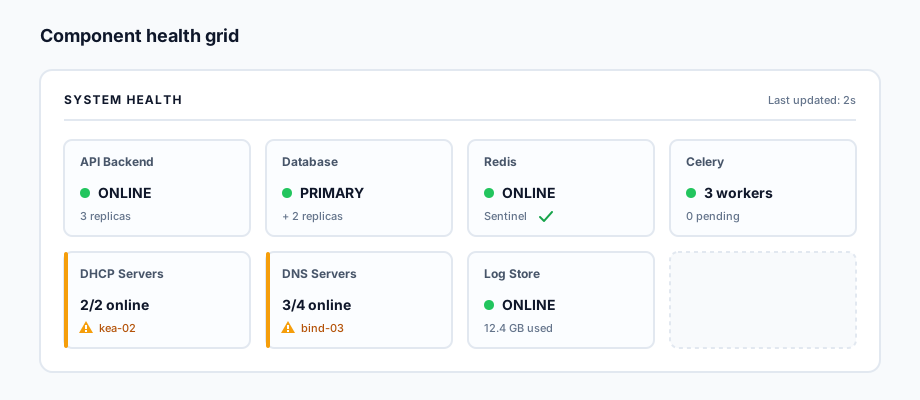
Component Health Grid
Each managed component shows a status card:
Per-Component Detail
Clicking any component opens a detail panel:
Database:
- Primary/replica status
- Replication lag (ms)
- Active connections / max connections
- Longest running query
- WAL archive status
- Last backup timestamp
DHCP/DNS Servers:
- Online/offline status per server
- Last successful sync timestamp
- Config version: IPAM DB version vs. pushed version
- Query rate (DNS), lease count (DHCP)
- Agent connectivity status
Celery Workers:
- Worker list with hostname, status, active tasks
- Queue depths per queue
- Failed task count in last hour
Redis:
- Sentinel / Cluster topology
- Memory usage
- Hit/miss ratio
Service Start / Stop / Restart (issue #890)
Admin → Platform Insights → Services. Superadmin-only, audited, and off by default on everything except the appliance.
This section previously described a Start/Stop/Restart surface spanning Docker, Kubernetes and bare-metal SSH
systemctl, none of which had been written — the appliance’s pod restart was the only thing that existed. What follows is what ships.
Capability first, not a 503
GET /api/v1/system/services answers which lifecycle backend this
deployment has before anything is attempted, so the UI renders the
actions that exist. That matters because the same 503 previously meant
both “this deployment cannot do that” and “the daemon is down”, and
those need opposite responses from the operator.
| Backend | Detected when | Actions | Mechanism |
|---|---|---|---|
kubernetes (flavor k3s-appliance or kubernetes) |
a Kubernetes ServiceAccount is projected into the api pod | restart |
rollout restart — bump kubectl.kubernetes.io/restartedAt on the pod template |
compose |
/var/run/docker.sock is mounted and the api can read its own com.docker.compose.project label |
start, stop, restart |
Docker API POST /containers/{id}/{action} |
none |
neither | — | the response names the missing mount |
start / stop are deliberately absent on Kubernetes. They would
mean scaling a workload to zero and back, and restoring the previous
replica count needs somewhere durable to remember it — a control plane
that forgets how many replicas a workload had is worse than one that
never offered to stop it.
Scope: the inventory is the allowlist
An action names a service from the inventory and is resolved against a fresh listing server-side. There is no second allowlist to keep in sync, and a caller-supplied id that is not currently one of ours is a 404 rather than a string handed to a daemon.
The id is the compose service name (api, worker) or Kind:name
for a Kubernetes workload (Deployment:spatiumddi-api) — never a
container id or pod name, which churn on exactly the restart the
operator just asked for. The separator is a colon, not a slash,
because the action route matches its path parameter as [^/]+ against
the unquoted path: a %2F in the id is unescaped before routing and
the request would 404 before reaching any handler.
- compose — only containers whose
com.docker.compose.projectlabel matches the api container’s own. This needs no configuration and cannot be widened by a request. It also fails closed: if the api cannot identify its own project (it is not running under compose, or the socket does not expose it), the backend reports unavailable rather than falling back to a name prefix, which a co-tenant container could match on purpose. - kubernetes — only workloads in the api pod’s own namespace
labelled
app.kubernetes.io/name=spatiumddiorapp.kubernetes.io/part-of=spatiumddi. An operator’s own Deployment in the same namespace is neither listed nor restartable.
Enabling it
| Deployment | Gate | RBAC / mount |
|---|---|---|
| Appliance | on — implied by appliance_mode |
granted by spatiumddi-firstboot (api.serviceControlRBAC) |
| Helm | api.serviceControl.enabled=true |
api.serviceControlRBAC.enabled=true (needs api.serviceAccount.enabled) |
| Raw manifests | SERVICE_CONTROL_ENABLED=true on the api |
kubectl apply -f k8s/service-control/rbac.yaml |
| docker-compose | SERVICE_CONTROL_ENABLED=true on the api |
mount /var/run/docker.sock + group_add: ["${DOCKER_GID}"] |
The two halves are independent and fail differently, which is why they are separate switches: without the gate the screen renders read-only and says so; without the RBAC, kubeapi answers 403 and the API reports “enable the service-control RBAC” instead of an empty inventory that would read as “nothing to restart”.
The appliance is exempt from the gate because
POST /api/v1/appliance/containers/{name}/{action} has shipped the same
control since #134 — requiring a new opt-in there would take a capability
away rather than add one. Everywhere else it is off because a
restart-capable docker.sock is equivalent to root on the host, and a
restart interrupts live DNS / DHCP / API traffic.
Restarting the API that serves the page
Allowed, and flagged in the response as self_targeted. The audit row is
committed and the 202 returned before the daemon is signalled — on
compose the container stops the moment the request is accepted, so
signalling inline would abort the response and the operator would see a
connection reset instead of confirmation. For the same reason the row
records result="accepted", not "success": nothing here survives to
observe the outcome. On Kubernetes a rollout keeps the current pod
serving until the replacement is ready, so this only bites on compose.
Fleet: remote appliances
The Fleet drilldown’s restart is a workload picker, fed by
GET /api/v1/appliance/appliances/{id}/k8s/workloads through the
supervisor’s kubeapi proxy, so it lists what that appliance actually
runs. It was previously a single button hardcoded to
deploy/dns-bind9 — a node running PowerDNS, Technitium or Kea had no
restart at all. Remote compose-based agents (legacy pre-#170 installs)
stay out of scope.
Not covered
Force sync and test connectivity are per-server DNS / DHCP
actions and live on those servers’ own pages, not here. Bare-metal
systemctl over SSH is not implemented and is not planned — the
supported non-container path is the appliance, which runs k3s.
MCP
find_services (read, default on, superadmin-only) reports the
capability and the inventory. propose_restart_service (default
off — non-negotiable #13) prepares a proposal the operator must
Apply; a restart is the widest non-destructive blast radius in the
product, so the copilot cannot offer it until an operator opts in.
2. System Configuration Sections
The System Configuration panel is organized into the following sections, each accessible via a settings menu.
2.1 Network Configuration (per node/container)
Configure the network settings for each SpatiumDDI node:
NodeNetworkConfig
  node_id
  interface: str         -- e.g., eth0, ens3
  ip_address: inet
  prefix_length: int
  gateway: inet
  dns_servers: inet[]
  search_domains: str[]
  mtu: int (default 1500)
  apply_method: enum(netplan, ifupdown, networkd, nmcli)
- Changes are applied via the SpatiumDDI agent on the target node
- Preview diff before applying
- Rollback available (reverts to previous config) if connectivity is lost after 60 seconds
2.2 Firewall Rules (per node/container)
Manage host firewall rules on SpatiumDDI nodes:
FirewallRule
  node_id (nullable — null = apply to all nodes)
  direction: enum(inbound, outbound)
  protocol: enum(tcp, udp, icmp, any)
  source_cidr: cidr (nullable)
  destination_cidr: cidr (nullable)
  port_range: str (nullable)   -- e.g., "80", "1024-65535"
  action: enum(allow, deny, log)
  priority: int
  description: str
Implemented via:
- Linux:
nftablesrules (preferred) oriptables - Containers: Rules applied to Docker network or Kubernetes NetworkPolicy
Default ruleset (enforced, cannot be deleted):
- Allow: HTTPS inbound (443)
- Allow: API port inbound from configured management networks
- Allow: Prometheus scrape from monitoring network
- Allow: all established/related
- Deny: all other inbound
2.4 Users and Groups (Platform-Level)
Separate from IP-range-scoped permissions — this section manages:
- Local user accounts (create, edit, enable/disable, reset password). Users enrol their own MFA from the Account page; there is no per-user “require MFA” switch
- Local groups (create, manage membership)
- External auth provider group mapping (LDAP, OIDC, SAML, RADIUS, TACACS+): each provider carries group mappings (external group → SpatiumDDI group). There is no directory sync job, interval or “Sync Now”: a user’s groups are replaced from the mappings at each sign-in (see AUTH.md)
- Last login per user
- Active sessions (with revoke capability)
2.5 API Tokens
APIToken
  id, name, description
  token_hash: str        -- only the sha256 hash is stored; token shown once on creation
  prefix: str            -- short identifier shown in the UI
  scope: str            -- always "user" today (see below)
  user_id (FK)           -- the owning user; the token acts as that user
  scopes: list[str]      -- coarse scopes (below); empty = no scope restriction
  resource_grants: list  -- optional binding to specific subnets / DNS zones
  allowed_paths, permissions: JSONB -- reserved columns, not set or read today
  expires_at: timestamp (nullable)
  last_used_at: timestamp
  created_by_user_id, created_at
  is_active: bool
- User tokens are the only kind the build issues: a token acts as its owning user and cannot exceed that user’s rights. A token with no owner (a “global” token) is refused with 401 “Global-scope API tokens are not yet supported”; use a dedicated service user for automation, CI/CD and Terraform instead
- Tokens are displayed once on creation (sha256 hash stored)
- Instead of typing API paths, the create dialog offers five fixed scopes, each a family of routes:
read(read-only),ipam:write(/ipam/*,/vlans/*,/vrfs/*,/network-devices/*),dns:write,dhcp:writeandagent. A token may also be bound to specific subnets or DNS zones (resource_grants; the create dialog binds one)
2.6 Syslog / Log Forwarding
SyslogTarget
  id, name
  protocol: enum(udp, tcp, tcp_tls)
  host, port
  format: enum(rfc3164, rfc5424, json)
  facility: enum(local0..local7, daemon, syslog)
  severity_filter: enum(debug, info, warning, error, critical)
  tls_ca_cert: text (nullable)
  is_enabled: bool
  applies_to: [enum(api, agent, dhcp, dns, audit)]
Multiple syslog targets can be configured simultaneously (e.g., local Loki + remote SIEM).
2.7 Audit Log and Data Retention
- Audit log is append-only — no update or delete capability, even for superadmin; DB triggers refuse both, and the
audit_log_immutableconformity check fails if either trigger is dropped or disabled (tamper-evident, not tamper-proof — the DB owner can still remove them) - Fields logged on every mutation: user, timestamp, source IP, action, resource, old value, new value
- Tamper evidence (#73, #2286). Every row is hash-chained to the one before it. The
audit_chain_verifytask runs nightly at 02:00 UTC and opens a criticalaudit-chain-brokenalert on a break. It walks the chain in pages of 5,000 rows and records how far it verified inaudit_chain_checkpoint, so a nightly run checks only the rows added since the last one. Trade-off: a nightly run trusts every row at or below that checkpoint, so an edit to an older row is found at the next full pass, which starts on the first nightly run after the last full pass is more than 7 days old (so roughly every eighth night, and later if nightly runs fail), and also whenever the checkpointed row is missing or no longer carries the recorded hash (a restore, a rewritten row) or the recorded full-pass time lies in the future. So expect up to about eight days between an edit to an old row and its alert, plus however long the full pass takes.GET /api/v1/audit/integritywalks the whole chain on demand (max_rowscaps it; a capped check answerspartial: truewithrows_checkedand thefirst_seq/last_seqit walked). The chain is not keyed: it detects edits made without recomputing the hashes, not a writer with database access who recomputes them. Forward the audit log off-box (audit forwarding) for evidence such a writer cannot reach. Audit log. The audit log is append-only: nothing deletes from it, not even a superadmin, and no task prunes it, so it has no retention setting. Every mutation records the user, timestamp, source IP, action, resource, old value and new value. Export a date range as an auditor-facing PDF (GET /api/v1/audit/export.pdf), or forward events as they happen to syslog or a webhook (Settings → Audit Event Forwarding). A configurable audit retention period and archive to S3-compatible storage are not implemented; size visibility and the tables nothing prunes are tracked in #2274.
Data retention (Settings → Application → Data Retention, #2273).
Each window below is read by a nightly prune task, which deletes
anything older. All are superadmin-only to change, and every change is
written to the audit log (resource_type=platform_settings,
resource_id=retention) with the old and new values. Shortening a
window deletes the older data on the next nightly run.
| Setting | Data | Default | Range |
|---|---|---|---|
log_retention_hours |
DNS query log and DHCP activity log rows | 24 hours | 1–168 hours |
metric_retention_days |
DNS / DHCP metric samples (dashboard charts, InfluxDB backfill) | 7 days | 1–365 days |
dhcp_lease_history_retention_days |
Expired / released DHCP lease history | 90 days | 0–3650 days (0 = keep forever) |
soft_delete_purge_days |
Trash (soft-deleted IPAM / DNS / DHCP rows) | 30 days | 0–365 days (0 = never purge) |
pcap_retention_days |
Finished packet captures and their .pcap files |
7 days | 1–90 days |
appliance_revoked_retention_days |
Deleted (revoked) Fleet appliance rows | 30 days | 0–365 days (0 = keep until permanently deleted) |
log_retention_hours is capped at a week because the prune is a single
DELETE, and a longer window makes that one transaction larger;
#2185 replaces
it with partition drops and raises the cap. The agent ingest endpoints
skip a replayed log line already older than this window rather than
inserting a row the next prune would delete. For longer log history,
forward to Loki or a SIEM. Backups have their own retention per
destination (§2.9).
2.8 Statistics / Reporting
Dashboard tiles showing platform-wide stats:
- Total IP spaces / blocks / subnets / addresses
- Overall utilization heatmap
- Top 10 subnets by utilization
- DHCP lease counts by server
- DNS query rates by server
- Recent audit log summary (top actors, most-changed resources)
- Scheduled report configuration:
- Report type (utilization, expiring leases, unused IPs)
- Schedule (daily/weekly/monthly)
- Output format (PDF, CSV, JSON)
- Delivery method (email, webhook, S3)
2.9 Backup and Restore
The Backup admin page (/admin/backup) ships four tabs: Manual (build-and-download / restore-from-file), Destinations (configured remote targets, scheduling, restore-from-destination), Restore Drills (scheduled proof that an archive is actually restorable), and Factory Reset (per-section wipe back to defaults). Everything described here is reachable from the UI; the same surface is exposed via REST under /api/v1/backup, /api/v1/backup/targets, and /api/v1/backup/drills so operators can drive it from automation.
Factory Reset removes only what a section names. A section never uses TRUNCATE … CASCADE (which would empty every table with a foreign key into the wiped one, whatever its ON DELETE rule — #1835). Tables nothing else references are truncated; the rest are deleted so ON DELETE SET NULL references are cleared and the referencing rows kept: a Tools reset leaves every IP address, DNS record and DHCP static in place. The one exception is a row that cannot exist without its parent (ON DELETE CASCADE — a DHCP scope without its subnet, a zone’s DNSSEC keys): each section declares those, and the preview lists them as <table> (cascade) with the exact number of rows that go (an Integrations reset counts the records of integration-owned zones, not every record). The whole reset is one transaction, and a reset that a RESTRICT reference from a surviving row would break (IPAM while an integration, network device or multicast group still points at an IP space; Integrations while an operator’s subnet sits under an integration-owned block) is refused with a 409 that names the referencing table and row count, and nothing is deleted.
What’s in the archive
A single .zip per backup, named spatiumddi-backup-{hostname}-{YYYYMMDD-HHMMSS}.zip:
| Member | Role |
|---|---|
manifest.json |
app_version, schema_version (alembic head), hostname, created_at, dump_format (plain or custom), secret_passphrase_hint |
database.dump (or database.sql for Phase 1 archives) |
Full pg_dump --format=custom of the SpatiumDDI database |
secrets.enc |
Operator-passphrase-wrapped JSON envelope carrying the source install’s SECRET_KEY + CREDENTIAL_ENCRYPTION_KEY (PBKDF2-HMAC-SHA256 600k → AES-256-GCM) |
README.txt |
Human-readable note covering format, restore steps, version compatibility |
The archive is the unit operators move around — single-file, easy to ship over SCP / drop into S3 / download to a laptop.
What an archive exposes
Only secrets.enc is encrypted. The database dump next to it is not. Anyone who can read an archive can read the whole database: users and their emails, password and API-token hashes, every IPAM / DNS / DHCP row, and the audit log. The credentials SpatiumDDI stores (auth-provider secrets, agent keys, integration and destination credentials, operator TSIG keys, each DNS server group’s internal TSIG key, and audit-forward webhook URLs and Authorization headers) stay Fernet-encrypted inside the dump, so reading those also takes the source install’s key, which is inside secrets.enc behind the passphrase. Leftover until the next release: one of those was stored in clear until a recent release, and its old column is kept, unread, for one release so a rolling upgrade’s old pods keep working. It still holds the pre-upgrade value:
- The group TSIG key (#1364,
dns_server_group.tsig_key_secret). That key matters: the group’s BIND9 servers grant zone transfers and dynamic updates to it from any address. Rotate each group’s key once the upgrade has finished (DNS → server group → Rotate group TSIG key, orPOST /dns/groups/{id}/group-tsig-key/rotate) and the leftover copy is a dead secret.
Webhook forward targets (#1502) had the same arrangement: audit_forward_target.url / auth_header and the legacy platform_settings.audit_forward_webhook_url / audit_forward_webhook_auth_header were kept in clear for one release and are now dropped (migration c2b203844c95); any value still left in one is encrypted into its *_encrypted column first. An archive taken before that still carries them, so a Slack, Discord or Teams incoming-webhook URL in such an archive is readable by anyone who has it: re-issue the URL in the chat platform (and any collector token) to retire it. Restoring such an archive works either way — a full restore runs the migration over it, and a selective restore loads the old columns, encrypts what they hold, and drops them again. A target (or the Settings webhook) whose URL or header is filled from one of those old columns, on upgrade or on restore, is left disabled, since the value may be one an admin had cleared: an audit-log row per target records it (filter the audit log on the target), and a restore’s warnings name each one. Re-enable it once the endpoint is confirmed.
An “exclude secrets” diagnostic archive blanks the leftover column along with the encrypted ones. Restoring an “exclude secrets” archive leaves the encrypted webhook columns as an empty bytea rather than NULL; the application treats an empty bytea as unset everywhere (url_set, the audit snapshot, and the check that a webhook target has a URL), so a restored target with no re-entered URL is reported as unconfigured instead of silently failing to deliver — re-enter the URL and header after such a restore.
An “exclude secrets” archive removes every secret, not only the credentials an operator types in: the appliance CA private key, the k3s join tokens and the cluster kubeconfig, persistent pairing-code reveals, the ACME account key, and the stored digests of credentials (local password hashes, API-token, session, pairing-code and agent-token digests). Its secrets.enc carries no SECRET_KEY or CREDENTIAL_ENCRYPTION_KEY, only the archive metadata the passphrase check needs. Restoring one succeeds and leaves an install that regenerates what it can:
- Local sign-in. Every local password is cleared, so sign in through an external provider or reset a password with the recipe in Troubleshooting. API tokens and sessions no longer match anything; issue new tokens.
- Appliances. The appliance CA is regenerated on the next approval, so appliances approved against the old one must be re-keyed. The supervisor re-reports the kubeconfig and the join token on its next heartbeat. Pairing codes cannot be claimed or revealed; create new ones.
- Agents are refused on their next request and re-bootstrap from their pre-shared key.
- ACME. The next certificate order mints a new account key and registers it with the CA.
So treat an archive as the install itself. Keep it at a destination that restricts who can read it and, if the medium could leave your control, encrypts it at rest (S3 / Azure / GCS server-side encryption, an encrypted share). A removable disk on the appliance cannot be encrypted — see Removable (USB) disks.
Passphrase rules
Operators supply a passphrase at backup time (min 8 chars). The passphrase wraps the secrets.enc envelope so the source install’s master key never lands in clear on disk anywhere. The same passphrase is required at restore. There’s also a passphrase_hint field — a free-text label (max 200 chars) that’s stored alongside the envelope so operators with multiple archives can remember which key decrypts which one. The hint is not secret: it is written in clear into manifest.json and the secrets.enc header of every archive, returned by the API, and recorded in the audit log when a target is edited. So a hint that contains the passphrase is refused with a 422 on every path that sets one (target create / update, create-and-download), compared case-insensitively. A target saved before that check existed keeps backing up, but its archives are written without the hint (logged as backup_hint_contains_passphrase_dropped); re-save it with a new passphrase and hint, because the old pair is already in its earlier archives and in the audit log.
The passphrase is not the destination’s auth credential — every destination type has its own credential fields (S3 keys, SCP password / private key, Azure account key, etc.) which are Fernet-encrypted at rest in the backup_target.config JSONB.
Destination kinds
All ten destination kinds register in the same driver registry; the UI’s destination picker reflects on GET /backup/targets/kinds so adding a new kind requires no frontend changes.
| Kind | Tier | Notes |
|---|---|---|
local_volume |
1 | Filesystem path on the api/worker container — production deployments mount this as a docker / k8s volume so archives survive container recycle. On the appliance this is also how a removable USB disk is used, via the mount plane below |
s3 |
1 | AWS S3 + S3-compatible (MinIO, Wasabi, Backblaze B2, Cloudflare R2, DigitalOcean Spaces) via the endpoint_url field |
scp |
1 | SSH password or PEM private key auth (paramiko); SFTP write/read; per-call connection lifecycle (no pooling) |
azure_blob |
1 | Azure Storage account via shared-key or full connection string |
smb |
2 | Windows / Samba shares (smbprotocol); NTLM auth, optional SMB3 encryption toggle |
ftp |
2 | Plain FTP / FTPS-explicit / FTPS-implicit; passive + active; verify_tls toggle for self-signed labs |
gcs |
2 | Google Cloud Storage; service-account JSON key (encrypted at rest) — no ADC by design |
webdav |
3 | WebDAV servers (Nextcloud, ownCloud, Apache mod_dav, IIS WebDAV, any RFC 4918 server) over httpx PUT / GET / PROPFIND / DELETE — no SDK dependency |
nfs |
2 | NFSv4 (default) / NFSv3 exports — a NAS (Synology / TrueNAS / QNAP) or a Linux file server. Speaks NFS in userspace via libnfs, so no kernel mount and no CAP_SYS_ADMIN; works identically on compose, Kubernetes and the appliance |
https_put |
3 | Any receiver that takes a PUT or POST — Artifactory / Nexus generic repositories, a presigned S3 URL, an internal receiver. Write-only by construction: no listing, no delete, no restore-from-destination, no drill |
Two export options decide whether NFS works at all. SpatiumDDI’s control
plane runs as a non-root user with no CAP_NET_BIND_SERVICE, so it connects
from an unprivileged source port — and Linux’s secure export option, which
requires a port below 1024, is the default (on a Synology the equivalent is
“allow connections from non-privileged ports”, also off by default). Add
insecure to the export options, or the mount is refused with a permission
error. The second is root_squash, covered below. The driver’s error message
names both, because they need opposite fixes and a confident diagnosis of the
wrong one sends the operator in circles: if the mount failed it is almost
certainly the port; if the mount succeeded and only the write was refused, it is
squash.
NFS has no authentication, and the form says so. AUTH_SYS is the only
security flavour v1 supports: the client asserts a uid and the server believes
it. A passing connection test therefore says nothing about who else on the
network can read the export, and an archive’s database dump is not encrypted
(see What an archive exposes), so an unrestricted
export exposes the contents of every archive on it. Restrict the export to the
control plane’s address on the server side, and set the destination’s uid / gid to an
identity the export grants write access (with the usual root_squash default,
presenting uid 0 gets mapped to nobody and every write fails; the driver
detects that errno and names squash as the likely cause rather than reporting a
bare EACCES). Kerberos (sec=krb5*) is out of scope for v1 — the same call
smb made for NTLM-only.
Two NFS behaviours differ from the object stores. Writes are staged to
<name>.part and renamed into place, because a PUT is atomic and an NFS write is
not — the staged name deliberately does not match the archive-name pattern, so a
run killed halfway leaves nothing a retention sweep or latest/download can see.
And version is an explicit choice rather than an auto-negotiation: NFSv3 also
needs the portmapper (111) and mountd reachable, so falling back silently would
turn a firewall rule into a mystery.
Every driver implements the same four operations: write / list_archives / delete / download + a test_connection probe (writes a 16-byte random payload, head/stats it, deletes it — same shape as the DNS / DHCP server probes).
Write-only and immutable destinations
By default the credential that writes an archive can also delete it, and the
retention sweep uses that credential on every scheduled run. So a compromised
control plane, a leaked backup_target.config, or an attacker who reaches the
API can wipe the backups with the same key that made them. Marking a target
write-only removes that:
| Behaviour | With write_only |
|---|---|
| Retention sweep | Skipped entirely — retention becomes the destination’s own policy |
DELETE /backup/targets/{id}/archives/{filename} |
409, naming the reason |
GET .../archives/latest/download (pull mode) |
409 — there is nothing to list |
| Connection test | A refused delete is tolerated and reported as probe_retained |
| Restore drill | cannot_drill, and recovery readiness reports the target unverified — never healthy |
Retention fields cannot be set alongside it: the API answers 422 rather than leave a keep-N on screen that silently does nothing every night.
The recommended shape, which keeps restores and drills working while making retention unshortenable:
- Create the bucket with Object Lock enabled (it cannot be turned on afterwards on S3) and add a lifecycle rule for eventual expiry.
- Mint an IAM key with
s3:PutObject,s3:GetObjectands3:ListBucket, and nos3:DeleteObject. - On the target, set
object_lock_modetocomplianceandobject_lock_daysto your retention period, and turn write-only on.
Under compliance mode not even the bucket owner can delete an object before its
retain-until date, so retention holds regardless of what credential leaks.
governance mode is the softer variant — a principal holding
s3:BypassGovernanceRetention can override it.
Two behaviours are worth knowing about:
- The connection probe object is written without lock headers. A probe under a 30-day compliance lock would be undeletable litter created every time somebody clicks Test. If the bucket carries a default retention rule the probe is retained anyway — that is the bucket’s choice, and the probe reports it rather than failing.
- When a target is not write-only but its objects are locked, the prune reads
ObjectLockRetainUntilDatefromhead_objectand skips locked objects quietly. A refused delete on a locked bucket is the feature working; warning about it per file per night would make a correct configuration look broken.
Azure immutability policies and GCS bucket retention are bucket-level and
already make deletes fail, so the write_only semantics above cover them.
Driving per-object policies from SpatiumDDI (Azure version-level WORM, GCS
object retention locks) is a follow-up once the S3 shape has proven itself.
The write_only tolerance in the connection probe is implemented in the drivers
where it is reachable — s3 (a key without DeleteObject) and https_put
(no delete verb at all). The filesystem-shaped kinds are not covered, because a
destination that grants write but not unlink is not a configuration those
protocols really produce.
local_volume on a multi-node appliance (#1838)
The default /var/lib/spatiumddi/backups is a hostPath, so it is per node:
an archive stays on the disk of the node whose pod wrote it, and only the api on
that node can list, download, restore or drill it. Scheduled runs land on
whichever node’s worker picked up the job, so the archives spread across nodes,
and retention prunes each node’s directory separately. Losing a node loses its
archives. On a cluster, use a network destination (S3, SCP, SMB, NFS).
SpatiumDDI does not move the archives, but it says where they are:
- Each successful run records the node that wrote it,
last_run_node, shown next to the last run on the Backup page and returned by the targets API andlist_backup_targets. - With two or more control-plane nodes, Test connection warns that the target is per node.
- The archive list carries
node_nameper archive and anX-Archive-Listing-Noteheader, shown above the list, saying whose disk it is and, when the last run’s archive is absent, which node holds it. - A download or restore that misses answers 502 naming the node that answered and, when the run recorded it, the node holding the archive. Nothing is restored. Copy the archive off that node and use Restore from file, or retry until the request reaches that node’s api.
- A drill on a node that cannot see the newest archive reports
error(no verdict) instead offailedwhen it sees no archive at all, and notes it in thearchive_availablecheck when it drilled an older one.
A single-node appliance and Compose never see this wording.
Removable (USB) disks on the appliance
The single-appliance operator with no NAS and no cloud account backs up to a USB
disk. local_volume writes to a path inside the api and worker pods, so
pointing one at a block device needs that disk mounted on the host and
exposed to those pods — which is what the removable mount plane does. (NFS
avoided the same problem by speaking the protocol in userspace; a block device
has no userspace escape hatch.)
Appliance only. On Docker Compose, mount the disk yourself and point a
local_volume target at the path; on plain Kubernetes, use a PV.
Setting one up. Plug the disk in, then go to Fleet → the appliance → Removable storage:
- The disk appears under Detected disks within about a minute — the listing rides that node’s heartbeat, so it is not instant.
- Click Mount…, give it a short name (
backup-usb), and confirm. - Create a Local volume destination pointing at
/var/lib/spatiumddi/removable/<name>/spatiumddi. The mount modal shows the exact path to paste.
ext4 and exFAT only. FAT32 is refused, and not out of fussiness: it caps
a single file at 4 GiB, so an estate whose archive outgrows that would fail
mid-run, at the end of a long backup, on a destination that had worked for
months. A disk with no filesystem UUID is refused too — there would be nothing
stable to mount it by, since the kernel device name is reassigned on the next
plug. An encrypted disk is refused for the same reason as any other filesystem:
a LUKS container reports as crypto_LUKS, and the appliance carries no
cryptsetup to unlock it. So the archives on a removable disk sit there in the
clear, and an archive’s database dump is not encrypted (see
What an archive exposes) — treat the disk as a copy
of the install: keep it physically secured, and if it has to leave the building,
use a destination that encrypts at rest instead.
On a multi-node cluster the Kubernetes node field on the destination is filled in for you from the fleet — the disk is plugged into one machine, and that is what lets a run scheduled elsewhere name the node instead of just reporting that nothing is mounted.
Disks that cannot be used are listed with the reason rather than hidden. A disk that simply does not appear reads as a broken feature, and you cannot tell that from “SpatiumDDI has not noticed it yet”. The appliance’s own root, ESP and STATE partitions are always refused — an appliance that boots from USB reports every one of them as a removable candidate with a perfectly good filesystem on it, and offering the running root as a backup destination is the worst thing this feature could do.
Ejecting. The Eject button flushes and unmounts. It deliberately does not refuse while a backup destination still points at the mount — you want your disk back, and refusing would leave you pulling it anyway with the filesystem un-flushed. A run against an ejected disk then fails loudly (see below). Pulling the disk without ejecting is also handled: the mount unit is bound to the device, so systemd tears the mount down and the path stops being a mountpoint.
Wait for the row to disappear before you pull it. If anything is holding a file open under the mount — a backup run, a shell you left there — the unmount is refused, and the appliance says so rather than removing the unit and reporting success. The mount stays listed, the apply is reported as failed with the reason, and the disk is not safe to pull yet.
A mount that reads present rather than waiting is the one to look at:
waiting means the disk is not plugged in (normal for a disk you rotate
off-site), while present means it IS plugged in and did not mount — a dirty
filesystem after a yank, a reformat, or a changed UUID.
A destination on a removable disk fails closed, and that is the whole point.
local_volume’s write does mkdir -p before it writes, so a path whose disk is
absent would otherwise be created and written to — on the appliance’s own
/var, with the run reporting success, retention pruning happily, and you
believing you had backups. Three independent things stop that:
- The per-disk mountpoint is
0500root-owned whenever nothing is mounted on it. That is the kernel refusing the write, and it holds even if everything above it is wrong. - Every read and write through a
local_volumepath under/var/lib/spatiumddi/removablerefuses unless the path is still on a live mount. One test, four causes: ejected, yanked, the mount unit failed, or the run landed on the wrong node. - The destination records which node the disk is on, so the error names it.
Multi-node clusters: node-local, and scheduling is not routed. A USB disk is
plugged into one node. On a multi-node control plane the api and worker each run
one replica per node, so a manual Run now lands on the right node roughly
one time in N, and a scheduled run likewise — the ones that land elsewhere fail
with this run is on node X and the removable disk is plugged into node Y
rather than writing to the wrong host. Routing a run to a particular node is not
implemented; on a cluster, prefer a destination every node can reach (nfs,
s3, smb) and keep USB for the single-appliance case it was built for.
How it works underneath, for anyone reading journalctl: the desired mount
set lives on the appliance row, rides the supervisor heartbeat like every other
host-config plane, and is applied by spatiumddi-removable-reload, which
renders one systemd .mount unit per disk and validates it with
systemd-analyze verify before installing it. Each unit is WantedBy its
dev-disk-by-uuid-….device unit rather than local-fs.target, so udev mounts
the disk when it appears and boot never waits for one that is absent. There is
deliberately no .automount: nofail-style non-blocking comes from the
device dependency, while autofs would add a way for a process touching the path
to block in the kernel — and the processes touching this path are the api and
the Celery worker. See APPLIANCE.md for the host
plane itself.
Pull mode — let a backup tool fetch, rather than pushing
Enterprise backup tooling (Veeam, Bacula, Commvault, a cron curl) wants to
fetch. That works today and is worth writing down:
# One archive, conditionally. The second run returns 304 and transfers nothing.
curl -sS -f -o backup.zip -D headers.txt \
     -H "Authorization: Bearer $SPATIUM_TOKEN" \
     -H "If-None-Match: $(cat etag.txt 2>/dev/null || echo '\"none\"')" \
     https://spatium.example/api/v1/backup/targets/$TARGET_ID/archives/latest/download
grep -i '^etag:' headers.txt | cut -d' ' -f2- > etag.txt
Three things make this a least-privilege pull rather than a full API key:
- Mint the token with
allowed_pathsrestricted to that one route. A token so restricted gets 403 onGET /backup/targets— it can fetch the archive and nothing else. - The response is conditional. Archive filenames carry a UTC timestamp and
the bytes under a name are never rewritten, so the filename is a legitimate
strong
ETag. A poller that already has the newest archive gets a304and the destination is not read at all — without this, a nightly poller re-downloads a multi-GB archive every run. - The puller never needs the target passphrase, and should not have it: without it the stored credentials in the archive stay encrypted. The rest of the database dump is readable (see What an archive exposes), so protect the token and wherever the puller writes the archive as you would the install itself.
Two limits: a destination must exist — for a pull-only deployment make a
local_volume target the staging destination, because a GET that triggers a
pg_dump would be neither idempotent nor safe to expose; and a write-only
target cannot serve pull (there is nothing to list), which answers 409 saying
so.
Schedule + retention
Each target carries:
| Field | Behaviour |
|---|---|
schedule_cron |
5-field UTC cron (0 2 * * * for “daily at 02:00 UTC”). Optional — leave blank for manual-only. |
retention_keep_last_n |
Keep the N newest archives matching the archive-name regex. |
retention_keep_days |
Drop archives whose mtime is older than N days. |
last_run_status / last_run_at / last_run_filename / last_run_bytes / last_run_duration_ms / last_run_error |
Surfaced inline on the target row. last_run_status=in_progress acts as a per-target mutex so a slow run can’t double up on the next tick. |
Both must be at least 1 (0 is rejected), and retention never deletes the newest archive or the one a run has just written, whatever the setting; a stored 0 from an older release behaves as 1. A retention failure after a successful write leaves the run success and shows the problem on the target’s last-run error line. Set exactly one of retention_keep_last_n / retention_keep_days, or neither for no auto-prune. A single Celery beat task (every 60 s) walks all enabled targets, checks each one against its next_run_at, and dispatches a one-off backup task per target that’s due.
Two alert rules, both seeded enabled, watch every enabled target that has a schedule (#1262). backup_failed (warning) fires when the last finished run failed and resolves on the next success. backup_stale (critical) fires when there has been no successful run for N scheduled runs plus one hour (N = the rule’s threshold_percent, default 2). It counts from the last success, but never from before the schedule was set, so a new schedule gets its first run first. It also catches the case where nothing runs at all: worker or beat down, or a run left in_progress by a process that died, which the sweep then skips for good. Clicking Run now clears that. Manual-only targets are not watched. The get_backup_health copilot tool shows the same per-target state (ok / failed / stale / stuck / running).
A failed run also writes a backup_target_run_failed audit row, which audit forwarding and the system.backup_failed event send on. It carries a fixed failure_category (unreachable, timeout, permission_denied, auth_failed, no_space, not_found, config_invalid, …) rather than the driver’s error text, which often names the destination (#1617). The full text is still shown under the target in the backup targets list (last_run_error, superadmin-only).
Manual triggers
| Action | Endpoint |
|---|---|
| Build + download a fresh archive | POST /backup/create-and-download (StreamingResponse, browser saves the zip directly) |
| Restore from a laptop-uploaded archive | POST /backup/restore (multipart upload) |
| Run a configured target now | POST /backup/targets/{id}/run-now |
| Test a configured target’s connection | POST /backup/targets/{id}/test |
| List archives at a configured target | GET /backup/targets/{id}/archives |
| Restore from any archive at a target | POST /backup/targets/{id}/archives/restore |
| Download an archive from a target through the proxy | GET /backup/targets/{id}/archives/{filename}/download |
The proxy-download endpoint streams driver.download(filename) straight back to the operator’s browser, so SCP / S3 / Azure / SMB / FTP / GCS / WebDAV archives can be pulled to a laptop without giving the operator the destination credentials.
Restore — what the server does
Same code path is hit whether the archive comes from an upload or a destination download.
- Pre-flight. Validates archive shape, manifest
format_version(1 or 2 currently), passphrase. The passphrase verify happens before any destructive step so a wrong passphrase is rejected up front. - Pre-restore safety dump. The current state of the database is snapshotted to
/var/lib/spatiumddi/backups/pre-restore-{ts}.zip(passphrasepre-restore-safety). If the apply fails for any reason, the operator can roll back from this dump. Only the newest three safety dumps are kept in that directory; older ones are deleted when a new one is written, because each carries the install’sSECRET_KEYunder that public passphrase. - Connection pool teardown. SQLAlchemy’s engine is disposed and
pg_terminate_backendkicks every other connection so the replay’s drops don’t deadlock against the worker / beat / agents. - Data replay.
-
Full restore: the schema is cleared, then the archive replayed, in one transaction (#1363).
psql --single-transaction --set=ON_ERROR_STOP=1reads one script on stdin: first a block that drops every table, view, sequence, standalone type and routine inpublic(extension members excepted), then the archive’s SQL. For a Phase 2+ archive (dump_format: custom) that SQL ispg_restore --no-owner --no-acl --file=-’s output, streamed rather than staged on disk. For a Phase 1 archive (plain SQL) it is the dump itself. Ifpg_restorefails part way, psql is killed before it reaches end of input, so it never commits. A replay counts as complete only when psql acknowledges the end of the script: a per-run token is\echo-ed after the archive’s last statement, so a psql that left early with exit 0 is reported as a partial restore, not a success. Any failure before psql is given end of input (a bad statement, apg_restoreerror, a timeout) rolls back and leaves the database exactly as it was. The one exception is a timeout after end of input, while psql may be committing. It is reported as an unknown outcome, not as a rollback, so check the database (or restore the pre-restore safety dump) before relying on it.The clearing is what makes an archive older than this install restorable. The replay used to be
pg_restore --clean --if-exists, and--cleandrops only the objects the archive contains. Every table a later migration had added survived with its constraints. An archive from beforedns_agent_bundle(every 2026.09.04-1 archive) then failed with a 400:--cleancould not dropdns_server_pkeywhiledns_agent_bundle_server_id_fkeydepended on it. A surviving table with no such dependency failed later instead, stopping the upgrade below on “already exists”. Backups dump the whole database with no exclusions, so clearing loses nothing the archive does not recreate. -
Selective restore (operator ticked specific sections) →
TRUNCATE … RESTART IDENTITY CASCADEfollowed bypg_restore --data-only --table=…, over the FK-cascade closure of the selected sections’ tables rather than the selection alone.platform_internal(alembic_version + oui_vendor) always rides along.The emptying and the load run in one transaction, through the same streamed
psql --single-transactionreplay the full restore uses (#1693):pg_restore --data-only --file=-writes the closure’s rows as a script, and psql runs it between a prelude and a postlude. Any failure rolls the emptying back with it and leaves the database as it was. They used to be two transactions, and the TRUNCATE committed first, so a load that failed left every table in the closure empty,alembic_versionamong them, which leaves the api not ready and the restore page out of reach.It needs no superuser. The load used
--disable-triggers, which emitsALTER TABLE … DISABLE TRIGGER ALL, and PostgreSQL refuses that to a non-superuser on any table with a foreign key. An appliance connects as the app role, which owns the tables but is not a superuser, so every selective restore there failed. Instead, the prelude drops the closure’s foreign keys after the TRUNCATE, and the postlude adds them back from their own catalog definitions, which only ownership requires. No load order would do without that, sinceip_address/dns_record/nmap_scanandasn/providerreference each other. Adding a key back checks every row it covers, which the disabled triggers never did: an archive whose rows point at something deleted since the backup, outside the restored sections, is refused with the constraint named, and nothing changes. Restore the missing section too, or do a full restore.The postlude then sets each sequence a reloaded table owns past the largest value its column holds (#1720).
RESTART IDENTITYsends those sequences back to their start andpg_restore --tablereloads rows, not sequences, soaudit_log.seqused to hand out values the restored rows held, and every audited write after a restore ofaudit(a login is one) answered 409. Values that rows written after the backup had held can be handed out again, as after a full restore.Before anything is emptied, the prelude works the closure out again from the database’s own foreign keys, and refuses the restore if the
CASCADEwould reach a table outside it (a key a migration created and no model declares). That table would otherwise be emptied and never reloaded.The emptying holds its locks until the load commits, so a selective restore takes every table’s lock up front, as the full restore does (#1648).
The closure matters because
CASCADEempties every table holding a foreign key into a truncated one, transitively — catalogued or not, ticked or not. Restoring only the ticked tables therefore deleted the difference: measured against the shipped catalog, selectingauthcascaded into 130 tables and refilled 11 (#781).cascade_closure()inapp/services/backup/sections.pyderives that reach from mapped metadata (the FK graph is what Postgres actually walks; a hand-maintained copy is one migration away from being wrong), and everything it reaches is restored from the same archive so the operation ends consistent. This is deliberately wider than what the operator ticked — the alternative was never “narrower”, it was “emptied”. The response’scascade_widened_tableslists exactly which tables were pulled in, and a warning repeats it in prose.Worth knowing for anyone revisiting this: classifying the unclassified tables — the fix originally sketched on #781 — would not have solved it, because
CASCADEreaches them regardless of whether a section claims them. Classification only decides what an operator can tick.
-
-
Alembic upgrade-on-restore. If the archive’s
schema_versionis older than this install’s expected head,alembic upgrade headruns against the freshly-restored database. Same head → no-op. An archive whose head is not in this install’s chain — i.e. taken on a newer build — is refused up front, before any data is replayed, so a database this build cannot migrate is never written (#781); the operator is told to upgrade SpatiumDDI here first.That refusal is overridable with
allow_newer_schema=true. It exists for the A/B-rollback case: an operator who rolled back because the newer build broke would otherwise be told to upgrade into the build they just escaped. The override also covers a subtler trap —_is_ancestorreturns False on any exception, so a forked, squashed or renamed revision is indistinguishable from a genuinely newer one. It is superadmin-only (like every restore), recorded on the audit row, and the response leads with a warning thatalembic_versionmay now be ahead of the running code: an api pod that starts or restarts on it stays unready, and one already serving keeps serving only while every table and column the build uses is still in the database (#2777). The head is taken from the manifest, falling back to the copy insidesecrets.enc, so an archive that never recorded one in its manifest is still checked. The restore returns amigrationblock withstate(up_to_date/upgraded/auto_recovered/incompatible_newer/unknown/failed),source_head,local_head,migrations_applied.Drift recovery. An upgrade that stops on an object that already exists is the signature of a stale
alembic_version: the archive was taken while that row lagged the schema, so the dump carries a schema already at head beneath a version that says otherwise. The restore then runsalembic stamp headand reportsauto_recovered— but only after checking that every table and column this build’s models declare is present in the restored database. The signature alone is not proof (#1233): any revision that meets one object it would create fails the same way, and since migrations commit one revision at a time (#1204), the revisions before it stay applied and those after it never ran. Stamping head on the signature would record that partially migrated schema as current, and it would fail later somewhere unrelated to the restore. When anything is missing, or the check cannot run, the restore reportsfailed, names the missing tables and columns, and leavesalembic_versionat the last revision that committed, so a manualalembic upgrade headresumes from there. The check is deliberately one-directional and covers tables and columns only; a revision after the failing one that changes only data, indexes, constraints or types is not visible to it.Running the upgrade by hand. A
failedupgrade asks foralembic upgrade headonce whatever blocked it is fixed. It runs in the api container, which carriesalembic.iniand the database URL:Deployment Command Docker Compose docker compose exec api alembic upgrade headAppliance (k3s) sudo k3s kubectl -n spatium exec deploy/spatium-control-spatiumddi-api -c api -- alembic upgrade headHelm kubectl -n <namespace> exec deploy/<api deployment> -c api -- alembic upgrade headOn Helm, look the deployment up by its labels rather than working out its name, which
fullnameOverride,nameOverrideand the release name all change:kubectl -n <namespace> get deploy -l app.kubernetes.io/instance=<release>,app.kubernetes.io/component=apiprints it. With the defaults it is<release>-spatiumddi-api(ddi-spatiumddi-apifor the documentedhelm install ddi …).alembic currentin place ofupgrade headshows the revision the database is at. The api stays out of service (/health/readyis not ready) until the schema reaches head. -
Cross-install secret rewrap. Walks every Fernet-encrypted column in the schema plus every JSONB-embedded Fernet string (
backup_target.config’s__enc__:fields, and onplatform_settingsthe SNMPv3 passphrases, syslog TLS CA bundles, APT GPG keys and private-mirror passwords); decrypts each with the source key recovered fromsecrets.enc, re-encrypts with the destination’s local key, UPDATEs in place. Same-install restores short-circuit withsame_install=true. The operator does not have to copy the recoveredSECRET_KEYinto the destination’s.envmanually.Both lists in
app/services/backup/rewrap.pyare deliberately explicit rather than auto-discovered, so that adding an encrypted field is a review decision — and both are guarded, because “explicit” only works if drift is caught. It wasn’t: the column list had silently drifted to 21 of 47 columns (#781). Everything a list misses stays encrypted under the source install’s key, which surfaces only on first use of the affected credential. On the appliance this is the default case, not an edge case —spatiumddi-firstbootmints a freshSECRET_KEYon every install, so every restore onto reimaged hardware is a cross-install restore.The two guards work differently because the two conventions do.
tests/test_rewrap_coverage.pydiffsENCRYPTED_COLUMNSagainst the mapped metadata, which finds everyLargeBinarycolumn. That is structurally blind to the second convention — Fernet ciphertext stored as a string inside JSONB, which is neitherLargeBinarynor named*_encrypted— sotests/test_rewrap_jsonb.pydiffsJSONB_ENCRYPTED_FIELDSagainst the source instead: everyencrypt_str(...).decode(...)call site in the app must be registered, that idiom being exactly the act of embedding ciphertext in a JSON-friendly field. A rewrap that dies part-way through is reported as such. Each column commits on its own, so an abort leaves the credential store genuinely half-migrated — some columns under the destination key, the rest under the source key. The walk absorbs its own failure and returns the accumulated counters withaborted=trueplus how far it got, and raises an operator-facing warning. Previously the caller discarded those counters and substituted an empty result, so the audit row claimedrewrapped_rows=0on a half-migrated database — the one reading that makes an operator conclude nothing happened (#781). - Audit row. Inserts a
backup_restoredrow into theaudit_logtable on a fresh session — this row sits in the restored database (the trail of evidence survives the wipe), and carries the manifest, pre-restore safety path, migration counters, rewrap counters (includingaborted), the selected sections,cascade_widened_tables, and whetherallow_newer_schemawas used.
The restore endpoint is superadmin-only. Operators must type the literal phrase RESTORE-FROM-BACKUP server-side to confirm, so accidental drag-and-drops don’t nuke the install. Selective restore is opt-in via the section checklist on the restore modal.
Confirmation phrase + selective restore
Selecting “Selective restore” on the modal reveals a section checklist driven by GET /backup/sections. The checklist auto-ticks every non-volatile selectable section the first time the operator flips into selective mode; volatile sections (DHCP leases, DNS query log, DHCP activity log, nmap scan history, metric samples, Celery scratch) stay unticked by default but can be ticked individually. platform_internal is forced-on (alembic_version + oui_vendor are install-state, not user data, so they always ride along).
The UI surfaces a TRUNCATE-CASCADE warning on the selective panel because the restore necessarily reaches past the ticked sections: rows in non-selected sections that reference wiped data via foreign key are cascade-truncated, and since #781 are restored from the archive rather than left empty. The restore response reports the widened set as cascade_widened_tables.
Cross-install rewrap counters
The restore response carries a rewrap block:
{
  "same_install": false,            // true when source + dest keys derive identically
  "rewrapped_rows": 7,              // column-level rewraps
  "rewrapped_jsonb_fields": 0,      // JSONB-embedded secret rewraps
  "skipped_idempotent_rows": 0,     // already-dest-key-decryptable (re-run / post-restore-created)
  "failed_rows": 0,                 // couldn't decrypt with either key — operator re-enters by hand
  "columns_visited": 52,            // every ENCRYPTED_COLUMNS entry + every JSONB_ENCRYPTED_FIELDS entry
  "failures": []                    // first 10 failures with table / column / pk / reason
}
Same-install restores return {"same_install": true, ...counters all zero}. The operator-facing note string adapts to the rewrap state (“no key rewrap was needed” / “re-encrypted N secret values” / “re-encrypted N, but K rows could not be decrypted with either key”).
What’s NOT in the archive
| Excluded | Why |
|---|---|
| DHCP daemon state (leases live in DB; binary state on the agent is regenerated from config) | Volatile — re-syncs from agents on next poll. Sectioned as leases (volatile) so operators can opt in for diagnostic backups. |
| DNS daemon state | All records live in DB; the BIND9 zone files are templated by the agent on apply. |
| DNS query log / DHCP activity log | Short-lived diagnostic data. Sectioned as logs (volatile). |
| nmap scan history | Often huge, regenerable. Sectioned as nmap_history (volatile). |
| Metric samples | Volatile, short retention. Sectioned as metrics (volatile). |
| Agent ingest receipts (#1077) | Replay-dedupe state for spooled agent pushes, 35-day retention. Sectioned as agent_ingest_receipts (volatile). Restoring receipts without the rows they vouch for would make a replay of those batches read as duplicates, so an empty table is the safe post-restore state. |
| Uploaded asset directory | Phase 2 polish — uploaded files (custom-field attachments, future logo overrides) aren’t a separately-tracked path yet. |
Restore drills (issue #702)
A backup you have never restored is a hypothesis. The Restore Drills tab turns it into a fact: on its own schedule, SpatiumDDI downloads a target’s newest archive, replays it into a throwaway database, runs a fixed assertion set against the result, and drops the throwaway database again.
The live database is never written to. The scratch database name is generated from a fixed spatiumddi_drill_ prefix plus random hex — never from operator input — and is checked against the live database name before anything runs. The drill deliberately does not reuse the operator-facing restore path, which takes a safety dump and disposes the live connection pool; those behaviours are right for a real restore and wrong for an unattended background check.
| Check | What a failure means |
|---|---|
archive_available |
The destination holds no archives — there is nothing to restore from. |
archive_readable |
The zip is malformed, or its format_version is one this build cannot restore (checked against the same list the real restore path enforces, so a drill never green-lights an archive a restore would refuse). |
passphrase_opens_secrets |
The passphrase stored on the target does not open the archive’s secrets.enc. A restore from it would be impossible. |
dump_replays_cleanly |
pg_restore / psql aborted — the dump is truncated or corrupt. |
alembic_version_present |
No single schema revision, or one this build has never heard of (the archive came from a newer SpatiumDDI). An archive behind the bundled head passes: a real restore migrates it forward. |
core_tables_populated |
The archive restored but came back with no users — an install restored from it would have no way in. |
audit_chain_intact |
The restored audit log’s tamper-evident hash chain does not verify. Skipped when the restored schema isn’t at the bundled head, because the ORM-based verifier would misread schema skew as tampering. Capped at 250k rows — a break inside that window is plenty to prove damage, and the audit_chain_verify task walks the whole live table at least weekly (see §2.7). |
Requirements and costs
Two things a drill needs that a backup doesn’t, both checked up front so a drill that can’t run says so plainly instead of failing obscurely (and both report as error, not failed — see below):
CREATEDBon the database role. The scratch database has to be created. On Kubernetes and appliance installs the umbrella chart grants this via CloudNativePG’smanaged.roles(postgresql.cnpg.appRoleCreateDb, defaulttrue), which reconciles onto existing clusters as well as new ones — the role CNPG’sinitdbcreates has noCREATEDBand superuser access is switched off, so without the grant drills cannot run at all. On docker-compose the defaultPOSTGRES_USERis a superuser and nothing is needed; if you run SpatiumDDI as a restricted role, grant it withALTER ROLE <user> CREATEDB;.- Room for a second copy of the database. The scratch database lands on the same Postgres instance, so a drill temporarily doubles the space the database occupies. Postgres offers no portable way to query the free space on its own data volume, so the risk is bounded from the other side: a drill refuses to run when the live database exceeds 20 GiB. Raise
SPATIUM_DRILL_MAX_DB_BYTES(bytes;0disables the guard) once you have confirmed the volume has room. Sizing this wrong is the one way a read-only verification job can cause a real outage — on the appliance’s default 8Gi volume, a 6 GB install would fill it.
Scratch databases are dropped when the drill finishes, whatever the verdict. If a worker is killed outright — pod eviction, OOM, node drain — the drop never runs, so the drill sweep also reaps any spatiumddi_drill_* database with no active connections on its next tick.
failed and error mean different things. failed is a verdict about the archive — a real finding. error means the drill could not run at all (destination unreachable, missing CREATEDB, database over the size ceiling) and says nothing about the backup. Only failed opens the restore_drill_failed alert; an error leaves whatever the previous verdict was standing, which is the honest reading — you know no more than you did before.
Drills carry their own cron (drill_enabled / drill_cron on the backup target), separate from the backup schedule, because replaying a full dump costs far more than taking a backup. Weekly drills against nightly backups is the expected shape. The restore_drill_failed alert keys on the target, so a target failing every night holds one open event rather than opening a new one per drill, and auto-resolves when the target’s next drill passes. It only considers enabled targets with drills scheduled — turning drills (or the target) off resolves an open event on the next tick, which is also the operator’s way out if an ad-hoc drill against an unscheduled target ever fires one.
Two Operator Copilot tools cover the surface: find_restore_drills (history, filterable by verdict) and get_restore_drill_readiness (the per-target rollup answering “can I restore this install right now, and how do I know?”), the latter sharing its computation with the Restore Drills tab and GET /api/v1/backup/drills/readiness so the UI and the assistant cannot disagree. A target that has never passed a drill reports as unverified rather than healthy — an untested backup is an unknown, not a pass — while a target whose most recent drill merely errored keeps its previous verdict, since an error disproves nothing.
3. Notification Settings
Notifications are sent when system events occur.
Notification Channels
NotificationChannel
  id, name
  type: enum(email, webhook, slack, teams, pagerduty)
  config: JSONB {
    -- email:
    smtp_host, smtp_port, smtp_user, smtp_password_ref, from_address, to_addresses[]
    -- webhook:
    url, method, headers, auth_type, auth_config, payload_template
    -- slack:
    webhook_url, channel, username
    -- teams:
    webhook_url
    -- pagerduty:
    routing_key, severity_mapping: JSONB
  }
  is_enabled: bool
  test_trigger: bool   -- POST to this endpoint triggers a test notification
Notification Rules
NotificationRule
  id, name
  event_type: enum(
    subnet_utilization_threshold,   -- e.g., > 80%
    ip_allocated,
    ip_released,
    dhcp_server_offline,
    dns_server_offline,
    dhcp_sync_failed,
    dns_sync_failed,
    lease_pool_exhausted,
    discovery_conflict_found,
    backup_failed,
    audit_suspicious_activity,       -- e.g., bulk delete by non-admin
    certificate_expiring,
    blocklist_update_failed
  )
  conditions: JSONB    -- e.g., { "utilization_gt": 80, "subnet_id": "*" }
  channels: [NotificationChannel]
  cooldown_minutes: int   -- don't re-notify for same event within N minutes
  is_enabled: bool
Email Configuration
Global SMTP settings (used by all email channels unless overridden):
SMTPConfig
  host, port
  use_tls: bool
  use_starttls: bool
  username, password_ref
  from_address, from_name
  reply_to: str (nullable)
About page: licence, NOTICE and third-party lists
/about (sidebar footer —
#2895) shows the
product name and version, the Apache-2.0 licence and its text, Spatium North,
links to the source, docs and privacy statement, the full
NOTICE text, a section on the GPL / LGPL components of the OS appliance
image, and the two generated third-party lists.
It is for signed-in users only, and so is every file it shows. Someone probing the server from outside must not learn which version, libraries or third-party tools it runs, so the page is routed inside the authenticated console, the sign-in page does not link to it, and each data source refuses a caller without a session (401, or 403 for a disabled account or a pending password change). Any signed-in user may read it; no role is needed.
| Source | Generated by | Served from |
|---|---|---|
NOTICE, LICENSE |
copied from the repo root by the Vite build | /legal/NOTICE.txt, /legal/LICENSE.txt (frontend image) |
| Web UI libraries (npm) | rollup-plugin-license during vite build, so it covers exactly what is in the bundle |
/legal/third-party-npm.txt (frontend image) |
| Backend libraries (Python) | pip-licenses in the backend image’s builder stage, over the packages the runtime stage receives; the tool itself never reaches the runtime image |
GET /api/v1/about/third-party/python (plain text) |
How the /legal/ files are protected: the Vite build writes them to
dist-legal/, a sibling of the public dist/, and the frontend image copies
them to /usr/share/spatiumddi/legal, outside the nginx web root, so neither
the SPA fallback nor the static-asset location can serve them. nginx serves
/legal/ only after an auth_request to GET /api/v1/about/session, which
answers 204 for a signed-in caller and 401 / 403 otherwise; an api that cannot
answer is a 503, never the file. Both nginx configs carry this: the image’s own
default.conf.template (Docker Compose, and the Helm chart without TLS) and
the chart’s frontend-tls-config.yaml (the Helm chart with TLS, and the
appliance). The SPA’s session is a Bearer token held in memory, which a plain
link would not send, so the page fetches each file through its API client and
shows it inline rather than linking it for a new tab. Nothing is inlined into
the JS bundle.
That is about the content. The version number is a separate decision,
made on its own route: GET /api/v1/version, which the installer probe and
the mobile client use, answers everyone, but since #2935 an anonymous caller
gets version: "restricted" and only a signed-in caller sees the release (see
API.md §7.2).
A make dev or npm run dev session has none of these files, and the page
says “not available in this build” rather than show an empty list. Agent images
and the appliance’s OS packages are not in the generated lists yet; NOTICE
covers them.
4. Multi-Role Servers
A physical or virtual server can run multiple SpatiumDDI service roles simultaneously. The platform tracks this explicitly.
ManagedServer
  id, name, hostname, ip_address
  roles: [enum(api, worker, dhcp, dns, agent)]
  platform: enum(bare_metal, vm, docker, kubernetes_pod)
  os_info: JSONB         -- populated by agent heartbeat
  agent_version: str
  agent_status: enum(online, offline, stale)
  last_heartbeat_at: timestamp
  resource_metrics: JSONB {   -- populated by agent
    cpu_percent, memory_percent, disk_percent, uptime_seconds
  }
From the UI, a managed server card shows:
- All roles it is running
- Health of each role
- Resource usage
- Link to per-role configuration
- Start/stop individual roles
This allows a small deployment where one VM runs DHCP + DNS agents simultaneously, and the UI correctly represents that.
5. Maintenance Mode
Maintenance mode (issue #57) is a system-wide read-only switch, implemented as an ASGI middleware in backend/app/core/maintenance_mode.py (MaintenanceModeMiddleware, wired in app/main.py). It is toggled by writing PlatformSettings.maintenance_mode_enabled / maintenance_message through the settings router (PUT /api/v1/settings); maintenance_started_at is server-stamped on enable and cleared on disable (it is never operator-set directly).
When maintenance mode is on:
- Mutating requests (
POST/PUT/PATCH/DELETE) are answered with503 Service Unavailable, aRetry-After: 120header, and a structured body carryingmaintenance: true, the configuredmessage, andstarted_at. - Read requests (
GET/HEAD/OPTIONS/ …) always pass through — the platform stays fully browsable. - The frontend renders a maintenance banner / page from the same flag.
- Agent connections are maintained. The DNS / DHCP / supervisor agent endpoints are on the exempt allow-list (see below), so a maintenance window never severs an agent’s config-caching path (non-negotiable #5) — DHCP / DNS keep serving from cache.
Exempt paths
A mutating request to any of these prefixes flows through even while maintenance mode is on, so the operator can recover and agents stay connected:
| Prefix | Why |
|---|---|
/api/v1/auth |
Admins must be able to log in to recover |
/api/v1/settings |
The maintenance toggle itself lives here |
/health, /metrics |
Liveness / readiness probes + Prometheus scrape |
/api/v1/dns/agents, /api/v1/dhcp/agents |
Agent register / heartbeat / long-poll / op-ack |
/api/v1/appliance/supervisor |
Supervisor register / poll / heartbeat / k8s-proxy |
/api/v1/appliance/self-register-bootstrap |
Local-supervisor self-bootstrap pairing |
Superadmin bypass
There is no ?bypass_maintenance=<token> query parameter. The bypass is keyed off the request’s Authorization: Bearer … credential: the middleware decodes the bearer (a JWT session token or an sddi_-prefixed API token), resolves the owning user, and lets the request through only when that user is an effective superadmin. Any failure — missing or invalid token, unknown / inactive user, revoked or expired session, an API token whose scopes don’t cover this method+path — yields no bypass and the request still gets the 503. This lets an admin flip the switch back off and run recovery tasks while everyone else is held read-only.
Performance: the middleware reads the flag from a short-TTL process-local cache. When maintenance mode is off (the common case) a mutating request passes straight through with no bearer decode and no DB round-trip; the toggle endpoint calls invalidate_cache() so the flipping worker sees the change immediately and other workers converge within the cache TTL.
6. Platform Settings
PlatformSettings is a singleton table (always exactly one row, id=1), defined in backend/app/models/settings.py. It backs the /api/v1/settings surface (GET + PUT). The model carries a large number of flat columns spanning branding, security, IPAM/DNS/DHCP defaults, scheduled-task gating, integrations, and per-appliance host-config (SNMP, NTP, APT, syslog, SSH, resolver, …). Below is a representative slice — every field named here is a real column; see the model for the full set.
Branding
app_title: str (default "SpatiumDDI")   -- browser tab, login heading, sidebar wordmark
app_base_url: str (default "") -- used to build OIDC/SAML redirect URLs; empty = derive from request

-- Login-screen acceptable-use banner (issue #885)
login_banner_enabled: bool (default false)
login_banner_title: str (default "")        -- short heading, e.g. "NOTICE"
login_banner_text: str (default "")         -- plain text; newlines preserved
login_banner_require_ack: bool (default false)

-- Environment banner (issue #887)
env_banner_enabled: bool (default false)
env_banner_text: str (default "")
env_banner_bg: str (default "#b91c1c")      -- 6-digit hex, validated
env_banner_fg: str (default "#ffffff")      -- 6-digit hex, validated
env_banner_position: str (default "top")    -- top | bottom | both
Branding writes (app_title, either banner) are superadmin-only:
these fields render to anonymous visitors on the login page, so a
delegated settings editor must not be able to put arbitrary text in front
of everyone. Every branding change writes an audit row
(resource_type="platform_settings", resource_id="branding").
The same holds for most of PUT /settings. A delegate holding
write on settings may change only the fields in
SETTINGS_DELEGATE_WRITABLE (backend/app/api/v1/settings/router.py):
IPAM / DNS / DHCP working preferences such as utilization thresholds,
DNS defaults, the DNS auto-sync and pull schedules, and DHCP lease and
domain defaults. Every other field is superadmin-only, including
app_base_url (it builds the URLs handed to identity providers),
session and password policy, appliance host configuration (SSH, APT,
syslog, SNMP, NTP, LLDP, resolver, timezone), and anything that makes an
outbound connection. A new field is superadmin-only until it is added to
that set. A delegate’s request naming any superadmin-only field is
refused whole with 403 and an audited denial, so nothing is written.
PUT /settings/resolver is superadmin-only for the same reason. The
Settings page offers every field to superadmins only.
6.1 Public branding endpoint
GET /api/v1/settings/public is unauthenticated — the login page has
to render the title, banners and logo before a session exists, the same
reason /auth/password-policy and /auth/providers are public. It
returns an explicit whitelist (app_title, login_banner, env_banner,
logo_sha256), never a filtered dump of the settings row, so a column
added to PlatformSettings later cannot leak through by default. Anything
placed in these fields is world-readable to anyone who can reach the login
page; the Settings UI says so.
The acknowledgement checkbox (login_banner_require_ack) gates the
sign-in button and the SSO buttons client-side. It is a consent
affordance, not an access control — the API never receives the
acknowledgement, and nothing server-side depends on it.
6.2 Branding logo (issue #886)
| Route | Auth | Purpose |
|---|---|---|
PUT /api/v1/settings/branding/logo |
superadmin, audited | Upload (multipart, PNG, ≤512 KB) |
DELETE /api/v1/settings/branding/logo |
superadmin, audited | Remove; UI falls back to the bundled asset |
GET /api/v1/settings/public/logo |
none | Serve the bytes to the login page |
The bytes live in Postgres, in a dedicated branding_asset table keyed by
kind — not on a volume, and not as a column on PlatformSettings.
Why the database: the control plane is multi-node. A file written to one API pod’s filesystem is invisible to the others, which is the problem that forced the slot-image mirror sidecar (#296) into existence — a whole extra Deployment and PVC to fan one file out. A logo is tens of KB, Postgres is already the shared store, and DB storage means it propagates everywhere for free and rides along in backups.
Why its own table: the platform_settings row is read on many request
paths, and none of them should pay to load a blob.
Why PNG only: the logo is served same-origin, and an SVG can carry script — accepting one would turn a branding upload into stored XSS against every visitor, including unauthenticated ones. The upload validates PNG magic bytes rather than trusting the client’s declared content type.
The response carries a weak ETag built from the content sha256, and the
frontend requests the logo with that sha as a query parameter, so a
re-upload busts the cache immediately while an unchanged logo answers 304.
The upload is an ON CONFLICT upsert keyed on uq_branding_asset_kind, so
two superadmins uploading at the same moment resolve as last-write-wins
rather than one of them hitting a unique-constraint error.
Operator Copilot coverage is one read tool, find_branding_settings
(default enabled) — it returns the same payload GET /settings/public
serves, so nothing it exposes is secret. There is deliberately no
propose_update_branding: these fields render to anonymous visitors, which
is why the write path is superadmin-only, and that is not a gate to hand to
a chat tool.
IP allocation
ip_allocation_strategy: str (default "sequential") -- sequential | random
Session / security
session_timeout_minutes: int (default 60)  -- idle session timeout; 0 = disabled
auto_logout_minutes: int (default 0)       -- console warning before it; 0 = disabled
session_timeout_minutes is enforced by the API: a browser session
(user_session) whose last activity is older than the timeout is refused
on its next request and on /auth/refresh, and is left out of the
Sessions list. Activity is user_session.last_seen_at. A refresh carries
it forward rather than counting as activity, and the console sends
X-Spatium-Idle-Seconds (time since the operator last used the page) on
every request, so background polling does not keep a session alive. The
check allows up to a minute (a quarter of the timeout, if shorter) past
the configured value, never less. API tokens are not sessions and are not
affected. The console shows the warning auto_logout_minutes before
expiry, capped at half the timeout, and returns to the login page when
the timeout passes.
Password policy (issue #70 — flat columns, not a JSONB blob; validator + history in app.services.password_policy)
password_min_length: int (default 12)
password_require_uppercase: bool (default true)
password_require_lowercase: bool (default true)
password_require_digit: bool (default true)
password_require_symbol: bool (default false)
password_history_count: int (default 5)   -- 0 disables history checking
password_max_age_days: int (default 0)     -- 0 disables forced rotation
Account lockout (issue #71)
lockout_threshold: int (default 0)          -- 0 disables lockout
lockout_duration_minutes: int (default 15)
lockout_reset_minutes: int (default 15)
Utilization thresholds
utilization_warn_threshold: int (default 80)
utilization_critical_threshold: int (default 95)
utilization_max_prefix_ipv4: int (default 29)   -- exclude PTP/single-host subnets from reporting
utilization_max_prefix_ipv6: int (default 126)
subnet_tree_default_expanded_depth: int (default 2)
Release checking
github_release_check_enabled: bool (default true)
-- result columns written by the daily beat task:
latest_version: str | null
update_available: bool (default false)
latest_release_url: str | null
latest_checked_at: timestamp | null
latest_check_error: str | null
DNS / DHCP defaults
dns_default_ttl: int (default 3600)
dns_default_zone_type: str (default "primary")
dns_recursive_by_default: bool (default true)
dhcp_default_dns_servers: str[]
dhcp_default_domain_name: str (default "")
dhcp_default_lease_time: int (default 86400)
Scheduled-task gating (the Celery beat tick reads these every run, so cadence changes take effect without restarting beat)
dns_auto_sync_enabled / dns_auto_sync_interval_minutes / dns_auto_sync_delete_stale
reverse_dns_enabled / reverse_dns_interval_minutes        -- PTR auto-population (issue #41)
dhcp_pull_leases_enabled / dhcp_pull_leases_interval_seconds
oui_lookup_enabled / oui_update_interval_hours
Data retention — see §2.7 for ranges and what each prunes
log_retention_hours (default 24)                          -- DNS query + DHCP activity logs
metric_retention_days (default 7)                         -- DNS / DHCP metric samples
dhcp_lease_history_retention_days (default 90)
soft_delete_purge_days (default 30)                       -- trash purge sweep
pcap_retention_days (default 7)
appliance_revoked_retention_days (default 30)
Maintenance mode (issue #57 — see §5)
maintenance_mode_enabled: bool (default false)
maintenance_message: str (default "")
maintenance_started_at: timestamp | null  -- server-stamped on enable, never operator-set directly
Other notable areas on the model (each a small cluster of columns): a derived copy of each integration’s on/off state (integration_kubernetes_enabled, integration_docker_enabled, …; the integrations.* feature module is the switch, #2196), Operator Copilot caps (ai_per_user_daily_token_cap, ai_per_user_daily_cost_cap_usd, ai_tools_enabled — changes via the Tool Catalog are audited as an enabled/disabled diff, …), audit-event forwarding (audit_forward_syslog_*, audit_forward_webhook_*), and the per-appliance host-config plane (snmp_*, ntp_*, apt_*, syslog_*, ssh_*, resolver_*, lldp_*, timezone, console_mode).
7. Version and Release Management
Current Version Display
The current application version is displayed in the sidebar footer and on the About page. Releases up to the bridge are CalVer, YYYY.MM.DD-N, where N is the release number for that date (starting at 1). From 1.0.0 they are SemVer, MAJOR.MINOR.PATCH, with release candidates tagged 1.0.0-rc.N (#1182).
Examples: 2026.04.13-1, 2026.04.13-2 (hotfix same day), 1.0.0-rc.1, 1.0.0, 1.0.1
Every SemVer release is newer than every CalVer one, and versions are never compared as strings ("1.0.0" > "2026.09.04-1" and "1.0.10" > "1.0.9" are both false as strings): the update check, the upgrade preflight and the Fleet gates all go through app/core/versions.py, mirrored for the UI in frontend/src/lib/versions.ts. A build that is not a release (dev, latest, a nightly’s 0.0.0-nightly-YYYYMMDD+sha, a 0.x placeholder) is an unknown version, never an old one.
Upgrade to the bridge before 1.0.0. Everything that decides whether a version is newer runs in the version being upgraded from, so an install older than the bridge is never offered 1.0.0 and its preflight refuses it. The 1.0.0 release notes name the bridge release.
The version is injected at build time and exposed via:
- UI header (e.g.,
v2026.04.13-1) GET /api/v1/version— returns{ "version": "...", "update_available": ..., "latest_version": ... }to a signed-in caller
What an anonymous caller sees (#2935). Version and stack details are for signed-in users only, because the exact release tells a scanner which advisories apply. Without a session or API token:
GET /api/v1/versionreturns onlyproduct,api_levelandrestricted: true; the version and release-check fields are null / false.GET /health/platformreturns the rollupstatusonly, with no component list (which named every Celery worker by container id or pod name)./api/openapi.jsonanswers 401./api/docsand/api/redocload, then ask the reader to sign in.- The web tier sends
Server: nginxwith no version (server_tokens off), on the console and on the appliance’s agent landing page. - DNS servers answer
version.bind CH TXTwith"none". BIND9 also stops answeringhostname.bind, and PowerDNS answersid.server(and NSID) with"none"instead of the container hostname. Technitium already refuses CHAOS queries.
The public JavaScript bundle still carries the libraries it is built from; that cannot be hidden while the console loads before sign-in.
GitHub Release Check
When github_release_check_enabled is true, SpatiumDDI periodically polls the GitHub Releases API for the latest release tag. If a newer version is available:
- A banner appears in the admin UI: “SpatiumDDI 1.0.1 is available — view changelog”
- A notification is sent to configured notification channels if
notify_on_new_releaseis enabled - Superadmins can dismiss the banner or snooze for N days
The check is performed by the Celery beat scheduler (task: app.tasks.update_check.check_github_release). No personal data is sent — only a GET request to the public GitHub API.
# API model
GET /api/v1/version
→ {
    "version": "2026.04.13-1",
    "update_available": true,
    "latest_version": "2026.05.01-1",  # null if up to date, check disabled, or check failed
    "latest_release_url": "https://github.com/spatiumnorth/spatiumddi/releases/tag/2026.05.01-1",
    "latest_checked_at": "2026-04-13T02:00:00Z",  # null if never checked
    "release_check_enabled": true,
    "latest_check_error": null         # most recent error, if any
  }
8. Metrics Export
Prometheus (built-in)
Available at /metrics when prometheus_metrics_enabled=true. Scraped by any Prometheus-compatible tool including Grafana Cloud.
InfluxDB Export (issue #889)
Settings → Metrics → InfluxDB Export. SpatiumDDI is the writer: a
Celery beat task formats line protocol
from the metric tables the agents already fill and POSTs it. Nothing is
read back, so a target’s health is whatever its last push reported.
Superadmin-only, audited, and independent of the Prometheus /metrics
endpoint — running both is fine.
Multiple targets run at once (a local InfluxDB alongside a hosted one), each with its own interval, prefix and metric selection.
Not a feature module (non-negotiable #14, stated explicitly): this
adds no sidebar section and no top-level router prefix. It is a
Settings-level integration under the existing /settings surface, same
as audit forwarding, and “off” is already modelled by disabling or
deleting a target.
InfluxDBTarget                    -- backend/app/models/influxdb.py
  id, name (unique), enabled
  version: enum(v1, v2, v3)
  url: str                        -- base URL only, e.g. http://influxdb:8086
  verify_tls: bool (default true)
  timeout_seconds: int (default 10)
  -- v1 fields:
  database: str
  username: str
  password_encrypted: bytes       -- Fernet at rest; API returns password_set only;
                                  -- blank on save keeps it, clear_password removes it (#1989)
  -- v2 / v3 fields:
  org: str                        -- required on v2; optional on v3
  bucket: str                     -- on v3 this is the database name
  token_encrypted: bytes          -- Fernet at rest; API returns token_set only;
                                  -- blank on save keeps it, clear_token removes it (#1989)
  measurement_prefix: str (default "spatiumddi_")
  push_interval_seconds: int (default 60, min 30)
  push_dns_metrics / push_dhcp_metrics /
  push_subnet_utilization / push_dhcp_scope_leases: bool (all default true)
  -- push state (written by the task, read-only to the operator):
  last_dns_bucket_at, last_dhcp_bucket_at    -- per-source high-water marks
  last_push_at                    -- last ATTEMPT (moves on failure)
  last_success_at                 -- last push accepted; NULL = never (#1990)
  last_push_points, last_push_error
“All versions” — v1, v2 and v3
Three declared versions, two wire dialects. v3 is not a third client; it is the v2 write endpoint with different auth and naming, so InfluxDB 3 Core / Enterprise / Cloud Dedicated / Cloud Serverless are all covered by the same code path.
| version | endpoint | auth | destination field |
|---|---|---|---|
v1 |
POST /write?db=… |
HTTP basic, omitted when username and password are blank | database |
v2 |
POST /api/v2/write?org=…&bucket=… |
Authorization: Token … |
bucket (org required) |
v3 |
POST /api/v2/write?bucket=… |
Authorization: Bearer … |
bucket, labelled Database in the UI (org optional — Core/Enterprise accept-and-ignore it, Cloud Serverless honours it) |
Pointing a v1 target at an InfluxDB 3 server also works: the API token goes in the password field and the username is ignored. That is InfluxDB’s documented compatibility shim, and it needs nothing special here beyond basic auth already sending it.
All three write with precision=s.
What gets pushed
Two shapes, which behave differently on a dashboard:
Counter deltas — agent-reported, already bucketed at 60 s, carrying the bucket’s own timestamp. A backfill therefore lands on the hour the traffic happened, not the hour it was exported.
| measurement | tags | fields |
|---|---|---|
<prefix>dns_queries |
server, server_id |
queries_total, noerror, nxdomain, servfail, recursion, rate_dropped, rate_slipped |
<prefix>dhcp_messages |
server, server_id |
discover, offer, request, ack, nak, decline, release, inform |
Point-in-time gauges — sampled at push time from counters the application already maintains, so there is no historical backfill: the first point is the moment the target was enabled.
| measurement | tags | fields |
|---|---|---|
<prefix>subnet_utilization |
subnet, subnet_id, space |
allocated, total, percent |
<prefix>dhcp_scope_leases |
scope, scope_id, group, subnet |
active_leases, is_active |
active_leases counts distinct addresses, not dhcp_lease rows.
That table is per-server, and under Kea HA both partners mirror the same
lease, so a bare row count would report 2× the addresses actually in use
on a redundant pair — and disagree with the pool-occupancy figures,
which dedupe for the same reason.
A scope with no active leases is exported as 0 rather than omitted —
an absent series and an empty scope look identical on a graph, and “the
scope went quiet” is what an operator wants to see.
“Realtime” caveat. The floor for the counter deltas is the 60 s agent bucket, not the push interval; setting a 30 s interval just re-sends the same bucket. Sub-minute resolution would need agent-side cadence changes and is out of scope. For the gauges, the floor is the push interval.
Not yet carried, because nothing samples them: API request rates and
latencies, and per-component health status. The tracked deferrals in
SHIPPED.md each widen what this export carries when
they land — Windows DNS/DHCP stats over WinRM, and per-qtype (BIND) /
per-subnet (Kea) breakdowns.
Idempotency and the high-water marks
Line protocol overwrites a point with an identical measurement, tag set and timestamp, so re-sending a batch is a no-op at the server. That is what makes the task safe to retry (non-negotiable #9), and it is what lets each push do two queries per source instead of one:
- a forward drain, strictly
bucket_at > watermark, capped at 5 000 rows — so a newly-added target converges over several ticks rather than in one oversized POST; - a replay of the closed window
(watermark - 5 min, watermark], on its own row budget, so a bucket an agent reported late is still exported instead of being skipped forever.
The two budgets are separate deliberately. Folding the replay into the drain’s lower bound would, on a fleet dense enough to fill the row cap inside that 5-minute window, return a truncated batch whose maximum sits below the watermark — dragging the cursor backwards a little further every tick until it pinned on the oldest retained sample. The export would stop advancing while every push still reported success and the UI still showed the target green. Replayed rows never contribute to the cursor, so it can only move forwards.
The watermarks advance only on a successful write. A dead collector
means a delayed export, never a hole — the samples stay in Postgres until
prune_metrics retires them, so a target that recovers inside
metric_retention_days backfills on its own.
last_push_at moves on failure as well as success — otherwise a
fast-failing target would be retried on every 30 s beat tick instead of
on its own interval. So last_push_at is the last attempt; the
last_success_at column is the last push the destination accepted
(NULL = never), and the table’s Last push column shows that one,
with a “last attempt failed” line beside it. A failure is always recorded against the target
that caused it: the push is wrapped in a broad per-target boundary,
because the beat task pushes every due target in one transaction and an
escaping exception would discard the state updates of the ones that
succeeded.
Test write
The Test button performs a real single-point write to the target’s
own <prefix>export_test measurement, not a reachability check: a
correct URL with the wrong bucket, org or token answers a plain GET
perfectly well and then rejects every point. It leaves the watermarks
alone — it is a probe, not
a push.
MCP
find_influxdb_targets (default on, superadmin-only) reports each
target’s version, destination, what it carries, and its last push’s
timestamp, point count and error. Never returns a token or password —
only whether one is on file.
9. Support bundle (issue #875)
Diagnostics → Support bundle, or POST /api/v1/system/support-bundle.
Superadmin-only and audited. Works on every deployment shape — appliance,
docker-compose and plain Kubernetes.
A one-click archive to attach to a bug report. The appliance-only
GET /api/v1/appliance/diagnostics/bundle that predates it still exists;
this is the platform-wide successor and degrades gracefully where that
one returns 503.
The premise: attachments are public
There is no private channel for this on GitHub, and that shapes the whole design:
- Attachment URLs on a public repository’s issues are effectively
world-readable. Uploads go to
private-user-images.githubusercontent.combehind short-lived JWTs, but visibility follows repository visibility — anyone who can read the issue gets a working link. Deleting the comment does not reliably purge the file. - GitHub has no confidential issues (GitLab does). Secret gists are unlisted, not private.
- Private vulnerability reporting exists, but it is for security advisories — the wrong tool for a routine support bundle.
So the bundle is scrubbed, not secret.
Two tiers
Hard-exclude — secrets. Fernet blobs, bcrypt/argon2 password hashes, PEM private keys, JWTs, PSKs, API tokens, TSIG keys. Matched both by field name and by value shape, and removed in every mode including the unscrubbed one. There is no version of “let me read my own logs” that is improved by including the key that decrypts the database.
The process environment (system/env.txt) is the exception to matching by
name: a variable’s value appears only when its name is on an allowlist
of known non-secret settings (log level, timeouts, feature flags, versions,
Kubernetes service links). Every other variable is listed with its value
replaced, so the dump still shows what is set. Connection URLs such as
DATABASE_URL and REDIS_URL are on the replaced side. The appliance
diagnostic bundle applies the same rule to its env dumps and runs every
file it contains, logs included, through the same secret-shape sweep.
Pseudonymise — identifiers. IPs, hostnames, domains, MACs, usernames become stable synthetic values, so the archive stays readable:
| Real | Becomes | What survives |
|---|---|---|
10.1.2.5, 10.1.2.9 |
240.x.y.5, 240.x.y.9 |
Same subnet, same host octet |
10.1.3.5 |
a different 240.x.z.5 |
A different subnet reads as one |
2001:db8:1::5 |
2001:db8:… |
The /64 grouping — but not the interface ID |
aa:bb:cc:dd:ee:ff |
02:00:00:… |
Nothing; the OUI names your hardware vendor |
a.corp.example.net |
nA.nB.dK.invalid |
Zone and subdomain grouping, subdomain depth |
127.0.0.1, fe80::1, 5.2.1.10.in-addr.arpa |
unchanged | These identify nobody and are load-bearing in a log |
Synthetic IPv4 lands in 240.0.0.0/6, not the CGNAT range sos report
uses: SpatiumDDI models CGNAT as a real thing (#42 badges it), so
obfuscating into it would make a bundle look like it documents genuine
CGNAT deployments. IPv6 uses the RFC 3849 documentation prefix and names
use the RFC 2606 .invalid TLD, both unmistakably synthetic. The IPv6
interface ID is discarded rather than mapped because a SLAAC address
embeds the MAC (RFC 4291 modified EUI-64) — preserving it would route
hardware identity straight past the MAC scrubber.
Mappings are HMAC-derived from the install’s SECRET_KEY, so they are
stable across bundles from one install (support can correlate two
reports) and unguessable from outside it.
Review before you share
The preview step is not decoration. It lists every file with its size, counts what the scrubber replaced, shows a sample of the output, and names any section that failed to collect. Read it, then download.
Scrubbing is best-effort — the same caveat sos report --clean and
GitLab’s sanitizer carry. Freeform text can hold an identifier in a shape
no pattern anticipates. Review the archive before attaching it.
The decode map
Support answers in synthetic terms: “n5.d12.invalid is failing its health
check.” POST /system/support-bundle/decode-map returns synthetic → real
so you can act on that.
It is never inside the archive. A bundle carrying its own decoder is not scrubbed, it is merely inconvenient to read. The endpoint regenerates the mapping rather than storing it, which works because the mapping is deterministic per install.
The unscrubbed variant
scrubbed: false keeps real hostnames and addresses, for debugging your
own systems. It requires the confirmation string
I understand this bundle is not anonymised sent verbatim, and the file is
named …-UNSCRUBBED-….zip so it is recognisable in a downloads folder a
week later. Credentials are still excluded.
Contents
manifest.json plus: versions.json (product, appliance, Alembic head vs
database head, image tags), health/ (self-test, connection counts, table
sizes), errors/internal-errors.json (#123), alerts/events.json,
audit/recent.json, activity/recent.log (merged, time-ordered),
config/ (feature modules, sanitised platform settings, integration
flags), agents/servers.json, system/ (environment, /proc), plus
containers/ and logs/ where the deployment exposes them.
logs/install/ carries the disk installer’s own logs on a box built from
the ISO (#995 item 1) — spatium-install copies them off the live
medium’s tmpfs before it unmounts the target, which is the only reason
they exist after the first reboot at all. Absent, silently, on every
other deployment shape.
A section that cannot be collected becomes a note explaining why, not an absence — an empty section and an inapplicable one are otherwise indistinguishable. Each runs inside its own savepoint, so one failure cannot abort the transaction and take every later section with it.
Limits
- Assembled in memory, not streamed: a zip’s central directory is written last, so real streaming needs a third-party writer. Bounded instead by per-section caps (1 MB, 2 MB for logs) and a 48 MB total, with truncation marked in-file and in the preview.
- No CLI fallback for a host that cannot serve HTTP. The appliance console remains the path there.
safety_net_hitsin the manifest names any file where the last-chance redaction sweep fired. That is a bug report in itself — it means a collector shipped something it should have redacted. The UI surfaces it in red for the same reason.
MCP: get_support_bundle_preview (default off — a broad read of
logs and configuration). It returns the preview, never the archive.