IPAM Feature Specification
Implementation status: Full hierarchical CRUD (spaces, blocks with nesting, subnets, addresses); next-available allocation that skips dynamic DHCP pool ranges; orphan soft-delete + bulk orphan purge modal; block utilization rollup via recursive CTE; block/subnet overlap validation via PostgreSQL
cidr &&operator; grow-only subnet + block resize with blast-radius preview, cross-subtree overlap scan, typed-CIDR confirmation gate, and pg advisory lock during commit; subnet planner at/ipam/plans(draggable multi-level CIDR design saved asSubnetPlanrows, validated live, applied transactionally); planning tools — CIDR calculator at/tools/cidr, address planner that packs{count, prefix_len}requests into block free space, aggregation suggestion banner for clean-merge opportunities, free-space treemap toggleable from the Allocation map header; block-detail bulk-select reaches parity with the space view (child blocks selectable + bulk-deletable alongside subnets); DNS assignment inheritance (space → block → subnet) with dual-listbox picker for additional zones and sharedZoneOptionsprimary/additional separator across Create / Edit / Bulk-edit flows; DNS sync check (subnet / block / space scope) reconciling missing, mismatched, and stale records, with a[Sync ▾]dropdown (DNS / DHCP / All) on the subnet header plus result modals for each; scheduled IPAM ↔ DNS auto-sync (opt-in Celery beat task gated onPlatformSettings.dns_auto_sync_enabled); reverse-zone auto-create + backfill; IP aliases (CNAME/A tied to the IP, auto-cleaned on purge) with single-step delete confirmation + query-invalidation fix for the subnet Aliases tab; VLAN association (router + VLAN columns); DHCP scope/pool/static linkage with per-IP pool-membership badge, pool boundary rows in the IP listing, and dynamic-pool allocation gates (a force-overridable 409 warning on manual allocation, skipped by/next-ip); static DHCP creation flow integrated into Allocate IP; drag-drop reparenting; bulk-edit IPs with per-field opt-in toggles (status, description, tags-merge-or-replace, custom-fields merge, DNS zone); IP assignment collision warnings (FQDN + MAC collisions across any subnet; 409 withforce-flag reconfirm); import/export (CSV/JSON/XLSX) with UTC-timestamped filenames + subnet-scoped IP address importer; custom fields per resource type with inherited-value placeholders on Edit Subnet / Edit Block modals; global search v2 (Cmd/Ctrl+K palette over twenty permission-filtered resource types, relevance-ranked in SQL, trigram-indexed, with scope chips, recent searches and go-to-page commands — see §10); mobile-responsive layout (sidebar drawer, horizontally scrollable tables, modals cap at95vw); every modal is draggable (bg-black/20backdrop, Esc close). IPv6: storage, UI, subnet create, AAAA/PTR sync,/blocks/{id}/available-subnetsup to/128, per-block “Find by size” with family-aware prefix options, next-available allocation (sequential/random/eui64strategies, defaulting toSubnet.ipv6_allocation_policy), and Kea Dhcp6 scope rendering with v6 option-name translation all land.
Overview
The IPAM module is the core of SpatiumDDI. It manages the hierarchy of IP space from broad routing domains down to individual IP addresses. All other modules (DHCP, DNS) reference IPAM resources.
1. IP Hierarchy
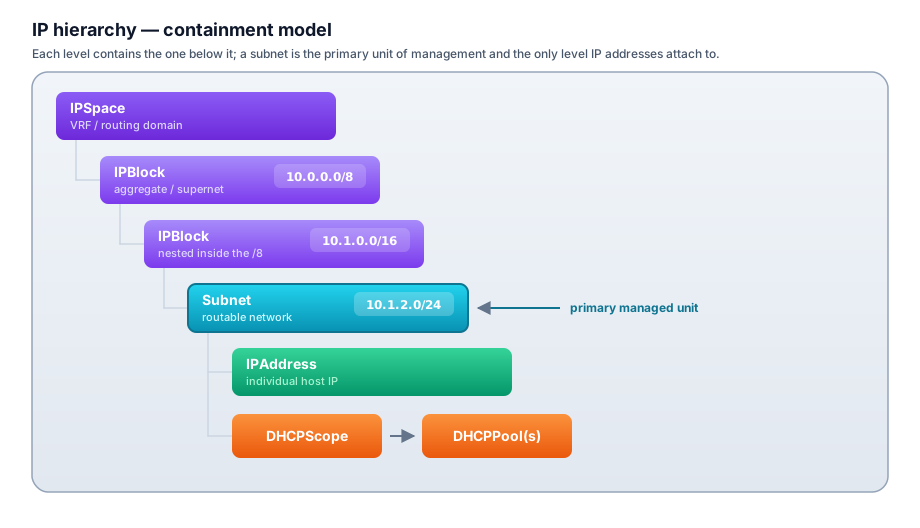
IP Space
- Represents a VRF or isolated routing domain (e.g., “Corporate”, “Internet”, “OOB”)
- IPs in different spaces may overlap without conflict
- One space can be marked
is_defaultfor simplified deployments
IP Block
- Aggregate/supernet range (e.g.,
10.0.0.0/8,172.16.0.0/12) - Used for organizational grouping — you cannot directly assign IPs to a block
- Blocks can be nested (a /16 block inside a /8 block)
- Sub-blocks and subnets are children in the tree
Subnet
- The primary unit of management — a routable network with a gateway
- IPs are allocated, tracked, and assigned at the subnet level
- Subnets cannot overlap within the same IP Space
- Subnets in different IP Spaces may overlap (VRF semantics) — but overlapping spaces must use disjoint DHCP and DNS server groups: one Kea server cannot serve two same-prefix subnets, and one DNS group cannot hold two same-name reverse zones. Enforced per #844 (scope create/activate
409; reverse-zone attach refused)
2. IP Block & Subnet Tree UI
Both IP blocks and subnets are displayed in a tree view in the UI, mirroring the network hierarchy.
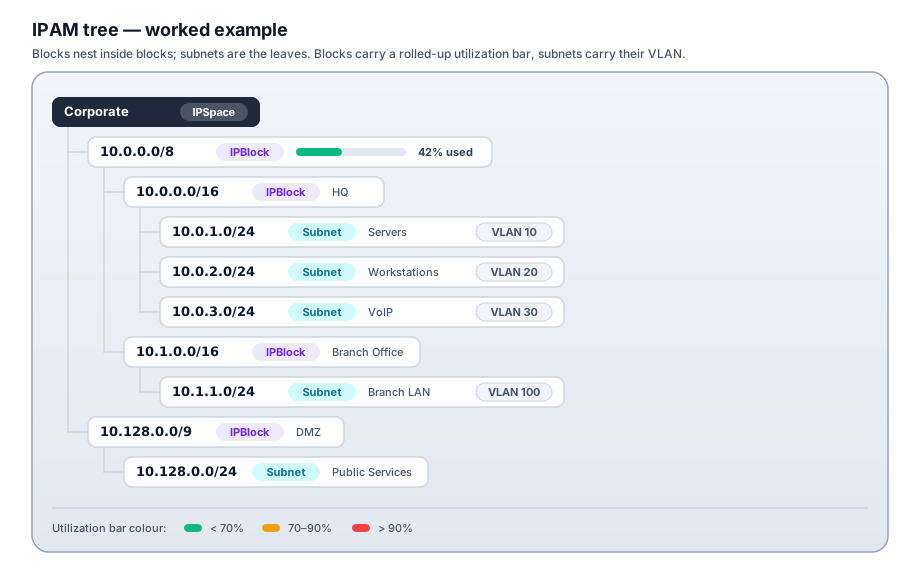
Tree Features
- Expand/collapse nodes
- Utilization color-coded bars (green < 70%, amber 70–90%, red > 90%)
- Right-click context menu: Create child block, Create subnet, Edit, Delete
- Drag nodes to reorganize (with validation — child must fit inside parent CIDR)
- Free space visualization: show unallocated ranges within a block
3. Subnet Model (Extended)
Subnet
  id, space_id, block_id (nullable)
  network: cidr              -- e.g., 10.1.2.0/24
  name, description

  -- Layer 2 / Switching
  vlan_id: int (nullable)    -- 802.1Q VLAN tag (1–4094)
  vxlan_id: int (nullable)   -- VXLAN VNI (1–16777215)

  -- Routing Context
  gateway: inet (nullable)
  router_zone_id (FK → RouterZone, nullable)  -- see section 4

  -- DNS Integration
  forward_zone_id (FK → DNSZone, nullable)    -- primary A records zone
  reverse_zone_id (FK → DNSZone, nullable)    -- PTR records zone
  dns_servers: inet[] (nullable)              -- override IPs to push to DHCP clients
  domain_name: str (nullable)                 -- primary domain suffix (DHCP option 15)
  -- Multiple domains: see SubnetDomain junction table (section 11)

  -- DHCP
  dhcp_scope_id (FK → DHCPScope, nullable)
  dhcp_server_group_id (FK → DHCPServerGroup, nullable)

  -- Status / Metadata
  status: enum(active, deprecated, reserved, quarantine)
  utilization_percent: float (computed)
  total_ips: int (computed — usable addresses; IPv4 network + broadcast excluded)
  allocated_ips: int (computed — non-available rows, excluding the IPv4 network / broadcast placeholders, so allocated ≤ total)

  -- Custom Fields (see section 6)
  custom_fields: JSONB

  tags: JSONB                 -- free-form key/value tags
  created_at, modified_at
4. VLAN / VXLAN and Router Zones
Subnets can be associated with Layer 2 and routing context.
VLAN / VXLAN Assignment
vlan_id: 802.1Q VLAN tag. Informational in IPAM (SpatiumDDI does not configure switches directly).vxlan_id: VXLAN VNI. Used in overlay network environments.- Both can be set simultaneously (e.g., VLAN 100 mapped to VNI 10100).
- A lookup table
VLANMappingtracks VLAN → VXLAN mappings for reference.
Router Zone / Domain
A RouterZone groups subnets that are locally significant to a routing domain or site:
RouterZone
  id, name, description
  type: enum(site, vrf_lite, mpls_domain, data_center, custom)
  parent_zone_id (nullable)   -- zones can be nested (campus → building → floor)
  contact_info: str           -- who manages routing in this zone
  notes: str
Subnets assigned to the same RouterZone imply they share routing context (e.g., all subnets on a campus router). This is informational in Phase 1 but can drive automation in later phases (pushing route configs to routers via API).
5. IP Address Model (Extended)
IPAddress
  id, subnet_id
  address: inet
  status: enum(
    available,      -- not assigned, not seen
    allocated,      -- manually assigned in IPAM
    reserved,       -- held but not assigned (e.g., future use, gateway placeholder)
    dhcp,           -- currently active DHCP lease
    static_dhcp,    -- has a static DHCP assignment (requires mac_address)
    discovered,     -- seen on network but not in IPAM
    orphan,         -- was assigned, device no longer seen
    deprecated      -- was assigned, now decommissioned
  )
  hostname: str (nullable)
  fqdn: str (nullable, computed from hostname + domain)
  domain_id (FK → DNSZone, nullable)   -- which domain this hostname belongs to
  mac_address: macaddr (nullable)      -- required when status = static_dhcp
  description: str

  -- Ownership
  owner_user_id (FK → User, nullable)
  owner_group_id (FK → Group, nullable)
  managed_by: str (nullable)   -- free text, or pulled from custom fields

  -- Linked Records
  dns_record_id (FK → DNSRecord, nullable)
  dhcp_lease_id (FK → DHCPLease, nullable)
  static_assignment_id (FK → DHCPStaticAssignment, nullable)

  -- Discovery
  last_seen_at: timestamp (nullable)
  last_seen_method: enum(ping, arp, dhcp, manual, snmp)

  -- Custom Fields
  custom_fields: JSONB

  tags: JSONB
  created_at, modified_at, created_by_user_id
Next Available IP Allocation
POST /api/v1/ipam/subnets/{id}/next
{
  "strategy": "sequential",    // "random", or "eui64" (IPv6)
  "hostname": "app-server-01",
  "description": "New app server",
  "custom_fields": { "ticket": "INC-12345" }
}
Returns the allocated IPAddress. Allocation is atomic (uses DB-level SELECT ... FOR UPDATE on the subnet row to prevent race conditions). The picker skips network/broadcast placeholders and any IP inside a dynamic DHCP pool.
Wake-on-LAN (#533)
POST /api/v1/ipam/addresses/{id}/wake
Sends a Wake-on-LAN magic packet to the IP’s MAC. The MAC comes from the
address row and the IPv4 broadcast target is derived from the IP’s subnet, so
the request body only needs an optional port (default 9) and an optional
run-from target:
{ "port": 9, "target": { "kind": "server" } }
target.kind = "server"(default) — the control-plane container broadcasts. Only wakes hosts on a segment the api container can reach (the common single-box case).target.kind = "appliance"+target.id— dispatch to a Fleet appliance whose NIC sits on the target’s segment, so the packet originates in the right broadcast domain (reuses the generic nettool command channel).
Optionally arm a post-wake liveness check (#596) — the body accepts verify
(default false), verify_wait_seconds (default 60), verify_retries (default
1) and verify_method (default auto). See
Ad-hoc wake verify below.
Gated by the use_network_tools permission and audited against the IP
(action="wake_on_lan"; the audit row carries verify_run_id when verify was
armed). Surfaced as a Wake button on the IP detail modal (shown only when the
IP has a MAC), with a verify checkbox beside it, and as the
propose_wake_host Operator Copilot tool. WoL is IPv4-only — the magic packet
rides a UDP broadcast.
Scheduled Wake-on-LAN (#586, Phases 1–3)
The one-shot Wake button above sends a single magic packet on demand.
Scheduled Wake-on-LAN layers a recurring, tag-targeted job on top of the
same #533 send path — the schedule owns when, which hosts, and how; the
actual packet dispatch is the shipped app.services.wol code unchanged.
Phase 1 shipped the recurring tag-targeted schedule + built-in holiday/term gate; Phase 2 layered an external iCal / CalDAV calendar gate; Phase 3 adds post-wake liveness verify + bounded retry, stagger auto-tuning for large fleets, and the FOG / PXE re-image runbook below.
Lives behind the tools.wake_scheduler feature module, which ships
disabled — it ends in magic packets going out on a schedule, so it is
opted into (#1069).
Enable it under Settings → Features; while it is off the router prefix,
sidebar entry, and MCP tools all drop out (non-negotiable #14). REST surface is mounted at /api/v1/wake-scheduler
(the Python package is wol_schedules; the wire prefix is wake-scheduler,
the cross-surface contract shared with the frontend and MCP layers). Every
handler is gated by the wake_scheduler permission (read / write /
delete) and every mutation is audited (non-negotiables #3, #4). Operator
Copilot gets read tools (find_wol_schedules, …) plus a propose_* write
that lands in the standard preview → apply flow (non-negotiable #13).
Schedules
A wol_schedule row carries the recurrence, the target selector, the built-in
holiday gate, and the send knobs:
name/description/enabled.schedule_cron— a standard cron expression, or NULL for a manual-only schedule (never swept by the beat task; fires only via Run now).timezone— an IANA zone (e.g.America/Toronto). The cron walks the operator’s wall clock in this zone, so a0 7 * * 1-5“07:00 on weekdays” job stays at 07:00 local across DST transitions rather than drifting an hour twice a year.next_run_at— denormalised UTC, the beat sweep’s due-query key. A Celery beat task polls for due schedules, re-checks the holiday gate at fire time, dispatches, and recomputesnext_run_atfrom the cron + timezone.
Each fire (scheduled or manual) writes a wol_run history row — including
gated skips, so “skipped because holiday” stays visible — with per-host
wol_run_target children recording sent / skipped / failed, the
resolved MAC and its mac_source (ip / history / lease), the segment
broadcast, and the vantage the packet left from. Run history uses
ON DELETE SET NULL on the schedule FK so deleting a schedule doesn’t erase
the audit trail of what it did.
Targeting modes
The target_selector JSONB picks the host set at fire time (resolved fresh on
every run, so newly-tagged hosts are picked up automatically). Four modes:
| Mode | Selector shape | Wakes |
|---|---|---|
address_tags |
{ "mode": "address_tags", "tags": ["wake:nightly"] } |
Every IP address carrying all the listed tags |
subnet_tags |
{ "mode": "subnet_tags", "tags": ["env:lab"] } |
Every host in every subnet carrying the listed tags |
subnet |
{ "mode": "subnet", "subnet_ids": [<uuid>, …] } |
Every host in the named subnets |
hosts |
{ "mode": "hosts", "address_ids": [<uuid>, …] } |
An explicit list of IP addresses |
Resolution is permission-scoped to the schedule’s creator (non-negotiable
#3): a schedule can only wake hosts in subnets its owner may read, so a
tag-match can’t be used to reach across a tenancy boundary. Multicast subnets
and soft-deleted subnets are excluded (they hold no host MACs); addresses with
no resolvable MAC are recorded as a per-host no_mac skip rather than
silently dropped. Use Preview targets on the schedule modal to see the
resolved host set (and skip reasons) before saving or running.
Built-in holiday gate (Phase 1)
Every schedule carries a built-in blackout/term gate that needs no external calendar (the calendar subscription below is an optional additional gate layered on top):
blackout_dates— a list of ISOYYYY-MM-DDdates. A fire whose local calendar date (evaluated in the schedule’stimezone) is a member is skipped withskip_reason = "holiday".active_from/active_until— an optional term range. A fire whose local date falls outside[active_from, active_until]is skipped withskip_reason = "off_term"(e.g. a classroom lab that should only wake during the school term).
The gate is evaluated on the local date so a 07:00-local wake on a blackout day
is correctly suppressed regardless of the UTC offset. Skipped runs are still
recorded as wol_run rows so the skip is auditable.
Calendar subscriptions (Phase 2)
Phase 2 layers an external calendar gate on top of the built-in
blackout/term checks. Instead of hand-maintaining a blackout_dates list, a
schedule can subscribe to a calendar the organisation already publishes and let
its all-day events drive the wake decision — the exact “follow the school/term
calendar instead of a dumb weekday cron” workflow the feature was requested for.
A wol_calendar row is a subscribed feed in one of two kinds:
- iCal
.icsURL (kind = "ical_url") — an unauthenticated (or token-in-URL).ics/webcal://feed. This is the MVP path and covers the 80% case: Google Calendar “public address in iCal format” links and most published school / district holiday calendars.webcal://andwebcals://are normalised tohttps://before fetch. - Authenticated CalDAV (
kind = "caldav") — ausername+ password collection on a CalDAV server (Nextcloud, Radicale, a school’s own server). This is the HomeAssistant-CalDAV path the original requester described. The password is Fernet-encrypted at rest and is never returned by the API — reads expose only apassword_setboolean.
On each refresh the reconciler pulls the feed, parses it with icalendar
(CalDAV collections via the caldav client), and flattens all-day VEVENTs
into concrete date spans in the child wol_calendar_event table
(starts_on / ends_on inclusive, summary, categories, uid).
Recurrence (RRULE / RDATE, minus EXDATE) is expanded via
python-dateutil over a bounded forward horizon (~400 days) so a
FREQ=YEARLY rule can’t produce an unbounded set. Only all-day events count —
a timed 09:00 meeting is ignored; a holiday / term calendar is all-day spans.
DTEND is treated as RFC 5545-exclusive, so a stored ends_on is
DTEND − 1 day. The flattened spans make the fire-time gate an O(events)
in-memory check with no per-fire network call — the same last-known-good-cache
shape the DNS blocklist feed uses, so a schedule keeps gating correctly even
while the feed source is unreachable.
Two gate modes (wol_schedule.calendar_mode) cover the two shapes schools
actually publish:
| Mode | Calendar shape | Behaviour |
|---|---|---|
skip_on_event |
Holiday calendar (events = days off) | A matching event covering the local fire date skips the wake (skip_reason = "calendar_event") |
only_on_event |
School-day / term calendar (events = days on) | The wake fires only when a matching event covers the local fire date; otherwise skipped (skip_reason = "no_calendar_event") |
none (default) |
— | Calendar ignored; pure Phase-1 built-in gating |
calendar_match (optional, per-schedule) is a case-insensitive regex that
narrows which events count — matched against each event’s summary and its
categories. Use it when one calendar carries mixed entries and only some are
wake-relevant (e.g. calendar_match = "closed|holiday" on a shared calendar
that also holds staff-PD days). A malformed regex is treated as “no filter” so
a bad operator entry can never wedge the gate.
The calendar is an additional gate: the built-in term-range and
blackout_dates checks still run first (term → blackout → calendar), and the
whole thing is evaluated on the local fire date in the schedule’s timezone.
A skipped fire is still written as a wol_run row with the calendar skip
reason, so “skipped — holiday calendar” stays visible in history.
Refresh cadence + sync-now. Each calendar carries a
refresh_interval_minutes cadence (default 6 h). A 60 s beat sweep
(app.tasks.wol_calendar.sweep_wol_calendars) reconciles every enabled
calendar whose interval has elapsed, mirroring the DNS-blocklist feed pull —
transient network failures set last_sync_status = "error" + last_sync_error
and retry with backoff; a successful pull stamps last_synced_at and
recomputes event_count. The Calendars tab surfaces last-synced status and an
upcoming-events preview so an operator can confirm “yes, this feed marks our
holidays” before wiring a schedule to it, plus a Sync now button that runs
the reconcile inline for immediate feedback.
The wol_calendar tables belong to the same tools.wake_scheduler feature
module as Phase 1 (no new module). Deleting a calendar SET NULLs the
calendar_id on any schedule referencing it — the schedule falls back to its
built-in gate rather than erroring.
Post-wake verify + retry (Phase 3)
A wake that sent isn’t proof a host came up. When verify_enabled is set, a
run chains a non-blocking liveness check after it dispatches, probes each host
that was actually sent a packet, and re-wakes the ones that didn’t answer — up to
a bound. This turns “did we fire?” into “did the fleet actually power on?”.
Per-schedule config (all on wol_schedule):
verify_enabled(defaultfalse) — arm the post-wake check.verify_wait_seconds(default60, range 5–3600) — grace between the dispatch (and between each retry pass) and the probe, so a host has time to POST + bring its NIC up before it’s pinged.verify_retries(default1, range 0–10) — number of re-wake passes after the first probe. Total probe passes ≤verify_retries + 1;0== probe once, never re-wake.verify_method(defaultautofor new schedules; existing rows keepping) — which liveness source settles the verdict. See Liveness sources below.verify_alert_enabled(defaulttrue) — per-schedule mute for thewol_wake_failedalert. See Alerting on a failed wake below.
Liveness sources (#596)
| method | class | what it does |
|---|---|---|
ping |
active | ICMP echo from the control plane. The pre-#596 behaviour. A host behind a default Windows firewall answers nothing and reads as down. |
tcp |
active | Connect-or-RST across a small port set (22, 80, 443, 445, 3389, 8006, 53, 8080 — the same set the IPAM discovery sweep uses). A refused connection still proves the host is up, so this survives an ICMP-blocking host firewall. |
seen |
passive | Emits no traffic. Confirms the host only if IPAddress.last_seen_at >= run.started_at. |
auto |
both | ping → tcp → seen, stopping at the first source that confirms. |
Two properties make this safe to default to auto:
- Active probes may report either verdict; a passive probe may only ever
confirm. “No sighting” is equally consistent with “the SNMP poller hasn’t run
yet”, so
seennever asserts a host is down. A richer method can therefore only ever shrink the down set relative toping— it can never manufacture a re-wake. - The wake anchor kills the stale-cache false positive. A sighting only counts if it was recorded after this run’s magic packet went out. A week-old ARP entry or yesterday’s lease can never be mistaken for evidence that the wake worked.
auto short-circuits, so a live ICMP-responsive host costs exactly one ping and the
extra sources are only paid for on hosts a ping-only verify would have re-woken for
nothing. A passive confirmation never re-stamps last_seen_at — the sighting is
already recorded by whichever subsystem actually observed the host. Only an active
UP verdict writes Seen, with last_seen_method set to the winning probe.
What seen actually observes today: the SNMP ARP/FDB cross-reference, DHCP lease
pulls, nmap, ping/ARP discovery sweeps, and the DHCP agent’s passive L2
fingerprinting — every writer of IPAddress.last_seen_at. The read-only
integration mirrors (UniFi, OPNsense, Proxmox, Tailscale) do not stamp last_seen_at,
so they contribute no sightings. Teaching them to is a follow-up.
The per-target wol_run_target.verify_method records the source that settled the
verdict (ping / tcp / seen) — never the auto keyword — so the History chip
stays honest about how each host was confirmed.
How it runs (chained, bounded, idempotent — non-negotiables #9):
run_wol_scheduledispatches as usual, then — ifverify_enabledand at least one packet went out — enqueuesverify_wol_run(run_id, attempt=1)with averify_wait_secondscountdown. The dispatch task never blocks on the probe.- Each verify pass atomically claims the run (
verify_statepending → verifyingvia a conditionalUPDATE … WHERE verify_state='pending'), so a double-delivery of the same attempt is a no-op and a re-fire afterdoneis a no-op. - It probes the still-unverified sent targets under the schedule’s
verify_method. A host confirmed by an active probe is stampedverified=trueand itsIPAddress.last_seen_at/last_seen_methodare updated (the same Seen infra discovery uses). A host confirmed only byseenisverified=truewithout re-stamping Seen. A host no source confirmed isverified=false. A host no source could run against — no address under an active-only method, or no IPAM row (ip_address_id IS NULL, the FK isON DELETE SET NULL) underseen— staysverified=null: honestly “not checked”, counted as unverified in the rollup, and never a re-wake candidate. - If non-responders remain and
attempt ≤ verify_retries, it re-wakes only those hosts (reusing the Phase-1 dispatch path), bumps theirwake_attempts, releases the run back topending, and re-enqueues the next attempt. Otherwise it finalises:verify_state='done', rolls upverified_count/unverified_count, and writes onewol_run_verifiedaudit row.
Read surfaces: wol_run.verify_state (none → pending → verifying → done) +
verified_count / unverified_count on the run; per-host wol_run_target.verified
(tri-state: null = not-yet/not-checked · false = probed down · true = probed
up), verified_at, verify_method, wake_attempts. The find_wol_runs MCP tool
surfaces the rollup so the copilot can answer “did last night’s wake bring the fleet
up?” — distinct from “did it send?”.
Alerting on a failed wake (#596)
A finished verify that gave up used to leave exactly one audit row and page
nobody. The wol_wake_failed alert rule closes that. It is a normal rule on the
60 s evaluator, so channel delivery, dedupe and auto-resolve come from the shared
machinery — see OBSERVABILITY.md §9.1 for the rule table.
Two decisions worth knowing:
- The subject is the schedule, not the run. A 15-minute schedule that fails
every fire would otherwise open ~96 events a day. One open event per failing
schedule carries the blast-radius rollup (
N of M hosts, a hostname sample). - It re-checks passively on every tick. A target counts as still-failed only
if
IPAddress.last_seen_atis still older than the run that woke it. So the lab PC that boots twenty minutes late closes its own alert, and an operator is never paged for a host that has since come up. A target with no IPAM row can’t be re-checked and keeps the alert open rather than silently resolving.
The rule seeds disabled (rogue_dhcp precedent) — enable it under
Administration → Alerts once a schedule arms verify. verify_alert_enabled on
the schedule is the per-schedule mute for a deliberately-noisy lab job.
Per-target evidence trail (#596)
wol_run_target.verify_method records which source settled a host’s verdict.
verify_evidence records what every source it consulted actually said — an
ordered JSONB array of {source, up, detail, observed_at}, rendered under each
host’s chip in the run’s History drilldown. It answers the operator’s real
question about a down host: down according to what? “ICMP timed out, no TCP
port answered, no sighting since the wake” is a dead box; a short-circuit trail
that stops at ping · up means nothing else was ever needed. NULL on rows no
source could run against, and on rows recorded before the trail shipped.
Two Operator Copilot reads surface the same data: find_wol_wake_failures (runs
whose verify finished with unconfirmed hosts — scheduled and ad-hoc, newest
first) and count_wol_wake_failures. Both read-only, both default-enabled.
Ad-hoc wake verify (#596)
The single-host wake action (POST /ipam/addresses/{id}/wake, the Wake button on
the IP detail modal) can arm the same chain. Tick verify next to the button, or
pass verify: true with optional verify_wait_seconds / verify_retries /
verify_method. Because the machinery is keyed on a run, an opted-in ad-hoc wake
mints an ephemeral WolRun with schedule_id = NULL, trigger = "adhoc" and a
single target, and carries its config in WolRun.verify_params — there is no parent
schedule row to read it from. The run appears in Wake Schedules → History like any
other. Requires the tools.wake_scheduler feature module (422 otherwise — the run
would otherwise be invisible in the UI and never reclaimed by the sweep). A failing
ad-hoc wake raises no alert: alerting is keyed on a schedule subject, and an ad-hoc
run has none.
ACTIVE probes run from the SERVER vantage only, regardless of the schedule’s wake
vantage. The appliance command channel (agent_cmd) is an in-memory, per-replica
dispatch the api process owns; the verify task runs in the Celery worker, and
there is no worker→supervisor result-return path today. So for an appliance-vantage
wake, an active probe still runs from the control plane: correct when the api/worker
can reach the target segment (routed ICMP / directed broadcast), and a false-negative
(unverified) — never a false wake — when it can’t. seen sidesteps this entirely:
it is a pure DB read, so it verifies hosts on segments the worker cannot reach at all,
provided some other subsystem (an SNMP poll of the local switch, a DHCP lease)
observed them — which is why auto is the sensible default on a segmented network.
Appliance-vantage active verify (a worker→supervisor result channel) remains the
named follow-up, alongside the
deferred [auto-resolve on-segment appliance from the target subnet] and the
[scheduled-shutdown companion] below.
Vantage
A schedule inherits the #533 vantage choice — where the magic packet originates:
- Server vantage (
{ "kind": "server" }, default) — the control-plane container broadcasts. Reaches only segments the api container can reach directly, unless the target router forwards a directed broadcast (see the router matrix below). -
Fleet-appliance vantage (
{ "kind": "appliance", "id": <uuid> }) — dispatch to a Fleet appliance whose NIC sits on the target’s segment, so the packet originates in the right broadcast domain (reuses the generic nettool command channel). This is the preferred path when an appliance is on the segment — it needs no router changes at all.⚠️ Scheduled fires can’t use appliance vantage yet. The appliance command channel (
agent_cmd) is an in-memory, per-replica queue that the supervisor long-polls off the api process, but a scheduled fire runs in the Celery beat worker — a different process — so its enqueue never reaches the supervisor and the wake records per-host delivery failures (it is not silent, but it does not send). This is the same agent_cmd limitation the verify probe hits above; the fix is the tracked worker→supervisor Redis-backed multi-replica dispatch. Until then, for a scheduled wake to a remote segment use server vantage + the router directed-broadcast config (below), or trigger the appliance-vantage wake interactively via “Run now” (which originates in the api process and reaches the supervisor).
Stagger auto-tuning (Phase 3)
stagger_ms inserts a per-host delay between sends within a run (on top of the
repeat_count / repeat_interval_ms per-host retry burst). Firing every magic
packet back-to-back can spike inrush current on a rack (dozens of machines powering
on simultaneously) and micro-burst the broadcast domain / a PXE boot server.
As of Phase 3 the default stagger_ms = 0 means auto: the runner ramps a large
resolved fleet so a same-second all-at-once fire can’t inrush / PXE-thundering-herd,
while a small set still fires immediately. The bands (auto_stagger_ms):
| resolved wake count | stagger | approx wakes/sec |
|---|---|---|
| ≤ 20 | 0 (all at once) | — |
| 21 – 100 | 50 ms | ~20/s |
| 101 – 256 | 100 ms | ~10/s |
| > 256 (up to the 512 fan-out cap) | 150 ms | ~6–7/s |
Any positive stagger_ms is an explicit operator override that always wins
verbatim — auto never touches it. So 0 = “let the platform decide”, and a specific
value = “use exactly this ramp”. The preview-targets surface returns a
suggested_stagger_ms (the auto value for the resolved count) so the create modal can
show “waking N hosts → suggest ~X ms” as the operator edits the selector; the
preview_wol_schedule_targets MCP tool returns it too.
Scope caveat — wake only
Wake-on-LAN only wakes. There is no “scheduled shutdown” counterpart, and none of Phases 1–3 add one — WoL is a layer-2 magic packet with no reverse operation, and an orderly shutdown needs an authenticated out-of-band path (BMC / Redfish / IPMI) or in-guest agent (SSH / ACPI) that is out of scope here. The scheduled-shutdown companion (BMC/Redfish/IPMI power-off) is a deferred follow-up the issue flags as “investigate” — a separate feature, not this pass. Schedules turn machines on; turning them off is the operator’s / OS’s responsibility.
FOG / PXE re-image runbook (Phase 3)
A scheduled wake pairs cleanly with the shipped DHCP PXE profiles (#51:
pxe_profile + DHCPScope.pxe_profile_id, iPXE-vs-BIOS client-class match) to drive
lab / classroom re-imaging with a tool like FOG. The flow:
- Tag the machines to re-image (e.g.
wake:reimage) so asubnet_tags/address_tagsselector resolves exactly that set. - Point the scope’s PXE profile at FOG. With a
pxe_profileon the target DHCP scope, PXE-booting hosts get the FOG bootfile (BIOS) or the FOG iPXE script (iPXE) via the shipped client-class match — seedocs/features/DHCP.mdPXE profiles. - Wake at the imaging window. A schedule with cron
0 2 L * *(02:00 on the last day of the term — combined with the built-inactive_untilgate) wakes the tagged fleet; a manual-only schedule +run-nowworks for an ad-hoc re-image. - Hosts PXE-boot into FOG and image per the FOG task queued for each host.
Operational notes: leave stagger_ms = 0 (auto) or set a non-trivial explicit stagger
so a lab-full of machines doesn’t PXE-thundering-herd the TFTP / HTTP boot server all
in the same second (the auto bands above already ramp a large set). Turn on
post-wake verify so you can confirm the fleet actually powered on before the
imaging window closes — unverified_count > 0 on the run means some hosts never came
up (dead PSU, WoL disabled in BIOS, wrong segment). This runbook pairs with but
does not implement the deferred scheduled-shutdown companion (above): re-image jobs
that need the machines off afterward still rely on the OS / FOG task to power them down.
Directed-broadcast router matrix (server vantage across an L3 boundary)
Prefer a Fleet appliance on the target segment — it needs none of this. When the wake is dispatched to an appliance whose NIC is on the target subnet, the magic packet is broadcast locally and no router configuration is required.
The snippets below are the fallback for when there is no on-segment appliance and the packet must travel from the server vantage across a routed boundary. In that case delivery depends on the target router forwarding a directed broadcast to the subnet’s broadcast address. That is disabled by default on virtually all modern gear — it is the classic smurf-amplification vector — so server-vantage cross-subnet wakes silently fail until the operator enables it.
Enabling directed broadcast is a security downgrade. Every snippet below
therefore scopes the forwarding to our single sender only, via an ACL /
firewall filter pinned to <sender-ip> → the target subnet. Never widen
the source to any — that re-opens the smurf reflector. The schedule modal
renders these auto-filled from what the job already knows, in an expandable
“Router setup help” block shown only for a server-vantage + remote/L3 target.
Templated fields (auto-filled by the UI, shown as placeholders here):
| Placeholder | Meaning |
|---|---|
<sender-ip> |
The server/appliance vantage’s source IP (the only permitted source) |
<target-cidr> |
The target subnet in CIDR (rendered as network + wildcard/mask per vendor) |
<target-directed-broadcast> |
The subnet’s directed-broadcast address (computed via wol.broadcast_for_network) |
<wol-port> |
The schedule’s UDP port (default 9; some stacks also use 7) |
Worked example used below: <sender-ip> = 10.0.0.5, target subnet
192.168.10.0/24 → <target-cidr> = 192.168.10.0/24,
<target-directed-broadcast> = 192.168.10.255, <wol-port> = 9.
Cisco IOS / IOS-XE
access-list 110 permit udp host 10.0.0.5 192.168.10.0 0.0.0.255 eq 9
!
interface Vlan10
 ip directed-broadcast 110
host 10.0.0.5 = <sender-ip>; 192.168.10.0 0.0.0.255 = <target-cidr> as
network + wildcard mask; eq 9 = <wol-port>. The ACL scopes
ip directed-broadcast on the target’s downstream interface to only our
sender → the subnet, so it is not left open as a smurf reflector.
Juniper Junos
firewall {
    family inet {
        filter WOL-ONLY {
            term permit-wol {
                from {
                    source-address {
                        10.0.0.5/32;
                    }
                    destination-address {
                        192.168.10.255/32;
                    }
                    protocol udp;
                    destination-port [ 7 9 ];
                }
                then accept;
            }
            term default {
                then accept;   # or your normal policy
            }
        }
    }
}
10.0.0.5/32 = <sender-ip>; 192.168.10.255/32 =
<target-directed-broadcast>; ports 7 9 = WoL. Junos also needs the
receiving IRB/interface for the target subnet to permit the directed broadcast
(set interfaces irb unit <n> family inet targeted-broadcast) alongside the
filter — the filter authorises the traffic, targeted-broadcast converts the
inbound directed-broadcast into a link-layer broadcast on egress.
Arista EOS
ip access-list WOL-ONLY
   10 permit udp host 10.0.0.5 192.168.10.0/24 eq 9
!
interface Vlan10
   ip directed-broadcast WOL-ONLY
IOS-like: host 10.0.0.5 = <sender-ip>, 192.168.10.0/24 = <target-cidr>,
eq 9 = <wol-port>. ip directed-broadcast <acl> on the SVI facing the
target subnet forwards directed broadcasts only for ACL-matched traffic.
MikroTik RouterOS
/ip firewall filter
add chain=forward action=accept protocol=udp \
    src-address=10.0.0.5 dst-address=192.168.10.255 \
    dst-port=9 comment="WOL directed-broadcast (single sender)"
/interface ethernet switch
# RouterOS drops directed broadcasts by default; the forward-accept rule
# above pins src-address=<sender-ip> (10.0.0.5) to the subnet's
# directed-broadcast dst-address=<target-directed-broadcast> (192.168.10.255)
# on dst-port=<wol-port> (9). Keep src-address pinned — never 0.0.0.0/0.
src-address=10.0.0.5 = <sender-ip>; dst-address=192.168.10.255 =
<target-directed-broadcast>; dst-port=9 = <wol-port>. On CHR / routers
that also need the broadcast re-broadcast onto the LAN segment, ensure the
target bridge/interface is not filtering the directed broadcast in the bridge
firewall.
VyOS / EdgeOS
set firewall name WOL-ONLY rule 10 action accept
set firewall name WOL-ONLY rule 10 protocol udp
set firewall name WOL-ONLY rule 10 source address 10.0.0.5
set firewall name WOL-ONLY rule 10 destination address 192.168.10.255
set firewall name WOL-ONLY rule 10 destination port 9
!
# Enable directed-broadcast relay on the interface facing the target subnet:
set interfaces ethernet eth1 ip enable-directed-broadcast
source address 10.0.0.5 = <sender-ip>; destination address
192.168.10.255 = <target-directed-broadcast>; destination port 9 =
<wol-port>. enable-directed-broadcast on the egress interface converts the
routed directed broadcast into a link-layer broadcast; the firewall rule pins
it to our single sender. Apply the WOL-ONLY ruleset to the appropriate
in/local direction for your topology.
pfSense / OPNsense
Both are FreeBSD/pf-based and disable directed-broadcast forwarding by
default. Add a single-source firewall pass rule on the interface the wake
enters from:
# Firewall → Rules → <WAN/vantage interface> → Add
Action:            Pass
Protocol:          UDP
Source:            10.0.0.5/32            # <sender-ip> — Single host, never "any"
Destination:       192.168.10.255/32     # <target-directed-broadcast>
Destination port:  9                     # <wol-port>
Then allow the directed broadcast to be forwarded onto the LAN. On FreeBSD this
is the net.inet.ip.directed-broadcast=1 sysctl (System → Advanced →
System Tunables), scoped in practice by the source-pinned pass rule above.
Several SpatiumDDI integrations already mirror OPNsense/pfSense, so the target
subnet + directed-broadcast address are typically already known to the platform
and pre-filled into this snippet. Keep the source pinned to <sender-ip>/32 —
a rule with Source: any re-opens the smurf reflector.
6. Custom Fields
Both Subnets and IPAddresses (and IPBlocks and DNSZones) support administrator-defined custom fields. This allows organizations to store domain-specific metadata without schema changes.
Custom Field Definition
CustomFieldDefinition
  id
  resource_type: enum(subnet, ip_address, ip_block, dns_zone, dhcp_scope)
  name: str               -- snake_case key (e.g., "ticket_number")
  label: str              -- human-readable (e.g., "Change Ticket")
  field_type: enum(text, number, boolean, date, email, url, select, multi_select)
  options: JSONB (nullable)  -- for select/multi_select: list of allowed values
  is_required: bool
  is_searchable: bool        -- if true, indexed for search
  default_value: str (nullable)
  display_order: int
  description: str
Example Custom Fields for Subnets
| Field Name | Type | Example Value |
|---|---|---|
managed_by |
text | “Network Team - Alice Smith” |
contact_email |
“[email protected]” | |
ticket_number |
text | “CHG-45678” |
environment |
select | “production” / “staging” / “dev” |
cost_center |
text | “CC-1234” |
decom_date |
date | “2025-12-31” |
notes |
text | Free-form notes |
Custom Fields in the API
Custom fields are exposed under the custom_fields JSONB key on all resource objects. They are validated against their CustomFieldDefinition on write.
Required fields (#2478). A definition marked Required is enforced on IP block and subnet writes (create, allocate-subnet and update); a request that leaves one empty is refused with 422 naming it. A value inherited from the block chain above the row counts. The rule is deliberately narrow so that making a field Required later does not lock existing rows: a create needs every Required field; an update is checked only when the request sends custom_fields, and then only for a field it sends or the row already holds a value for. So a block or subnet that never had the field can still be renamed or saved untouched, but it cannot be given the field empty, and a value it holds cannot be blanked. Select fields always show an empty choice (not pickable for a Required field with nothing to inherit), and the New / Edit dialogs apply the same rule before sending. IP spaces and addresses are not covered yet, and neither are subnets a template’s child layout carves.
7. Import / Export
IP Range Import
Supported input formats:
- CSV: columns:
network,name,gateway,vlan_id,description+ any custom field columns.\n,\r\nand a bare\r(classic Mac) line endings are all read; a CSV the reader cannot read is a 422 with its reason (#1637) - JSON: array of subnet objects (matches API schema)
- IPAM vendor exports: generic CSV (network, name, gateway, vlan_id), SolarWinds IPAM CSV, Netbox JSON
Import behavior:
- Dry run first: always show a preview table of what will be created/updated before committing
- Conflict handling:
skip/overwrite/failon existing networks (selectable per import) - Parent detection: automatically places imported subnets under the correct block in the hierarchy
- Custom fields: mapped by column name / JSON key
IP Range Export
- Export a block, subnet, or entire space
- Formats: CSV, JSON, Excel (
.xlsx) - Includes: all subnet metadata + utilization + custom fields + IP address list (optional)
- What each format holds with “Include IP addresses” ticked (#2420): JSON and XLSX carry the subnet metadata and the address list (XLSX as separate sheets); PDF keeps its subnet table and appends the addresses. CSV is the address list only (
subnet,address,status,hostname,fqdn,mac_address,description,last_seen_at+ custom fields), the shape the address importer reads, so it round-trips. For subnet metadata in CSV, download it with the box unticked. The CSV follows the box, not whether the scope happens to hold addresses
DNS Zone Import / Export
- Import: RFC 1035 zone file format → creates zone + all records in IPAM + pushes to DNS server
- Export: Export zone as RFC 1035 zone file or JSON
- Bulk import of multiple zones via ZIP of zone files
NetBox migration import (#36)
For migrating a whole IPAM estate out of a live NetBox install — prefixes / IP
addresses / VRFs / tenants → Customers / sites / VLANs in one preview → commit
pass — use the dedicated NetBox importer rather than the generic CSV/JSON
range import above. See docs/features/MIGRATION.md § “NetBox → IPAM importer”.
8. Discovery / Reconciliation
Status (issue #23): shipped. Opt-in per subnet — default off, because a sweep is only meaningful for subnets the SpatiumDDI worker can actually route to, and unsolicited probes can trip an IDS.
Fragile devices:
do_not_probe(issue #722). Medical- and OT-device vendors instruct sites not to scan their VLANs, and fragile IP stacks genuinely fault under a sweep. Marking a space, block or subnet Do not probe (Edit → Advanced / Networking) suppresses every active probe SpatiumDDI originates against it: this sweep,tools.nmapincluding auto-profile-on-lease, and the ping / traceroute / mtr / port-test / tls-cert tools. The flag ORs down the space → block → subnet chain and a descendant cannot un-set it — deliberately unlike the DDNS fields it otherwise mirrors, because a safety constraint must not be overridable from below. A superadmin can proceed per-request withoverride_do_not_probe, which is audited. Passive collection (PCAP, DHCP fingerprinting, ARP reads) is unaffected. Resolve the effective verdict withGET /api/v1/ipam/subnets/{id}/probe-policy; the full design is indocs/features/VERTICALS.md§ “Fragile-device probe suppression”.
IP Discovery
A per-subnet-opt-in Celery sweep discovers IPs that are live but not
recorded in IPAM. Enable it on a subnet (Edit Subnet → IP discovery)
and set the sweep interval; a beat dispatcher (dispatch_due_subnets,
ticks every 60 s) queues run_subnet_discovery for each subnet whose
discovery_interval_minutes has elapsed since its last_discovery_at.
Interval changes take effect without restarting beat. Operators can
also sweep on demand: Tools → Reconcile (IP discovery) → Discover
now, or POST /api/v1/ipam/subnets/{id}/discover.
Methods (run together per pass):
- Ping sweep — pure-Python asyncio using an unprivileged
SOCK_DGRAMICMP socket. When that socket can’t be created (the worker’s uid is outsidenet.ipv4.ping_group_range), it falls back to a TCP-connect probe across a small set of common ports — a connect success or a connection-refused (RST) both prove the host is up. No raw sockets / CAP_NET_RAW required. - ARP scan — reads the worker’s own ARP cache (
/proc/net/arp). Only useful for subnets the worker is L2-adjacent to, but it catches hosts that drop ICMP and enrichesmac_address. - SNMP polling — ARP tables pulled from routers/switches (already
shipped separately; feeds the same
last_seen_atcolumns).
Reconciliation writes (services/ipam/discovery.reconcile_subnet):
- existing rows →
last_seen_at/last_seen_methodrefreshed (MAC filled only when NULL — operator data is never overwritten); - live IPs with no row → inserted
status='discovered', unless the IP is in a dynamic DHCP pool (owned by the DHCP server) or is the network / broadcast address.
Operator-locked rows (user_modified_at set) keep their status; a
sweep only refreshes their last_seen_at. Subnets larger than a /20
(MAX_SWEEP_HOSTS = 4096) and IPv6 subnets are skipped.
Reconciliation Report
GET /api/v1/ipam/subnets/{id}/reconciliation?stale_minutes=1440
(also surfaced to the Operator Copilot as find_subnet_reconciliation):
| Category | Description |
|---|---|
in_ipam_not_seen |
Allocated / reserved / static but nothing answered within the stale window |
discovered_not_allocated |
Live on the wire but never formally allocated |
status_mismatch |
Marked available but a host is answering right now |
stale_minutes (default 24 h) is the window after which a row’s
last_seen_at counts as stale.
New-device detection — arpwatch-style (issue #459)
Behind the default-off security.new_device_watch feature module
(group Security), SpatiumDDI alerts the moment a never-before-seen
MAC appears on the network — the classic arpwatch “new station”
behaviour, for operators who want a real-time heads-up on anything that
joins.
One store, not two. Rather than a parallel sighting table, the
feature extends the existing ip_mac_history observation log (the same
store that feeds the unknown_mac_in_static_range alert above) with a
classification layer:
| Column | Meaning |
|---|---|
classification |
new (never seen — raises the alert) · acknowledged (operator dismissed this (ip, mac)) · known (allowlisted, or on an allocated/reserved/static IP) |
source |
which path first/last saw it — sweep · snmp · dhcp_lease · l2_sniff |
is_randomized |
the MAC’s locally-administered (privacy-randomised) bit is set — flagged, and skipped by the default alert so reconnecting phones don’t storm |
Detection sources (all route through
record_mac_observation, which classifies on first sight):
- DHCP leases — the agent’s lease-event stream (zero-effort, the lowest-friction source).
- SNMP ARP/FDB — the existing device-poll cross-reference (agentless).
- L2 sniff — an opt-in arpwatch-style ARP/ND sniffer on the DHCP
agent (
DHCP_MAC_SIGHTING_ENABLED=1, needscap_add: NET_RAW), catching devices that never DHCP (static IP, link-local). Ships toPOST /api/v1/dhcp/agents/mac-sightings.
Allowlist. A mac_allowlist table of trusted MACs (or OUI
prefixes for VMs/containers — POST /new-devices/allowlist/virt-defaults
seeds the well-known virtualisation OUIs) that never alert and reclassify
matching sightings to known. Keyed on the MAC, so it survives the
cascade-delete of any IP it was first seen on.
Alert + events. The new_mac_seen alert rule (seeded disabled) opens
one AlertEvent per (ip, mac) sighting classified new, auto-resolving
once acknowledged / allowlisted or aged out (set its classification to
"all" to include randomised MACs). Genuinely-new devices also fire a
real-time device.first_seen typed webhook event (and
device.acknowledged on dismissal) on ingest — sub-minute, ahead of
the 60 s alert tick.
Operator surface. GET /new-devices/{summary,sightings,allowlist} +
acknowledge / baseline-import / allowlist / block actions
(/api/v1/new-devices, gated on read/write ip_address). The
Tools → New Devices review queue lists sightings with one-click
Acknowledge / Add to allowlist / Block (block creates a
DHCPMACBlock — arpwatch with teeth). Run a baseline import when
arming the feature to mark the existing fleet as known so day-one isn’t
a wall of alerts. Operator-Copilot tools: find_new_devices /
count_new_devices / find_mac_allowlist (read) +
propose_acknowledge_device / propose_allowlist_mac /
propose_block_mac (Apply-gated writes).
Stale-IP Report (issue #45)
A cross-subnet “address-space hygiene” view that reads the discovery
last_seen_at signal from the other direction: which IPs are still
marked allocated but haven’t been seen on the wire in N days?
Those are reclaim candidates — hosts decommissioned without anyone
freeing the IPAM row.
GET /api/v1/ipam/reports/stale-ips?stale_days=90&include_never_seen=false
(also surfaced to the Operator Copilot as find_stale_ips):
- Candidate status is
allocatedonly —reserved/static_dhcpare deliberately held, and DHCP-lease mirrors (auto_from_lease) churn on their own cadence, so all of those are excluded. - Stale means
last_seen_atolder than the cutoff. Rows that were never seen (last_seen_at IS NULL) are excluded by default — many live in subnets where discovery was never enabled — and fold in only withinclude_never_seen=true. - Optional
space_id/block_id/subnet_idscope the report. Stalest rows sort first (NULLS FIRSTascending).
One-click bulk-deprecate. POST /api/v1/ipam/reports/stale-ips/deprecate
flips stale rows to deprecated (reversible from the normal IP edit
path) and stamps user_modified_at so a later discovery / integration
sweep won’t silently un-deprecate them. Provide ip_ids to deprecate a
hand-picked set, or all_matching=true with the report filter to
deprecate every matching row in one shot (capped at MAX_BULK_DEPRECATE
= 5000; the response capped flag tells the operator to re-run for the
remainder). System placeholders and DHCP mirrors are skipped even if an
id slips through. Deprecating does not free the address (#2421): a
deprecated row is a retained record, so it still counts as allocated on
its subnet and Next available never offers it. Delete the row to give the
address back. The page lives at Stale IPs in the sidebar.
Hygiene alert. A stale_ip_count alert rule fires when any subnet
holds at least threshold_percent (re-used as a raw count) allocated
IPs older than threshold_days (default 90). It reads the same signal
but excludes never-seen rows so the passive feed stays high-confidence;
operators chase the full list, including never-seen, from the report.
Reverse-DNS auto-population (issue #41)
A scheduled, platform-opt-in sweep that names IP rows from reverse DNS.
The reverse-DNS beat task (every 60 s, gated on reverse_dns_enabled +
reverse_dns_interval_minutes) finds rows where hostname IS NULL,
issues a PTR lookup against the configured resolvers, and fills:
hostname← the short, leftmost label of the PTR FQDN (server01fromserver01.corp.example.com);description← the full PTR FQDN, but only when the description is currently empty so an operator’s note is never clobbered. (The dedicatedfqdncolumn is intentionally left to the forward-DNS sync, which derives it from the assigned zone.)
Candidate rows are allocated / reserved / static_dhcp /
discovered only. Rows whose hostname is authoritative from an upstream
integration are skipped — anything carrying an integration provenance FK
(Docker / Kubernetes / Proxmox / Tailscale / UniFi) or auto_from_lease
(a DHCP lease mirror). discovered rows are included because
ping/ARP/nmap discovery (#23) never provides a hostname. The sweep only
ever touches hostname IS NULL rows, so it never overwrites a name.
Configured under Settings → IPAM → Reverse DNS (PTR): enable toggle,
sweep interval, and a comma-separated resolver list (blank = the
worker’s system resolvers). A Run now button queues an on-demand
sweep (POST /api/v1/settings/reverse-dns/run) that bypasses the
enabled-gate + interval. Each sweep writes one summary audit row.
9. Utilization Tracking
Subnet.utilization_percentis computed and stored (updated on every IP change + on schedule). It isallocated_ips / total_ipsover the subnet’s usable addresses: an IPv4 subnet shorter than /31 leaves its network and broadcast addresses out of both figures, so a full /29 reads 6 / 6, 100% (#2411). An IPv6 subnet keeps its whole range, so itsnetworkplaceholder row counts.IPBlock.utilization_percentis the share of the block’s whole CIDR in use (#2982).total_ipsis the CIDR size (clamped to 2^63 - 1 for huge IPv6 blocks).allocated_ipsrolls up every descendant subnet’sallocated_ipsplus that subnet’s non-usable addresses — network and broadcast for IPv4 below /31, the network address for IPv6 below /127, nothing for /31, /32, /127 and /128 — each counted once even when a row already sits on it. So a /30 block holding one full /30 subnet reads 4 / 4, 100%, while the subnet itself reads 2 / 2. A block is clamped to its CIDR size and never reads over 100%. Both counters are rewritten on every write under the block and by the hourlyrecount_ipam_utilizationsweep.- Alerts are configured in the notification system when utilization exceeds thresholds (default: warn at 80%, critical at 95%)
10. Global search
GET /api/v1/search, and the Cmd/Ctrl+K palette over it, reach well past
IPAM — twenty resource types across IPAM, DNS, DHCP, Network and
Administration. GET /api/v1/search/types returns the subset the calling
user may search, which is what the palette’s scope chips are built from.
Query shapes. The query string is classified once, and only the providers that could match that shape run:
| Shape | Example | Reaches |
|---|---|---|
| IP | 10.0.0.42 |
exact address, containing subnet/block, DNS records whose value is that address, reservations, devices, server hosts |
| CIDR | 10.0.0.0/24 |
subnets and blocks within the range |
| MAC | aa:bb:cc:dd:ee:ff |
addresses and DHCP reservations |
| Text | web-01 |
names, hostnames, FQDNs, record values, descriptions, searchable custom fields |
MAC matching is separator-insensitive in both directions: the stored value and the query are both reduced to bare hex, so a dashed query finds a colon-form row, and a partial MAC (an OUI prefix) works too.
Ranking. Hits are scored exact (100) > prefix (60) > substring (25),
plus a small per-type weight used only to break ties within a bucket. The
score is computed in SQL, before each type’s LIMIT — otherwise the
database is free to return any N matching rows and the exact hit is
routinely not among them, which no amount of re-sorting afterwards can
fix. The returned score and matched_field make the ordering
inspectable rather than something to infer.
Permissions. Every type is filtered against the caller’s own read
permission and the install’s enabled feature modules, server-side
(non-negotiable #3). A type the caller cannot read is dropped from the
request rather than rejected, so a stale scope chip returns nothing for
that scope instead of failing the whole search. user is superadmin-only,
matching /api/v1/users.
Indexing. pg_trgm GIN indexes back the leading-wildcard ILIKE
matches on the tables that grow large — ip_address, dns_record,
dns_zone, subnet, dhcp_static_assignment (migration
f4b91d38a70c). Small tables are deliberately left unindexed: a
sequential scan of a few hundred rows is already the fastest plan and a
GIN index there is pure write amplification. Queries shorter than three
characters produce no full trigram and still scan; the palette is
debounced and those match nearly everything anyway. If CREATE EXTENSION
pg_trgm is refused on a locked-down managed instance, the migration logs
and skips the indexes — search degrades to sequential scans rather than
failing the upgrade.
One known cost remains: matching custom-field values uses
custom_fields ->> 'name' ILIKE …, which no trigram index can serve
because the field name is chosen at runtime. On a table with hundreds of
thousands of addresses that is a sequential scan of a few tens of
milliseconds. Indexing it would mean creating an expression index when an
operator flags a field searchable — worth doing, not yet done.
11. UI Conventions
Combined IPAM Tree View
The left-side IPAM menu expands into a unified tree view. There are no separate “IP Spaces” and “Subnets” pages — everything is a single hierarchical tree:
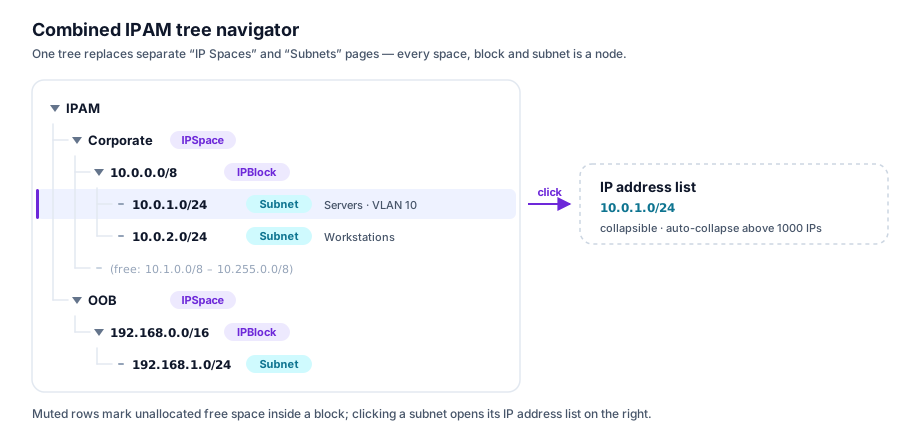
Clicking a subnet opens its IP address list panel on the right. The IP address list is collapsible — useful for large subnets (e.g., WiFi /16) where listing every IP is slow. A toggle “Show IP list” defaults based on subnet size (auto-collapse if > 1000 IPs).
Subnet Column Customization
The subnet list table supports:
- Selectable columns: user chooses which columns to display; preferences are persisted per user
- Sortable: click any column header to sort ascending/descending
- Filterable: per-column filter chips (e.g., status = active, utilization > 80%)
- Bulk edit: select multiple subnets → edit common fields in bulk (name, tags, custom fields, status, VLAN ID)
The same column customization applies to IP address lists, DHCP scope lists, and DNS zone/record lists.
Gateway Auto-Assignment
When creating a subnet, the first usable IP (network address + 1) is automatically designated as the gateway (status = reserved, description = "Gateway"). This can be:
- Changed to any other IP in the subnet
- Deleted if no gateway is needed (e.g., transit link)
- Overridden during import
Parent/Child Setting Inheritance
Settings can be defined at the IPSpace or IPBlock level and inherited by child subnets, with per-subnet overrides:
| Setting | Inheritable |
|---|---|
domain_name |
Yes — subnet inherits space/block domain, can override |
dns_servers |
Yes |
dhcp_server_group_id |
Yes |
tags |
Merged (parent tags + subnet tags) |
custom_fields |
Merged (parent defaults + subnet overrides) |
Inheritance display: the UI shows inherited values in muted text with a “Inherited from IPBlock: 10.0.0.0/8” tooltip. Overriding a field shows an “Override” badge.
Multiple Domains per Subnet
A subnet can be associated with multiple DNS domains. When assigning an IP address, the user selects which domain the hostname record belongs to:
Subnet: 10.0.1.0/24
  Domains: [corp.example.com, backup.example.com]

IPAddress: 10.0.1.42
  hostname: db-01
  domain: corp.example.com  ← selected at assignment time
  fqdn: db-01.corp.example.com (auto-computed)
Implementation: SubnetDomain junction table; IPAddress.domain_id (FK → DNSZone).
12. MAC Address / OUI Vendor Lookup
Opt-in feature — configured in Settings → IPAM → OUI Vendor Lookup. Off by default. When enabled, SpatiumDDI maintains a local copy of the IEEE OUI database to display vendor names next to MAC addresses in all IP and DHCP lease tables.
- Source:
https://standards-oui.ieee.org/oui/oui.csv(~5 MB, ~35k prefixes) - Update schedule:
app.tasks.oui_update.auto_update_oui_databaseticks hourly via Celery Beat; the task itself honoursPlatformSettings.oui_lookup_enabled+oui_update_interval_hours(default 24 h) so cadence is UI-controlled without restarting beat. - Manual refresh:
POST /api/v1/settings/oui/refreshqueuesapp.tasks.oui_update.update_oui_database_now, bypassing the interval gate. Exposed as a “Refresh Now” button in the Settings UI. - Storage:
oui_vendor(prefix CHAR(6) PRIMARY KEY, vendor_name VARCHAR(255), updated_at TIMESTAMPTZ).prefixis the first three MAC octets as six lowercase hex chars (matches the canonical form_normalize_macalready produces). - Incremental diff: each run SELECTs the current snapshot, classifies incoming rows into
added/updated/removed/unchanged, and applies only the deltas inside one transaction. A prefix’supdated_atonly bumps when the vendor string actually changes — so the timestamp tracks real IEEE re-assignments, not cron ticks. A failed fetch or parse rolls back to the previous snapshot so lookups never see partial data. - Refresh modal: the Settings page “Refresh Now” button opens a modal that polls
GET /api/v1/settings/oui/refresh/{task_id}and rendersTotal / Added / Updated / Removed / Unchangedcounters when the task finishes. - User-Agent: the IEEE edge returns HTTP 418 to clients with the default Python-httpx UA. The fetcher presents as
SpatiumDDI-OUI-Fetcher/1.0 (+https://github.com/spatiumnorth/spatiumddi). - Display: MACs render as
aa:bb:cc:dd:ee:ff (Cisco Systems)in the IP address table and DHCP leases. The IP table’s MAC column filter also matches the vendor name soapple/ciscowork when operators know the maker but not the prefix. When OUI is disabled thevendorfield is simply null on the wire and the UI falls back to the bare MAC.
12a. Address-space reports (issue #917)
Three read-only reports that answer “what is wrong with my address space right now”, each at a threshold the caller picks rather than one an alert rule was configured with.
| Route | Answers |
|---|---|
GET /api/v1/ipam/reports/stale-ips |
allocated IPs nothing has seen in N days (#45) |
GET /api/v1/ipam/reports/hygiene |
the three #369 hygiene detections, live |
GET /api/v1/ipam/reports/vendors |
device counts by hardware vendor |
GET /api/v1/ipam/reports/vendors/devices |
the devices behind one vendor bucket |
GET /api/v1/ipam/subnets/{id}/reconciliation |
per-subnet discovery reconciliation (#23) |
Hygiene
Three buckets, all derived from the discovery last_seen_at / ip_mac_history
signals:
free_but_responding— rows markedavailablethat answered on the wire insidefree_responding_days. Either the row is wrong or something is squatting; both matter before the address is handed out again.stale_reservations—reserved/static_dhcprows nothing has seen instale_reservation_days. Requires at least one prior sighting, so a subnet where discovery was never enabled does not read as dead.unknown_mac_in_static_range— a reservation whose recently observed MAC differs from the recorded one. Operator-setmac_addressis never overwritten by discovery, so a differing recent observation is a genuine “someone else is answering on this IP”.
These have existed as alert rules since #369, which answers “tell me when this becomes true”. The report answers “is it true right now”, without requiring a rule to have been configured — and it calls the same matchers the evaluator does, so the two cannot disagree about what a detection means.
counts are the full match counts while the row lists are capped at limit;
truncated says whether any bucket was cut, so a client that received exactly
limit rows does not have to compare against counts to find out.
Vendor rollup
Requires OUI lookup to be enabled (Settings → IPAM). When it is off the rollup
returns zero matches with an unchanged shape — total_macs_seen is what tells
an empty network apart from a disabled feature or a stale OUI table.
source selects ipam (managed rows), dhcp_active (live leases), or all
(the union, deduplicated by MAC — a device with both is one device).
12b. “Where has this MAC been?”
Per-IP MAC history is stored in ip_mac_history and surfaced through the
new-device endpoints rather than an IPAM-named one, which is not
guessable:
GET /api/v1/new-devices/sightings?classification=known&search=<mac>
Each row carries the MAC, the IP it was seen on, that IP’s subnet, the OUI
vendor, and first_seen / last_seen. classification=new is the
unacknowledged review queue; known is the history. The surface is gated on
the security.new_devices feature module.
Pair it with GET /api/v1/dhcp/lease-history?mac=<mac> (see
DHCP.md) for the DHCP side of the same question — that one is
fleet-wide and needs no module.
13. Network Device Management (SNMP Polling)
SpatiumDDI can manage a registry of network devices (routers, switches, access points) that are polled via SNMP to gather:
- ARP table → IP-to-MAC mappings (feeds IPAM discovery)
- FDB (forwarding database) → MAC-to-switch-port mappings (shows which switch/port a device is connected to)
- Interface information → link status, speed, VLAN assignments
This is handled by a dedicated snmp-poller container (separate from the core API).
Network Device Model
NetworkDevice
  id, name, hostname, ip_address
  type: enum(router, switch, ap, firewall, other)
  vendor: str (nullable, auto-populated from SNMP sysDescr)
  snmp_version: enum(v1, v2c, v3)
  -- SNMPv2c
  community: str (encrypted)
  -- SNMPv3
  security_name: str
  auth_protocol: enum(MD5, SHA, SHA256, none)
  auth_key_ref: str
  priv_protocol: enum(DES, AES, AES256, none)
  priv_key_ref: str
  -- Polling
  poll_interval_seconds: int (default 300)
  poll_arp: bool (default true)
  poll_fdb: bool (default true)
  poll_interfaces: bool (default true)
  last_poll_at: timestamp
  last_poll_status: enum(success, failed, timeout)
  -- VRF
  vrf_aware: bool (default false)
  vrfs: [str] (nullable)   -- if vrf_aware=true, poll only these VRF names; empty = poll all VRFs
VRF-Aware ARP Polling
When a router has multiple VRFs, the standard ARP table (ipNetToMediaTable, OID 1.3.6.1.2.1.4.22) only returns the global routing table. To get ARP entries from named VRFs, the poller must query per-VRF using SNMP community string indexing (SNMPv2c) or context names (SNMPv3):
| SNMP Version | VRF Method |
|---|---|
| SNMPv2c | Community string <community>@<vrf-name> (Cisco convention) or <community>@<vrf-rd> |
| SNMPv3 | Context name set to the VRF name in the SNMPv3 PDU header |
When vrf_aware = true:
- The poller iterates over each VRF in the
vrfslist (or discovers all VRFs viaCISCO-VRF-MIB::cvVrfNameif the list is empty) - Each VRF’s ARP table is polled separately
- Results are tagged with
vrf_nameand stored inIPAddress.vrf_namefor display in the UI - Duplicate IP entries across VRFs are allowed (matches the IPAM model — different IPSpaces can hold the same IP range)
- The poller attempts to match each ARP entry to the correct IPSpace based on the VRF name (configurable mapping:
DeviceVRFMapping:device_id,vrf_name,ip_space_id)
IP/MAC/Port Display
In the IP address list, additional columns show:
- MAC Vendor (from OUI lookup)
- Switch (which device last reported this MAC in its FDB)
- Port (which interface on that switch)
Example row:
10.0.1.42 | db-01.corp.example.com | 00:1A:2B:3C:4D:5E (Dell) | sw-01.dc1 | Gi1/0/24 | Allocated
13a. DNSBL / RBL Reputation Monitoring (#528)
SpatiumDDI already knows every public-facing IP it manages, so it can check them against the major DNS blocklists before a mail-deliverability / reputation problem is reported by users. IPv4 only in v1 (the DNSBLs are IPv4-centric; IPv6 DNSBL is a future enhancement).
Behind the security.dnsbl feature module, which ships disabled
(#1069): armed, it
asks public blocklist operators about the operator’s own address space, and
an off-prem call is a choice. It is the outer of two gates — even enabled,
the subsystem makes zero external DNS queries until the operator flips
the master sweep switch AND enables at least one list.
Curated catalog (dnsbl_list). Seeded as platform rows
(is_builtin=True) at startup, keyed on the unique zone_suffix
(idempotent; refreshes descriptive metadata but never clobbers the
operator-owned enabled flag). Seeded lists: Spamhaus ZEN
(zen.spamhaus.org), Barracuda (b.barracudacentral.org), SpamCop
(bl.spamcop.net), SORBS (dnsbl.sorbs.net), UCEPROTECT L1
(dnsbl-1.uceprotect.net), PSBL (psbl.surriel.com). Each row carries
a return_codes map (127.0.0.x → meaning), requires_registration,
and a qps_note describing the list’s query-rate / registration policy
— surfaced as a badge + note in the setup UI. Every list ships
disabled; the operator opts each in after reading its policy
(Spamhaus / Barracuda need a data-feed subscription or a registered,
non-public resolver for anything beyond trivial volume). Operators can
also add custom lists; built-in rows can be disabled but not deleted.
Candidate set. The daily sweep derives its candidate IPs from four
sources (deduped; private/reserved/CGNAT and IPv6 skipped via
app.services.ipam.classify.is_private_ip; source precedence
pinned > nat_egress > internet_facing > ipam):
- public IPv4 IPAM
ip_addressrows; - every IP in an
internet_facing-classified subnet (#75); - NAT / hide-NAT / PAT external (egress) addresses (
nat_mapping.external_ip); - operator-pinned IPs (
dnsbl_pinned_ip).
Sweep (app.tasks.dnsbl_sweep.sweep_dnsbl, beat daily at 04:30).
Gated inside the task on the security.dnsbl module + the
PlatformSettings.dnsbl_monitoring_enabled master switch. For each
candidate × enabled list it issues a reversed-octet lookup
(4.3.2.1.zen.spamhaus.org, A + TXT) via dnspython’s async resolver,
jitter-throttled to stay list-friendly, autoretry_for transient
DB/socket errors. NXDOMAIN = not listed; an A answer = listed (TXT
fetched for the delist reason). A resolver error is recorded as
check_error and never flips a listing off (so a transient failure
can’t spuriously auto-resolve an alert). Per-(ip, list) latch state
persists to dnsbl_listing (listed, return_codes, txt_reason,
first_listed_at, last_checked_at, resolved_at). Optional explicit
resolver IPs via dnsbl_query_resolvers (some lists refuse queries
from large public resolvers).
Alert. The latch-once ip_blocklisted AlertRule (seeded DISABLED)
fires on first listing (naming the lists) and auto-resolves when the
sweep finds the IP delisted, via the standard AlertEvent →
syslog/webhook/SMTP/chat fan-out.
Surfaces. Admin page at Administration → DNS Blocklists
(/admin/dns-blocklists): sweep settings, per-list enable +
registration/QPS notes, pinned-IPs list, blocklisted-IP overview. The
IP detail modal (IPAM row-click) grows a Reputation panel showing
per-list status + a manual Check now action
(POST /dnsbl/check). REST under /api/v1/dnsbl/*; Operator Copilot
tools find_blocklisted_ips / count_blocklisted_ips /
find_dnsbl_lists (read, default-on) + propose_pin_ip_for_dnsbl
(write proposal, default-off).
14. UI Backlog (Tracked Items)
Items marked ✅ are implemented. Remaining items are planned but not yet built.
✅ 14.1 Network and Broadcast Address Display
Implemented. When a subnet is created, network and broadcast address records are automatically inserted. They appear in the IP address table with distinct grey network / broadcast status badges, are rendered at reduced opacity, have no edit or delete buttons, and are excluded from allocation (next-available and manual). /31 and /32 subnets are exempt per RFC 3021.
✅ 14.2 Inline Editing of IP Spaces, Subnets, and IP Addresses
Implemented.
- IP Space: pencil icon on space header → edit modal (name, description). Delete is accessible from within the edit modal via a two-step confirmation (warning → checkbox confirm).
- Subnet: pencil icon on subnet row (hover) and in detail panel header → edit modal (name, description, gateway, VLAN ID, status).
- IP Address: pencil icon on each address row → edit modal (hostname, description, MAC, status).
networkandbroadcastrows are not editable.
✅ 14.3 Space Tree-Table View
Implemented. Clicking an IP Space in the left tree now shows a hierarchical flat table in the right panel. The table renders all blocks and subnets in the space in order, with depth-based indentation showing the tree structure. Block rows use a violet Layers icon and appear with a subtle background; subnet rows use a blue Network icon. Columns: Network, Name, VLAN, Used IPs, Utilization bar, Size (total IPs), Status. Clicking a block row navigates to BlockDetailView; clicking a subnet row opens the subnet IP address list.
✅ 14.4 Blocks vs Subnets Distinction in Create Flow
Implemented. Separate “Add block” (Layers icon) and “Add subnet” (+ icon) buttons appear on the space header and on each block row. CreateBlockModal has no gateway/VLAN/DHCP fields. Blocks appear with a Layers icon; subnets with a Network icon throughout the tree and table views.
✅ 14.5 Breadcrumbs as Colored Pills
Implemented. A BreadcrumbPills component renders clickable colored pills above all detail panels:
- Blue pill = IP Space (navigates to space tree-table)
- Violet pill = Block or ancestor blocks (navigates to
BlockDetailView) - Emerald pill = current Subnet (non-interactive, marks current position)
When the path is deeper than 4 levels, middle items are compressed to …. Pills appear in SubnetDetail, BlockDetailView, and SpaceTableView.
✅ 14.6 Collapsible Left Sidebar
Implemented. A « / » chevron button at the sidebar footer collapses the sidebar to 56px icon-only mode. Nav items show tooltips on hover when collapsed. State is persisted to localStorage and restored on page load.
14.7 Settings Page Link
A Settings entry should be added to the left sidebar nav, pointing to /settings. Phase 1 settings include:
- Platform display name and logo
- Default IP allocation strategy (sequential / random)
- Session timeout
- Utilization warning / critical thresholds
- Auto-logout idle timeout
This maps to the PlatformSettings singleton model defined in SYSTEM_ADMIN.md §6.
✅ 14.8 Orphaned (Soft-Deleted) IP Addresses
Implemented (using status field rather than deleted_at). When an IP address is deleted via the UI, DELETE /ipam/addresses/{id} sets status = "orphan" rather than issuing a SQL DELETE. Orphaned addresses:
- Appear in the IP list at reduced opacity with an orange “orphan” status badge
- Show a Restore (RefreshCw) button that sets status back to
allocated - Show a Purge (Trash) button that permanently deletes after a confirmation modal
DELETE /ipam/addresses/{id}?permanent=truehard-deletes immediately
The address’s host record and PTR are deleted when it becomes an orphan, and re-created on Restore. Its DNS aliases are withdrawn, not deleted (#2604): they leave the served zone, sit in Trash under one deletion batch per address, and come back on Restore, a CNAME re-pointed at the address’s current name. A record that took an alias’s name while the address was an orphan makes the Restore a 409 naming it. The trash retention purge leaves these aliases alone while the address is still an orphan; purging or permanently deleting the address deletes them for good. An address restored with no hostname leaves its aliases withdrawn.
Note: the current implementation uses status = "orphan" instead of a deleted_at column. The spec’s “Show deleted toggle” and “recycle bin” concept can be revisited in a future density pass.
✅ 14.9 IP Space Table View (Click-Through)
Implemented. See §14.3 above. The space view now shows a hierarchical tree-table with both blocks and subnets, not just subnets.
15. Post-Alpha Additions (Unreleased)
Features that landed after the 2026.04.16-2 cut but before the next tag.
✅ 15.1 Block / Subnet Overlap Validation
_assert_no_block_overlap() in backend/app/api/v1/ipam/router.py rejects
two failure modes at create time and on the reparent path of
update_block:
- Same-level duplicates — creating
10.0.0.0/8twice under the same parent (or at the space root) fails with409 Conflict. - Overlapping CIDRs — creating
10.0.0.0/16when a sibling10.0.0.0/8already exists at the same level fails with the same status.
Implementation is a single PostgreSQL query using the cidr && operator:
SELECT network FROM ip_block
WHERE space_id = :space_id
  AND network && CAST(:network AS cidr)
  AND (parent_block_id IS NOT DISTINCT FROM :parent_block_id)
  AND (:exclude_id IS NULL OR id <> :exclude_id)
Subnet overlap within a parent block is already enforced by existing
Subnet validation.
✅ 15.2 Scheduled IPAM ↔ DNS Auto-Sync
Celery beat task app.tasks.ipam_dns_sync.auto_sync_ipam_dns runs every
60 s unconditionally; the task itself gates on three PlatformSettings
columns:
dns_auto_sync_enabled— master on/off (default off).dns_auto_sync_interval_minutes— how often the task actually syncs (default 30 min). The task last-run timestamp is persisted so the cadence can be changed from the Settings UI without restarting beat.dns_auto_sync_delete_stale— opt-in deletion of auto-generated DNS records that no longer match an IPAM row.
The task iterates every subnet with dns_zone_id set and delegates the
per-subnet reconciliation to
app.services.dns.sync_check.compute_subnet_dns_drift +
app.api.v1.ipam.router._apply_dns_sync — the same code paths that power
the manual “Sync now” button, so results are identical.
Admin UI: new DNS Auto-Sync section in /admin/settings with
enable-toggle, interval input, and delete-stale checkbox.
✅ 15.3 Shared Zone Picker + Bulk-Edit DNS Zone
ZoneOptions is a shared React component that renders a DNS-zone
<select> dropdown with the subnet’s primary zone first and an
<optgroup label="Additional zones"> separator for the rest. Used in:
- Allocate IP modal (CreateAddressModal).
- Edit IP modal (EditAddressModal).
- Bulk-edit IPs modal (when the “DNS zone” opt-in toggle is enabled).
The picker is restricted to the subnet’s explicit primary + additional zones when any are pinned. If the subnet only has a DNS group assigned (no per-zone pinning), the picker falls back to every forward zone in the group (reverse zones are filtered out).
IPAddressBulkChanges.dns_zone_id on
POST /api/v1/ipam/addresses/bulk-edit routes each selected IP through
_sync_dns_record for move / create / delete, so bulk re-homing an IP
range to a different zone updates DNS in the same request.
✅ 15.4 Bulk-Edit per-field opt-in
Every field on the bulk-edit-IPs modal has a sibling checkbox. Unchecked fields are left untouched for every selected row; checked fields are applied. Tags support both a merge mode (union with existing) and a replace-all mode selected via a radio underneath the tags input. This replaces the earlier behaviour where any modified field applied to every selected row regardless of intent.
✅ 15.5 Inherited-Field Placeholders
EditSubnetModal and EditBlockModal show every custom-field input with
an HTML placeholder sourced from the first ancestor that defines the
field. A small “inherited from block <name>” or “inherited from space
<name>” badge appears next to the input. Typing a value overrides the
inheritance; clearing the input restores it.
Backed by:
GET /api/v1/ipam/subnets/{id}/effective-fields(existing).GET /api/v1/ipam/blocks/{id}/effective-fields(new — parity endpoint added in Wave D).
✅ 15.6 IPv6 Support
Storage, allocation, and the UI paths support IPv6 today. Specifically:
Subnet.total_ipswidened toBigInteger(migratione3c7b91f2a45) so a/64(2⁶⁴addresses) fits;_total_ips()clamps at2⁶³ − 1for anything larger.DHCPScope.address_familycolumn (migrationd7a2b6e9f134). The Kea driver renders either aDhcp4orDhcp6config block from the same scope rows, with v6 option-name translation via_KEA_OPTION_NAMES_V6(v4-only options are dropped from v6 scopes with a warning).- Subnet create skips the v6 broadcast row;
_sync_dns_recordemits AAAA forward records + PTR inip6.arpareverse zones. GET /api/v1/ipam/blocks/{id}/available-subnetsaccepts/8–/128with an address-family guard; the frontend’s “Find by size” splits the prefix pool into v4 (/8–/32) and v6 (/32, /40, /44, /48, /52, /56, /60, /64, /72, /80, /96, /112, /120, /124, /127, /128) and filters to prefixes strictly longer than the selected block’s prefix.- Create-block and create-subnet placeholder text includes an IPv6
example (
e.g. 10.0.0.0/8 or 2001:db8::/32). - Next-available allocation works on v6 subnets:
POST /api/v1/ipam/subnets/{id}/nexthonourssequential/random/eui64strategies, defaulting toSubnet.ipv6_allocation_policy. EUI-64 derives per RFC 4291 §2.5.1 (_eui64_from_mac); random uses a CSPRNG suffix with collision retry and skips the all-zero subnet-router anycast address._pick_next_available_ipdrives both the commit path andGET /api/v1/ipam/subnets/{id}/next-ip-preview(which accepts?mac_address=to preview the EUI-64 candidate). Unit coverage lives inbackend/tests/test_ipv6_allocation.py, pinning the RFC 4291 Appendix A worked example.
✅ 15.7 IP Alias Refresh + Delete Confirmation
Two smaller UX fixes on the subnet Aliases tab:
- Adding or deleting an alias from the IP Edit modal now invalidates
["subnet-aliases", subnet_id]in addition to the per-IP cache, so switching tabs no longer shows a stale alias list. - The trash icon in the subnet Aliases tab now pops a
ConfirmDeleteModal(“Delete alias<fqdn>? The DNS record will be removed.”) — matching the single-step confirmation used elsewhere in IPAM rather than firing an unconfirmed delete.
✅ 15.8 Modal Focus-Ring Fix
IPAM form inputs now use focus:ring-inset so the 2px focus ring renders
inside the rounded border. Prevents the left / right edges of the ring
from being clipped by the modal wrapper’s overflow-y-auto, which
browsers treat as overflow-x: auto in practice.
✅ 15.9 Mobile-Responsive Layout
- Sidebar converts to a drawer with a backdrop at
<mdbreakpoints; a hamburger toggle appears in theHeadercomponent. - All data tables in IPAM / DNS / DHCP / VLANs / admin are wrapped in
overflow-x-autowith amin-wso wide columns scroll horizontally instead of overflowing the viewport. - All modals use
max-w-[95vw]on<smso they always fit the screen.
✅ 15.10 Subnet / Block Resize (grow-only)
Why this and not arbitrary CIDR edit. A network engineer’s source of truth is the CIDR stored in SpatiumDDI. A bad edit silently orphans IP records, breaks DHCP scopes, and invalidates reverse-zone coverage. Resize is a restricted, validated, audited operation with two explicit guarantees:
- The new CIDR is strictly larger than the old (smaller prefix length). Shrinking is rejected with a 422 that explains the workflow (delete + recreate is the safer path).
- The old CIDR is a sub-network of the new CIDR (
old.subnet_of(new)in Pythonipaddresssemantics). A “resize” that would move the network address to an entirely different range is really a recreate and is rejected.
Endpoints (under the standard IPAM router-level permission gate —
POST requires write on subnet / ip_block):
| Method | Path | Purpose |
|---|---|---|
| POST | /api/v1/ipam/subnets/{id}/resize/preview |
Blast-radius dry-run |
| POST | /api/v1/ipam/subnets/{id}/resize |
Commit under advisory lock |
| POST | /api/v1/ipam/blocks/{id}/resize/preview |
Same for blocks |
| POST | /api/v1/ipam/blocks/{id}/resize |
Same for blocks |
Validation rules (every rule re-run at commit time — TOCTOU guard):
- Grow-only, same address family (v4 ↔ v6 is a recreate, not a resize).
- Old CIDR ⊂ new CIDR.
- New CIDR must fit inside the parent block (for subnets) or parent block (for child blocks). If the parent is too small we return 422 with “resize the parent block first” — we do not chain-resize the parent. A silent recursive resize is how a network tree gets a hole punched through it.
- No overlap with siblings or cousins anywhere in the same
IPSpace. - Block resize: every descendant block + subnet must still fit inside the new CIDR. Mathematically redundant given rule 2 but re-checked.
space_idis invariant — resize never moves a resource across spaces.
Preview response (SubnetResizePreviewResponse) surfaces the
“blast radius” so the operator knows what they’re about to touch:
- Old vs. new network / broadcast IPs + total IP count delta.
- Current gateway + suggested new first-usable (caller decides whether to move it).
- Placeholders split into two buckets:
placeholders_default_named— thenetwork/broadcastrows with no user-set hostname. These are the rows the commit can safely recycle to the new boundaries.placeholders_renamed— rows at old boundaries where the user has set a hostname (e.g.anycast-vip). Always preserved; the commit never touches them regardless ofreplace_default_placeholders.
- Affected counts: IPs in subnet, DHCP scopes / pools / static assignments, auto-generated DNS records, active leases.
- Reverse zones: the old CIDR’s set and the zones the new CIDR adds —
one per
/24it spans, so growing a/24to a/22lists three (#1840;ensure_reverse_zones_for_subnetis called idempotently on commit). conflicts— non-empty means the commit will 4xx; the UI disables the confirm button.warnings— non-blocking items (DHCP pools won’t auto-expand, the netmask change, and for any network-address shift a dedicated “update your ACLs / router docs” reminder).
Commit request (SubnetResizeCommitRequest):
| Field | Default | Effect |
|---|---|---|
new_cidr |
required | The target CIDR. |
move_gateway_to_first_usable |
false |
If true, set gateway to the new first-usable IP (new_net.network_address + 1 for v4 ≤/30, v6 ≤/126). Otherwise leave gateway untouched — the old gateway IP is guaranteed to be inside the new CIDR because old ⊂ new. |
replace_default_placeholders |
true |
Delete the unchanged “network”/”broadcast” rows at the old boundaries and re-create them at the new boundaries. Renamed rows are preserved regardless. |
Concurrency. Commit wraps the full mutation in
pg_try_advisory_xact_lock(ns, crc32(id)); a concurrent resize on the
same resource returns 423 Locked. The preview does not take the
lock — it is read-only and would only serialise legitimate parallel
read load.
Audit. One AuditLog(action="resize") row per commit, with
old_value {network, gateway, total_ips} and new_value
{network, gateway, total_ips, reason: "user_resize",
placeholders_deleted, placeholders_created, dhcp_servers_notified}
,
and resource_display "{old_cidr} → {new_cidr}".
DHCP / DNS side-effects.
- For every agent-based DHCP server with a scope on the resized subnet,
the control plane rebuilds the
ConfigBundle, bumpsconfig_etag, and enqueues a pendingapply_configop (mirroring the subnet-delete path). Agentless drivers (Windows DHCP read-only) are skipped — they have no write surface. ensure_reverse_zones_for_subnetruns after the CIDR mutation so the reverse zones for the new range are created. Idempotent for the zones that already exist.- Forward A/AAAA and PTR records for IPs inside the old CIDR are not touched — their values and names are unchanged by a grow.
UI. A new Resize… button sits next to Edit on both the
subnet header (IPAMPage.tsx subnet detail) and the block header.
The modal (frontend/src/pages/ipam/ResizeModals.tsx) runs a
preview → confirm flow with:
- Live preview of old → new network / broadcast / gateway / IP count.
- Collapsible lists of affected DHCP scopes / DNS records / leases.
- A big yellow banner reminding the operator that clients, routers, and documentation outside SpatiumDDI need to be updated by hand.
- A type-to-confirm gate: the confirm button only enables after the user has typed the new CIDR exactly into a text input. Conflicts surfaced by the preview hide the confirm button entirely; there is no force-commit.
Out of scope (deliberate non-goals):
- Shrinking — explicit 422 rejection with guidance.
- Cross-space moves — rejected; space is invariant.
- Chain-resizing parent blocks — rejected; the operator must resize the parent first.
- Auto-expanding DHCP pools into the new address space — pools stay where they are; the preview flags this as a warning.
- DNS record value mutations — a grow doesn’t change any record’s
name/value; only new reverse-zone coverage is backfilled.
✅ 15.11 IP Assignment Collision Warnings
Two non-fatal guardrails on IP create / update. Both fire at the API layer (so Terraform, Ansible, and ad-hoc scripts get the same treatment as the UI); both are confirmable — they’re warnings, not hard rejections. The user’s options either way are “fix the input” or “do it anyway”.
| Collision | Trigger |
|---|---|
| FQDN | Same (lower(hostname), forward_zone_id) on another IP anywhere in SpatiumDDI. Common accident: two people naming a host web. Occasionally deliberate: round-robin A records. |
| MAC | Same normalised MAC anywhere in IPAM. Usually means the MAC was cloned / moved and the old row should be decommissioned before re-use. |
Server side. _normalize_mac canonicalises colons / dashes /
dots / bare-hex input to 12 lowercase hex chars before comparison so
AA:BB:CC:DD:EE:FF and aabb.ccdd.eeff collide as expected.
_check_ip_collisions joins through DNSZone + Subnet to
return a list of warning dicts with the existing IP, subnet, and
(for FQDN collisions) the published FQDN.
A force: bool = False field is added to IPAddressCreate /
IPAddressUpdate / NextIPRequest. When force=false and a
collision exists the endpoint returns 409 with
detail = {warnings: [...], requires_confirmation: true}. Clients
re-submit with force=true to proceed.
On update, the check only runs for fields the client explicitly set
(model_dump(exclude_unset=True)), so editing an unrelated field
on an IP that happens to share an FQDN with another row won’t surface
a warning. exclude_ip_id=ip.id keeps the row from colliding with
its own current state.
UI. Shared CollisionWarning type + amber
CollisionWarningBanner in IPAMPage.tsx. Both the allocate and
edit modals parse the 409 body, render one line per collision (FQDN +
existing IP + subnet, or MAC + existing IP + hostname + subnet), and
flip the submit button to “Allocate anyway” / “Save anyway”. Editing
any collision-relevant field clears the pending warning so the next
submit re-checks fresh.
What’s intentionally not a collision.
- Same FQDN in different zones (e.g.
web.corp.example.comvs.web.staging.example.com) — those are distinct records. - PTR collisions — every IP gets at most one PTR, handled separately by the Sync DNS classifier.
- Empty MAC / empty hostname — nothing to collide with.
A record an operator already wrote is adopted, not duplicated. When an
address’s A / AAAA or PTR would be identical (same zone, name, type and
value) to a record a person wrote by hand, IPAM links the address to that
row and creates no auto_generated copy (#1867).
This is the same rule the record API applies with its 409 on a duplicate
(#1230), and it holds on every path that publishes records: allocation,
bulk-edit DNS zone, DDNS from a lease and Sync DNS. The adopted row stays the
operator’s (auto_generated false, no ip_address_id), so deleting the
address or expiring the lease leaves it served. A record with the same name
but another value is a different record and still gets its own, and a
generated record belonging to another address is never adopted. Renaming
an address onto a name and value the operator wrote retracts IPAM’s own row
and adopts theirs; renaming an adopted address away writes a new record for
IPAM and leaves the operator’s alone. Sync DNS counts an adopted record as
present, not missing.
✅ 15.12 DHCP Pool Awareness in IP Listing & Allocation
The subnet IP listing now shows where DHCP pools begin and end, and the allocation paths refuse to hand out IPs that live inside a dynamic pool — those are owned by the DHCP server, not IPAM.
IP listing. The subnet table renders ▼ “Start of <type> pool”
and ▲ “End of <type> pool” rows interleaved with the IP rows,
computed client-side from the pool ranges. Colour by pool type:
| Pool type | Accent | Meaning |
|---|---|---|
dynamic |
cyan | DHCP server hands these out first-come-first-served |
reserved |
violet | Reserved for future static allocation |
excluded |
zinc | Carved out of the dynamic range — operator may manually allocate |
Pool markers render even when no IPs have been assigned inside the range, so the operator sees pool extents as first-class structure.
Backend gates. Three helpers in backend/app/api/v1/ipam/router.py:
_load_dynamic_pool_ranges(db, subnet_id)joinsDHCPPool → DHCPScope → Subnetand returns packed int ranges for everypool_type == "dynamic"pool on the subnet._ip_int_in_dynamic_pool(ip_int, ranges)— cheap contains check used by both the write path and the preview endpoint._pick_next_available_ip(db, subnet, strategy)— hoisted out ofallocate_next_ipso the commit path and the new preview endpoint share the same “skip dynamic ranges” semantics.
Allocation rules.
| Path | Behaviour |
|---|---|
POST /subnets/{id}/addresses (manual) |
Allowed inside a dynamic pool, but returns a force-overridable collision warning (409 with {warnings, requires_confirmation}, kind: "dynamic_pool") so the operator confirms and knows to also pin a matching static reservation (#631). Excluded / reserved pools raise no warning. |
POST /subnets/{id}/next |
_pick_next_available_ip skips dynamic ranges during its linear search. |
GET /subnets/{id}/next-ip-preview?strategy=sequential\|random |
Read-only peek. Returns {address, strategy}; address: null means IPv6 (not supported) or exhausted subnet. No lock, no write. |
UI. AddAddressModal in next mode fetches the preview on
open and shows Next available: 10.0.1.42 (skips dynamic DHCP
pools) as an emerald highlight, or a destructive “No free IPs in
this subnet” line with submit disabled when the subnet is exhausted.
In manual mode the typed address is checked client-side against
the dynamic ranges: an amber advisory says the address is inside a
dynamic pool and suggests a matching static reservation, and submit
stays enabled. The server’s force-overridable 409 (the table above)
is the authoritative check — the modal shows its warning and turns the
button into Allocate anyway, which re-submits with force: true.
✅ 15.13 Subnet-Scoped IP Address Import
The space-scoped importer (§7) creates blocks + subnets from a vendor export; it does not import addresses. The subnet-scoped importer handles the far more common “dump IPs out of phpIPAM / NetBox / Infoblox / a CSV and load them into SpatiumDDI” migration case.
Endpoints:
| Method | Path | Purpose |
|---|---|---|
| POST | /api/v1/ipam/import/addresses/preview |
Parse + dry-run validation |
| POST | /api/v1/ipam/import/addresses/commit |
Apply with fail / skip / overwrite |
Parser. Auto-routes CSV / JSON / XLSX rows by header — address
or ip columns make a row an address, network makes it a
subnet (rejected by the address importer; space-scoped importer
handles that case). Unrecognised columns drop into
custom_fields so a raw vendor export works without rename passes.
Validation per row. Each IP must fall inside the targeted
subnet’s CIDR. Rows outside are rejected at preview. The strategy
controls the collision behaviour when a row matches an existing IP
by (subnet_id, address):
| Strategy | On match |
|---|---|
fail |
Reject the whole batch (default). |
skip |
Leave the existing row untouched, count as skipped. |
overwrite |
Apply the import row’s fields. |
DNS sync. Rows with a hostname route through
_sync_dns_record(..., action="create") so A + PTR records publish
through the same RFC 2136 / WinRM path the UI uses. Reverse zones
are backfilled on commit.
Audit. One AuditLog(action="import") row per commit with
counts of created / updated / skipped / failed.
UI. AddressImportModal + a combined Import / Export
dropdown on the subnet header (SubnetImportExportButton) replacing
the older single-purpose export button.
✅ 15.14 Per-IP role + reservation TTL + MAC observation history
Three IP enrichment columns landed in 2026.04.26-1 via migration
f1c9a4d2b8e6_ip_role_reserved_mac_history:
-
ip_address.role(string, nullable) —host/loopback/anycast/vip/vrrp/secondary/gateway. Orthogonal tostatus— a row can be bothallocatedand avip.IP_ROLES_SHARED(anycast,vip,vrrp) bypass MAC-collision warnings, since the same MAC legitimately appears on multiple IPs in load-balancer or HSRP/VRRP topologies. Surfaced in the IP table as a chip and in the create/edit modal as a picker. -
ip_address.reserved_until(timestamp, nullable) — soft TTL onstatus="reserved"rows. The new beat taskapp.tasks.ipam_reservation_sweep.sweep_expired_reservationsruns every 5 min, finds rows whose TTL has passed, and flips them back toavailable. UI shows a relative-time chip (“expires in 2 days”) on the row + a datetime picker in the edit modal. -
ip_mac_historytable — append-only record of every distinct MAC ever observed against an IP, keyed(ip_address_id, mac_address)withfirst_seen+last_seentimestamps. Written on every IP create/update where a MAC is present; surfaced viaGET /ipam/addresses/{id}/mac-history(newest-first, OUI vendor lookup attached). The IP detail toolbar gains a “MAC History” button that opens a modal listing the rows.
✅ 15.15 Subnet operations — find-free / split / merge
Three endpoints. Find free is a read that mutates nothing; split and merge are preview-then-commit, with typed-CIDR confirmation gates and pg advisory locks held through commit:
-
POST /ipam/spaces/{id}/find-free— walks the IPBlock tree for unallocated CIDRs of the requested prefix length. Optionalparent_block_idscope (Find Free… on the block detail pre-restricts to that block) and amin_free_addressesfilter. Each candidate carriesfree_addresses(its usable host count, as the subnet would hold) and the filter compares against it. “Create subnet here” files the subnet under the block the row names (which may be a child of the searched block). Opened from a block, the dialog’s title, hint and empty state say it searches that block, not the space. Service layer inapp.services.ipam.free_space. -
POST /ipam/subnets/{id}/split/preview+/commit— break a subnet into 2^k aligned children at a longer prefix. Preview reports the prospective children + any IP-address conflicts (rows that wouldn’t fit cleanly into one child or the other); commit refuses if the typed CIDR doesn’t match. A host sitting on a child’s network or broadcast address (e.g. .127 / .128 of a /24 split into /25s) is ahost_on_child_boundaryconflict naming the address, and the commit refuses it; the preview also warns that every client needs the new netmask. Children inherit the parent’s compliance and discovery settings (PCI / HIPAA scope, internet-facing, role, do-not-probe, kind, customer, site, discovery and split-horizon); integration ownership and import provenance are not carried, and the preview warns when the parent has any. Service inapp.services.ipam.subnet_split. -
POST /ipam/subnets/{id}/merge/preview+/commit— collapse contiguous siblings back into one supernet viaipaddress.collapse_addresses. Preview reports the prospective merged CIDR + any conflicts. Single-source gateways are preserved; differing source gateways are nulled (operator must re-set). PCI scope, HIPAA scope, internet-facing and do-not-probe are the safe union (true when any source has it, and the preview says so); sources that disagree on kind, customer or site are a conflict; any other disagreeing setting (role, discovery, …) is a preview warning and the target’s value is kept. Service inapp.services.ipam.subnet_merge.
UI surfaces all three on the subnet-detail header, and via the bulk-action toolbar on the block- and space-level subnet tables: select 1 subnet to enable Split, select 2+ to enable Merge. Free-space finder on the block detail header pre-scopes to the block.
✅ 15.16 Soft-delete + Trash recovery
IPSpace, IPBlock, Subnet, DNSZone, DNSRecord, DHCPScope, and — since
#617 — a scope’s DHCPPool and DHCPStaticAssignment children (which
ride the scope’s deletion_batch_id, so one Restore brings the scope
back whole) inherit SoftDeleteMixin (deleted_at,
deleted_by_user_id, deletion_batch_id). A global do_orm_execute
listener injects
deleted_at IS NULL into every SELECT — opt out via
execution_options(include_deleted=True). Cascade-stamping under
one deletion_batch_id lets a single Restore click bring back
every dependent row atomically (subnet → its DHCP scopes; zone →
its records).
- Subnet / block / space delete is soft by default — UI confirms “move to Trash. You can restore from Admin → Trash within 30 days.” Hard-delete is reachable via the Permanent button on the Trash row.
- A trashed subnet stops publishing: the auto-generated A / AAAA / PTR records IPAM wrote for its addresses (gateway PTR included) are retracted through the record-op queue and trashed under the same batch, so a Restore re-asserts them (#1906). Records in a reverse zone that goes to Trash with the subnet ride that zone; records in a zone that stays (a /24 reverse zone kept for a sibling /25, the forward zone) are what this covers. Hand-made records are untouched.
- IP addresses are deliberately NOT soft-deletable — they cascade-delete with their parent subnet, and the parent subnet is the recoverable unit.
- Nightly
app.tasks.trash_purge.purge_expired_soft_deleteshard-deletes rows pastPlatformSettings.soft_delete_purge_days(default 30; set to 0 to keep forever). - Admin UI at
/admin/trashlists deleted rows newest-first, per-type filter + since-date filter + free-text search. Restore button opens a confirmation modal that surfaces conflict details when a live row would clash on the same uniqueness key.
Migration c1f4a8b27d09_soft_delete.
✅ 15.17 IPSpace VRF / route-domain annotation
Three new optional columns on ip_space (migration
f1c8b2a945d3_subnet_ops_ipspace_vrf):
vrf_name— VARCHAR(64), nullable.route_distinguisher— VARCHAR(32), nullable. ASN:idx or IPv4:idx form; no validation since vendors disagree.route_targets— JSONB list of RT strings ([]is a legal value distinct from NULL).
Pure metadata — address allocation already supports overlapping ranges via separate IPSpace rows; these columns give operators somewhere to put the routing identity for reporting / export / future BGP-EVPN integration. Surfaced as badges on the IPSpace detail header when set, plus a “VRF / Routing” section in the Edit Space modal (open by default since operators kept missing it under a collapsed toggle).
✅ 15.18 NAT mapping cross-reference into IPAM
nat_mapping carries operator-curated 1:1 NAT, PAT, and hide-NAT
records. SpatiumDDI doesn’t render or push these rules — purely
IPAM cross-reference. Migration f5b9c1e8d472_nat_ip_fks adds
optional FK columns internal_ip_address_id +
external_ip_address_id (ON DELETE SET NULL) auto-resolved on
create / update by looking up the typed string in ip_address.
Strings stay authoritative for addresses outside IPAM (a public
WAN IP, a peer’s NAT endpoint).
- Conflict detection — create / update rejects 409 when an
external IP+ports is already claimed by another
1to1/patrule on the same protocol (port-overlap aware, protocol-aware). - Per-IP listing —
GET /ipam/nat-mappings/by-ip/{id}returns every mapping touching an IPAM row (FK match + INET-string match on either side). - Per-subnet listing —
GET /ipam/nat-mappings/by-subnet/{id}uses Postgresinet <<= cidrcontainment to find every mapping whose internal IP falls inside a subnet’s CIDR.
UI: clicking the NAT badge on an IP row opens a modal listing every mapping for that IP; new “NAT” tab on the subnet detail shows every mapping touching the subnet’s CIDR.
Feature module ipam.nat (#2100). The whole surface (the
NAT Mappings page, the routes above, the Dashboard card and the
subnet / IP detail NAT tab, badges and dialog) can be turned off
under Settings → Features. While it is off the routes answer 404,
but the rows are kept, and the PAN-OS / Fortinet / Meraki mirrors
keep writing them. The module ships off, but with no operator
override it resolves on whenever nat_mapping holds a row
(ModuleSpec.default_on_if_rows_in), so an install that already
uses NAT keeps it after upgrade without a seeded feature_module
row. An operator’s choice always wins. Two consequences follow
from “on when there is data”: on a fresh install a firewall
mirror’s first NAT rule turns the surface on, and deleting the
last mapping on an install that never set the toggle turns it
off. The NAT Mappings page then says the feature is off and links
to Settings → Features. Turning it on there pins it on.
✅ 15.19 VXLAN ID surface in the UI
subnet.vxlan_id (Integer, range 1–16 777 214, nullable) existed
in the schema and the frontend type but no UI ever read or wrote
it. Numeric input added to Create + Edit subnet modals next to the
VLAN picker; chip on the subnet detail header next to the existing
VLAN chip when set.
✅ 15.20 IPAM template classes (issue #26)
Reusable stamp templates for blocks + subnets. New ipam_template
table captures default tags / custom-fields / DNS / DHCP / DDNS
settings (plus an optional sub-subnet child_layout) and stamps
them onto blocks or subnets at apply time. applies_to locks
each template to one of the two carriers so apply-time semantics
stay unambiguous. force=False fills only empty/null target
columns; force=True overwrites unconditionally and is the path
/reapply-all uses to refresh drift across every recorded
instance (cap 200). IPBlockCreate.template_id /
SubnetCreate.template_id add optional pre-fill on the create
paths; carrier rows now carry an applied_template_id SET-NULL
FK so a “reapply across instances” sweep can find every row touched.
Block templates with child_layout carve sub-subnets sequentially
on apply (and on create); idempotent — sub-subnets already at a
target CIDR are skipped. Admin → Platform → IPAM Templates page
with list + tabbed editor (General / Tags + CFs + DNS-DHCP / DDNS /
Child layout). New manage_ipam_templates permission seeded into
the IPAM Editor builtin role.
✅ 15.21 Block move across IP spaces (issue #27)
POST /ipam/blocks/{id}/move/preview + /move/commit accept a
target space_id + a typed-name confirmation. Pre-flight validates
target space exists, no CIDR overlap in the target tree, every
dependent row (DNS records, DHCP scopes, addresses with custom-field inheritance)
survives the move. MoveBlockModal walks the operator through
the consequences with a chevron-revealed list of affected resources
before the typed-name confirm unlocks Move.
✅ 15.22 Subnet classification tags (issue #75)
Four boolean columns on subnet for compliance flags:
pci_scope, hipaa_scope, internet_facing, contains_pii.
Tags inherit through the IP block tree (set on a parent block →
all descendant subnets get the tag) with an explicit override
toggle on the subnet. List filters across the IPAM page + the API.
Compliance card on Platform Insights shows rolled-up counts.
✅ 15.23 Split-horizon DNS publishing at the IPAM layer (issue #25)
IPBlock.dns_split_horizon boolean + the existing
dns_inherit_settings walk. When set, descendant subnets publish
records to dns_zone_id (internal) AND every entry in
dns_additional_zone_ids (DMZ / external). Per-record routing is
decided by the new IPAddress.dns_zone_overrides JSONB list
([{zone_id, record_type}]) so an operator can pin one address to
publish only into the internal zone. Auto-sync task respects the
split. Closes the IPAM-layer half of the split-horizon roadmap;
DNS Views (#24) covers the recursive-resolver-side split.
16. Rules & constraints
Server-side validations that reject requests with a human-readable
error. Clients should surface the response detail — the IPAM UI
already wires this up for every delete / allocate / create flow.
Delete guards
- IP space delete refused when non-empty. A space with any blocks
or subnets can’t be dropped; clear them first.
409inbackend/app/api/v1/ipam/router.py. - Block delete refused when non-empty. A block with child blocks
or subnets returns
409with a breakdown (“Block 10.0.0.0/8 still contains 3 child block(s) and 5 subnet(s)”).backend/app/api/v1/ipam/router.py. - Subnet delete refused when non-empty. A subnet with user-owned
IPs (anything other than
network,broadcast,orphan, or DHCP-lease-mirroredauto_from_leaserows) or any DHCP scope attached is rejected with409. Pass?force=trueto cascade; the same pre-delete cleanup (WinRM remove-scope, Kea bundle rebuild) still runs so nothing is orphaned on a running server.backend/app/api/v1/ipam/router.py.
Block hierarchy
- Block cannot be its own parent.
parent_block_idmust not equal the block’s own id.422inbackend/app/api/v1/ipam/router.py. - Reparenting can’t create a cycle. Moving a block into one of
its own descendants is caught before commit; same rule applies via
drag-and-drop in the UI (checked client-side too, but the server
is authoritative).
422. - Block must fit inside its parent block. Child CIDR must be
fully contained in the parent’s CIDR. Enforced on create + on
reparent.
422. - Block overlap at the same level. Sibling blocks in the same
space cannot have overlapping CIDRs (duplicates or otherwise).
Checked via
_assert_no_block_overlap.422.
Subnets
- Subnet must fit inside its parent block.
422. - Subnet overlap within a space. Two subnets in the same IP space
cannot overlap, regardless of which block they sit under. Checked
via
_assert_no_overlap.422. - Gateway must be a valid IP inside the subnet. Malformed IPs
return
422; a parseable IP outside the CIDR returns422. - VLAN reference must resolve. A
vlan_ref_idthat doesn’t point to an existing VLAN returns404. - VLAN ID must match the referenced VLAN. If both
vlan_idandvlan_ref_idare supplied, the tag must match the referenced VLAN’s tag.422.
IP allocation
- IP must be inside the subnet’s CIDR.
422. Same check applies in the import path. - IP inside a dynamic DHCP pool is a soft warning (#631). Manual
allocation inside an active
dynamicpool is allowed — pinning a MAC in-range is the standard idiom on every driver we ship — but returns a force-overridable collision warning (409,kind: "dynamic_pool") reminding the operator to also create a matching static reservation on the scope, since a bare IPAM row does not itself stop the DHCP server leasing the address. Re-submit withforce=trueto proceed. Auto-allocation (next/next-ip-preview/ bulk) still skips dynamic ranges — only the explicit, typed path opens up. - IP already allocated in the subnet. Duplicate address in the
same subnet returns
409. - Malformed IP. Non-parseable address in create / import paths
returns
422. static_dhcpstatus requires a MAC. Creating an IP withstatus="static_dhcp"without amac_addressis rejected — a static reservation needs something to match on.422.- Collision warnings are soft, not hard. Duplicate hostname +
forward zone, or duplicate MAC across subnets, returns
409with{"warnings": [...], "requires_confirmation": True}; the client can retry withforce=trueto override. Unlike the rules above, this one isn’t a permanent block.
Enum validators
Pydantic field validators — all return 422 with the offending
value and the allowed set. Kept compact because the error messages
speak for themselves.
IPSpace.color→VALID_SPACE_COLORS(same 8 swatches as zone colour).backend/app/api/v1/ipam/router.py.Subnet.status→ allowed set (active,deprecated, etc).Subnet.ddns_hostname_policy→ seedocs/features/DHCP.md§ 13.NextIPRequest.strategy→sequential,random, oreui64.- Alias
record_type→CNAMEorA. Alias rows with nonameare also rejected.
CIDR form
- Invalid CIDR notation. Malformed CIDR strings are rejected.
- CIDR with host bits set. Non-strict CIDRs (e.g.
10.0.0.1/24) are rejected with a message suggesting the normalised form (10.0.0.0/24). - Prefix length can’t exceed the address family.
/33+for IPv4 and/129+for IPv6 are rejected in the available-subnets query. - Available-subnets
prefix_lenmust be strictly smaller than the block. Asking for a/24inside a/24returns422— there’s nothing to divide.
Import / DNS linkage
- IPAM import payload shape.
POST /import/...rejects requests without a top-levelpayloadobject.422inbackend/app/api/v1/ipam/io_router.py. - DNS zone link must resolve. Setting
dns_zone_idon a subnet requires the zone to exist in the subnet’s configured view — linking a zone from a different view returns404.